Docker Hub gets about 194K visits a month from Google in the US, and it wins them with plain pages named after the software people want, like the "mongo" page that ranks first.
Docker Hub is where coders get images, ready-made bundles of software they can run on any computer. Every image gets its own page.
We ran Docker Hub through our whole SEO toolkit. We found what makes those pages win, and an odd spam problem hiding in its links.
Here are 9 lessons you can copy, plus the part you can't.
Give every product its own page
We started with our Organic Traffic Checker. It estimates a site's organic traffic, meaning the people who find it on Google without ads.
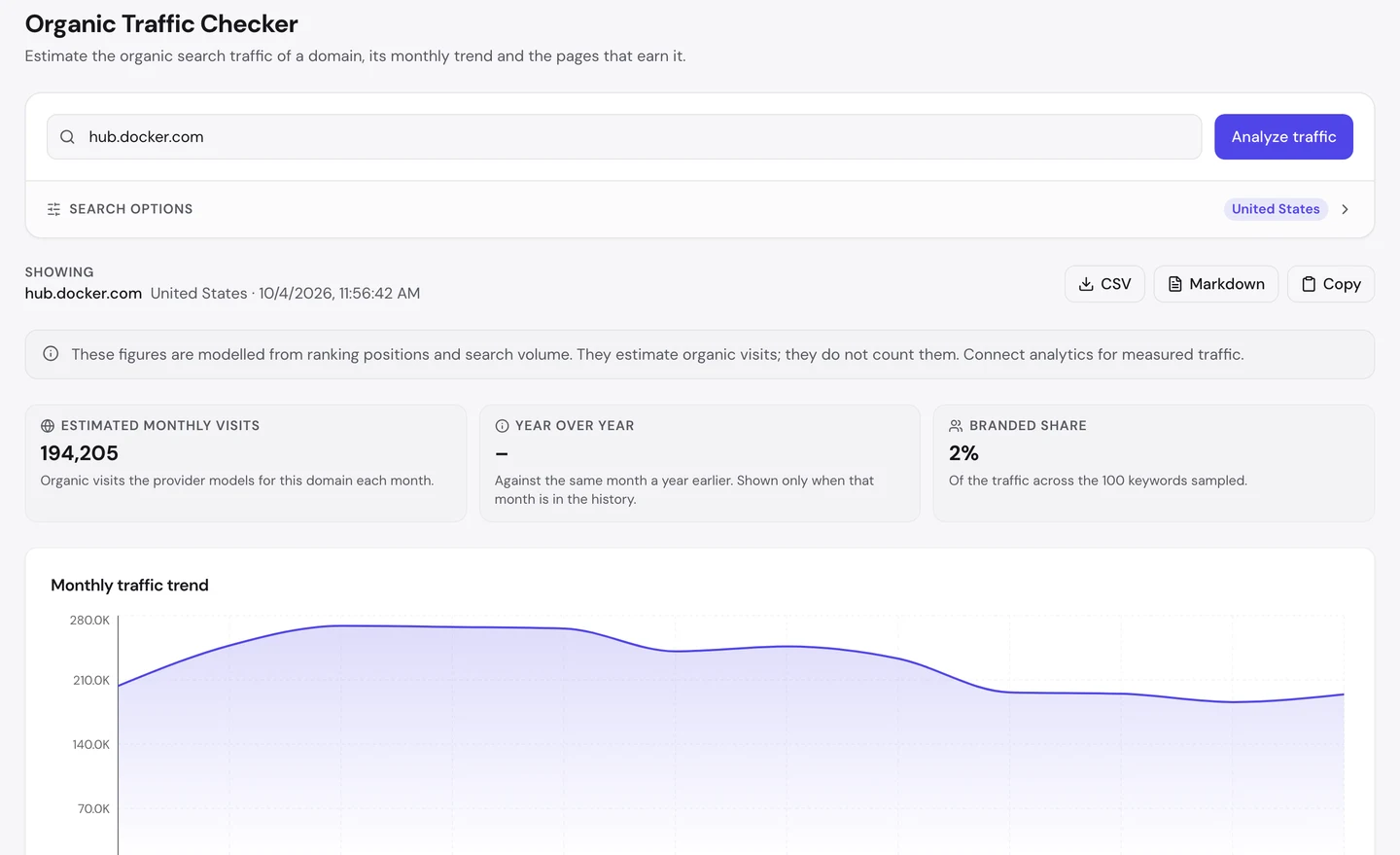
For hub.docker.com, that's about 194K visits a month in the US. The trend rose earlier this year and has eased since.
Now look at the branded share. Only 2% of the traffic in the searches we sampled came from people typing the name Docker Hub.
So 49 in 50 visitors weren't looking for Docker Hub at all. They typed the name of the software they needed, and Google sent them to a page like this one.
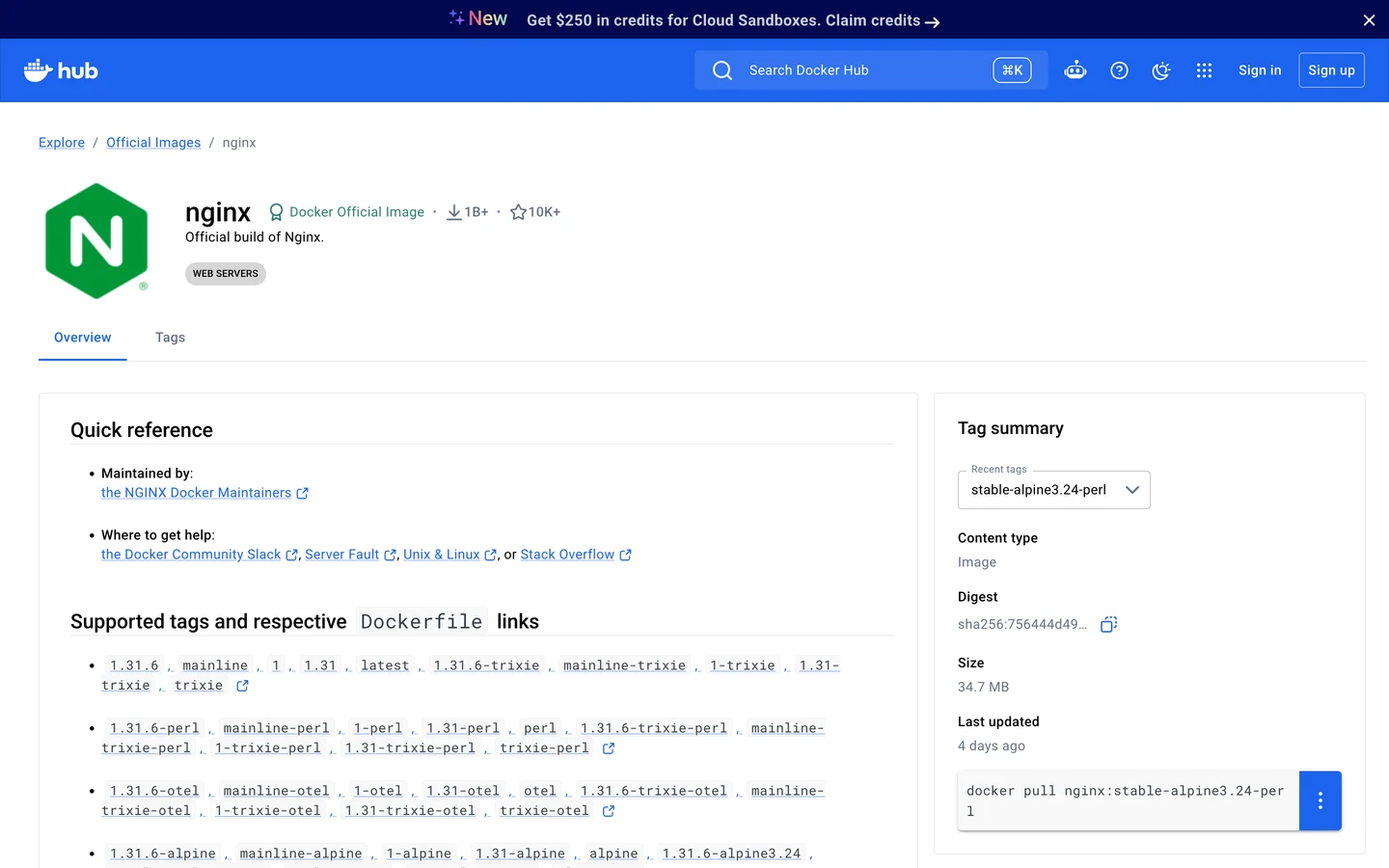
This is the page for nginx, a popular web server. It has the name up top, a short summary, and the command you'd use to download it.
The Traffic tab of our Website Audit shows the wider picture. It counts Docker as a whole, so its main site and its docs are in there too.
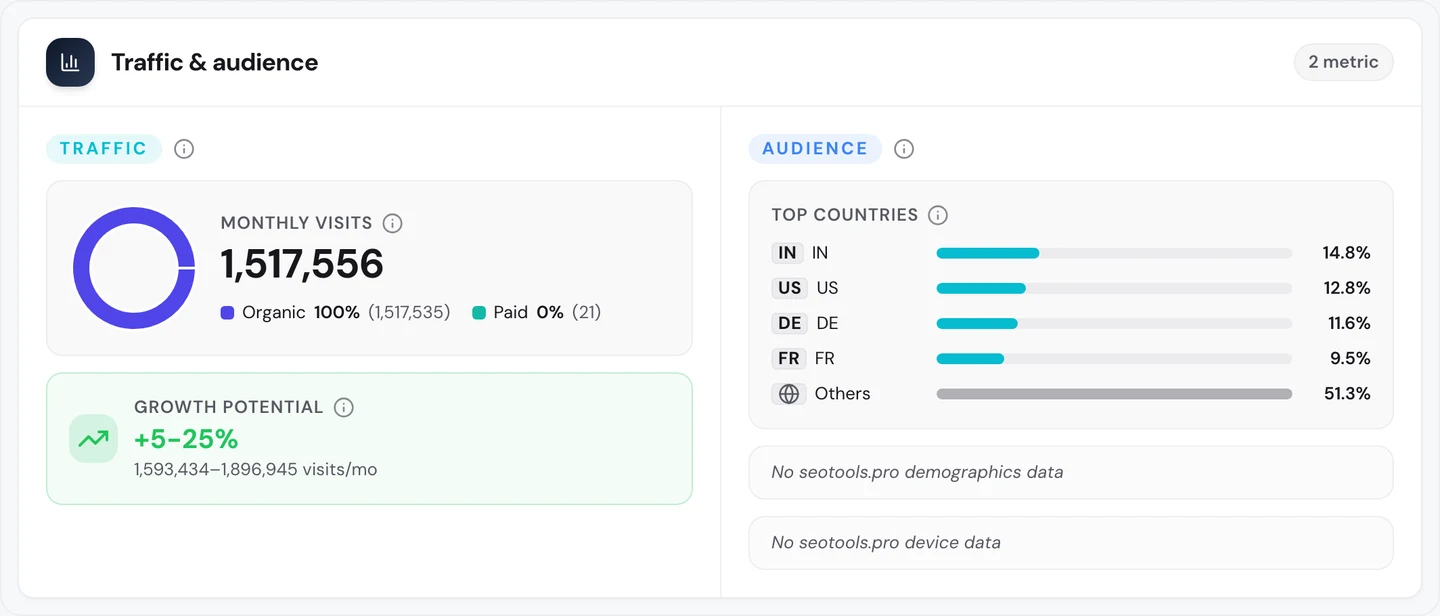
Docker as a whole gets about 1.5M search visits a month worldwide. India sends more of them than the US does.
So give each thing you offer its own page, named after it. Then see which of your pages earn the visits with our Organic Traffic Checker.
Name each page after the product
The Keywords tab of our audit lists the searches a site ranks for, where it ranks and how many visits each one sends.
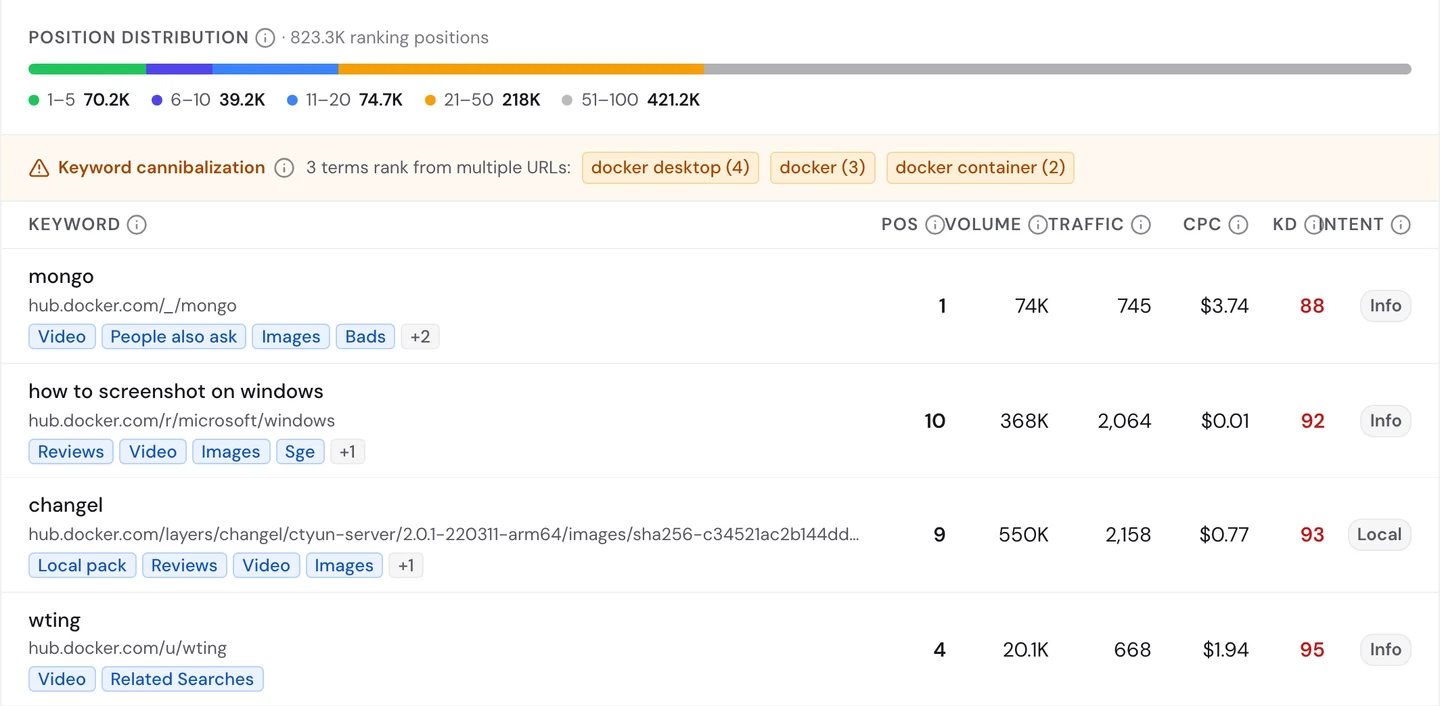
Look at the first row. Somebody types "mongo", the short name for the MongoDB database, and Docker Hub's mongo page is the top result.
That search happens about 74K times a month. The page wins because its name and its address match what you typed, word for word.
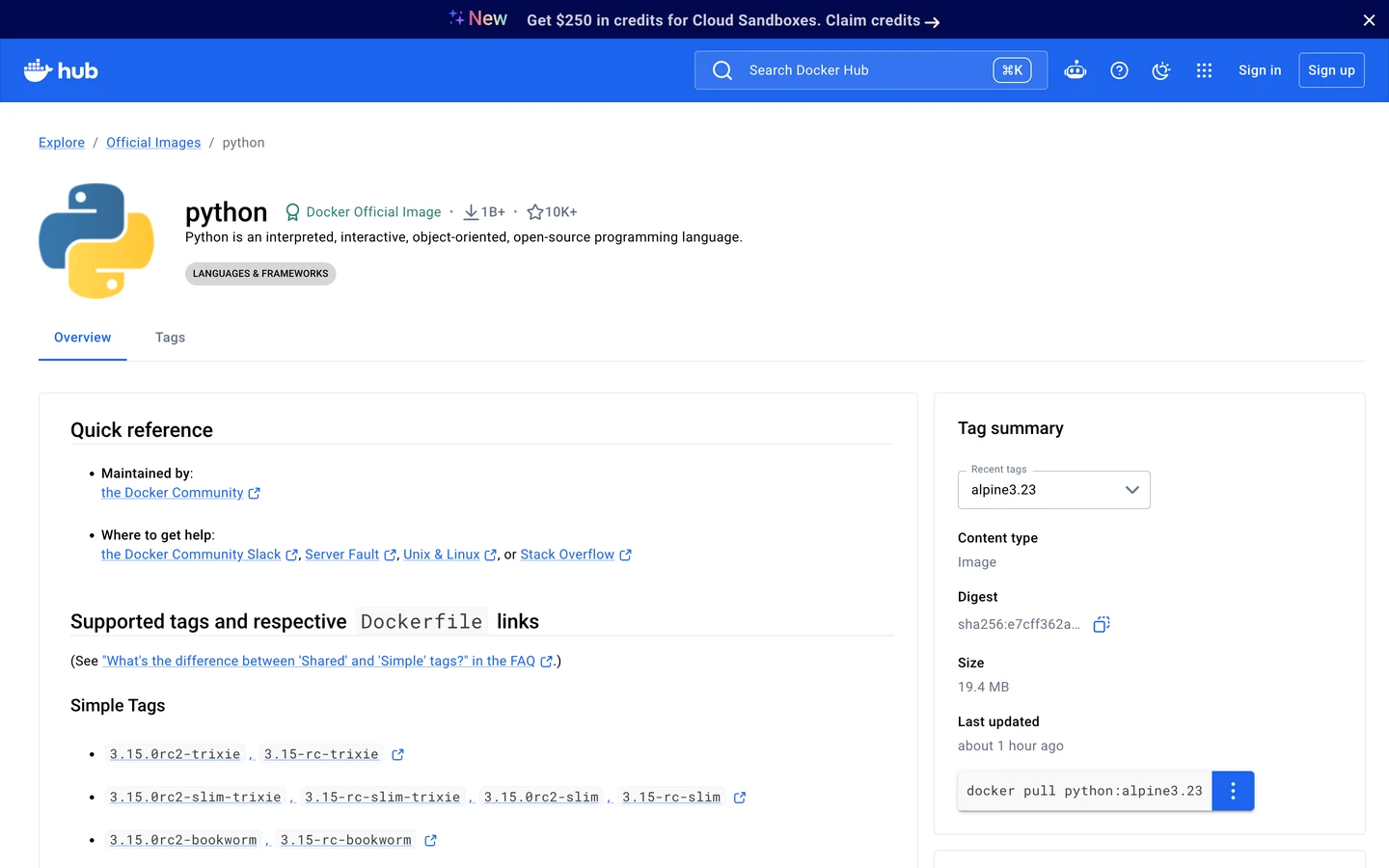
The python page is built the same way. Its main heading is just "python", the name you'd search for.
But name matching cuts both ways. Look at the other rows in the Keywords tab again.
A page for a Microsoft Windows image ranks 10th for "how to screenshot on windows". A page with a long code in its address ranks 9th for "changel", a word that's probably a typo.
And a user's own profile ranks 4th for "wting", which is just that user's name. None of those visitors wanted what they found.
Coders search in short, exact names. GeeksforGeeks, which we studied too, is another site built on searches like these.
So name each page after the thing people type, and check which searches each page really wins. Our Keyword Research tool shows the exact words people use.
Guard your free user profiles
That "wting" profile shows something big. On Docker Hub, anyone can sign up and get a public page of their own.
A backlink is a link from another website to yours. Google treats each one a bit like a vote of trust.
The Backlinks tab of our audit shows the same data as our Backlink Analyzer.
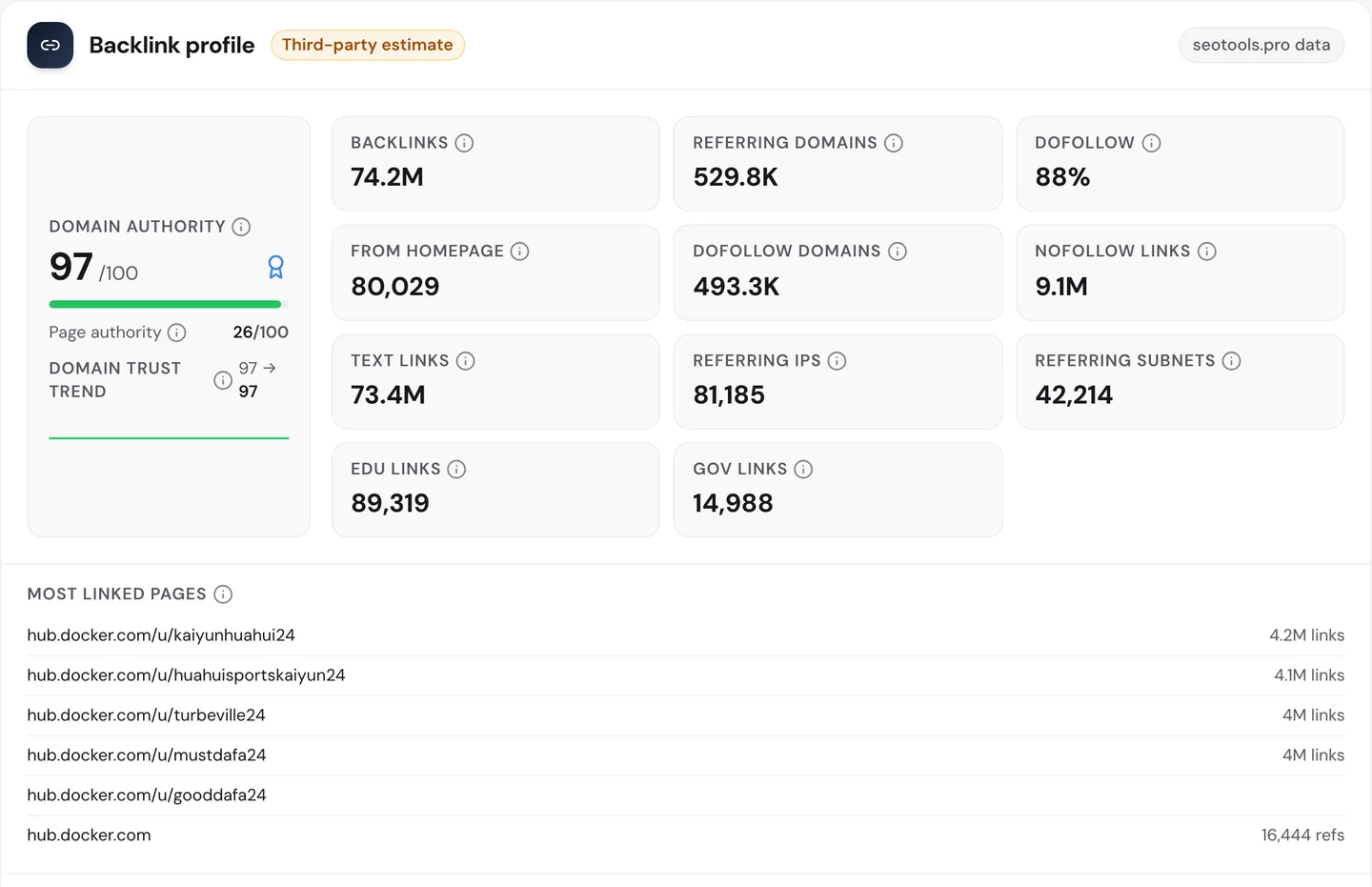
Docker Hub has about 74M links from about 530K referring domains, meaning websites that link to it. Its Domain Authority, our 0 to 100 score for a site's link strength, is 97.
Now look at the most linked pages. You'd expect nginx, python or mongo.
Instead, you get 5 user profiles with odd names that all end in "24".
Each one has about 4M links pointing at it. The homepage only shows up after all 5.
The sites sending those links are odd too. The top ones are throwaway pages on a free website builder, each with a strange name.
These look like spam accounts. Someone makes a free profile, fills it with links, then points millions of links at it so it borrows Docker Hub's trust.
Any big site with free profiles faces this. Meetup, which we studied too, also gives its members pages of their own.
The fix is a few house rules. Use noindex, a tag that tells Google not to list a page, on new or empty profiles until they show real activity.
Make links on profiles nofollow, so they don't pass your trust along. And limit how fast new accounts can sign up and post links.
So check your most linked pages in our Backlink Analyzer every month. If a profile you've never heard of tops the list, go and look at it.
Docker Hub's most linked pages look like spam profiles, not its products. We check your user pages and the links pointing at them, then set rules so spammers can't borrow your site's trust.
- We find the profiles and pages spammers use
- We set noindex and nofollow rules for new and empty profiles
- We point your real links at the pages you want to rank
- SEO and GEO, so AI answers can quote you too
Find the keywords near page 1
All those links should push Docker Hub high in Google. Our Domain Overview shows where it really stands.
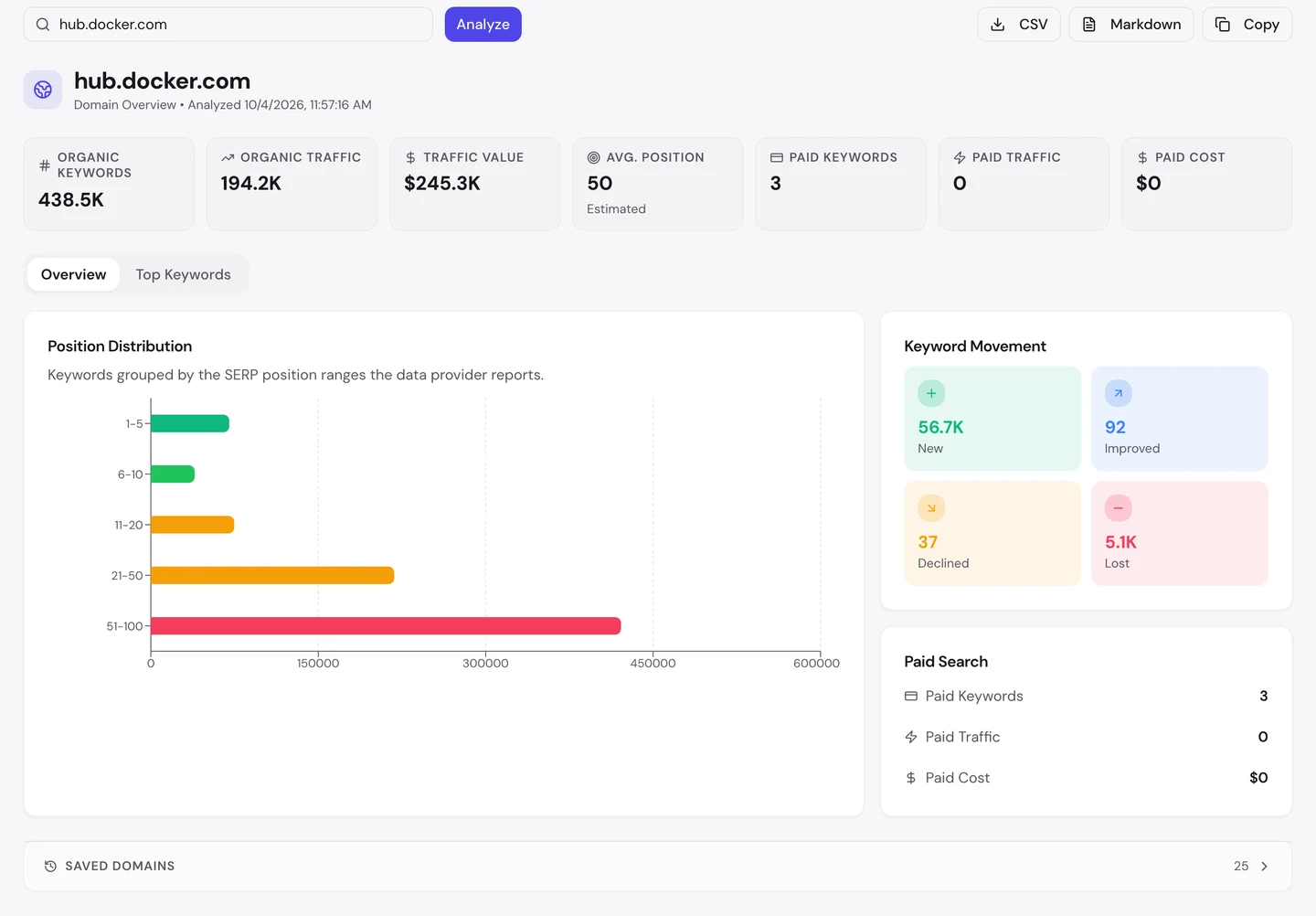
Docker Hub ranks for about 440K searches. Its traffic value, what those visits would cost as Google ads, is about $245K a month.
But its average position is 50, on page 5 of Google. The longest bar in the chart is spots 51 to 100, where hardly anyone clicks.
The good news is in the movement box. It picked up about 57K new keywords and lost about 5K.
That means the site keeps landing new searches, but most start deep down. The quickest wins are the ones already on page 2, just short of the top 10.
So find your keywords that sit between 11th and 20th, and improve those pages first. Then watch them climb in our Rank Tracker.
Check your real rivals
Some of the searches you want are already won by someone else. The audit's Competitors tab shows who.
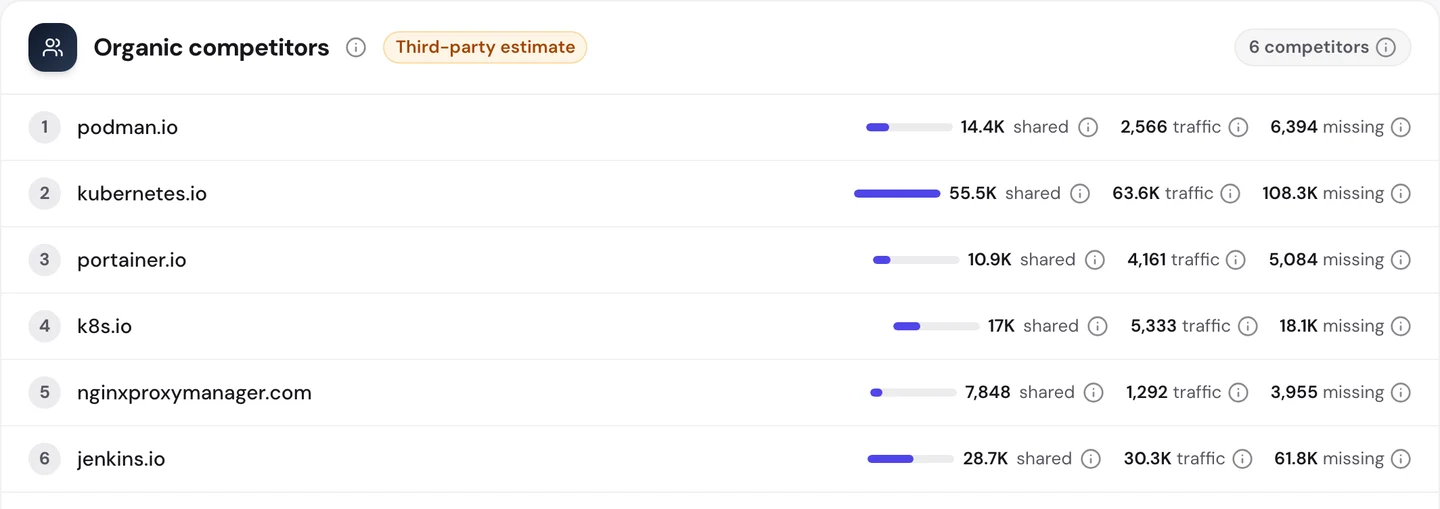
This tab counts Docker as a whole. Podman, a direct rival to Docker, tops the list by relevance, while Kubernetes shares the most searches, about 56K.
Kubernetes shares the most searches, about 56K. It's a tool that runs lots of containers at once, so its readers are Docker's readers too.
Now look at the "missing" column. Those are searches the rival ranks for and Docker doesn't, about 108K for Kubernetes alone.
That column is a ready-made to-do list. You can see each search a rival wins and decide if you need a page for it.
So check who shares your searches with our Competitor Analysis, then go through the ones you're missing.
Write a description for every page
Ranking is half the job. Once you're on the results page, your title and description decide whether people click.
Our free browser extension shows how a page is built. Open the page, Open the page, click the seotools.pro icon, and a panel opens beside it with 35 SEO checks., and a panel opens beside it with 35 SEO checks.
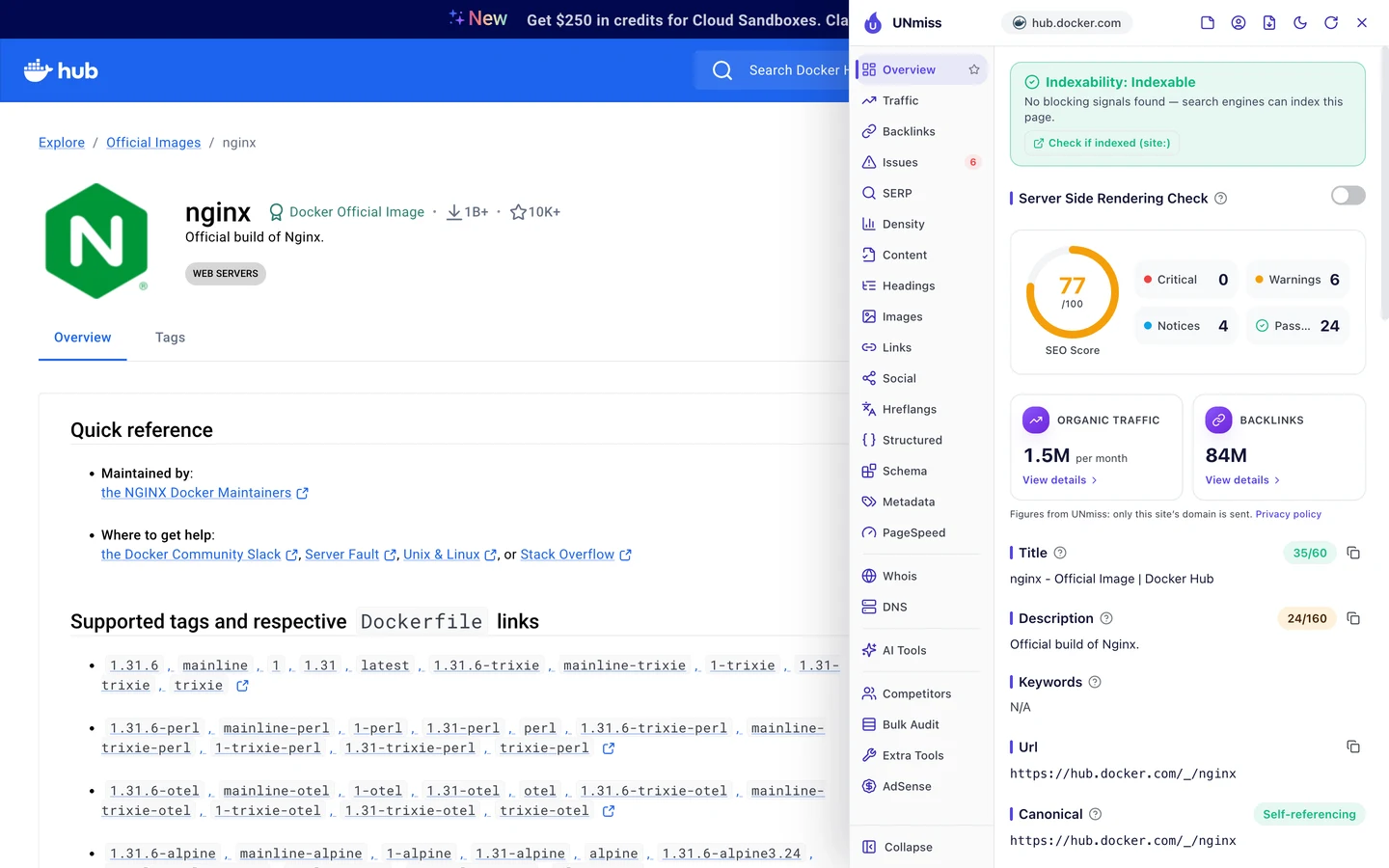
The nginx page scores 77 out of 100. Its title, "nginx - Official Image | Docker Hub", is short and clear.
The description is the short summary Google may show under your title. Here it's "Official build of Nginx.", just 24 characters when Google can show about 160.
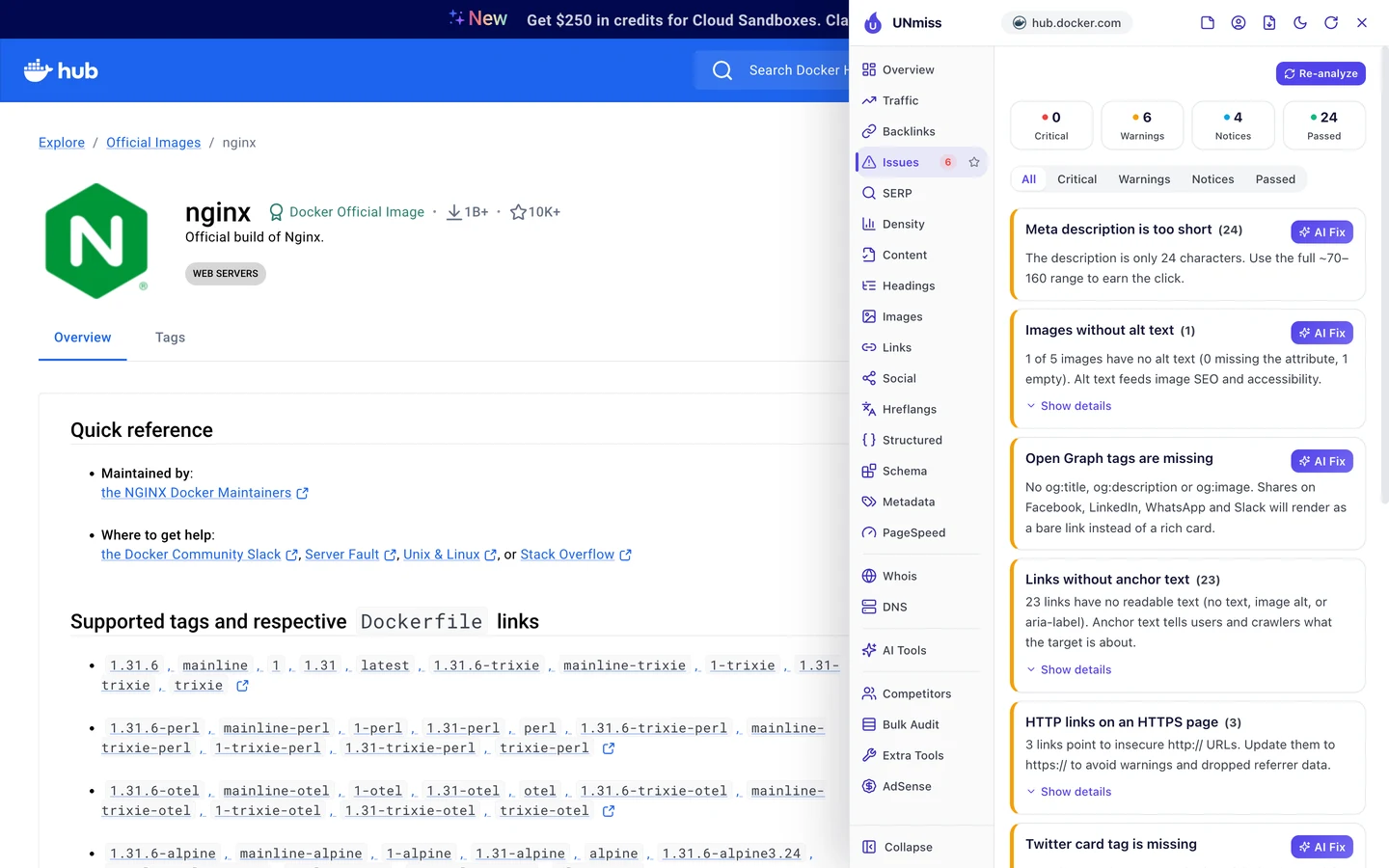
The Issues tab puts that at the top. It also flags missing Open Graph tags, the tags that build a preview card when you share a link.
And 23 links have no anchor text, the clickable words of a link. Without them, Google can't tell where those links lead.
Now compare the python page. It uses the same template.
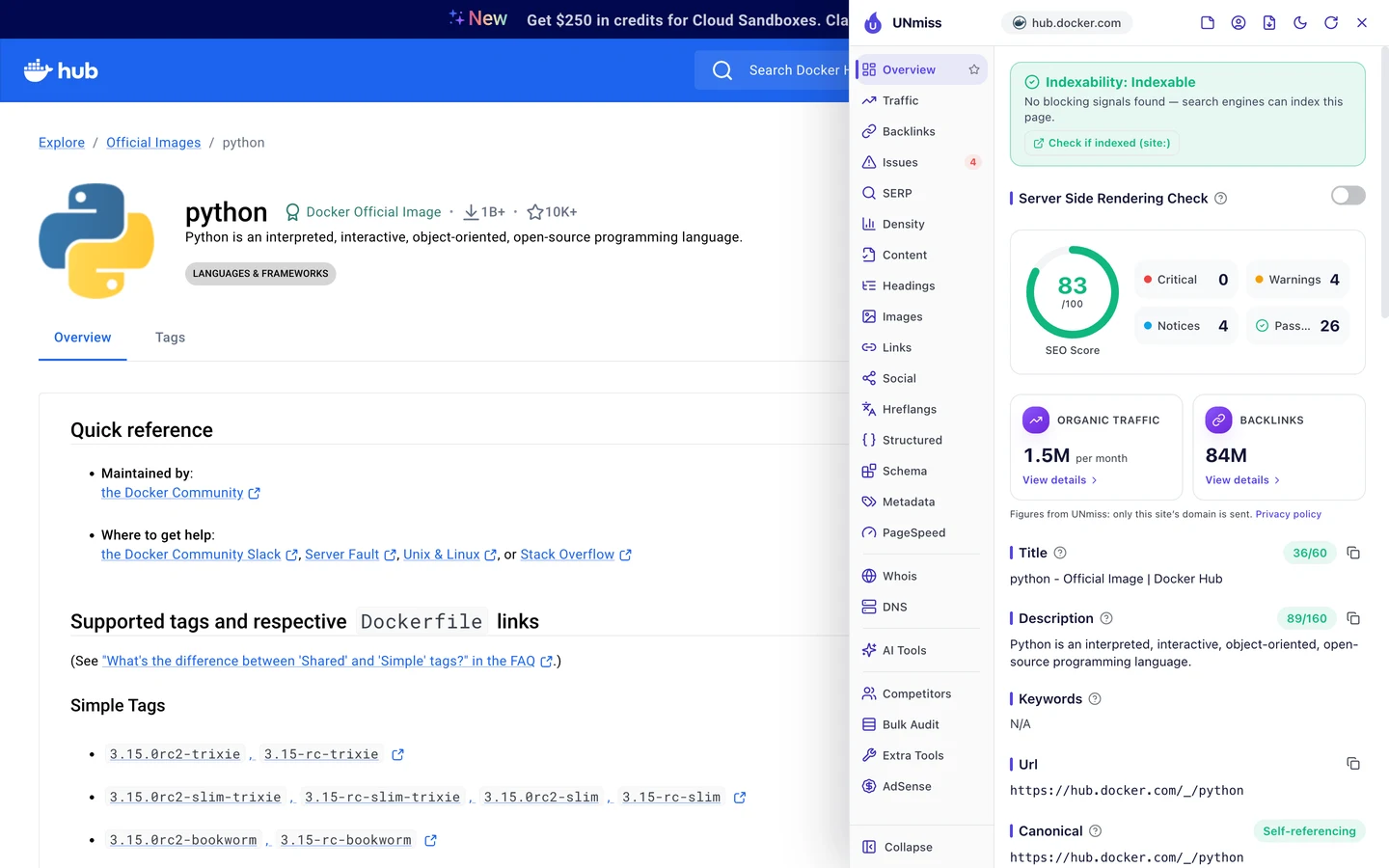
It scores 83. The biggest change is the description, which says what Python actually is.
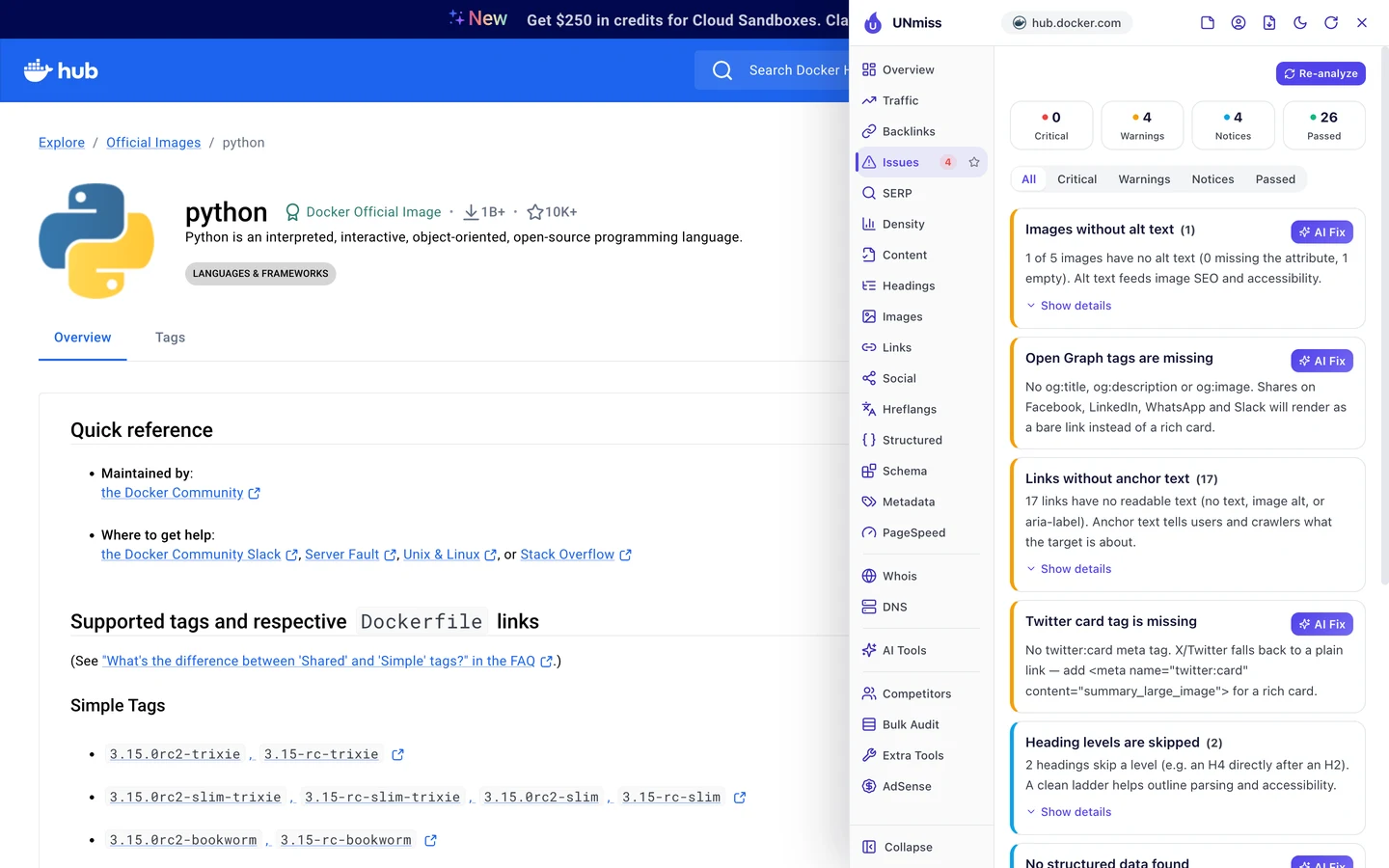
Its Issues tab has no description warning at all. The rest of the list looks much the same, since both pages share one template.
Each description is the one-line summary shown under the image's name. Some makers write a real sentence, and some write 4 words.
So don't leave the description to chance. Set a minimum length in your template, and preview yours with our Meta Tag Generator.
Mark up each page in code
Structured data is code that tells Google what a page is, like a product, a guide or a piece of software. The extension's Structured tab looks for it.
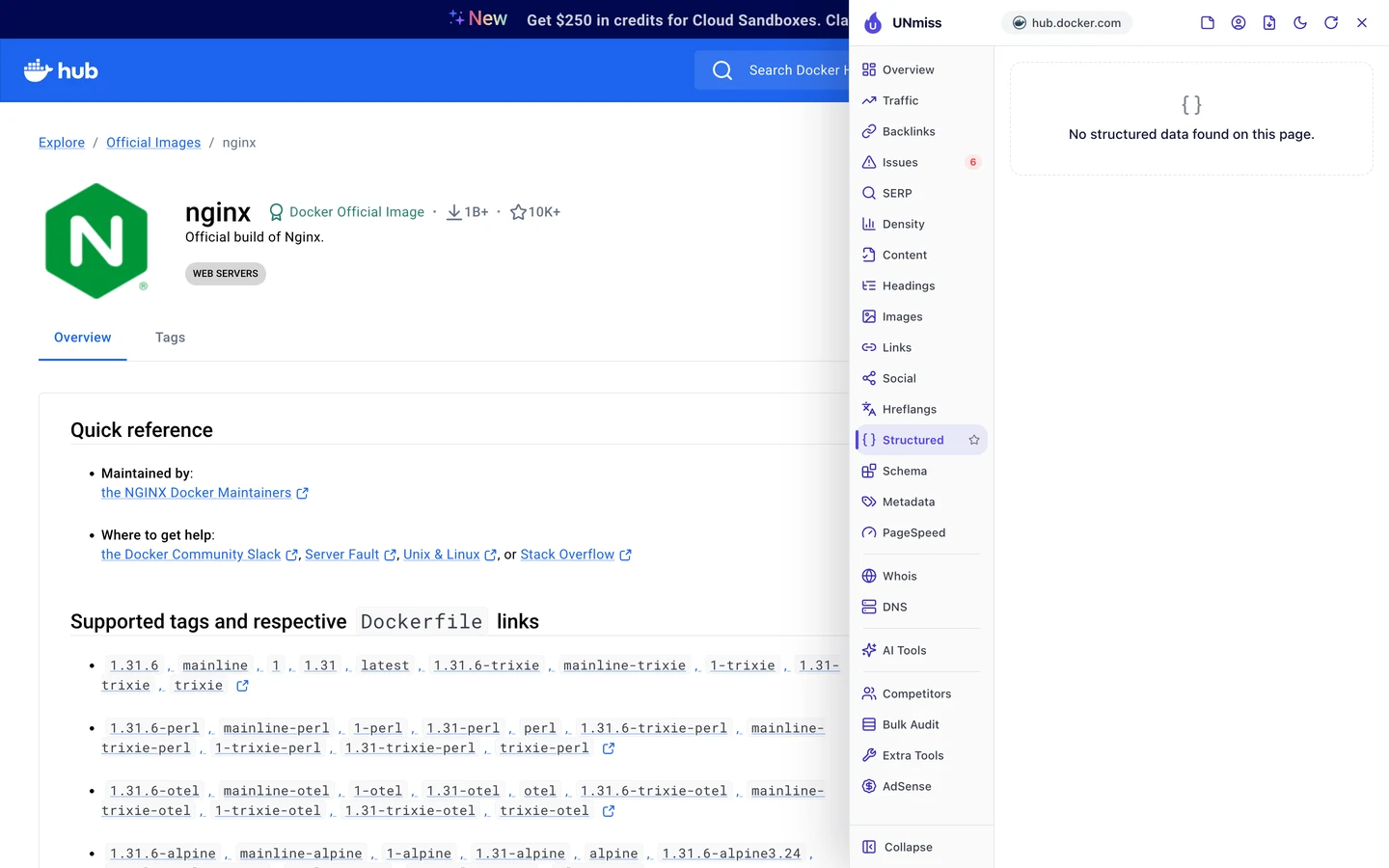
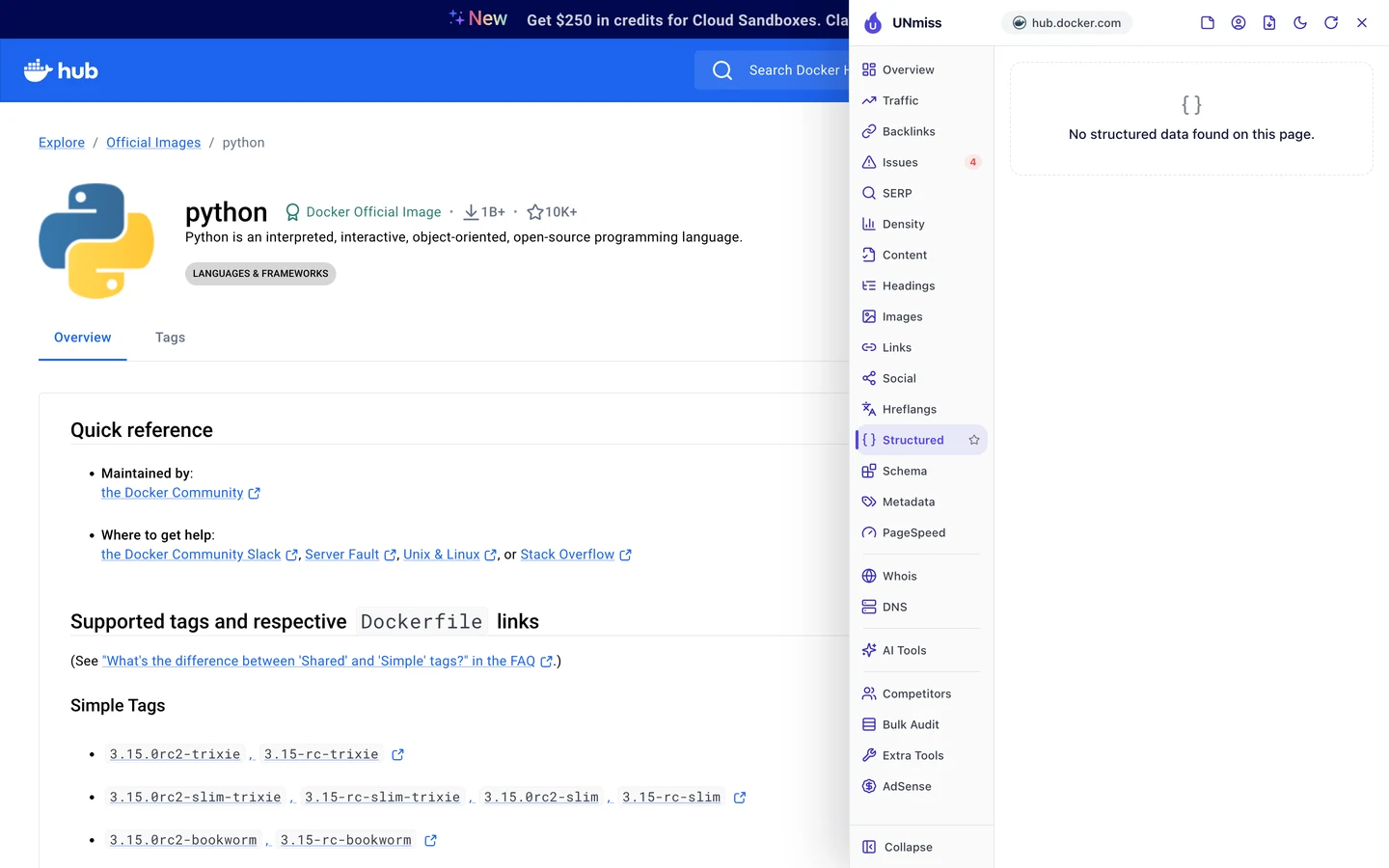
You won't find any on either page. Yet both pages show a trail of links at the top, and both show when the image was last updated.
The Content tab shows what that costs.
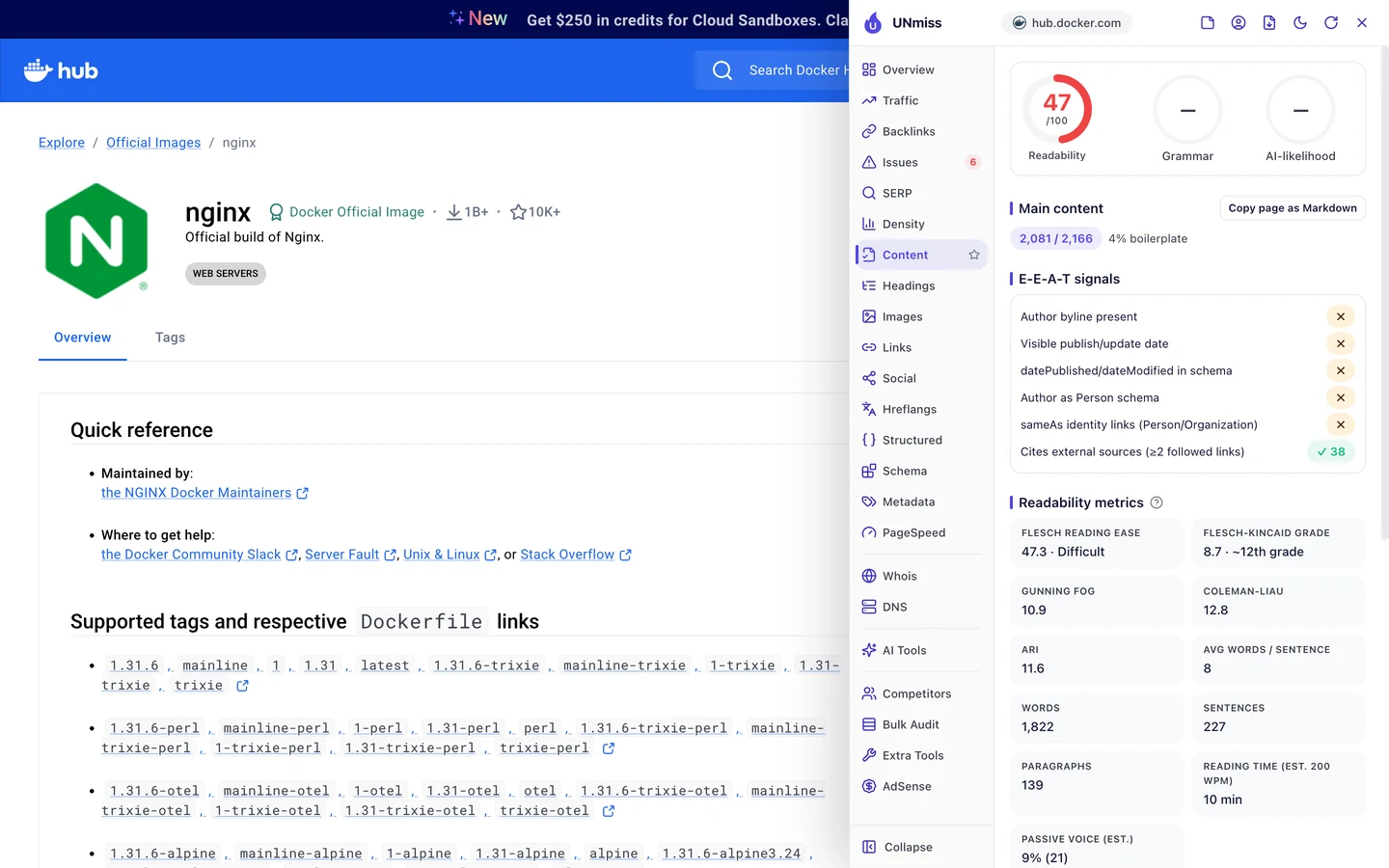
The nginx page links to 38 outside sources, which is great. But the extension finds no author and no date, in the text or in the code.
The page says it was updated 4 days ago. Without code, Google has to guess that from the page, and it may not.
The text is also hard to read, rated 47 out of 100. That's normal for setup guides, but beginners land here too.
The same code helps AI tools. More and more coders ask ChatGPT or Claude which image to use, so we checked which AI tools may read Docker Hub.
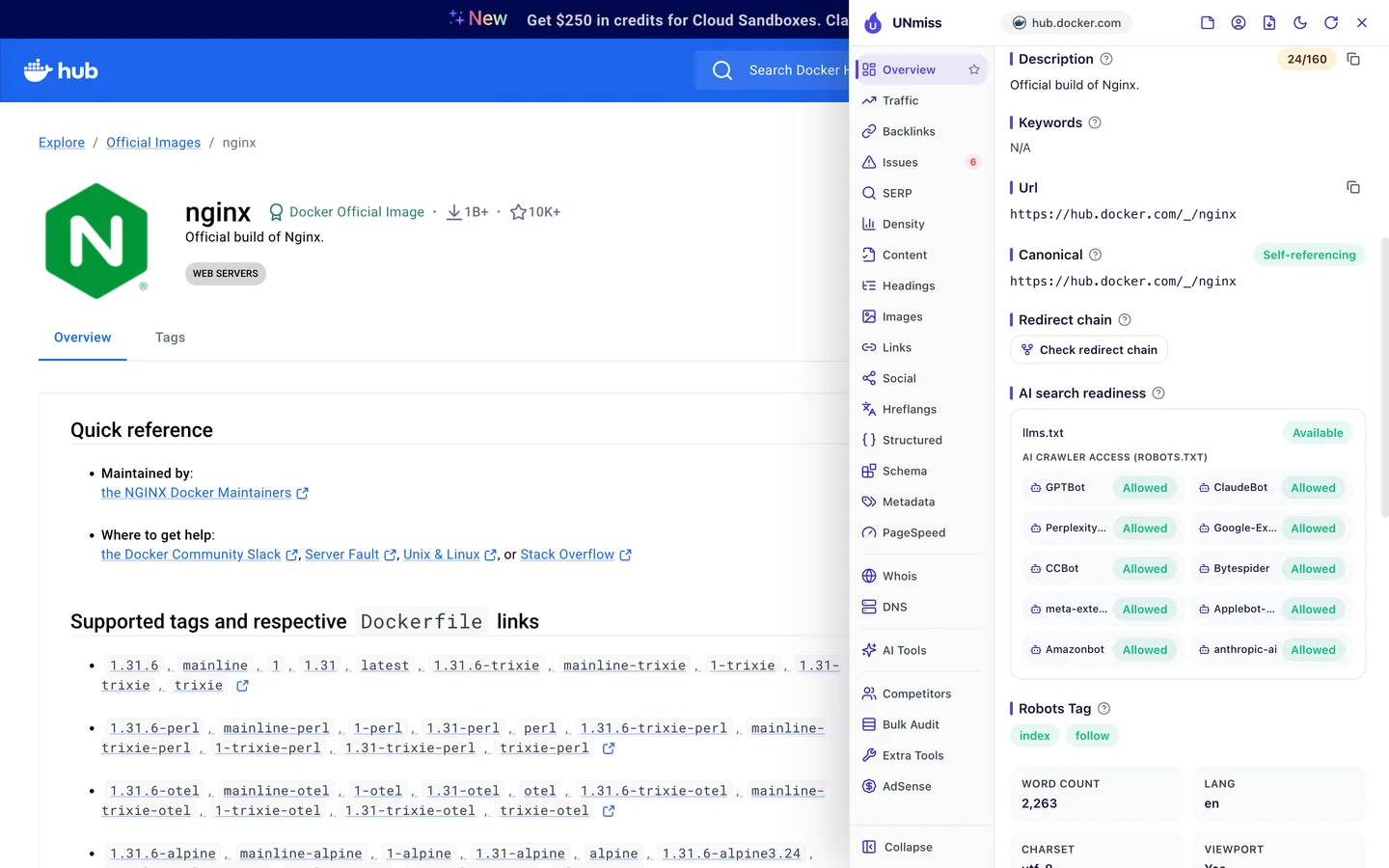
The rules live in robots.txt, a file that tells crawlers what they may read. A crawler is a program that visits pages the way Google does.
Docker Hub lets in all 10 AI crawlers the extension checks. It also has an llms.txt file, a short guide that explains a site to AI tools.
MDN, the coding docs site we studied too, lets every AI crawler in as well.
Set your own rules with our robots.txt generator. Then check whether AI tools mention you with our AI Visibility Checker.
So add code that says what each page is, who made it and when it changed. Our Schema Markup Generator writes it for you.
Audit your page templates
The extension checks one page at a time. Our Website Audit checks hundreds at once, so you can see which problems repeat.
We also gave it the sitemap, the file that lists a site's pages for Google. It checked 249 pages, and Docker Hub scored 74 out of 100, which the report rates as fair.
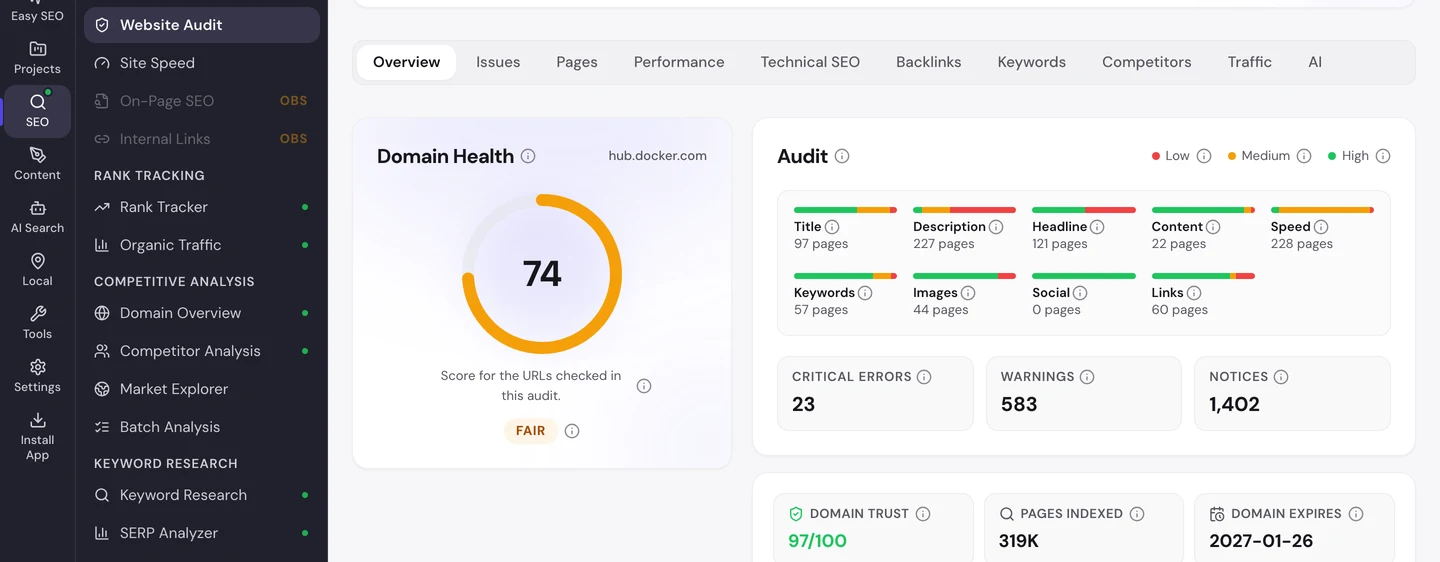
The Issues tab sorts the problems by how much they matter to you.
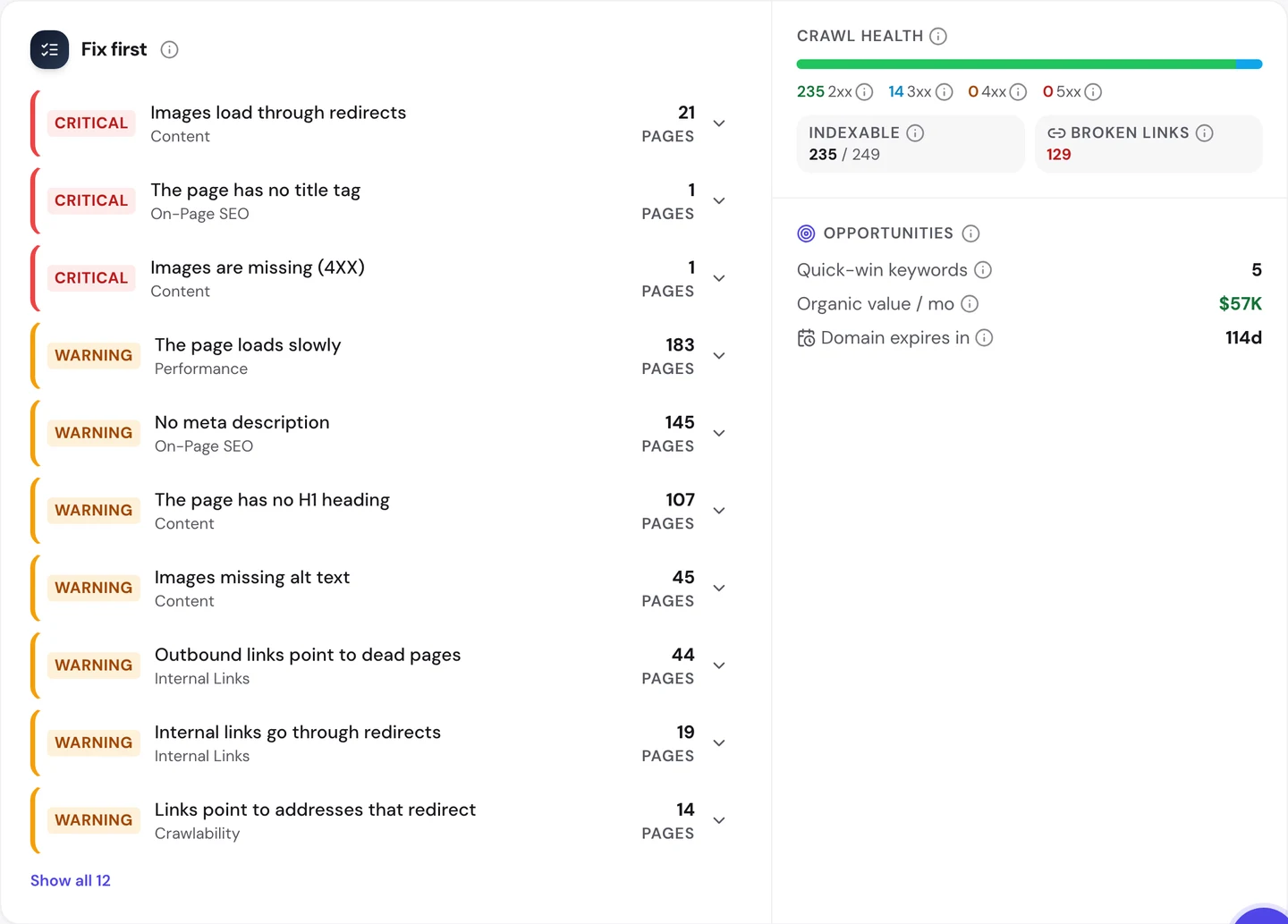
The top error is images that load through redirects. The image address points to an old spot and gets sent on, so each image takes an extra trip.
One page has no title at all. Then come the warnings: about 145 pages with no description and about 107 with no H1, the tag for a page's main heading.
The Pages tab shows you where they bunch up. The pages for AI models, like Qwen and Gemma, each carry the same 2 errors.
That points to one template behind them all.
The Technical SEO tab shows you which pages Google may list.
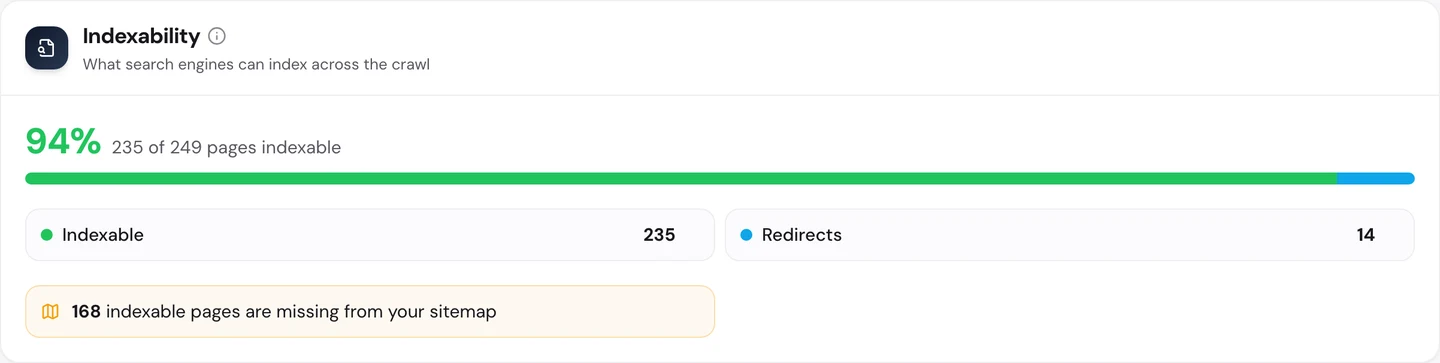
Almost every page can be listed, which is great. But 168 pages that Google may list are missing from the sitemap.
You don't have to work out what to fix first. The audit's AI tab writes the plan: a short summary, each problem with how to fix it, and a 90-day to-do list.
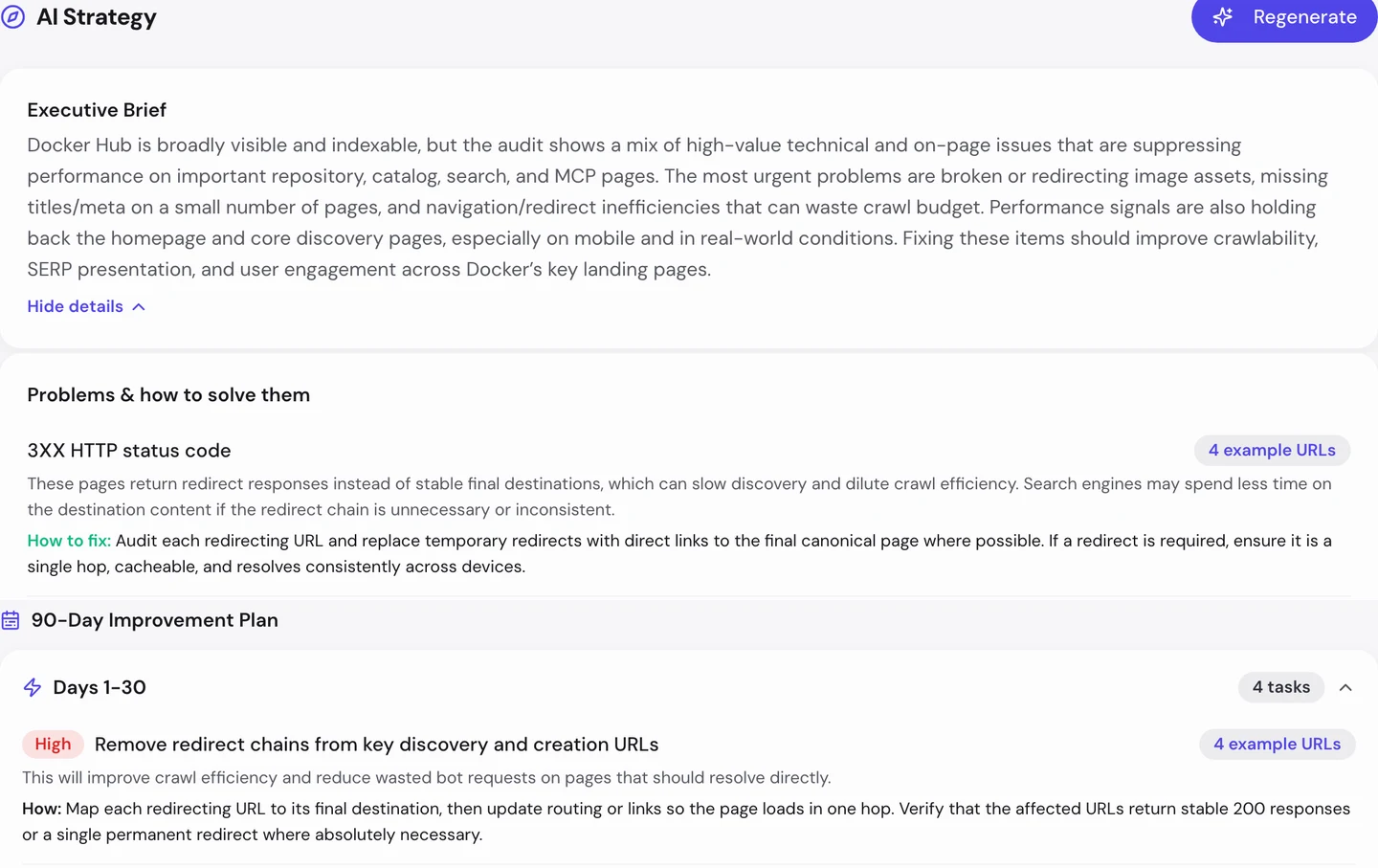
For Docker Hub, the first month goes to removing redirect chains, starting with images that load through redirects; then the missing title.
So check the templates your pages share: the images, the title, the description and the main heading. Run our Website Audit, fix one template, and hundreds of pages get better at once.
Fix slow pages on phones
The Performance tab of the audit shows Core Web Vitals. These are Google's 3 checks of how fast a page loads, how fast it reacts and whether it stays still, measured on real visitors' devices.
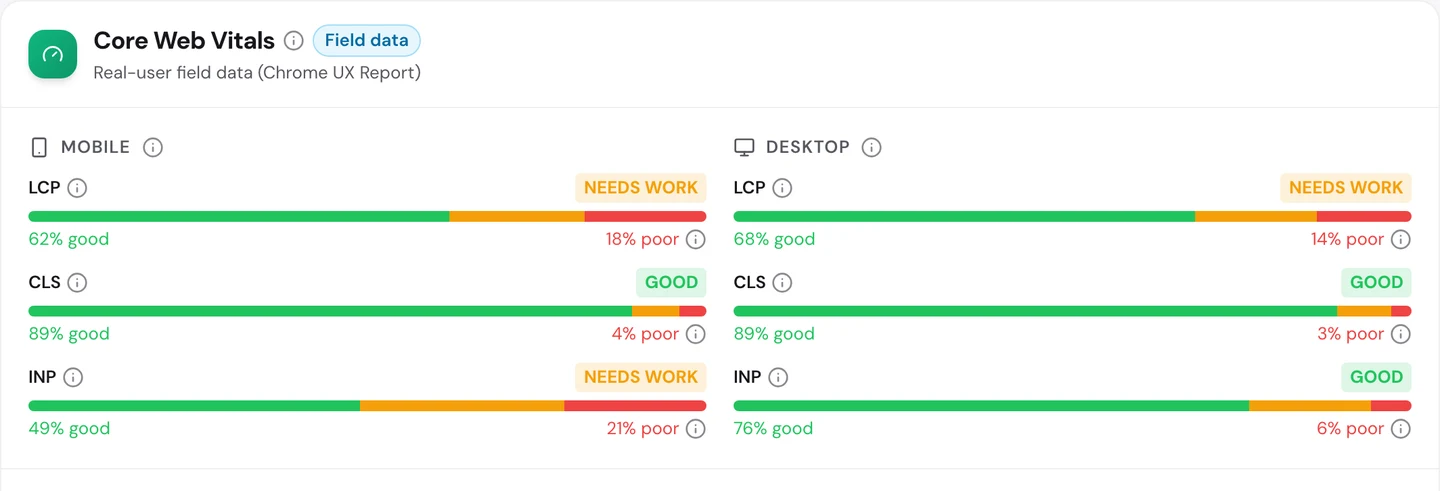
Docker Hub passes only 3 of the 6 checks. On phones, the main content loads fast for about 62% of visits.
The reaction check is worse. Only about half of phone visits see the page respond quickly when they tap.
Pages stay still nicely, on phones and on computers. On the homepage, the audit blames scripts that block the page for too long.
So test your busiest pages on a phone, and load the main text before the extras. Our Site Speed tool shows what slows each page down.
Only 2% of Docker Hub's US search traffic comes from people typing its name. Our Organic Traffic Checker shows your monthly visits, your trend and your branded share, so you know how many people find you by what they need.
- The same report that measured Docker Hub
- Your branded share and 12-month trend
- Run it on any rival's domain too
What you cannot copy
First, the part you can't copy: Docker Hub is Docker's own home for images. Its nginx and python pages each show more than 1B downloads.
Schools, government sites and millions of other pages link to it. That's years of links you can't buy.
Now a few honest notes on the numbers.
We took our figures on 4 October 2026. The 194K figure counts US searches for hub.docker.com only.
The audit's Keywords, Traffic and Competitors tabs count Docker as a whole, with its main site and docs. That's where the 1.5M worldwide figure comes from, so we only quoted Docker Hub rows from those tabs.
All of these are estimates. Nobody outside Docker can count its real visits, so tools work them out from rankings and search volume.
The spam profiles only look like spam from the outside. We didn't check each one by hand.
Docker does clean up. In 2024, security researchers reported millions of spam pages on Docker Hub, and Docker took many of them down.
So some of the links we saw may point at accounts that are already gone.
Our crawl checked 249 pages, a small sample of a very big site. So we used it to find problems that repeat, not to count every error.
The one number to take away
4M.
That's about how many links point at each of Docker Hub's most linked pages. They're not its famous software pages, but user profiles that look like spam.
Meanwhile, the pages that win searches, like mongo and nginx, do it with a plain name and a clear purpose.
That's the lesson for any site with free accounts. Your users can build you great pages, and they can also borrow your trust for spam.
Which pages get your most links? Check them the way Google would.
You can run every one of these checks on your own site, and on your rivals', and see the same numbers for yourself.
Frequently asked questions
Do spam links to my user profiles hurt my whole site?
Google says it mostly ignores spam links it spots. The bigger risk is the profiles themselves, if Google lists them and your site starts to look like a home for spam.
Should I noindex every user profile?
Not always. Profiles with real work on them can win searches. A good rule is to noindex new or empty ones and let active ones in.
How do I spot spam accounts early?
Watch for new profiles with lots of links, odd names that follow a pattern, and a sudden jump in links from outside. A monthly look at your most linked pages catches most of them.
Should I use a disavow file?
Only if you've built bad links yourself or got a warning from Google. For random spam you didn't ask for, it's usually not needed.
What should a software page's description say?
Say what the software does, who it's for and one reason to pick this version. Keep it to a sentence or two that fits under the title.
Which structured data fits a software page?
SoftwareApplication code can describe the name, the type of software and the version. Breadcrumb code fits too, since most product pages already show a trail of links.
What if one of my pages ranks for a search that doesn't fit?
Make the title and first line name the real topic. If the visits are useless and the page isn't needed, you can noindex it.
How often should I audit a site with lots of user pages?
Once a month is a good start, since new accounts appear all the time. Run it after big template changes too.