Dribbble gets about 713K visits a month from Google in the US, and many of its best pages are its own search results.
Its search page for "logo" brings in about 18K visits a month on its own. Most sites hide pages like that from Google.
We ran the site through our SEO tools. Our Website Audit got turned away, so we checked 2 page types by hand instead.
Here are 9 lessons you can copy, plus the part you can't.
Let Google index your search pages
We started with our Organic Traffic Checker. It estimates a site's organic traffic, meaning the people who find it on Google without ads.
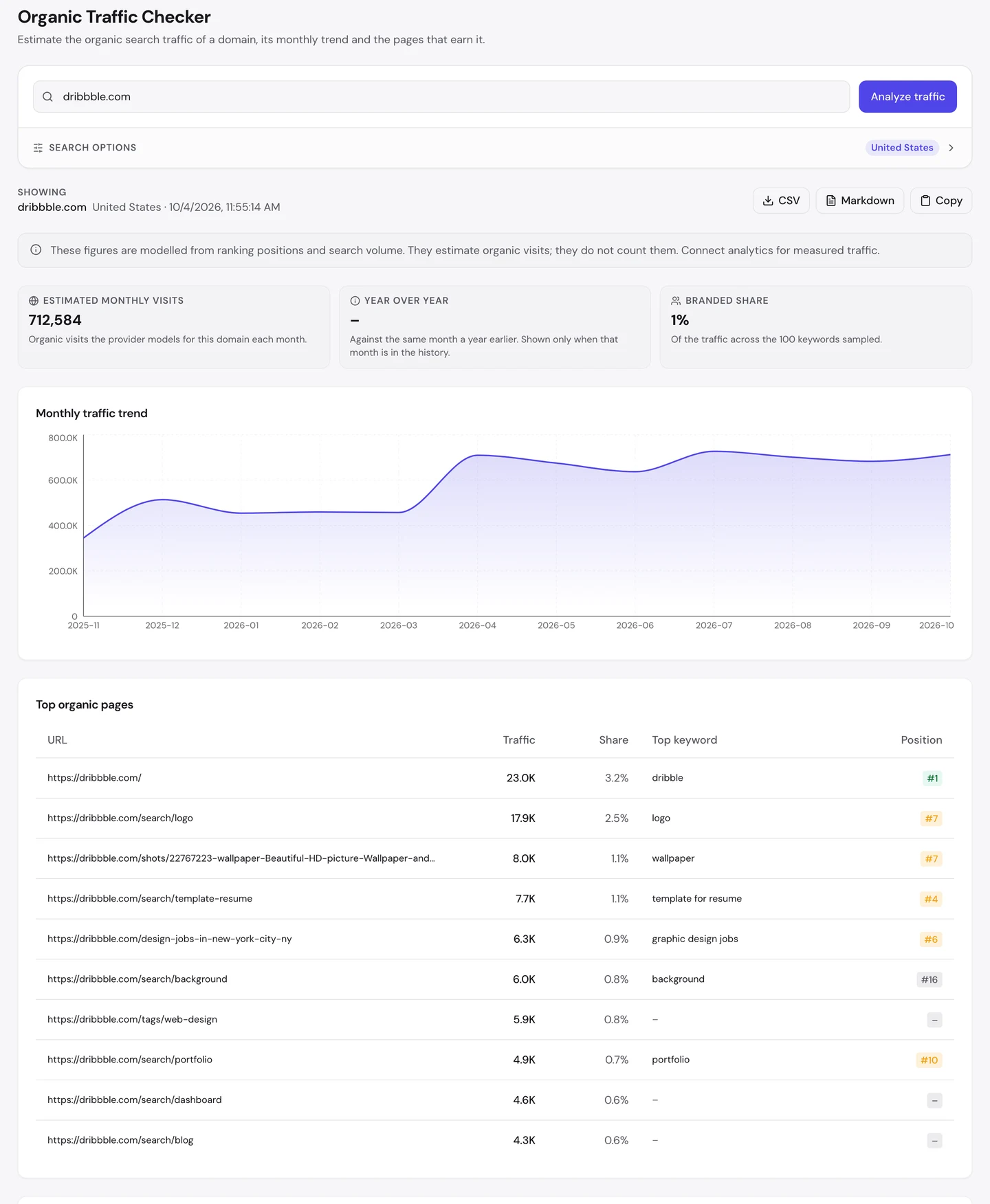
That's about 713K visits a month, from the US alone. The homepage leads with about 23K.
Now look at the second row. It's /search/logo, the page you get when you search Dribbble for "logo".
When a page is indexed, it's listed by Google and can show up when you search. Most sites keep their search pages out, but Dribbble lets Google in.
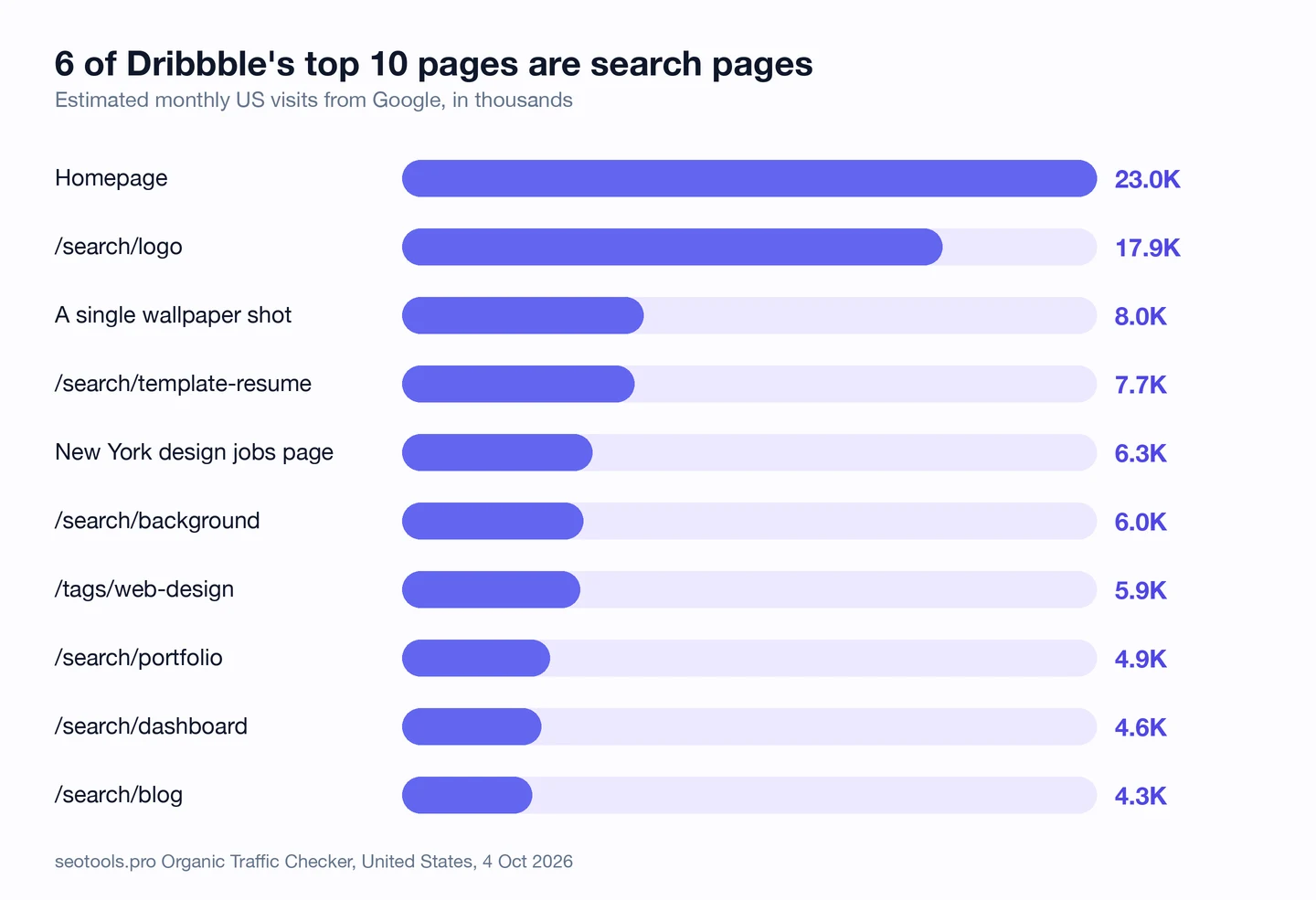
6 of the top 10 pages are search pages. They cover logos, resume templates, backgrounds, portfolios, dashboards and blogs.
Together, those 6 bring in about 45K visits a month. And they cost Dribbble almost nothing to make, since the search box builds them.
Still, the top 10 pages bring in only about 1 in 8 visits. The rest comes from a long tail, a huge pile of pages that each bring in a few visits.
Meetup, which we studied too, is another big community site you can compare it with.
So check which of your page types bring in visits, not just which pages. Our Organic Traffic Checker shows the top pages for any site, yours or a rival's.
Turn each search into a landing page
A raw search page is just a grid of results. Google doesn't like those much, since they're often thin, meaning they have little to read.
So Dribbble dresses its search pages up. Here's the page you get for "logo".
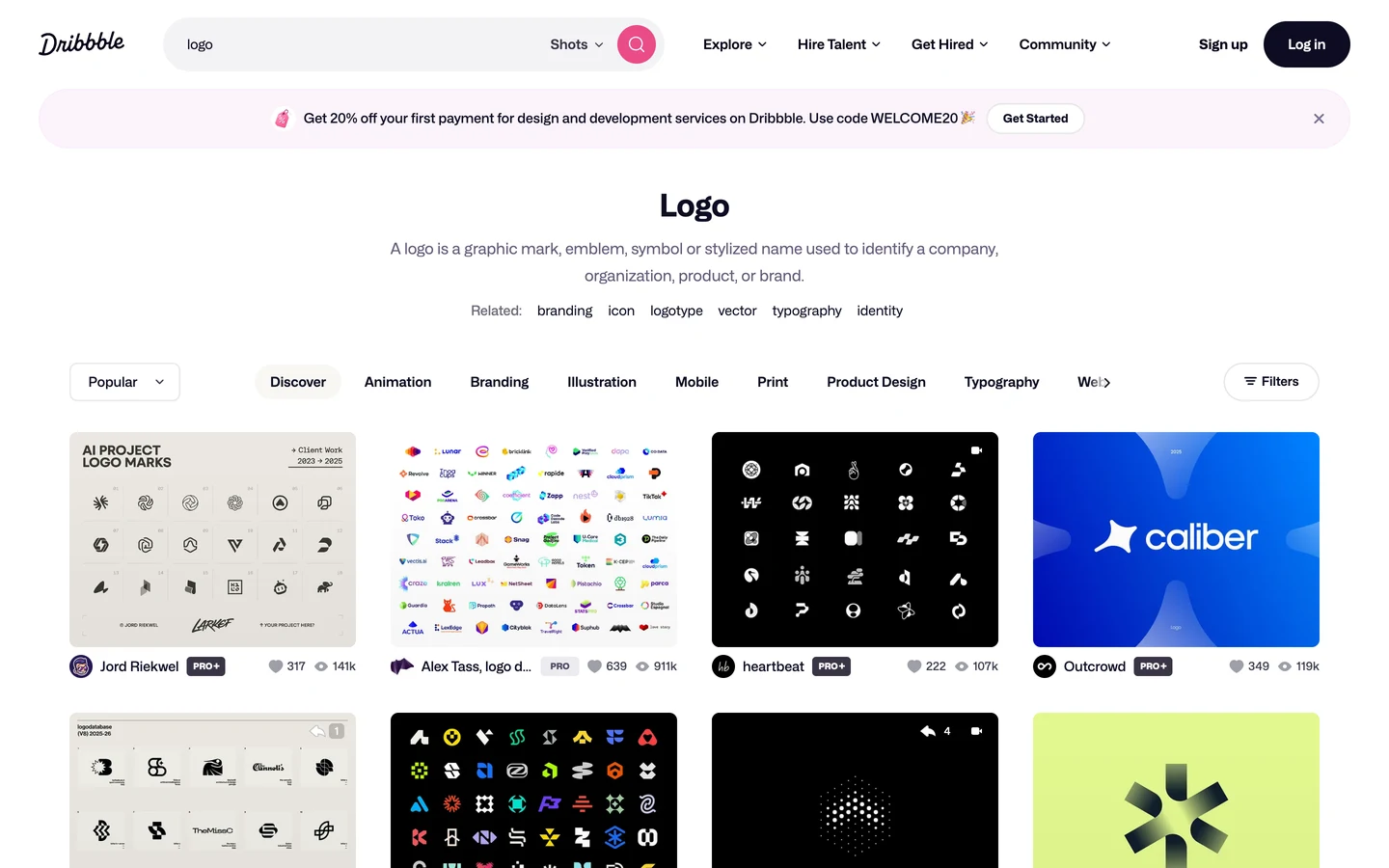
The page opens with a big heading, "Logo". Under it, a plain sentence tells you what a logo is.
Then come related tags, like branding, icon and typography. Each one links to another page just like this one.
That turns a search result into a landing page, a page built to greet people who arrive from Google. You land, you learn what you're looking at, and you get thousands of examples.
It ranks #7 for "logo", one of the biggest words in design. Not bad for a page the search box made.
So pick the searches your visitors make most, and give each search page a heading, a short intro and related links. Find the searches worth a page with our Keyword Research tool.
Block the pages Google shouldn't see
Opening up your search pages has a risk. Some pages, like accounts, edit screens and empty results, are junk to Google.
A crawler is a program that visits pages the way Google does. Robots.txt is a file that tells crawlers what they may read.
Here are a few lines from Dribbble's robots.txt, fetched on 4 October 2026.
User-agent: *
Disallow: /account$
Disallow: /messages/*
Disallow: /shots/*/edit
Disallow: /shots/*/comments
Disallow: /uploads/*
…
User-agent: PetalBot
Disallow: /search/*
Every crawler is kept out of accounts, messages, edit pages, comments and uploads. In all, the main block has 39 rules like these.
Only one crawler, PetalBot, is blocked from search pages. So you can tell the search pages are open to Google on purpose.
For search pages with no results, you'd use a noindex tag instead. It tells Google not to list a page, even if it can read it.
Our free browser extension reads these rules for you. Click the seotools.pro icon, and a panel opens beside the page.
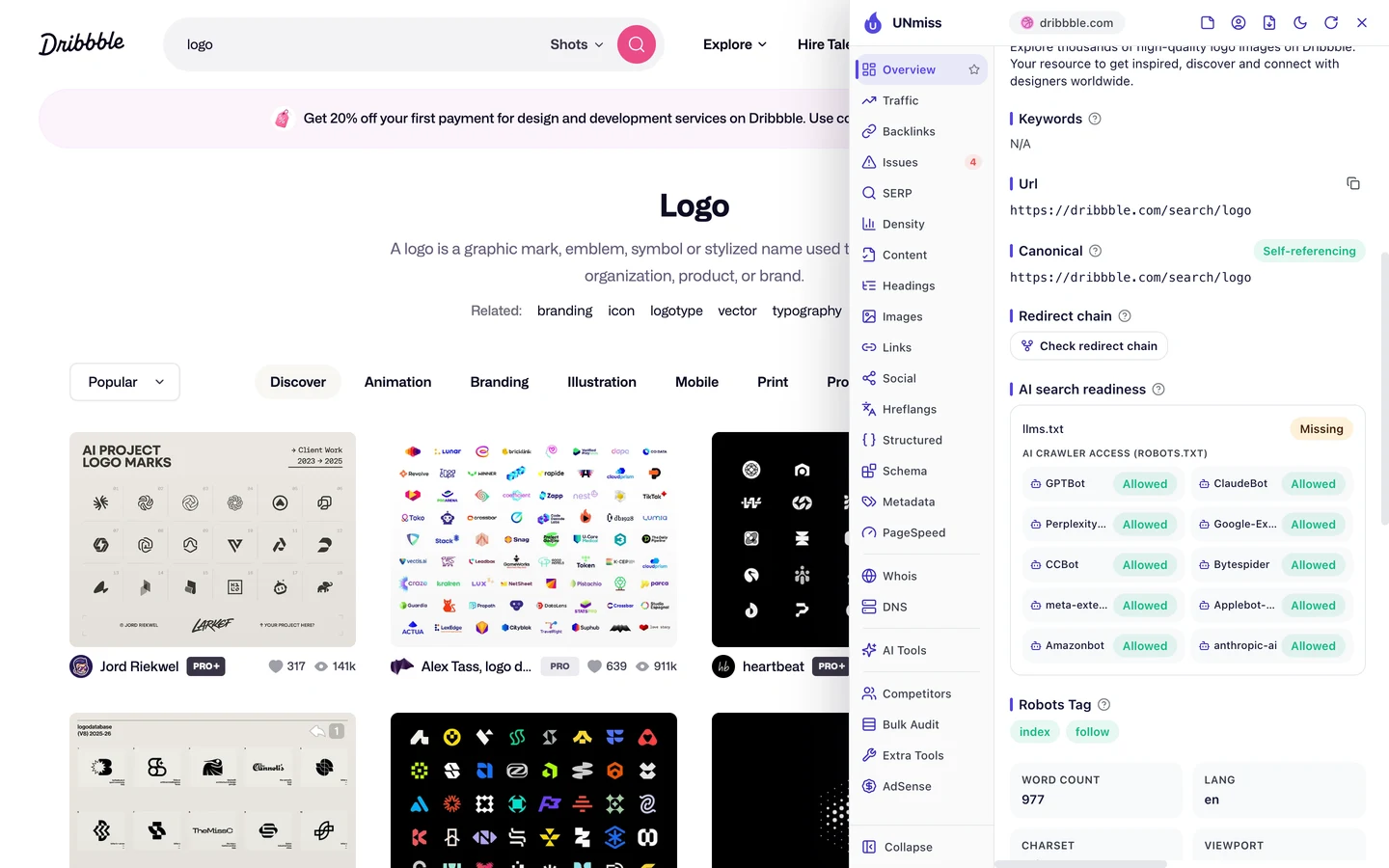
The logo page is open to all 10 AI crawlers the extension checks. Those are the bots that feed AI answer tools.
It also has a canonical tag, which tells Google which address is the main one. Here it points to itself, so Google won't mix it up with copies.
One thing is missing, though. There's no llms.txt, a new file that gives AI tools a short guide to a site.
We dug into how big sites treat AI crawlers in our robots.txt case study, too.
So block your junk pages in robots.txt, and leave your best search pages open. Write a clean file with our Robots.txt Generator, then see how AI tools talk about you with our AI Visibility Checker.
Build a page for every tag
Search pages aren't Dribbble's only trick. It also builds a page for each tag designers add to their work.
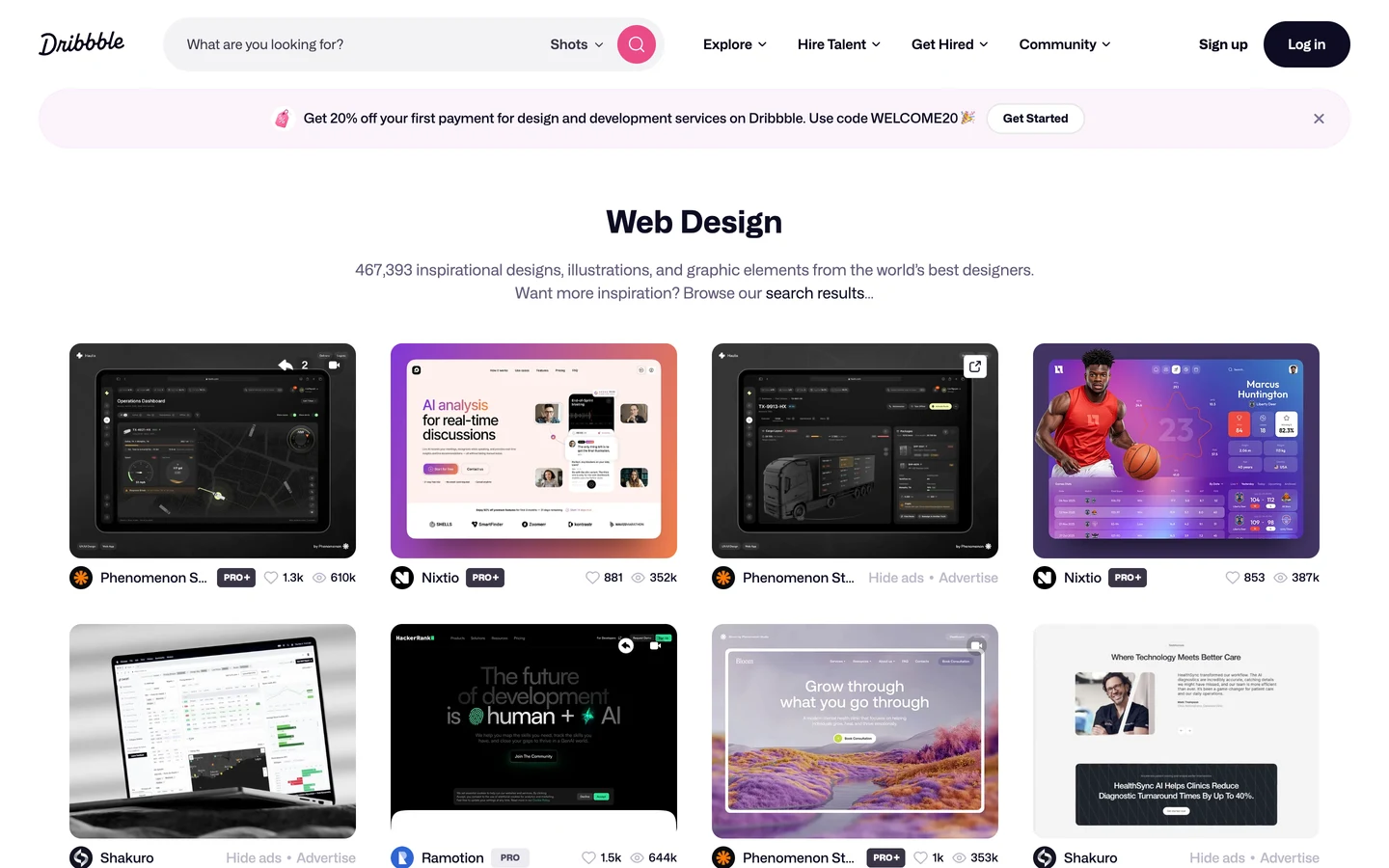
Here's the tag page for web design. Its heading is "Web Design", and the line under it counts about 467K designs.
Then it says, "Want more inspiration? Browse our search results." So the tag page and the search page link to each other.
That link walks you, and Google, from one page type to the next. Each page helps the others get found.
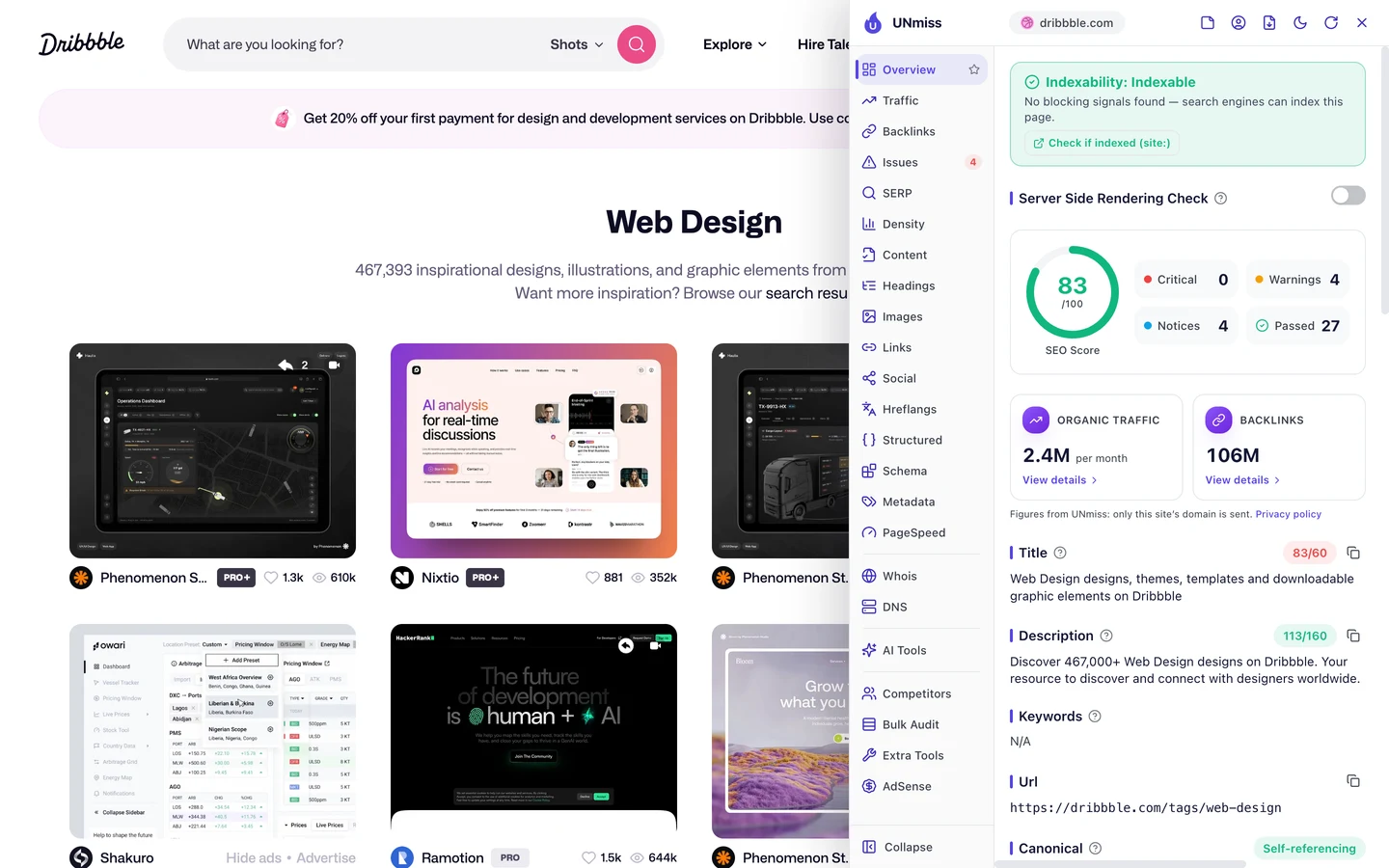
The description is the short summary Google may show under your title. This one starts, "Discover 467,000+ Web Design designs on Dribbble."
A big, exact number tells you there's lots to see before you click. And at 113 characters, it fits in the space Google shows.
Canva, which we studied too, also builds pages for each kind of template it offers.
So build a page for every tag or category your users fill, and put a real count in the description. Write and test it with our Meta Tag Generator.
Keep your titles under 60 characters
Now look at the title on that same tag page. The title is the blue link you see in Google.
It's 83 characters long, and Google often cuts titles off after about 60. So "on Dribbble", the brand name at the end, gets chopped.
It also says "designs" twice, in "Web Design designs". That wastes space you could use for a better word.
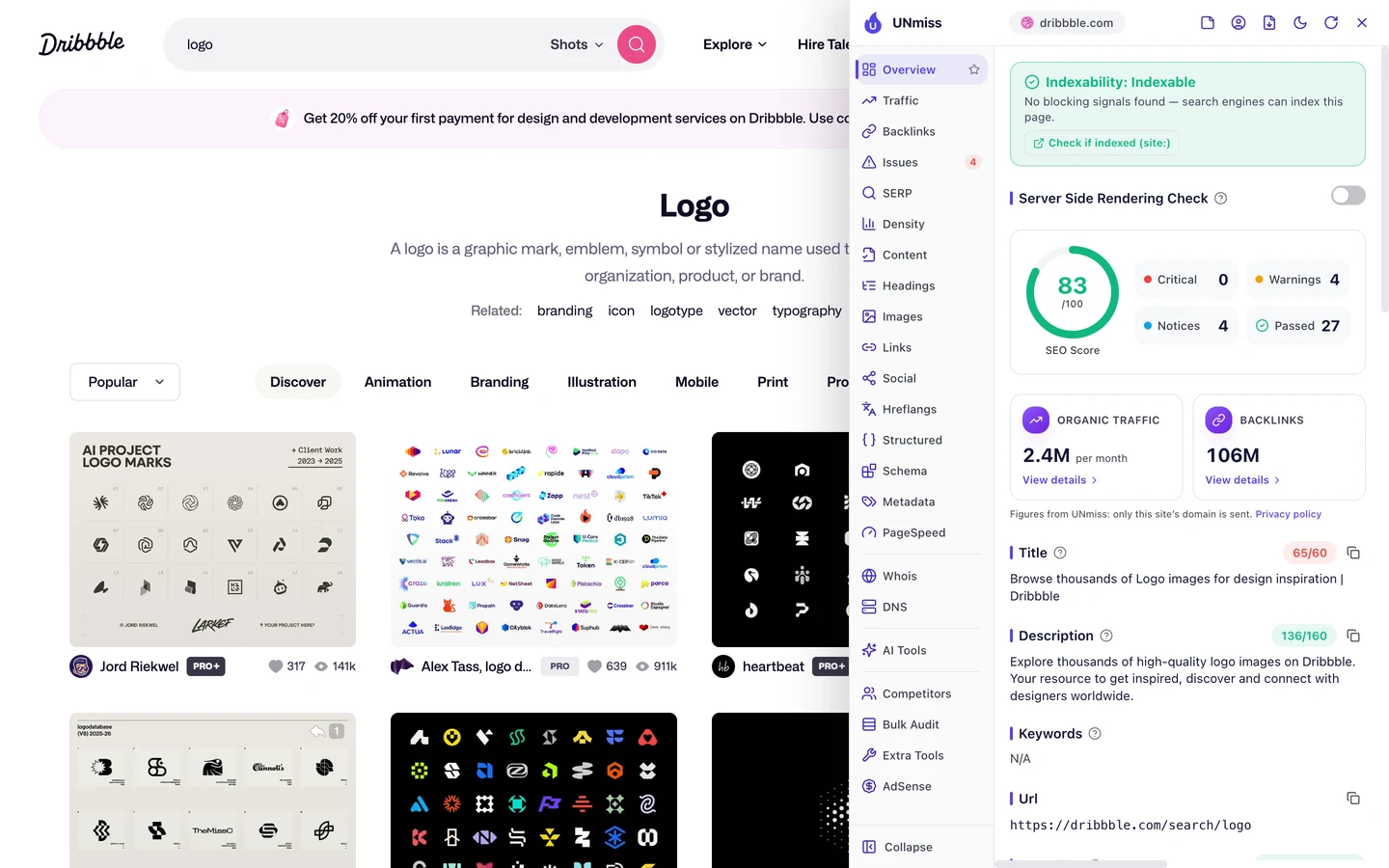
The logo search page is closer, at 65 characters. It reads, "Browse thousands of Logo images for design inspiration | Dribbble".
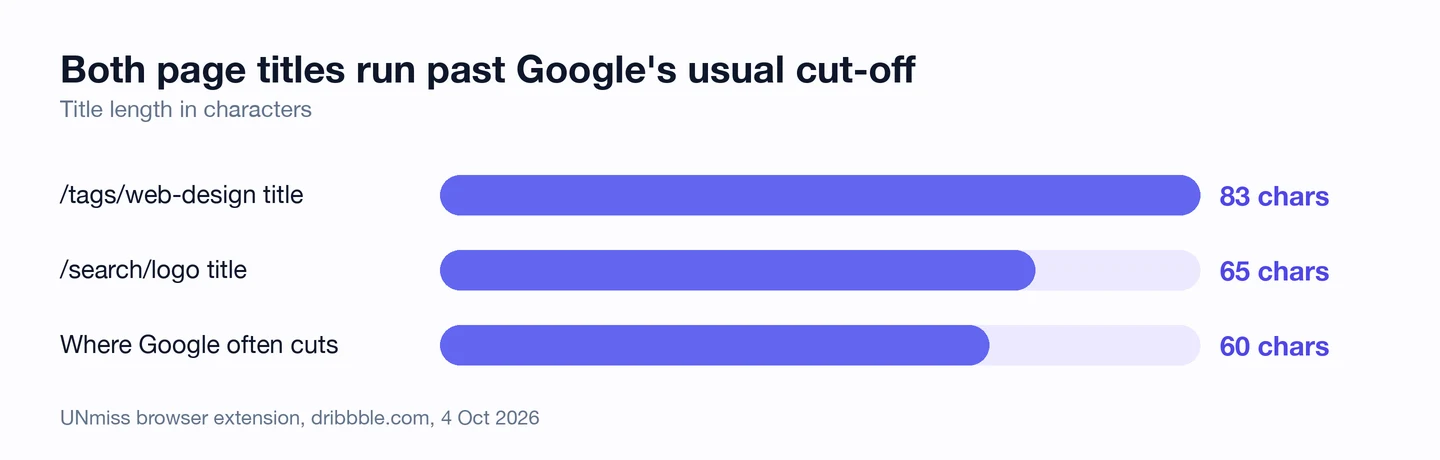
Neither one stops the pages from ranking. But a title that fits is easier to read, so more of the people who see it may click.
The fix is easy, too. Both titles come from a template, so one edit trims every tag page or every search page at once.
So keep your titles under 60 characters, with the main word up front. Preview how yours look in Google with our SERP Simulator.
Mark up every list page in code
Structured data is code that tells Google what a page is. The extension's Structured tab finds it for you.
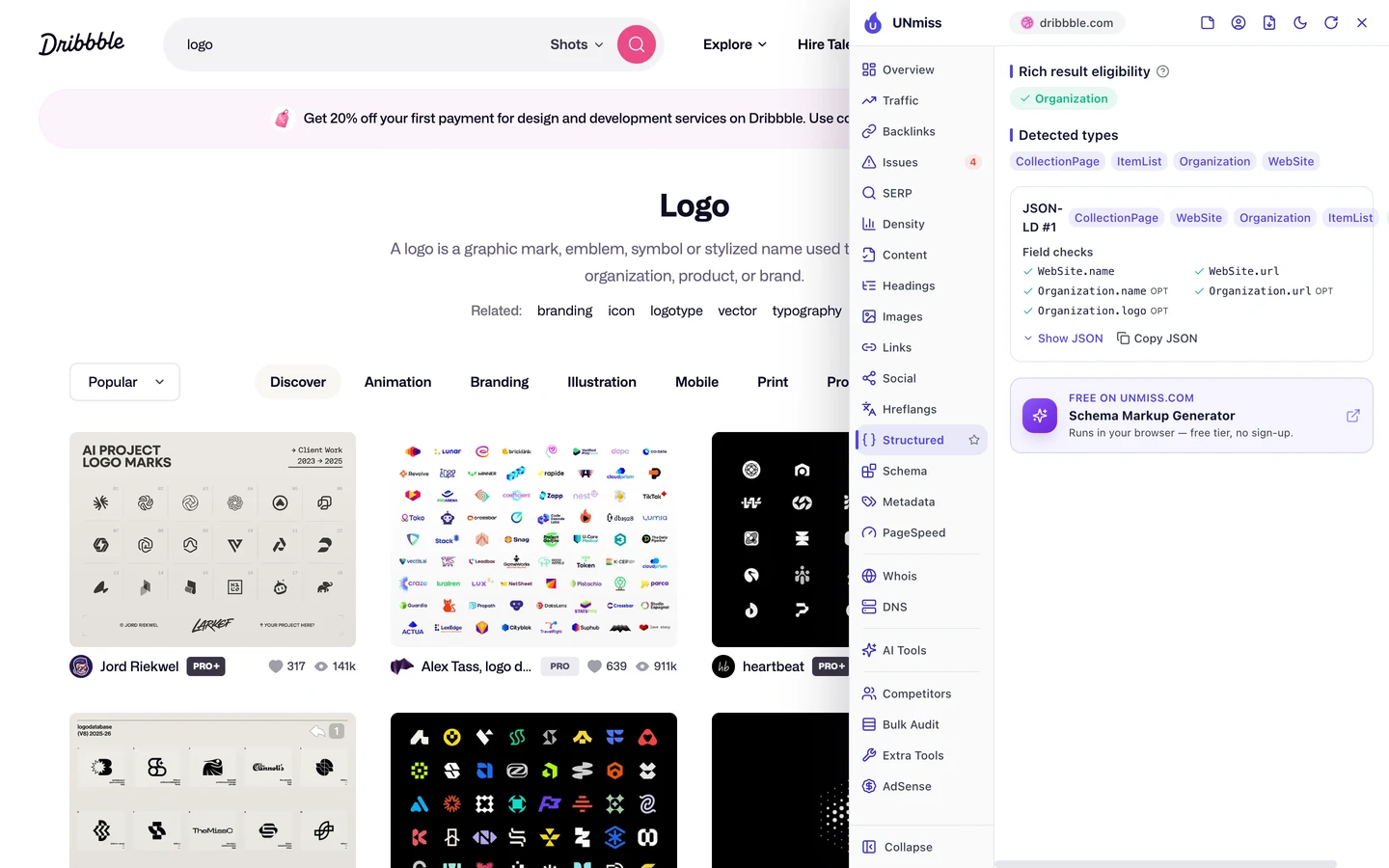
The logo page has 4 types. CollectionPage says it's a page that gathers lots of items, and ItemList says it holds a list.
The other 2, Organization and WebSite, tell Google who runs the site. All of it checks out as valid.
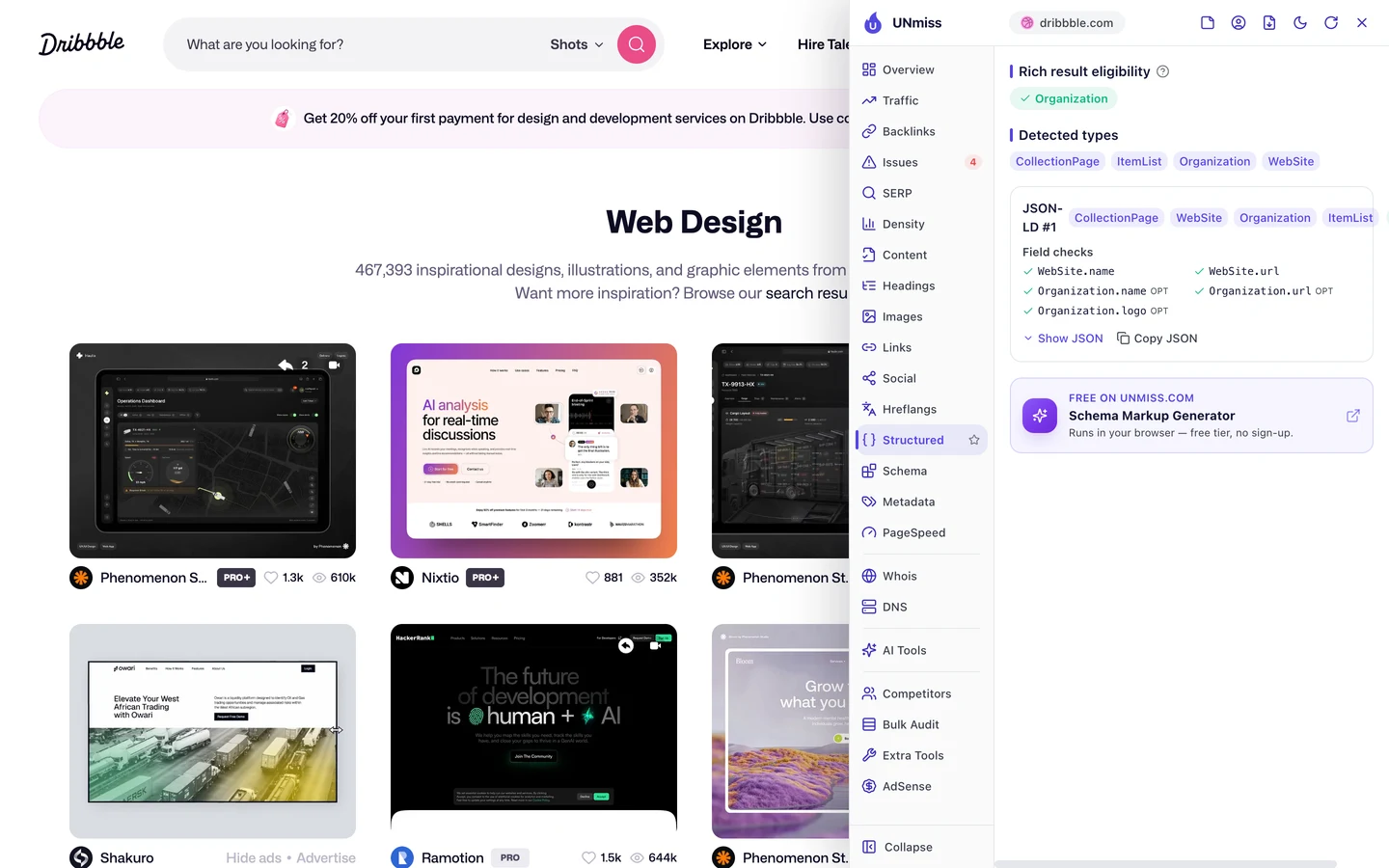
The tag page has the exact same set. So it lives in the template, and every new search or tag page gets it for free.
Docker Hub, which we studied too, is another site that builds lots of pages from one template.
So add structured data to your list templates once, and every page built from them will say what it is. Our Schema Markup Generator writes the code for you.
Audit your search pages
Next, we ran our Website Audit. It sends a crawler through a site to check lots of pages at once.
It came back empty. The report said it couldn't read any pages, and that the site "may block automated crawlers".
Robots.txt didn't stop us, since it lets crawlers in. Something else, like bot protection, likely turns tools like ours away.
Our audit couldn't read Booking.com either, a site we studied too. Big sites often guard their pages hard, so you may hit the same wall.
Here's the good news. On a template site, you don't need to crawl every page.
Check one page per template, and you've checked them all. So we opened the Issues tab on the logo search page and the web design tag page.
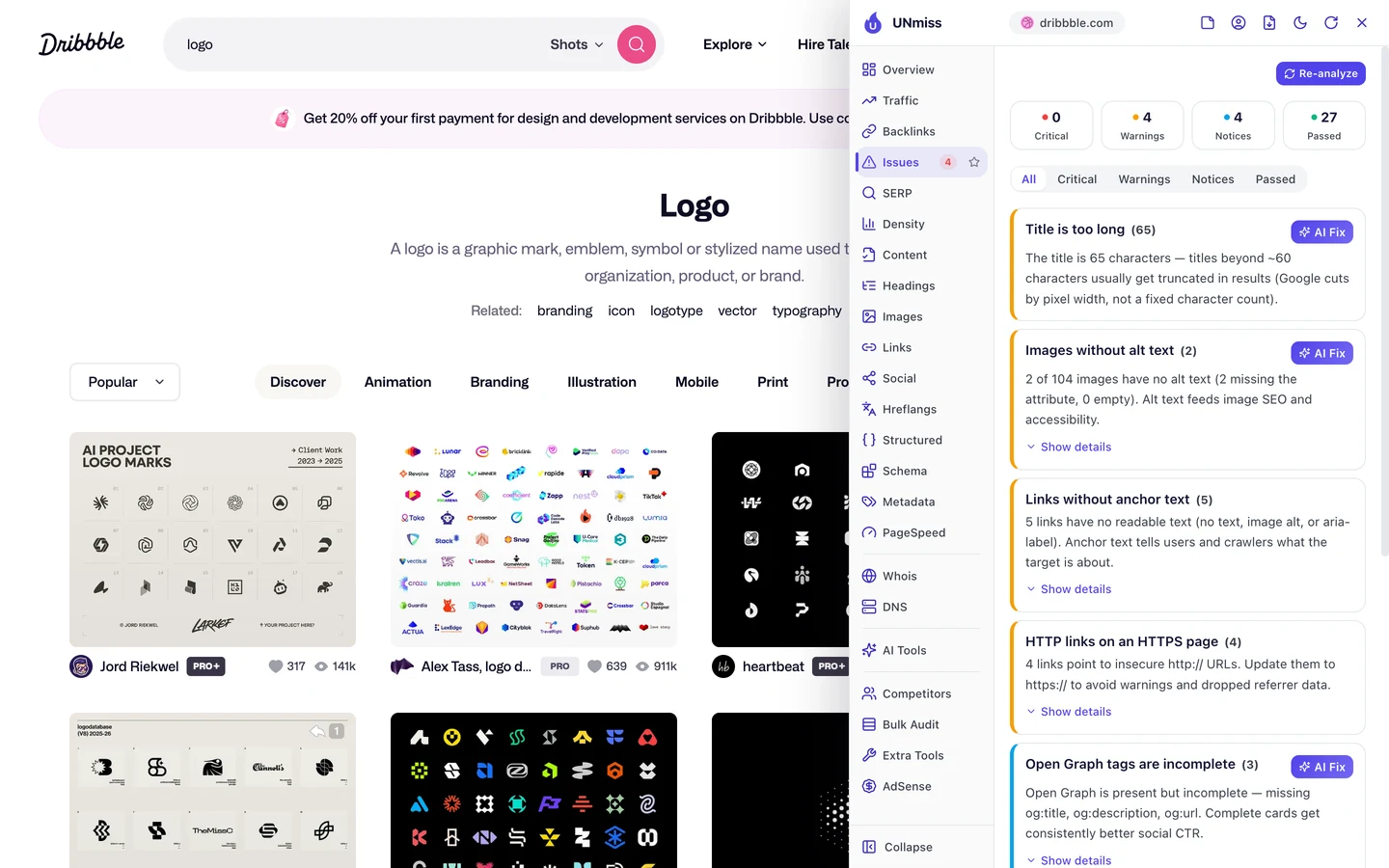
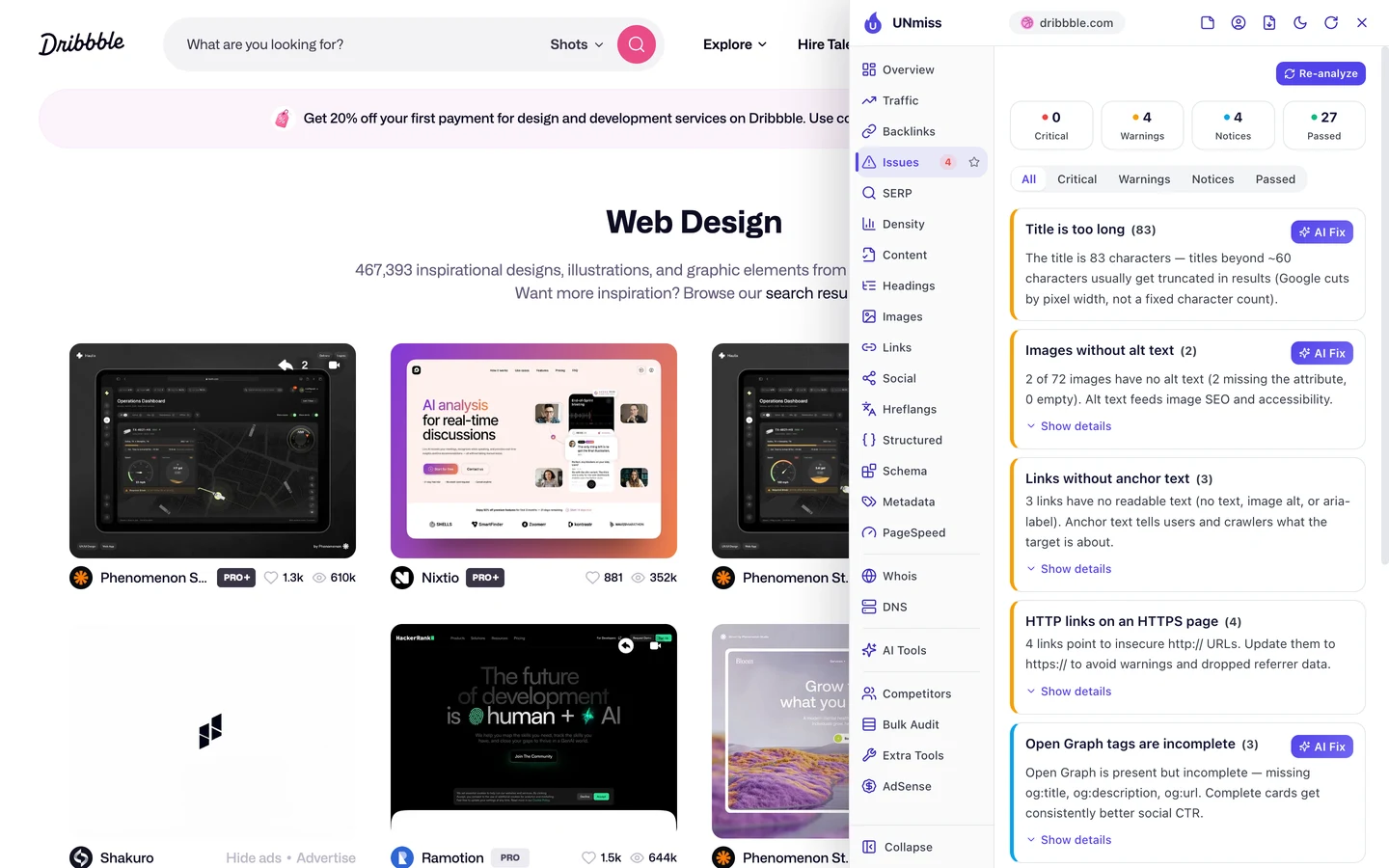
Both pages score 83 out of 100. Both have 0 critical issues, 4 warnings and 4 notices.
You've already seen the title warning. The next one is alt text, a short description that tells Google and screen readers what an image shows.
Only 2 images miss it on each page. That's small, but on a site full of pictures, alt text is how Google learns what each one shows.
The logo page has a bigger problem. 43 of its images have no width or height set, so the page jumps around as they load.
That hurts Core Web Vitals, Google's 3 checks of how fast a page loads, how fast it reacts and whether it stays still. The tag page has just 1 such image, so the fix belongs in the search template.
A few links also have no anchor text, the clickable words of a link. And the Open Graph tags, which shape how a link looks when it's shared, are missing a title, a description and an address.
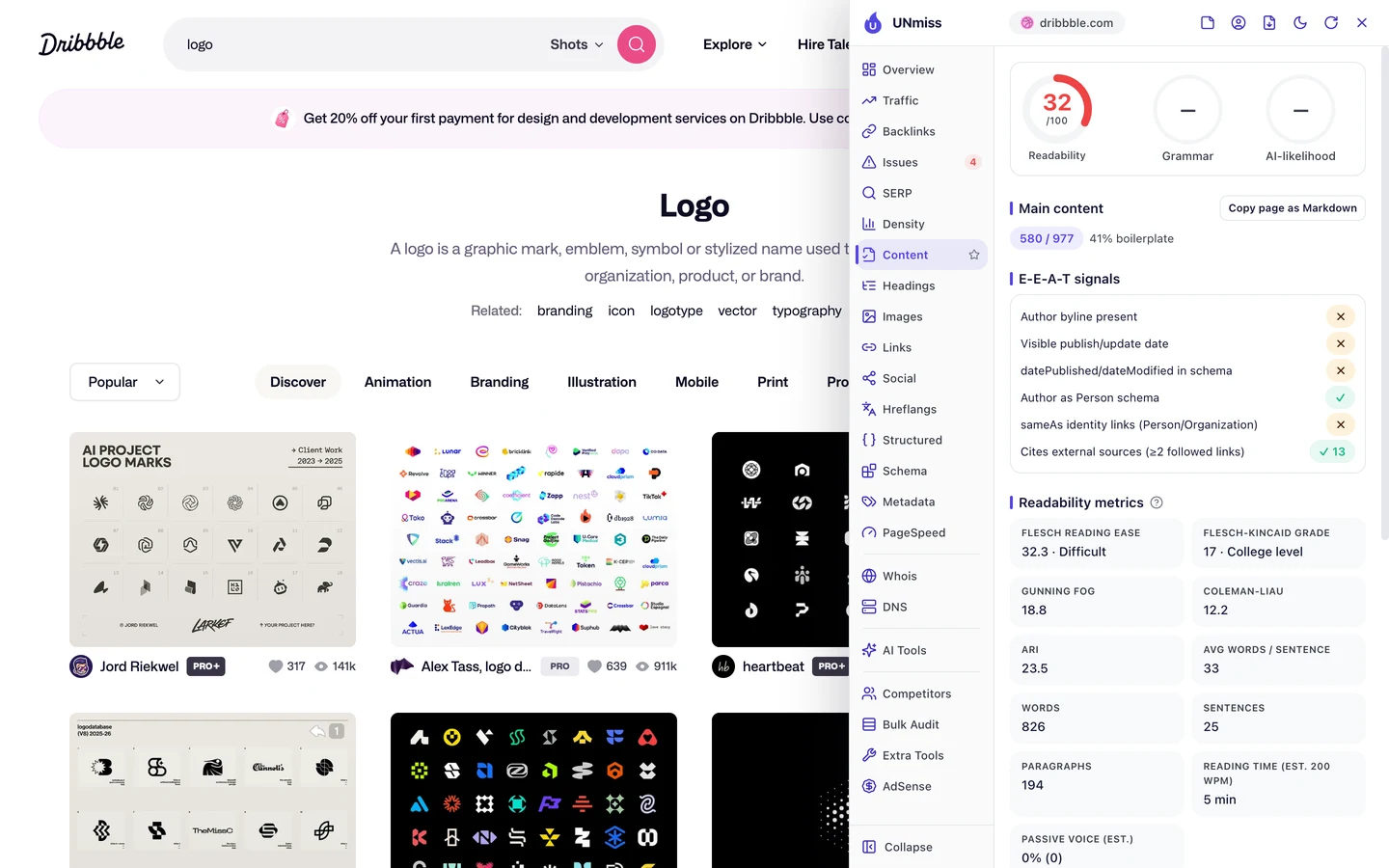
The Content tab shows one more thing. About 41% of the logo page is boilerplate, the menus and links every page repeats.
Most of the rest is design names. That's why the page scores just 32 out of 100 for readability, and why that 1-line intro matters so much.
So run our Website Audit on your site, or check one page per template with our free browser extension. Then test how fast your pages load with our Site Speed test.
Dribbble's search pages earn visits because each one has a heading, an intro and related links. We find which of your searches deserve a page, build that into your template, and keep the junk out of Google.
- We pick the searches worth a page from your own data
- We add headings, intros and related links to your templates
- We set robots.txt and noindex rules for the pages Google shouldn't see
- SEO and GEO, so AI answers can quote you too
Win searches that skip your name
Here's a number that surprised us. Only about 1% of Dribbble's search traffic comes from people typing its name.
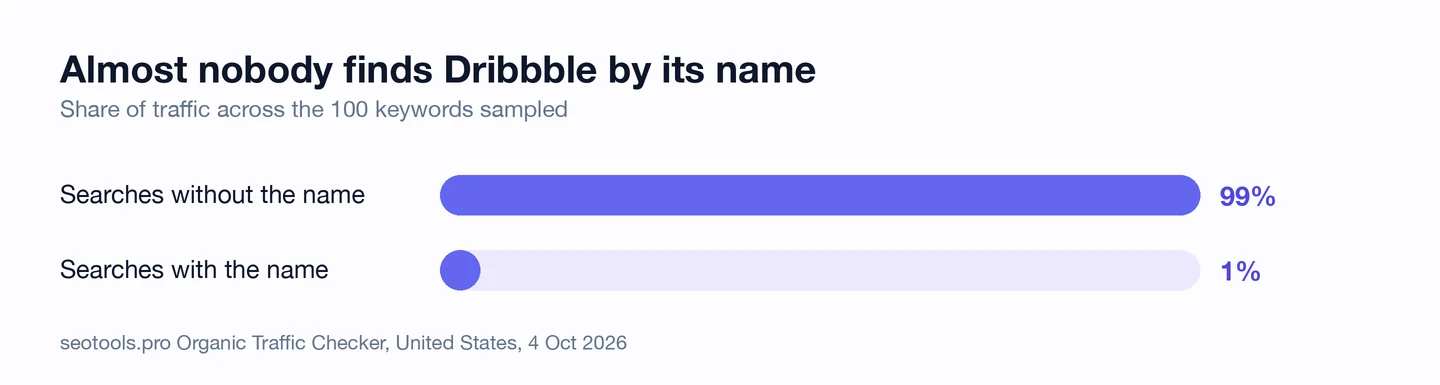
Its pages win plain searches instead, like "logo" and "background". Even a jobs page for New York ranks #6 for "graphic design jobs".
Its users help, too. A single post, which Dribbble calls a shot, ranks #7 for "wallpaper" and brings in about 8K visits a month.
itch.io, which we studied too, also lets pages made by its creators rank.
The brand searches it does get, it wins. The homepage is #1 even for "dribble", the name spelled with one b.
So find the plain searches your pages could answer, not just your brand name. Look them up with our Keyword Research tool, then follow each one with our Rank Tracker.
Watch the keywords you lose
Last, our Domain Overview shows where the whole site stands in Google.
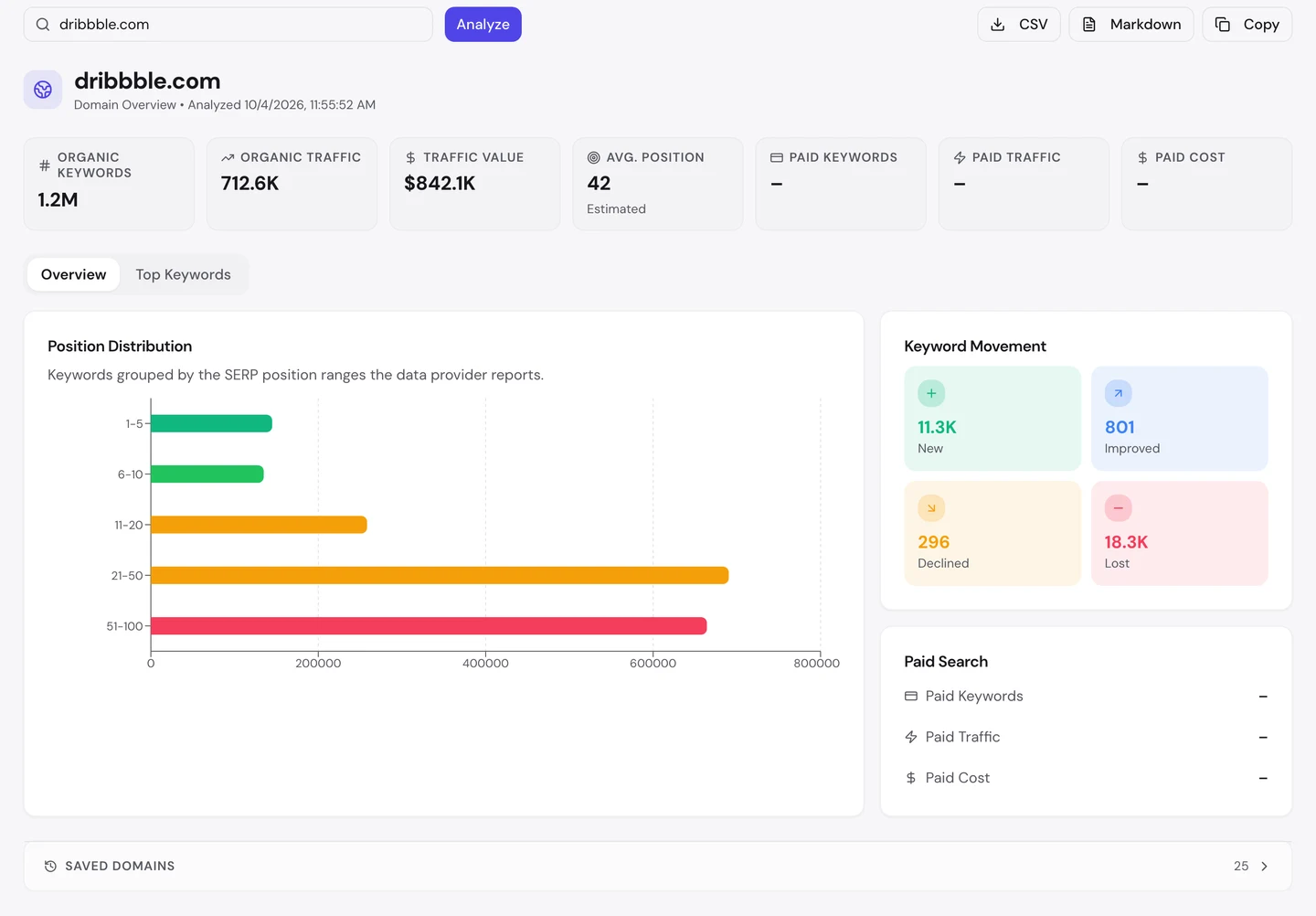
Dribbble ranks for about 1.2M searches. Its traffic value, what those visits would cost as Google ads, is about $842K a month.
Its average spot is 42, on page 5 of Google. With so many search pages, most of them sit low, and that's normal.
The chart shows it too. Most of its keywords sit between spot 21 and spot 100, far from page 1.
Now look at the movement box. It gained about 11K new keywords but lost about 18K.
On a site built from templates, losses often come in groups. If a set of search pages slips, the cause is usually something those pages share.
So check your lost keywords each month, and look for the page type behind them. Our Domain Overview shows the losses, and our Rank Tracker follows your key pages day by day.
Dribbble's search and tag pages share the same title, image and link issues. Run our Website Audit on your site to see what your templates repeat, good and bad.
- The same checks we ran on Dribbble's search and tag pages
- Titles, descriptions and images for every page it reads
- An AI plan for what to fix first
What you cannot copy
First, the part you can't copy: Dribbble has been around since 2008. Designers have shared their work there for years.
A backlink is a link from another website to yours. The extension counts about 106M of them pointing at Dribbble, and that takes years to earn.
You can still see who links to you, and to your rivals, with our Backlink Analyzer.
Then there's the content. Designers keep uploading new shots, so every search page and tag page fills itself.
A search page is only as good as what's behind it. Dribbble's real edge is that library, not the layout.
Now a few honest notes on the numbers.
We took our figures on 4 October 2026. The 713K figure counts US searches only.
The extension shows its own, different estimate of about 2.4M a month, for the whole world. Both are estimates, worked out from rankings and search volume, since nobody outside the site can count its real visits.
The 1% branded share comes from a sample of 100 keywords, not every search. Take it as a rough guide.
Our Website Audit read 0 pages, so there's no audit report and no crawl sample here. We checked 2 pages by hand with the extension instead, on the same day.
The issues we found are for those 2 pages. Other page types, like shots or job pages, may look different.
The one number to take away
18K.
That's about how many visits a month Dribbble's search page for "logo" brings in. Only the homepage brings in more.
And that page isn't a special project. It's a search result with a heading, one plain sentence and a few related links.
That's the lesson for you. If your site has a search box, some of its results could be landing pages already.
Which searches do your visitors make most? Start with those.
You can run every one of these checks on your own site, and on your rivals', and see the same numbers for yourself.
Frequently asked questions
Will Google punish me for letting it index search pages?
Google doesn't want endless thin, auto-made search pages in its results. Pick a short list of searches that matter, make each page useful, and keep the rest out.
Which search pages should I let Google see?
Start with searches people make often that return lots of results. Skip empty pages, typos and odd mixes of filters.
How do I stop filter pages from flooding Google?
Block filter settings in robots.txt, or add a noindex tag to those pages. Also avoid linking to them from your menus.
How much text does a search page need?
Not much. A clear heading and a short intro tell Google, and your visitors, what the page is about.
What's the difference between a tag page and a search page?
A tag page lists items people labeled with that tag. A search page lists items that match the words you type, so it can cover more ground.
Can my users' posts rank in Google?
Yes, if each post has its own page with a clear title and some text. Give posts a template with room for both.
Why would a big site block SEO tools?
Big sites guard against scrapers and fake traffic. Those filters can catch harmless tools too, so check a few pages by hand with a browser extension instead.
Do I need an llms.txt file?
It's new, and not every AI tool reads it yet. It's quick to add, so it's worth trying once your basics are done.