freeCodeCamp gets about 342K visits a month from Google in the US, and many of its biggest pages aren't about code at all, like guides to emoji, Google Maps pins and Roman numerals.
freeCodeCamp is a charity that teaches people to code for free. Its news site has thousands of guides by volunteers, and some of the most read answer everyday questions.
We ran it through our whole SEO toolkit to see what those guides win, and what holds the site back.
Here are 9 lessons you can copy, plus the part you can't.
Answer everyday questions too
We started with our Organic Traffic Checker. It estimates a site's organic traffic, meaning the people who find it on Google without ads.
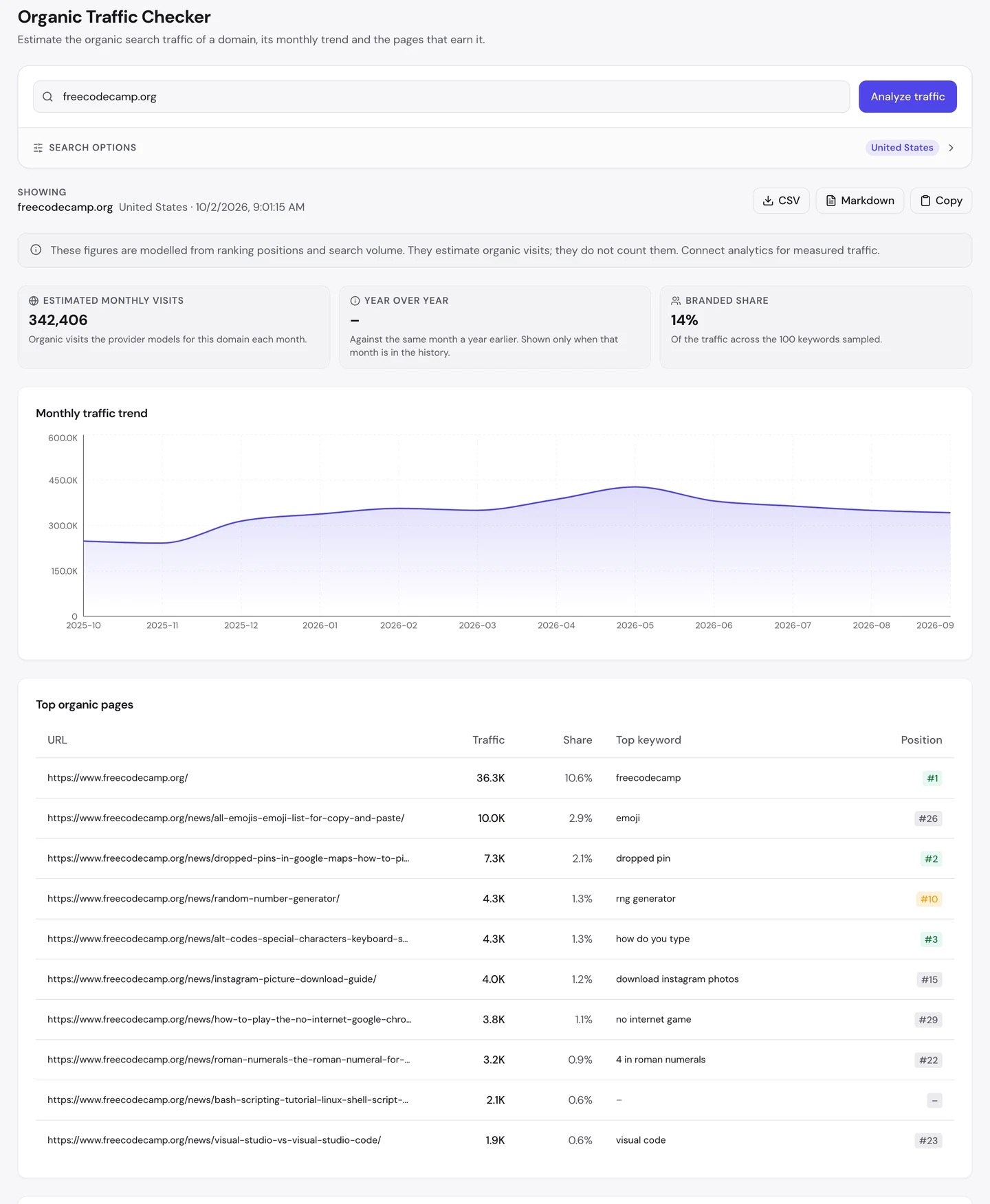
For this site, that's about 342K visits a month in the US. The chart rose for most of the year, then eased after May.
Now look at the top pages. After the homepage come an emoji list, a guide to dropping a pin in Google Maps, and an article about random numbers.
Further down are Instagram downloads, the Chrome dinosaur game and Roman numerals. None of them teaches you to code.
And only 14% of the searches we sampled used its name. Most people found it by asking a question.
The Traffic tab of our Website Audit shows the whole world.
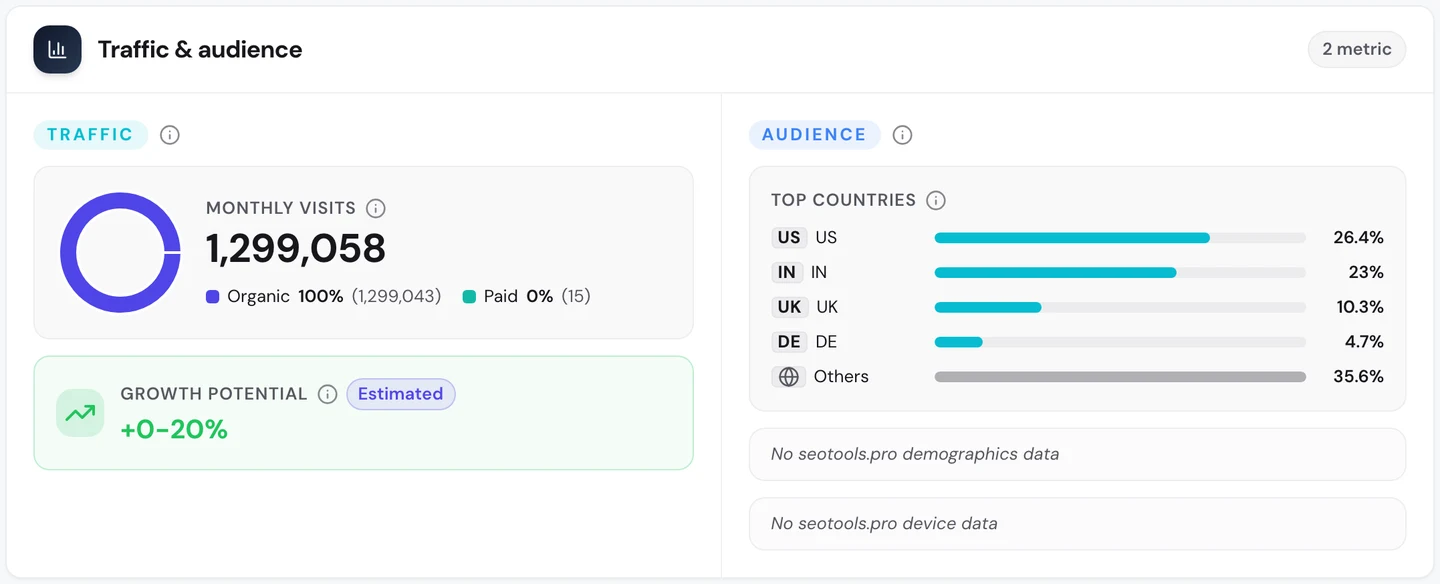
Worldwide it's about 1.3M search visits a month. India sends almost as many as the US.
GeeksforGeeks, which we studied too, has the same pattern: a coding site whose biggest pages answer non-coding questions.
So it's fine to answer the everyday questions your readers ask. Just link each one back to what you really do, so some of those visitors stay.
Push near-misses onto page 1
The Keywords tab of our audit lists every search a site ranks for, where it ranks and how many visits each one sends.
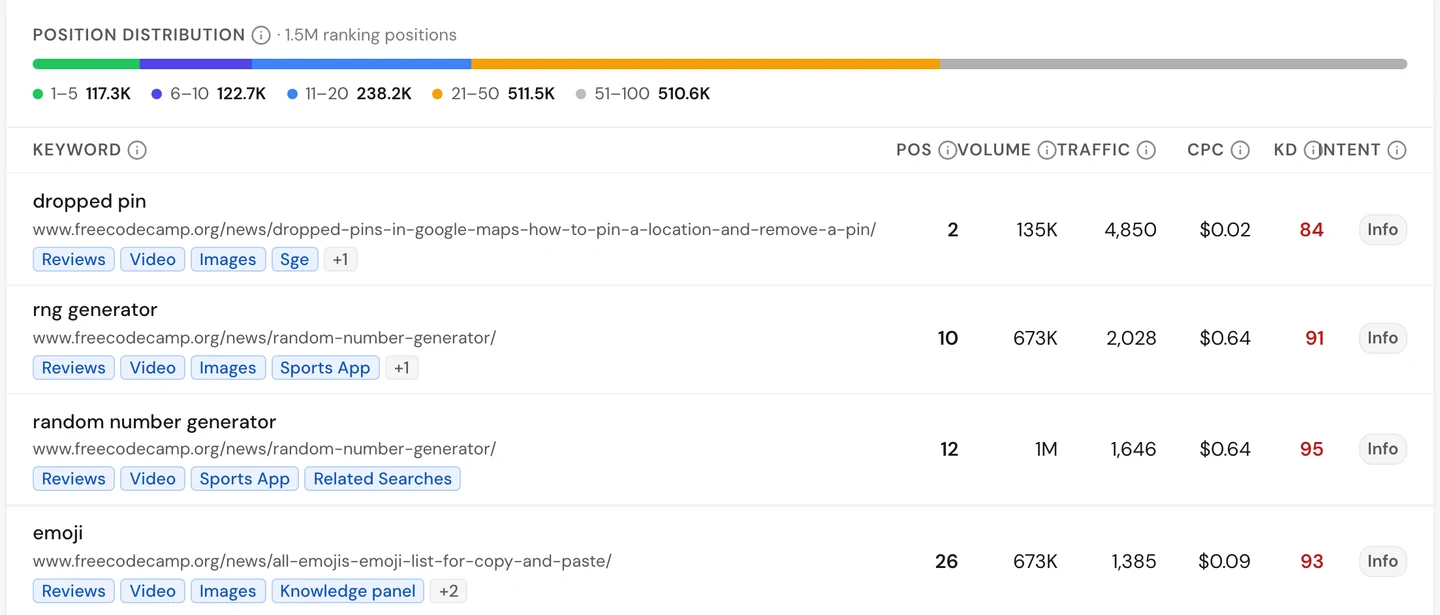
"Dropped pin" is searched about 135K times a month, and freeCodeCamp ranks second. That one guide brings in thousands of visits.
Now look at the other rows. "Random number generator" is searched about 1M times a month, and freeCodeCamp sits 12th, on page 2.
"Emoji" gets about 670K searches, and the emoji list ranks 26th, on page 3. Very few people ever scroll that far.
These pages already rank. A few places up could bring many times more visits, and that's usually easier than starting a new page.
So find your pages ranking between 8 and 30 for big searches, and improve those first. Check the searches with our Keyword Research tool.
Put a real name on every guide
Here's the guide that ranks second for "dropped pin".
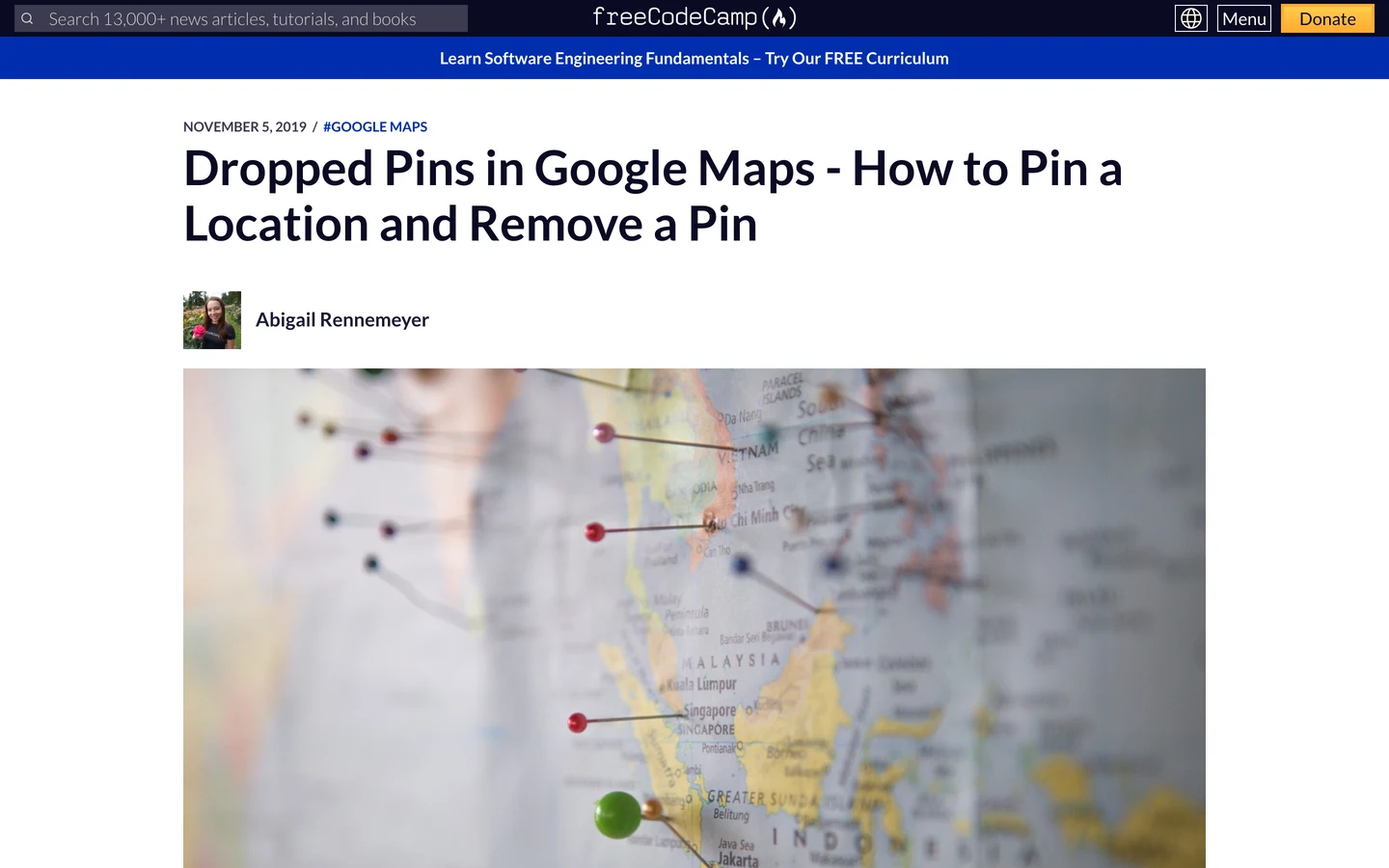
Right under the title you see the author's name, her photo and the date. You know who wrote it before you read a word.
Our free browser extension checks these signs for you. Open the page, click the seotools.pro icon, and a panel opens beside it with 35 SEO checks.
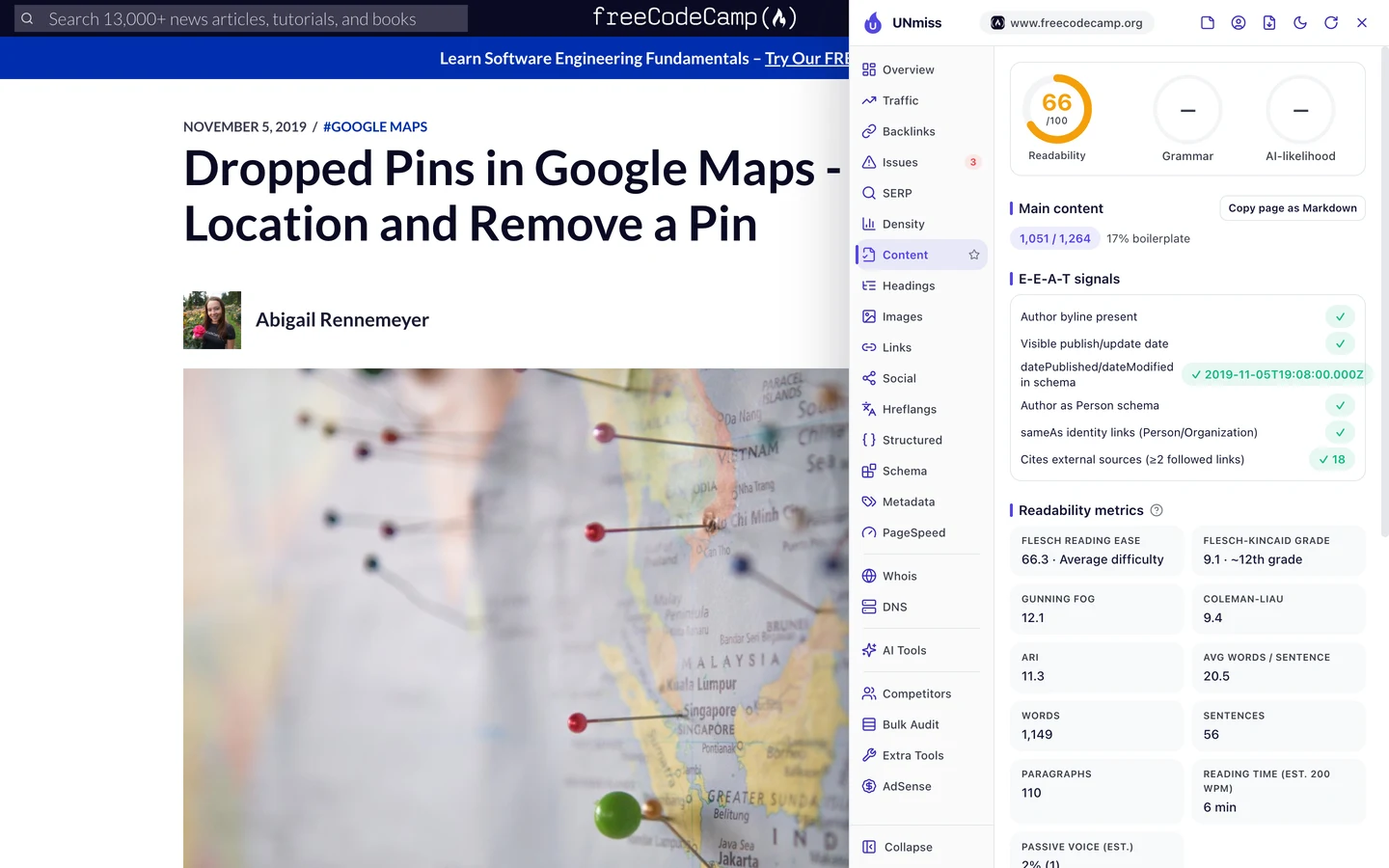
Every trust signal passes. The page shows the author and the date, and its code tells Google the same thing, with links to the author's other profiles.
Google says it wants to know who wrote a page and why you should trust them. This page makes that easy to see.
So show the author's name, photo and date on every guide, and put them in the code too. Our Schema Markup Generator writes the author code for you.
Write descriptions, don't cut them
The description is the short summary Google may show under your title. Here's what the extension found on the emoji list.
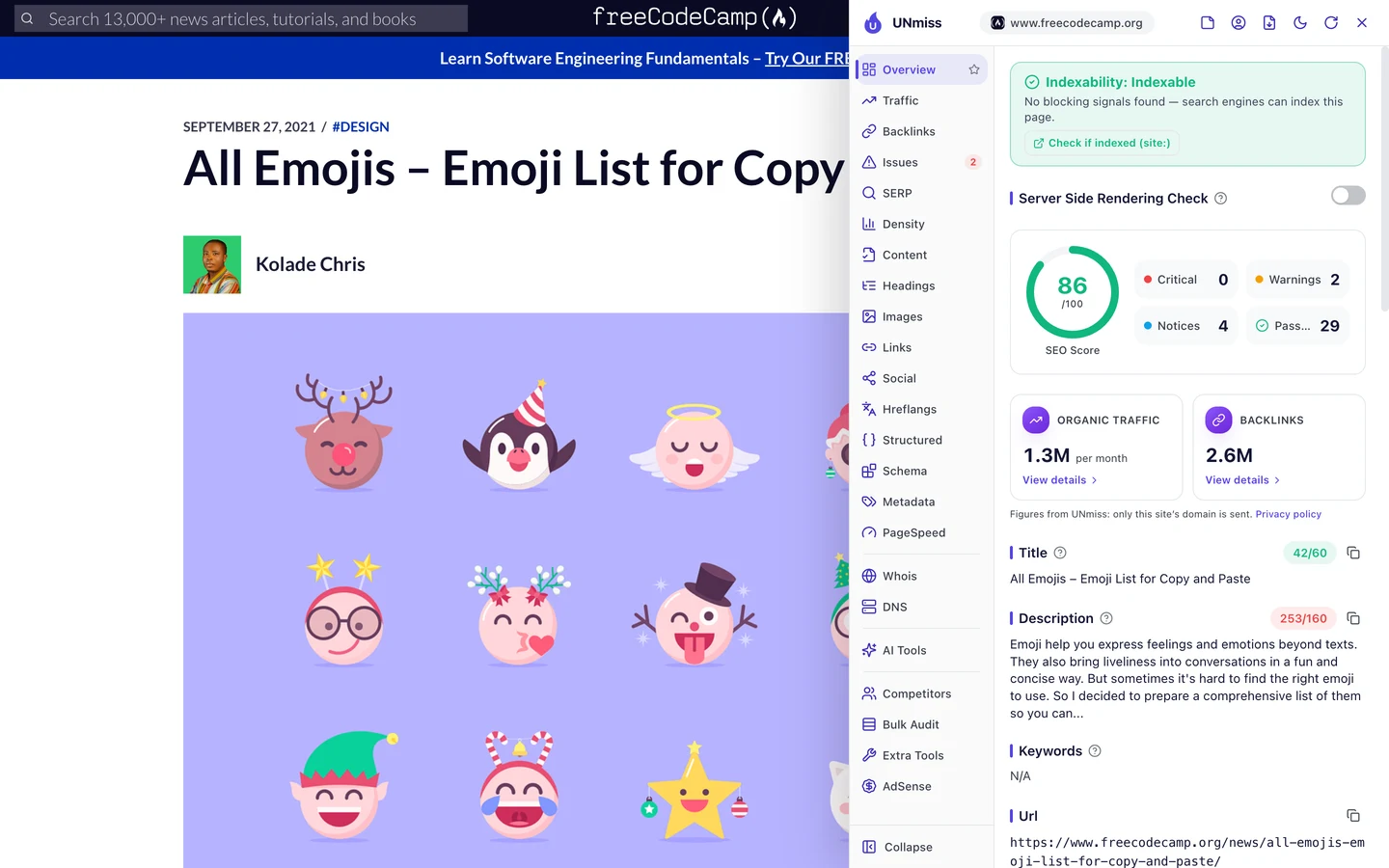
The page scores a solid 86 out of 100. But the description is 253 characters long, and it stops mid-sentence: "so you can...".
The dropped pins guide has the same problem, cut at exactly 253 characters. It looks like the template copies the start of each article and chops it off.
The audit shows how far it spreads.
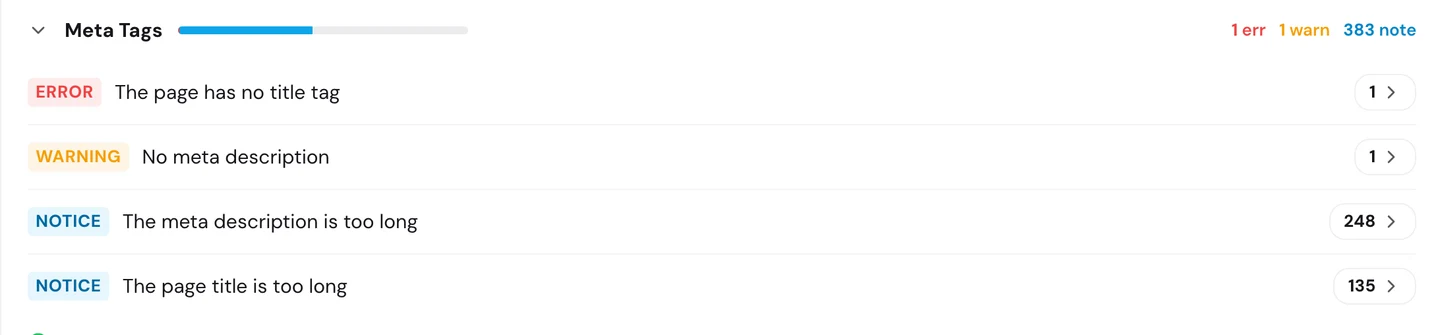
248 of the 250 pages we checked have a description that's too long. Google cuts them, and often writes its own instead.
So write a real description of about 150 characters for each page, or set your template to stop at the end of a sentence. Our Meta Tag Generator helps you write one.
freeCodeCamp's guides win huge searches, but many sit on page 2 with cut-off descriptions. We find your near-miss pages and fix the templates holding them back, so more of your guides reach the top.
- We find the pages a few places away from page 1
- We fix titles and descriptions across your whole template
- We make sure your key pages work without JavaScript
- SEO and GEO, so AI answers can quote you too
Audit your homepage's raw HTML
We checked the site with our Website Audit. It sends a crawler, a program that visits pages the way Google does, opening each page and following the links to the next ones.
Our first run found just 1 page. The crawler opened the homepage and found no links to follow.
So we checked the raw HTML, the code a server sends before any JavaScript runs. The homepage has no title, no main heading and not a single link in it.
It all shows up only after code called JavaScript builds the page in your browser. Google can run JavaScript, but many other crawlers can't, and that includes many AI tools.
We ran the audit again and told it to read the sitemap, the file that lists a site's pages for Google. This time it checked 250 pages, and the site scored 73 out of 100, which the report rates as fair.
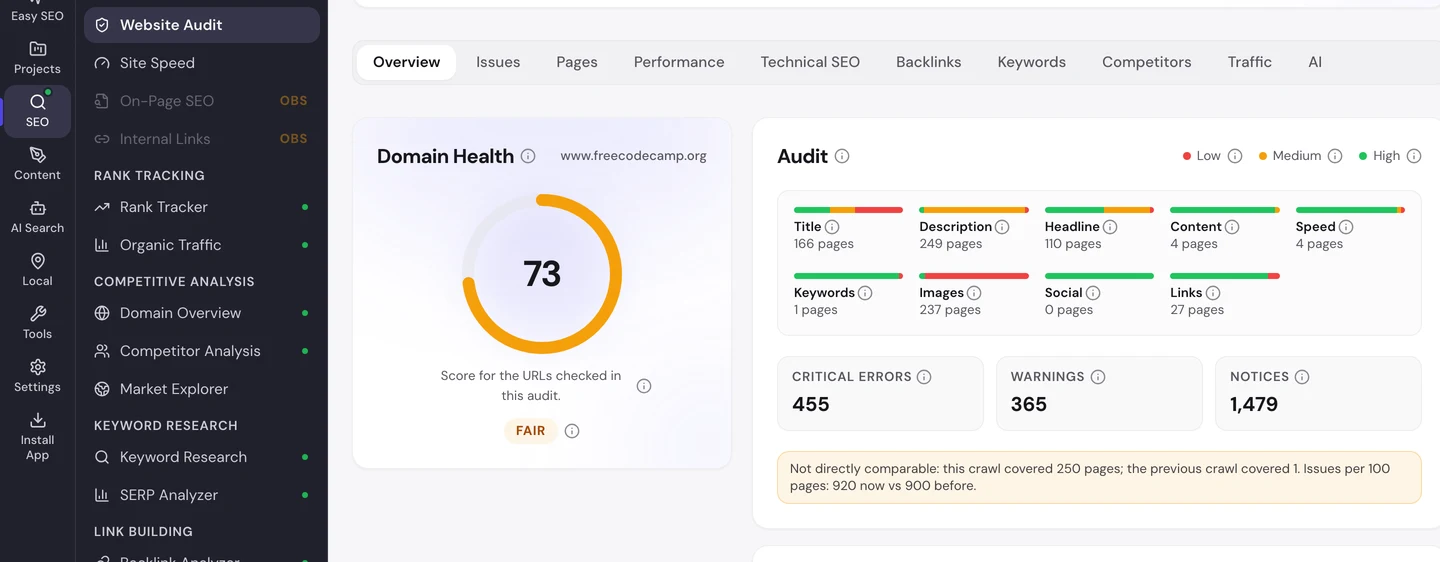
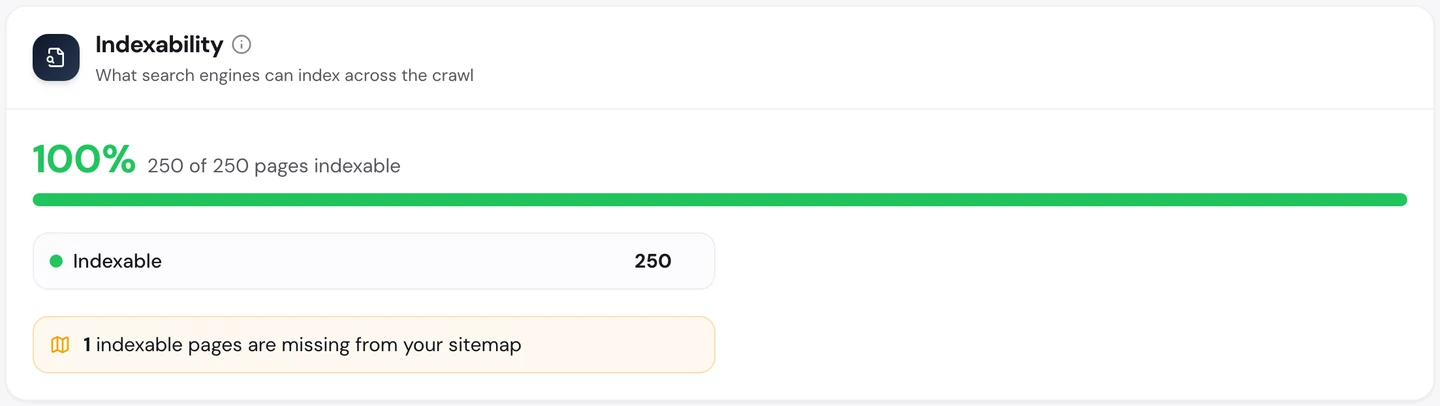
The news guides themselves are in good shape. Every page we checked can be listed by Google.
You don't have to work out what to fix first. The audit's AI tab writes the plan: a short summary, each problem with how to fix it, and a 90-day to-do list.
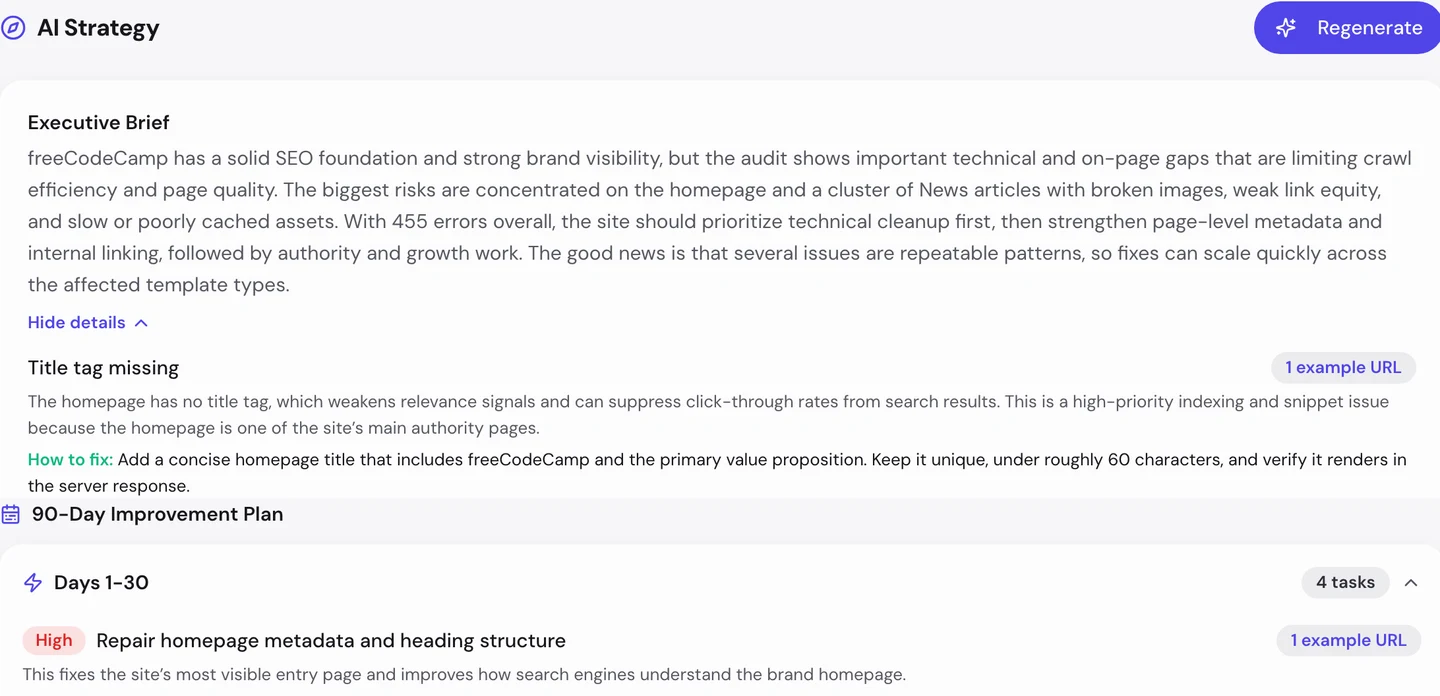
The first task is a homepage title and heading that are in the HTML from the start.
So open your homepage's source code, not just the page. If the title and links aren't there, crawlers may never find the rest of your site.
Publish a free handbook
A backlink is a link from another website to yours. Google treats each one a bit like a vote of trust.
The Backlinks tab of our audit shows the same data as our Backlink Analyzer.
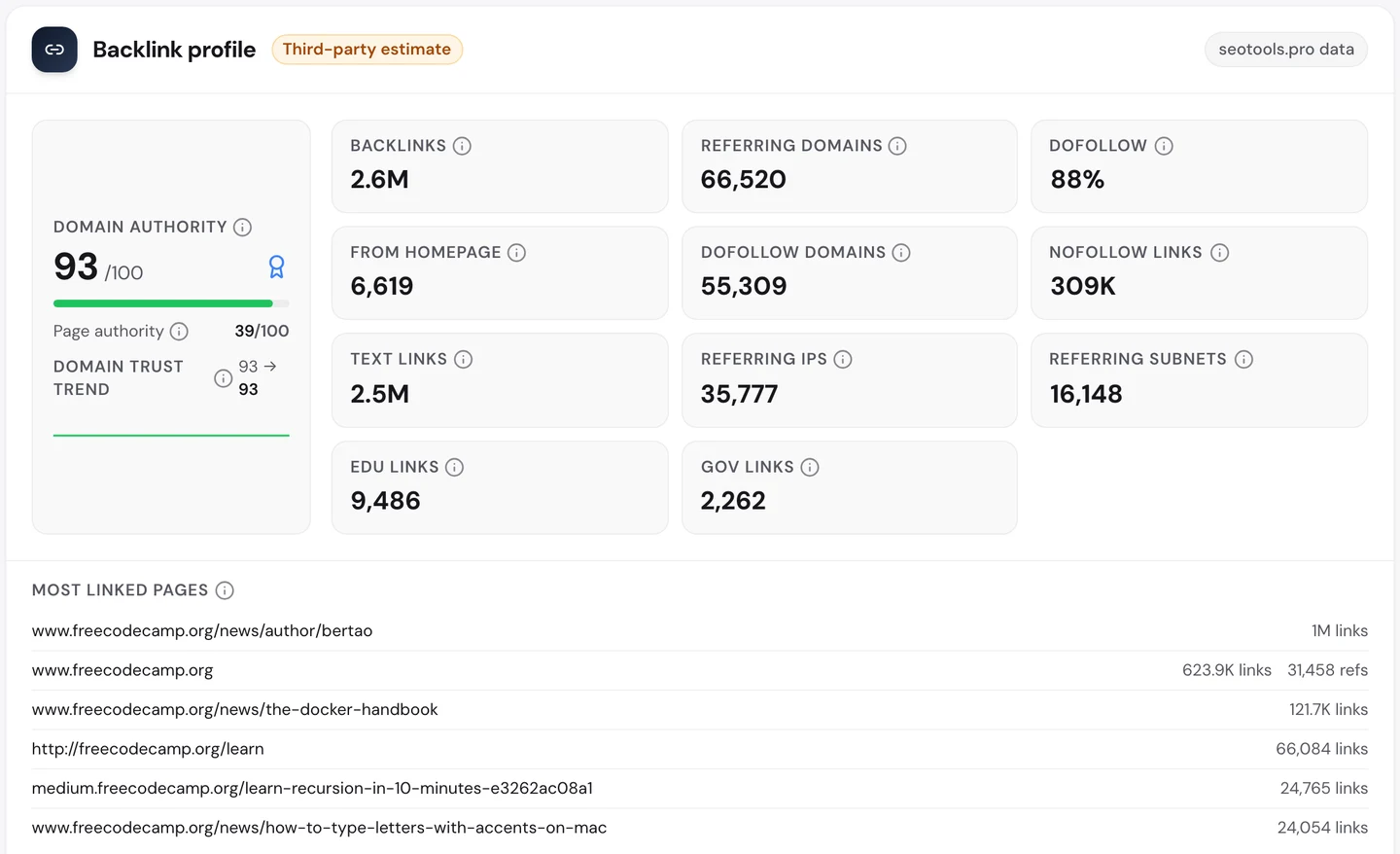
The site has about 2.6M links from more than 66K websites. Its Domain Authority, our 0 to 100 score for a site's link strength, is 93.
Look at the most linked pages. After an author page and the homepage comes The Docker Handbook, a free book-length guide, with about 120K links.
People link to a handbook because it's the one place that explains a whole topic. A short tip rarely earns that.
So write one big, free guide on the topic you know best, and keep it up to date. It can earn links for years.
Speed up the main content
The Performance tab of the audit shows Core Web Vitals. These are Google's 3 checks of how fast a page loads, how fast it reacts and whether it stays still, measured on real visitors' devices.
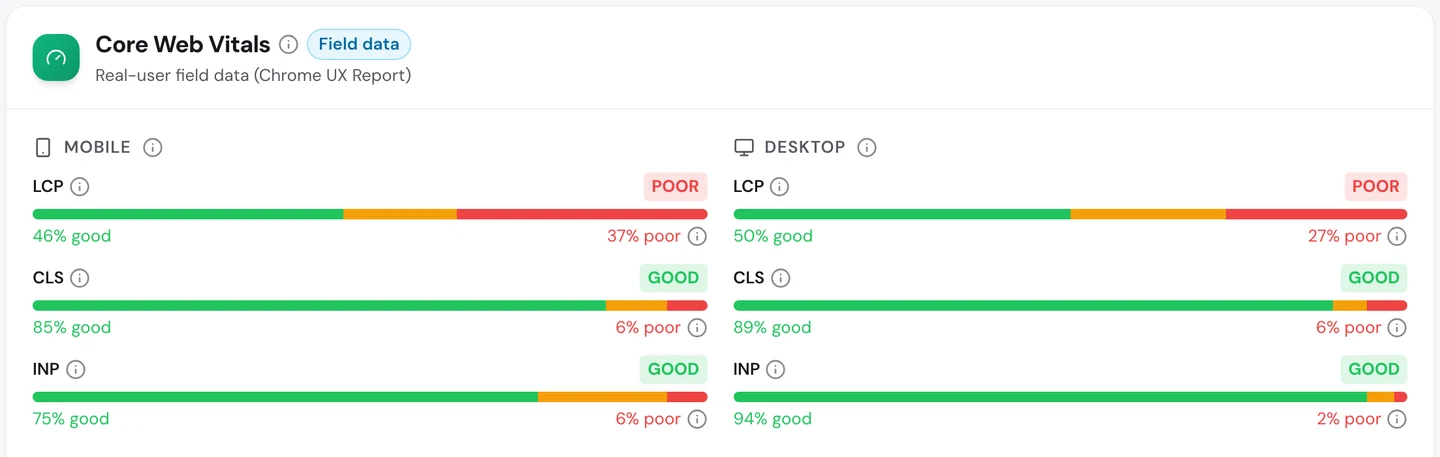
Pages react fast and stay still. But the main content loads too slowly, and Google rates it poor on phones and on desktops.
On phones, more than 1 in 3 visits waits too long to see the article. You'd probably give up and press back.
Big top images and pages built by JavaScript are the usual causes. Both are things you can fix in the template, once, for every guide.
So make the article text and its main image load first. Our Site Speed tool shows what slows each page down.
Know who teaches the same skills
The audit's Competitors tab lists the sites that rank for the same searches as you.
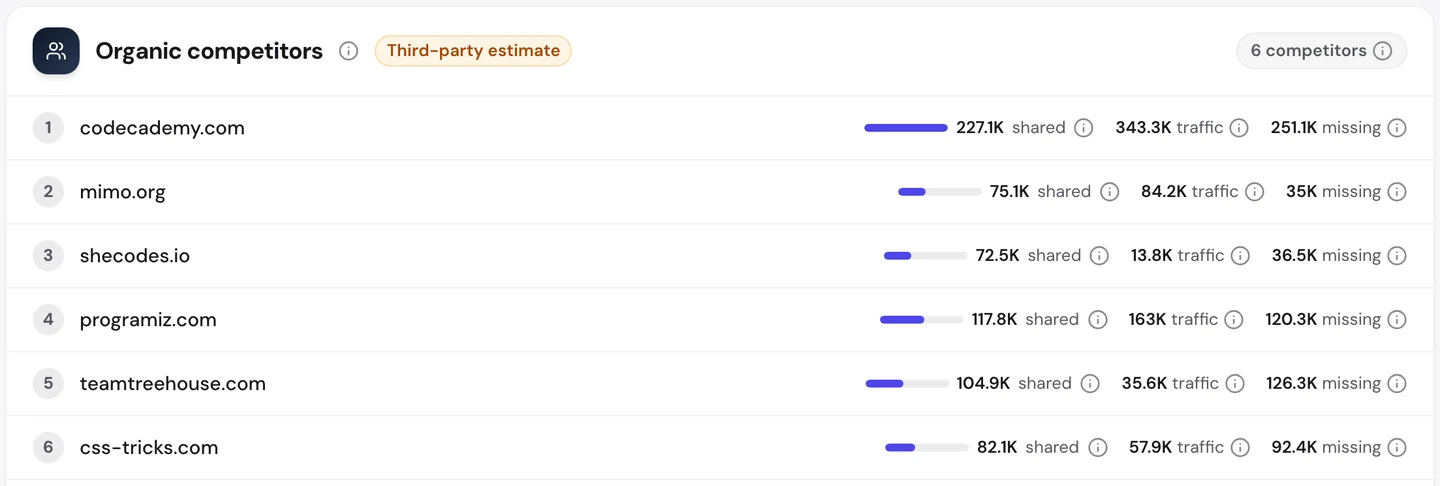
Codecademy shares about 227K searches with it. Programiz, Treehouse and CSS-Tricks come next.
MDN, which we studied too, chases many of the same coding searches with plain reference pages.
Our Domain Overview shows what that fight looks like underneath.
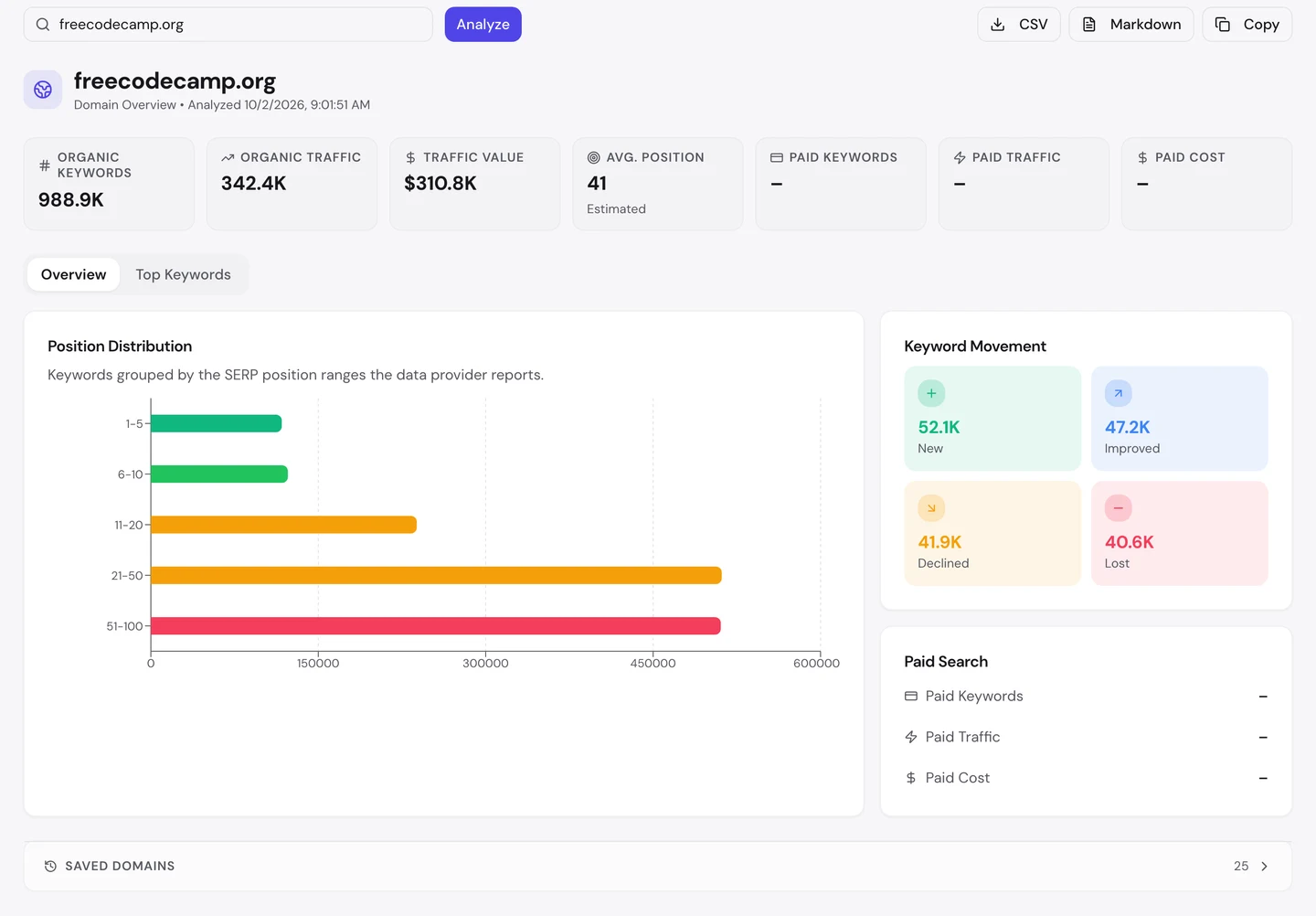
The traffic is worth about $310K a month in ad money. And it gains more keywords than it loses, so it's still growing.
So watch which rivals share your searches, and track your most important guides in our Rank Tracker. You'll see a rival pass you in days, not months.
Let AI tools read your guides
Lots of people now ask ChatGPT or Claude how to do things, instead of searching Google. So we checked which AI tools may read the site.
The rules for crawlers live in robots.txt, a file that tells crawlers what they may read, and our extension reads it for you.
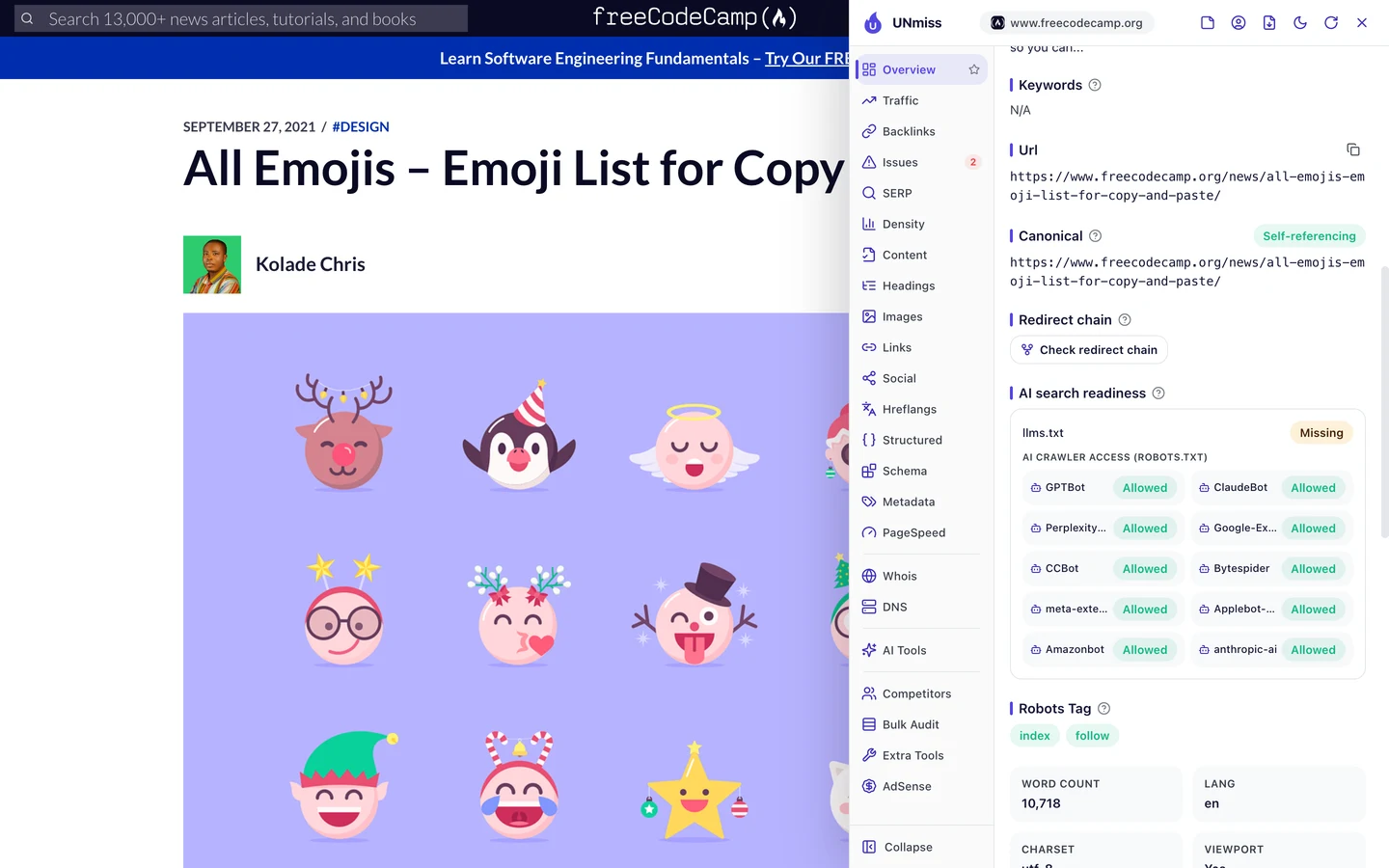
The site lets every AI crawler in. Its news guides are plain HTML, so AI tools can read and quote them.
The homepage is different. Without JavaScript it's empty, so an AI tool that doesn't run JavaScript sees nothing there.
TED, which we studied too, hides its talk transcripts behind a button in a similar way. If a crawler can't see your words, it can't quote them.
So let AI crawlers in, and make sure your key pages work without JavaScript. Write your rules with our robots.txt generator, then check whether AI tools mention you with our AI Visibility Checker.
Many of freeCodeCamp's top pages answer everyday questions. Our Organic Traffic Checker shows your top pages and the share each one brings, so you can see which kind of page is working for you.
- The same report that measured freeCodeCamp
- Each top page's traffic, share and top search
- Run it on any rival's domain too
What you cannot copy
First, the part you can't copy: thousands of volunteer authors and a free course that millions of people have used.
That's why it can post guides on almost anything. If you're starting out, write fewer guides and make each one the best answer you can.
Now a few honest notes on the numbers.
We took our figures on <correct date before/at publication>. The 342K figure counts US searches, and the 1.3M worldwide figure comes from the audit's Traffic tab.
Both are estimates. Nobody outside freeCodeCamp can count its real visits, so tools work them out from rankings and search volume.
Our audit also flagged images on most pages as missing. We opened them in a real browser, and they loaded fine.
They're course pictures from another site, Class Central, whose image server turns crawlers away. So we didn't count them as errors.
The one number to take away
0.
That's how many links a crawler finds on the homepage before JavaScript runs. Google can still find the guides, but a simpler crawler would stop right there.
That's the lesson for any site built with JavaScript. Your best pages only count if a crawler can reach them.
Not sure what your homepage looks like to a crawler? Open its source code and look for your links.
You can run every one of these checks on your own site, and on your rivals', and see the same numbers for yourself.
Frequently asked questions
Does Google read pages built with JavaScript?
Yes, Google renders JavaScript, but it can take longer and doesn't always work. Pages that send their text and links in the first HTML are safer for every crawler.
How do I see my page's raw HTML?
Right-click the page and choose "View page source", or add view-source: before the address. If your title, text and links aren't there, they're added later by JavaScript.
Should a niche site write about off-topic things?
Only a little, and only where your readers really ask. Off-topic pages bring visits, but too many can blur what your site is about.
How long should a guide be?
Long enough to answer the question fully, and no longer. A step-by-step guide may need 1,000 words, while a quick fact needs a few lines.
Is it worth updating an old guide?
Yes, especially one already on page 1 or 2. Fix outdated steps, add what's missing, and change the date only when the content really changed.
How many authors should a site have?
As many as you can check for quality. Give each author a profile page and show their name on every guide they write.
Do lazy-loaded images hurt SEO?
Not if they're done right. Load the first image straight away, give every image width, height and alt text, and use the browser's built-in loading="lazy".
What's the fastest SEO fix for a big content site?
Usually a template fix, like titles, descriptions or the order a page loads in. One change improves thousands of pages at once.