Goodreads gets about 11.5M visits a month from Google in the US, and it earns them with a page for every book, series, author and quote.
Goodreads is a site where readers rate books, write reviews and track what they read. Most of its pages are built from what those readers add.
We ran it through our whole SEO toolkit. We found a reader's typo that pulls in more visits than the homepage, and one book with the same title on 57 pages.
Here are 9 lessons you can copy, plus the part you can't.
Win searches beyond your name
We started with our Organic Traffic Checker. It estimates a site's organic traffic, meaning the people who find it on Google without ads.
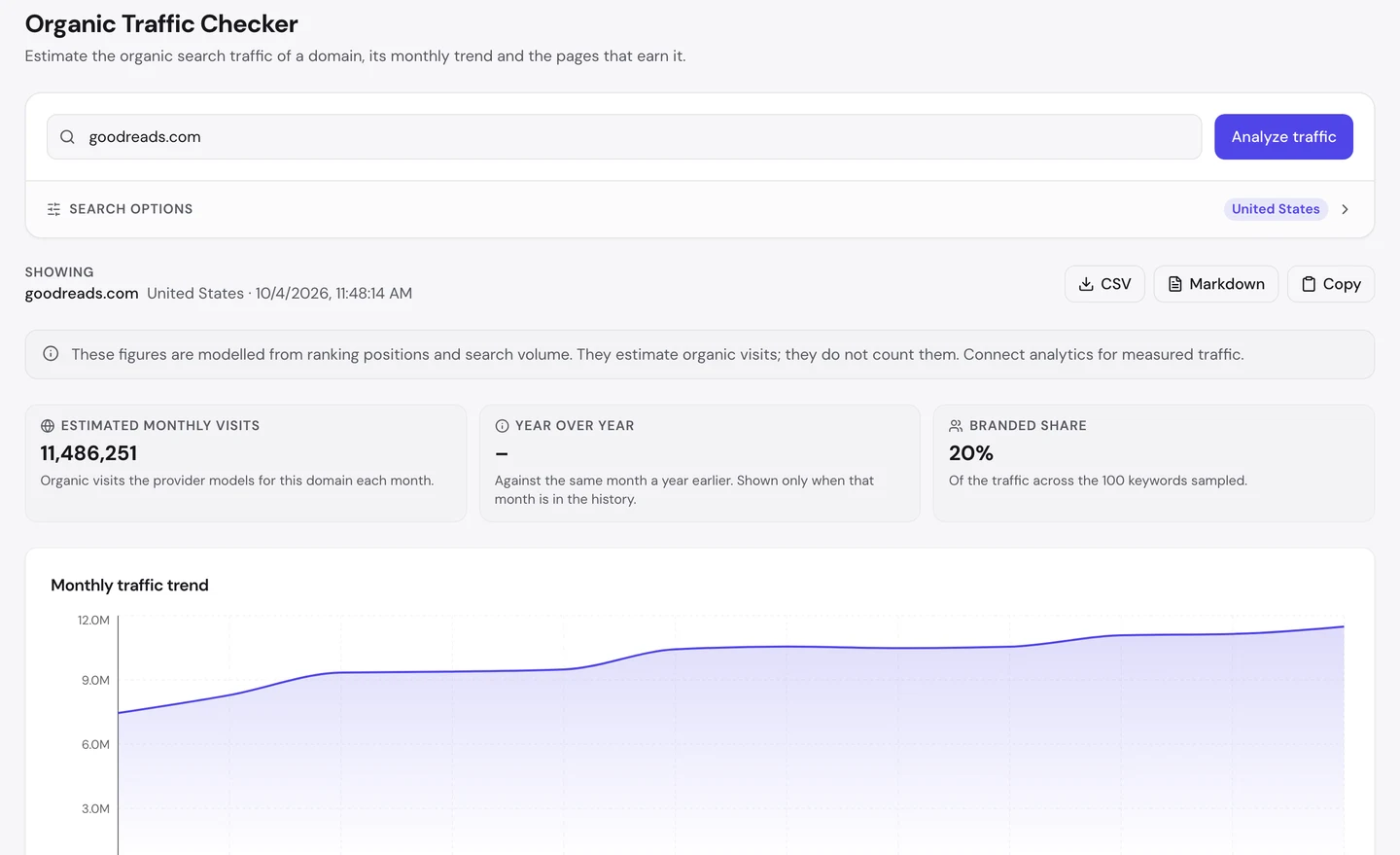
For goodreads.com, that's about 11.5M visits a month in the US. And the line has gone up across the whole year.
Look at the branded share box. Only about 1 in 5 visits come from people who type "Goodreads".
The other 4 in 5 search for something else. That's a book, a series, an author or a quote.
The Traffic tab of our Website Audit shows the whole world, not just the US.
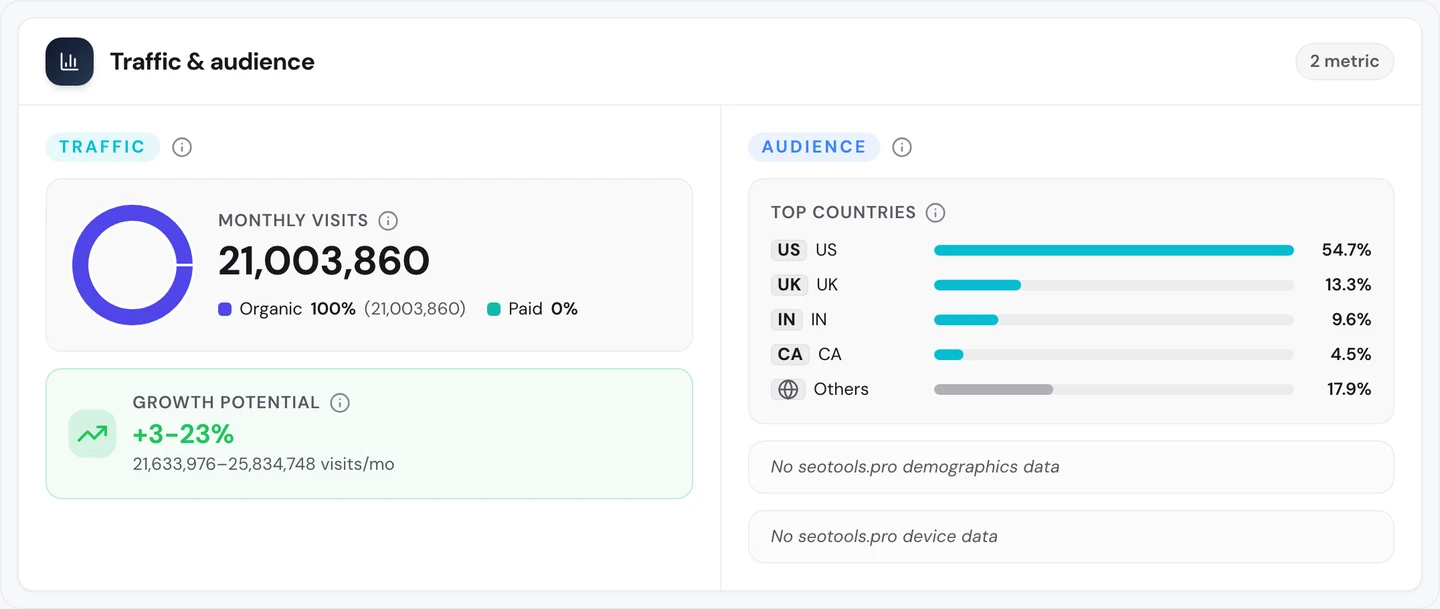
Worldwide, Goodreads gets about 21M search visits a month. It pays for none of them.
The US sends a bit more than half. The UK and India come next.
So don't stop at your own name. Our Keyword Research tool shows what else your buyers type, and our Organic Traffic Checker shows which of your pages win it.
Give every book its own page
So what do those people search for? The audit's Keywords tab lists the searches a site ranks for and the visits each one sends.
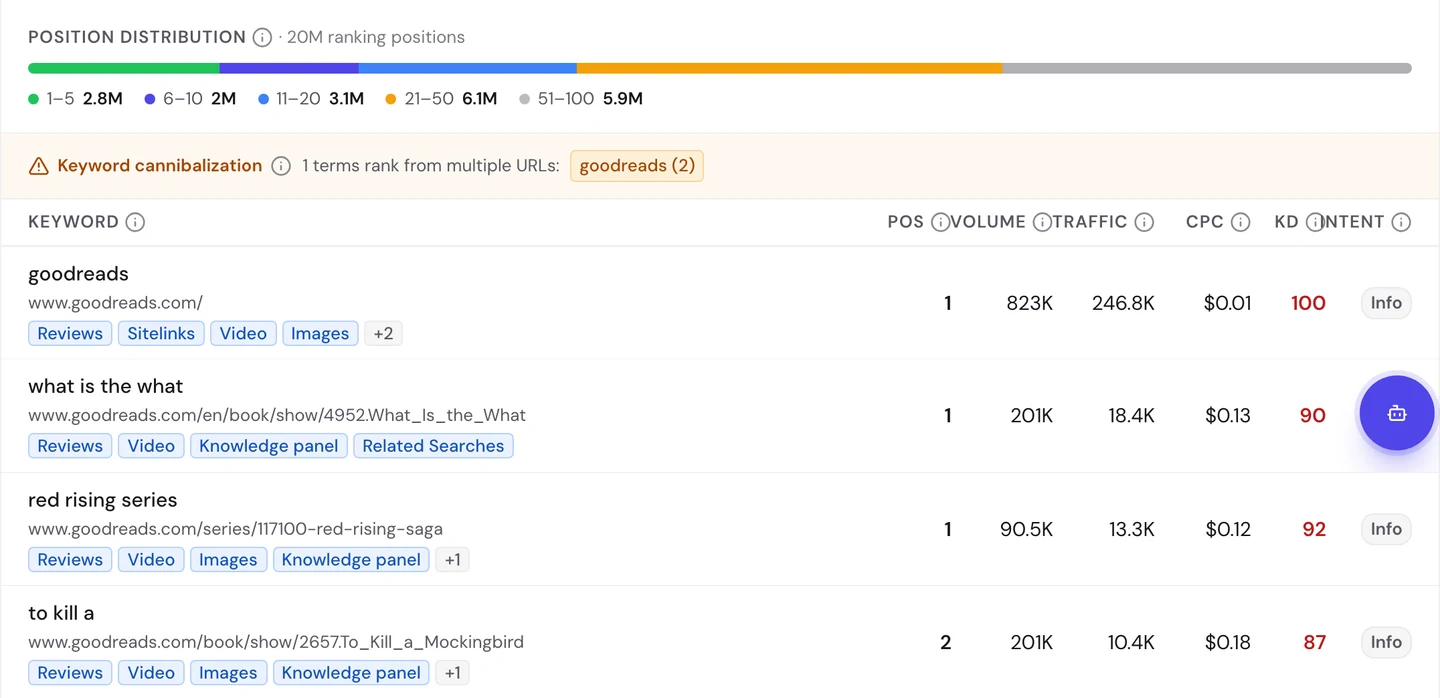
The homepage ranks first for "goodreads". That won't surprise you.
But look at the next rows. The page for the novel What Is the What ranks first for its name.
A page for the Red Rising books ranks first for "red rising series". And the To Kill a Mockingbird page ranks second for "to kill a".
The same goes further down the list. The Hunger Games series page ranks third for "the hunger games book".
And a list of Kristin Hannah's books ranks second for "kristin hannah books". So Goodreads has a page for each book, each series and each author.
Here's the Mockingbird page.
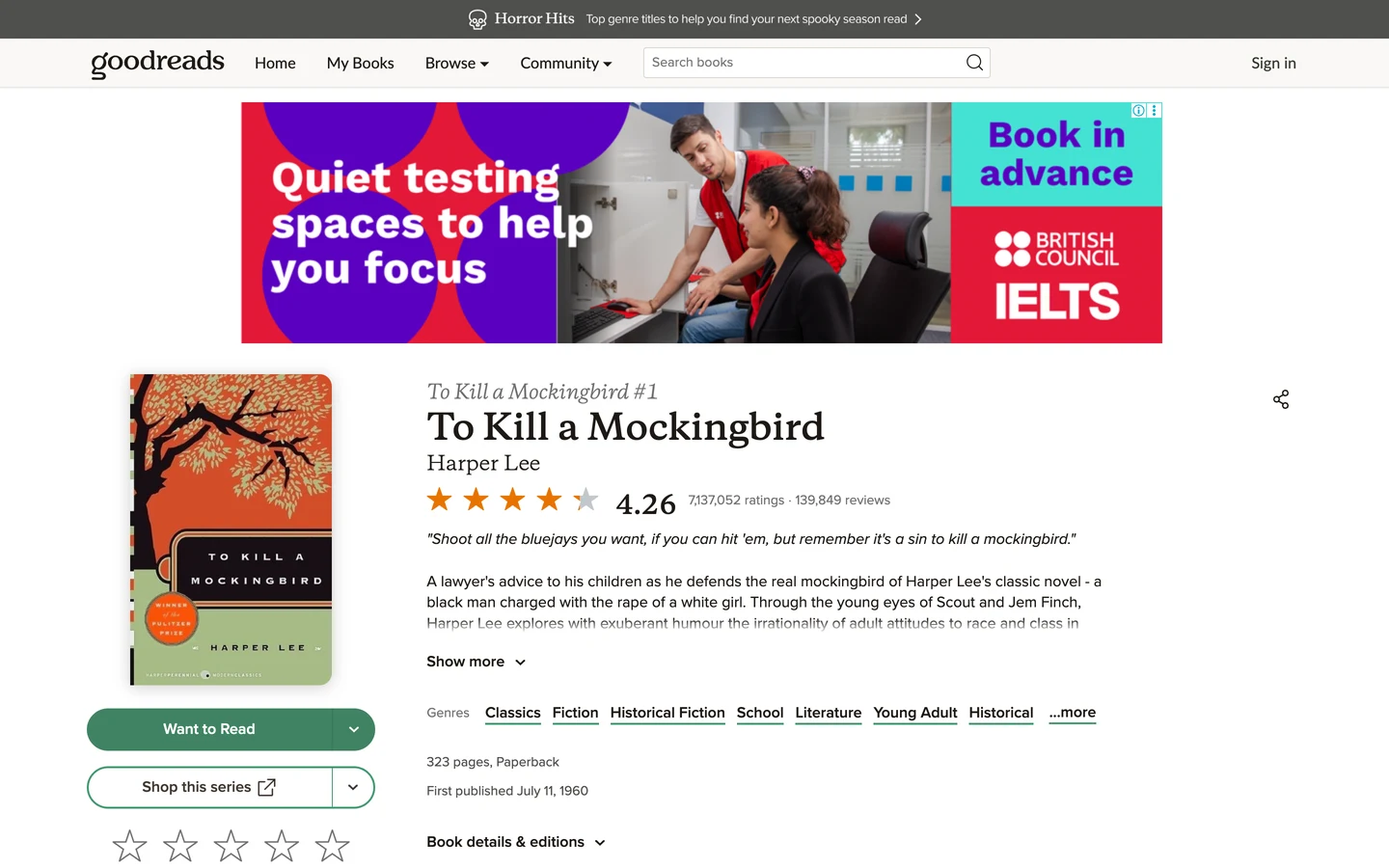
It shows the cover, the author, the genres and a short summary. Then it shows about 7.1M ratings and 140K reviews.
Goodreads didn't write those. Its readers did, and they keep adding more.
Our free browser extension shows how much of the page is real content. Open a page, click the seotools.pro icon, and a panel opens beside it with its SEO checks.
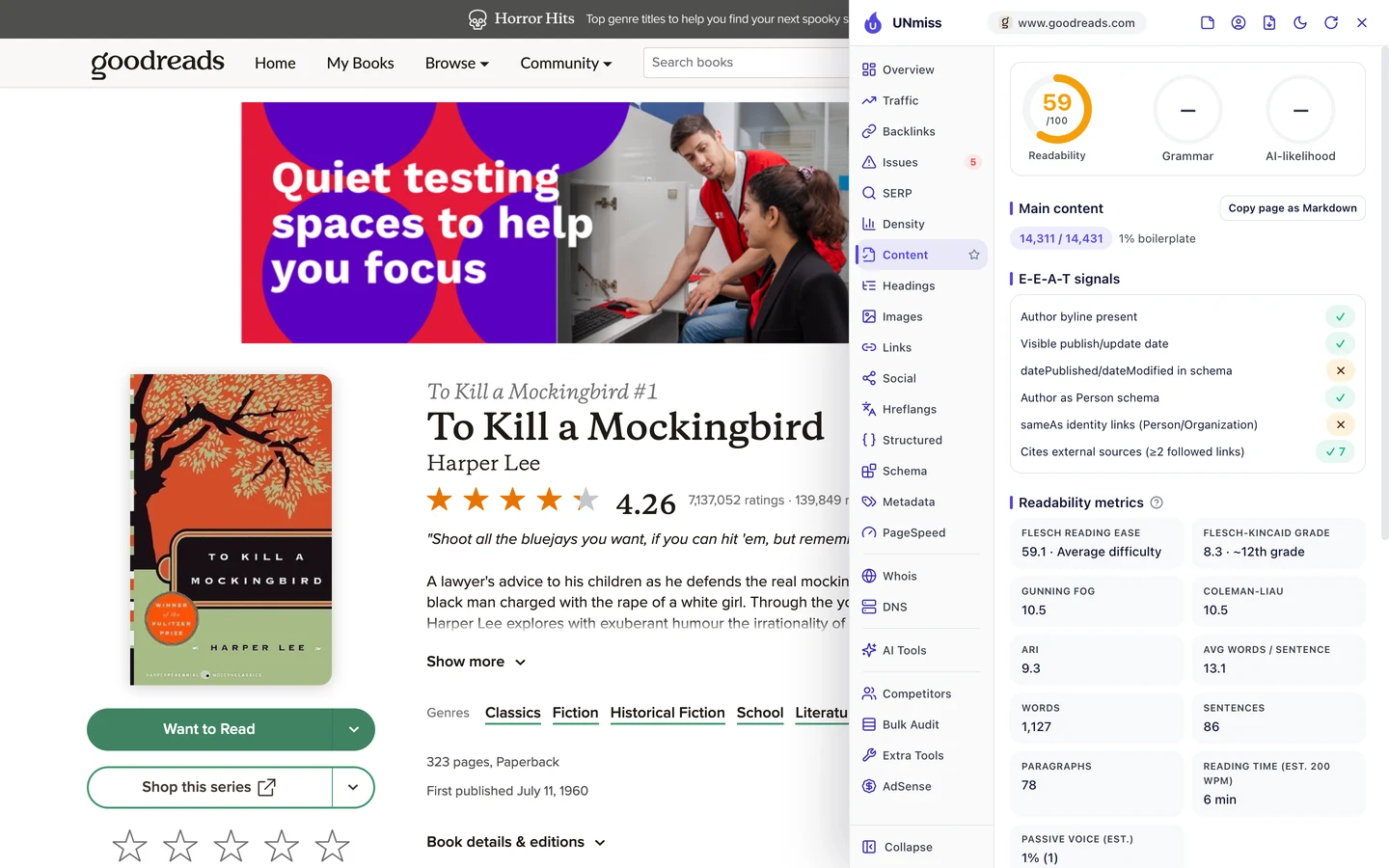
Only 1% of the page is menus and footer. The rest is the book and what readers wrote about it.
Open Library, a free book site we studied too, also aims for a page per book. Eventbrite, which we studied too, does it with events.
So list the things your buyers search for, and give each one its own page. Find those names with our Keyword Research tool.
Let your readers build pages
Now for the strangest page on the site. The page that gets the most search visits isn't a book at all.
It's a question a reader asked in the community area. The address has a typo in it: "is-this-book-wearth-getting".
Our tool estimates it gets about 363K visits a month, all from people who typed "wearth" by mistake. It ranks 13th for that word, so the estimate may be high.
But it shows how this works. When readers write pages, they use the words real people type, typos and all.
Goodreads does the same with quotes. Its quotes page ranks second for "quotes" and gets about 82K visits a month.
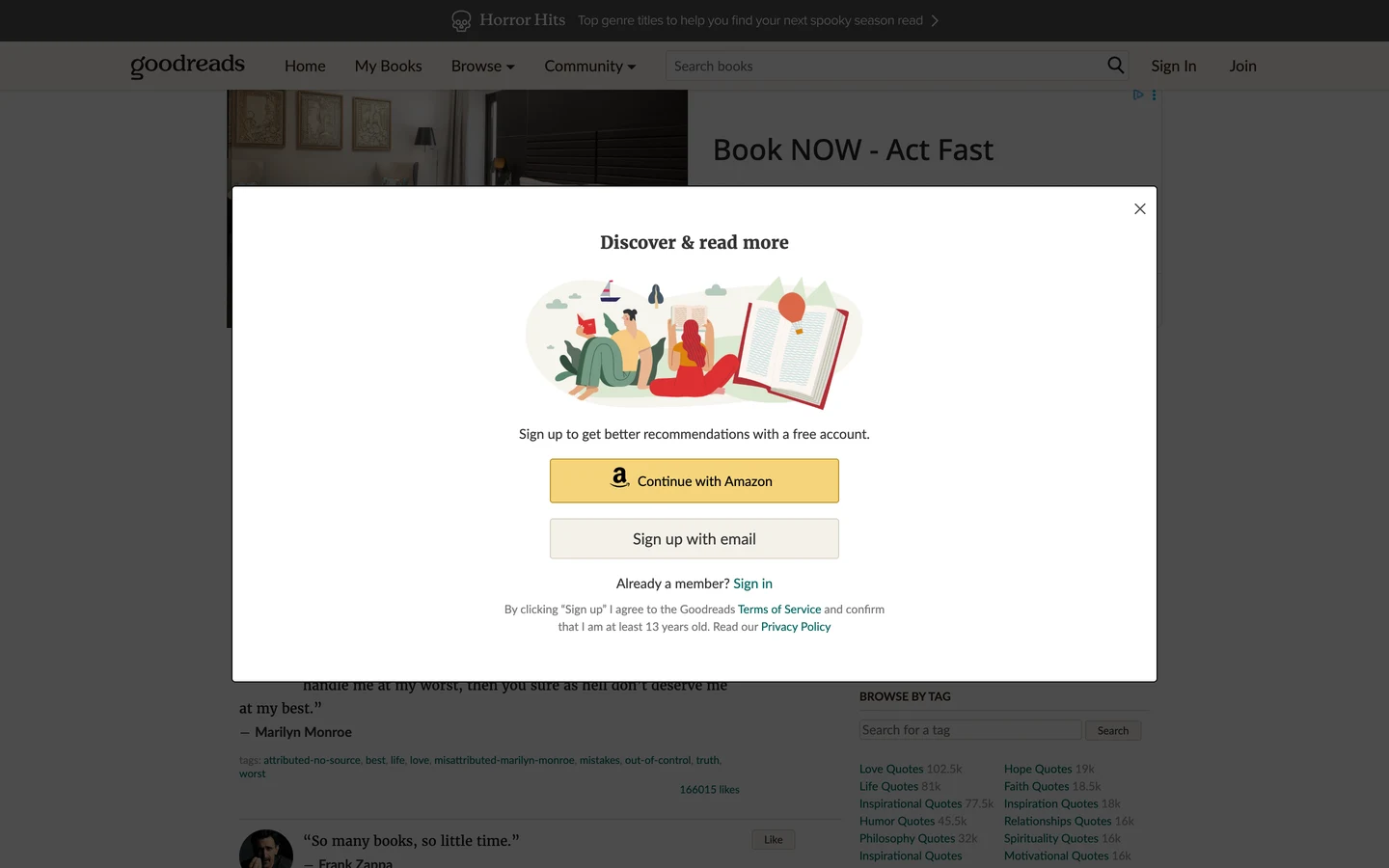
When we opened it, a sign-up box covered most of the quotes. Keep boxes like that small, so people can still read what they came for.
Behind it, you can see the quotes readers saved, each with likes and tags. The tags on the right turn into pages too, like Love Quotes and Life Quotes.
Our extension shows what Google reads on that page.
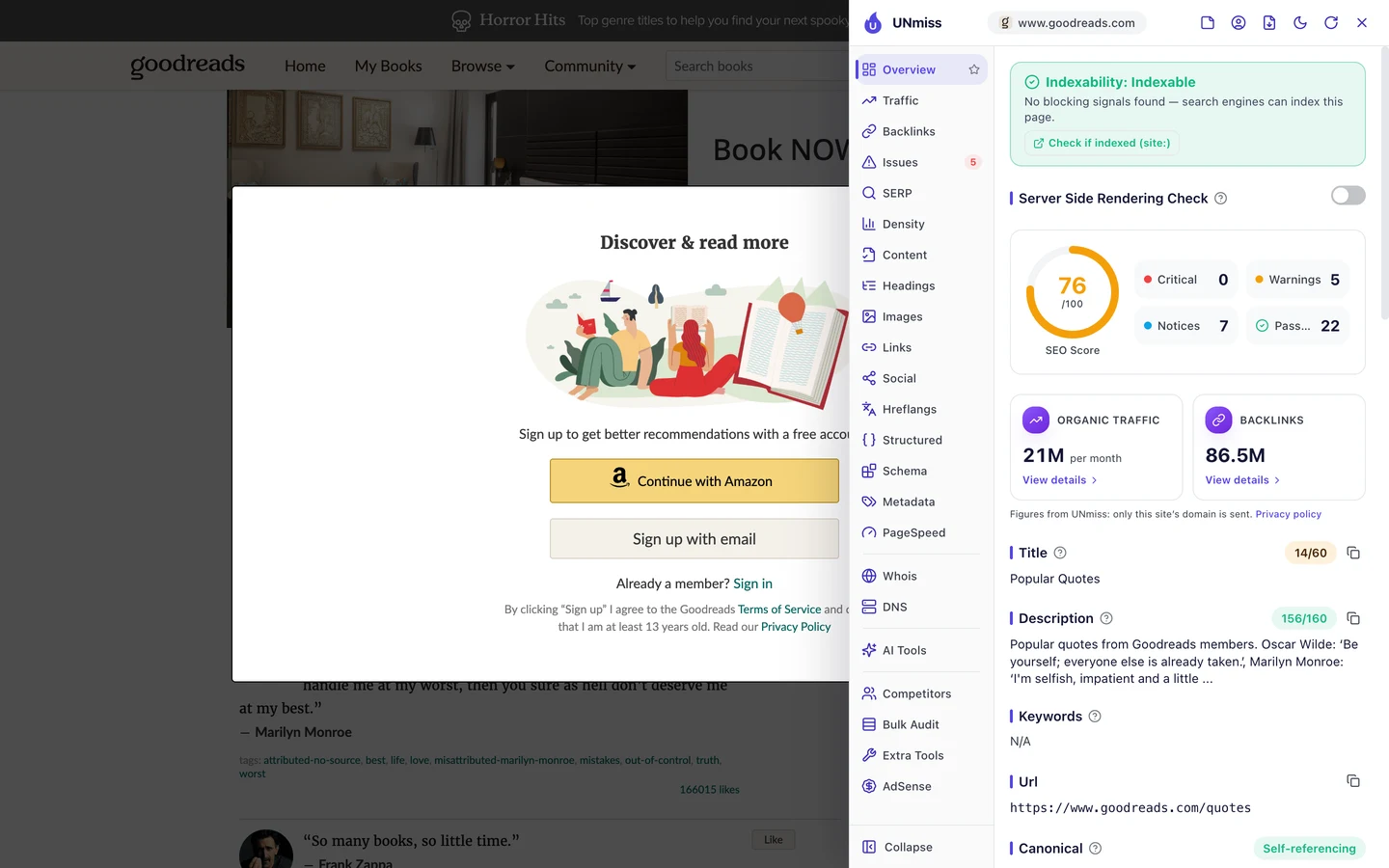
The description is the short summary Google may show under your title. This one starts "Popular quotes from Goodreads members", so it tells you who made the page.
The title, the blue link Google shows, is just "Popular Quotes". That's 14 characters, and it doesn't even say Goodreads.
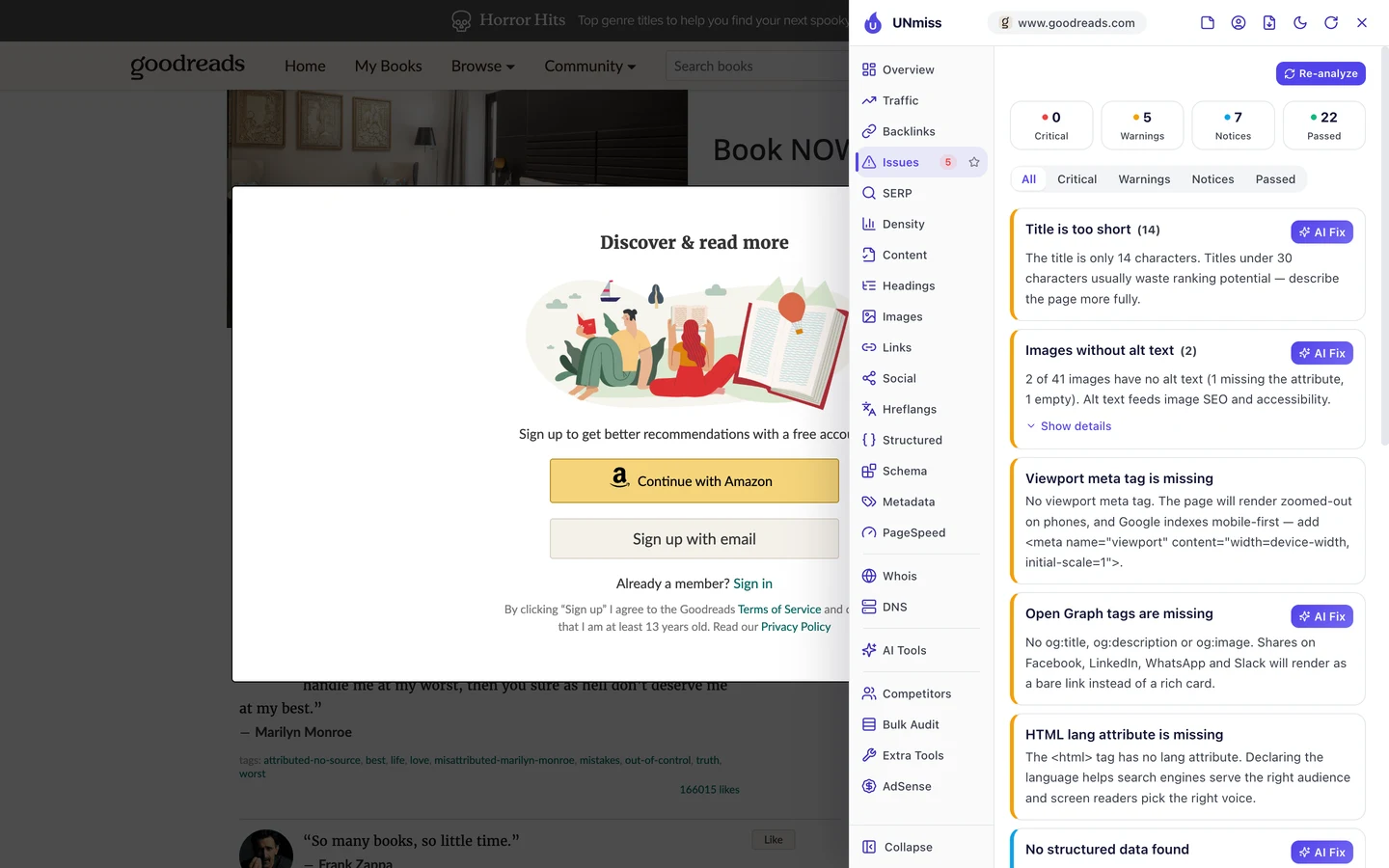
The Issues tab flags the short title first. It also finds no viewport tag, a line of code that tells phones to fit the page to the screen.
Yet, as you saw, the page ranks second anyway. Strong links and years of reader content cover a lot of gaps.
wikiHow and Meetup, which we studied too, also grow on pages their users make.
So give your users a way to add questions, lists and quotes, then give each page a clear title. Our Meta Tag Generator helps you write titles that say what the page is.
Point each book to one address
Back to the Mockingbird page you saw earlier. The extension's Overview tab found something odd.
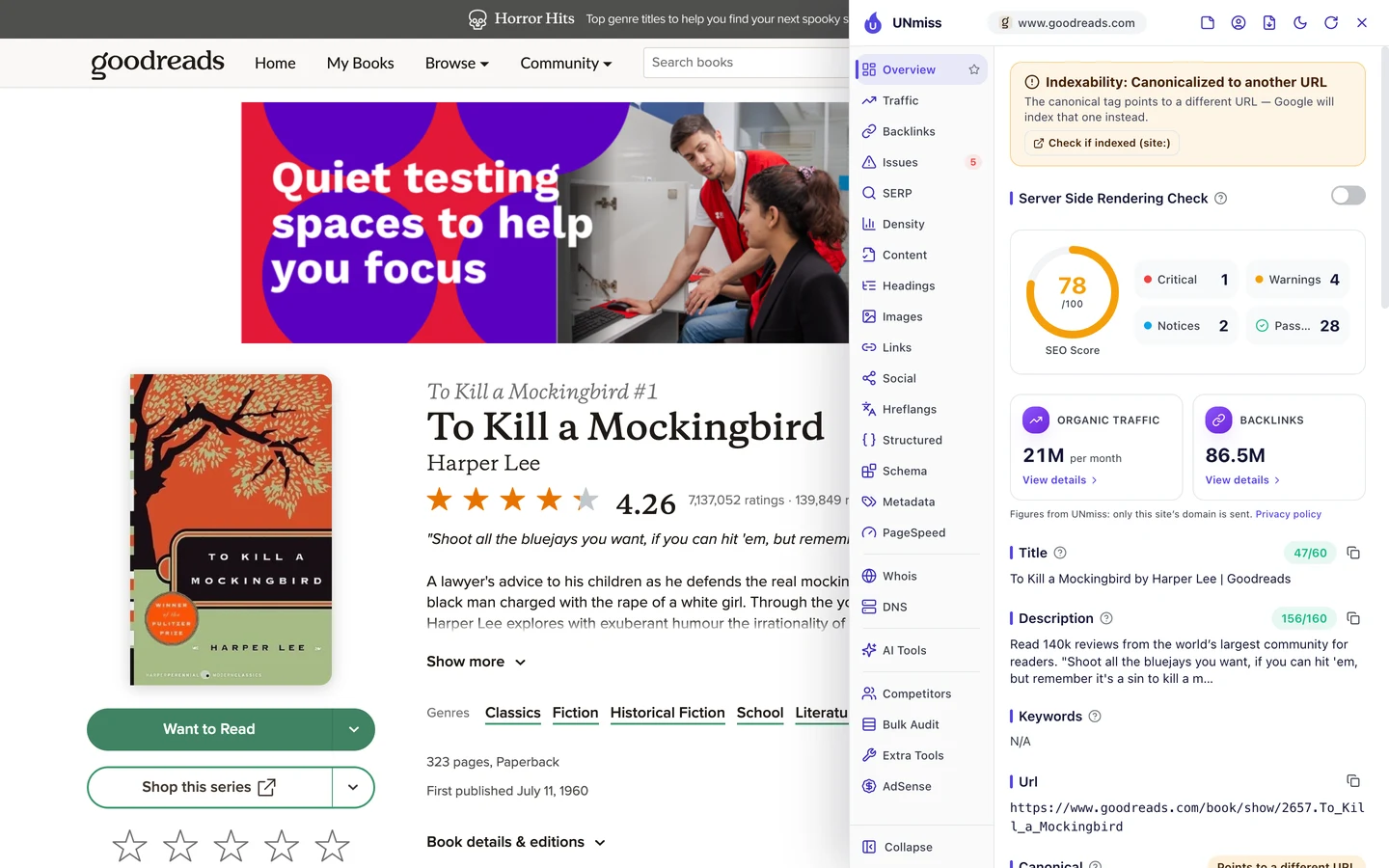
The page has a canonical, a tag that tells Google which address is the main copy. And it points somewhere else.
The page we opened lives at one address. Its canonical points to a newer address for the same book.
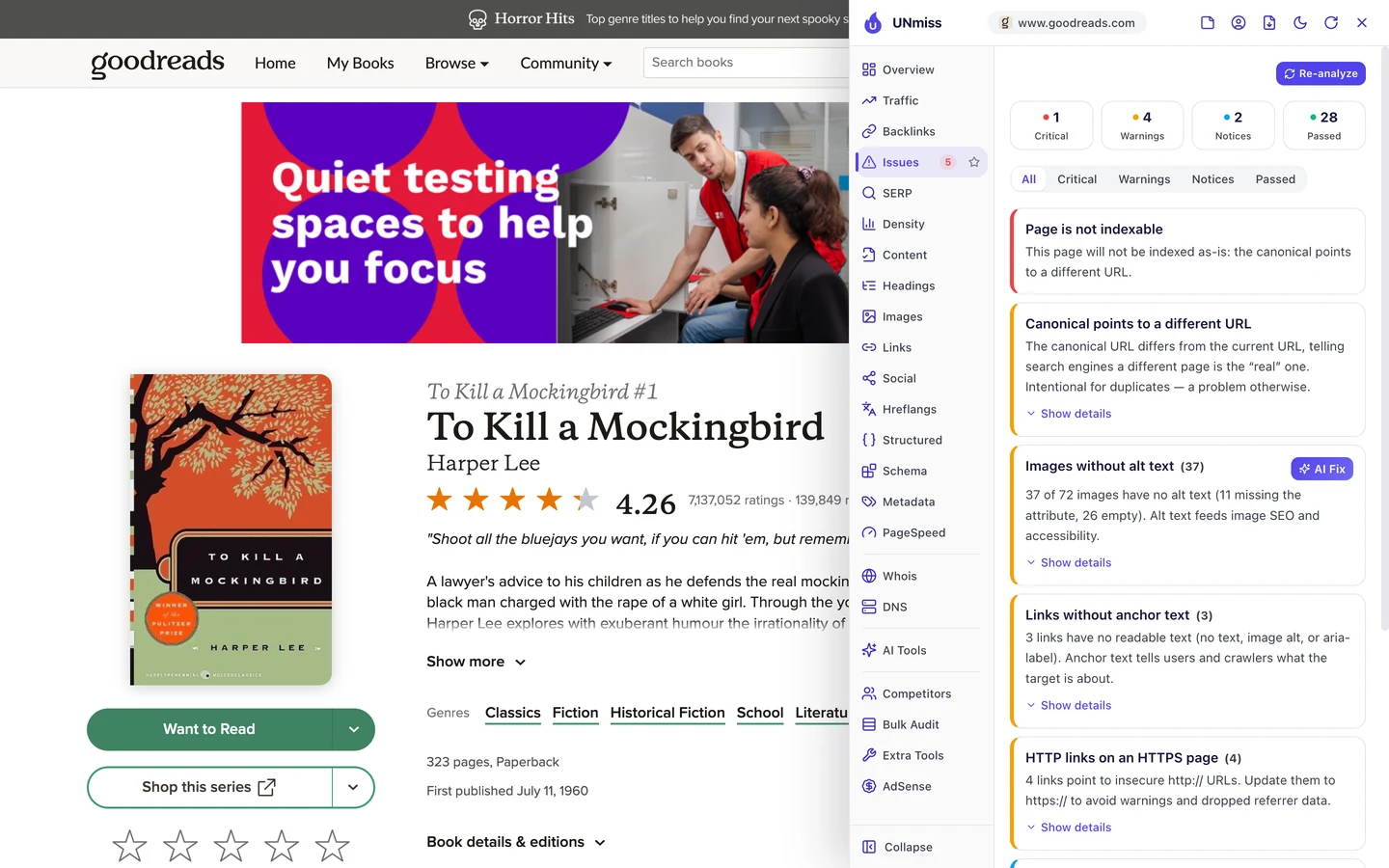
So the top issue says this address won't be listed by Google. Yet in our keyword data, this is the address that ranks for "to kill a".
That's a mixed message. The page says "list the other one", but Google still shows this one.
When you send mixed signals, Google picks for you. And it may not pick the page you want.
Language versions make it worse. The Technical SEO tab of our audit looks for pages that share a title.
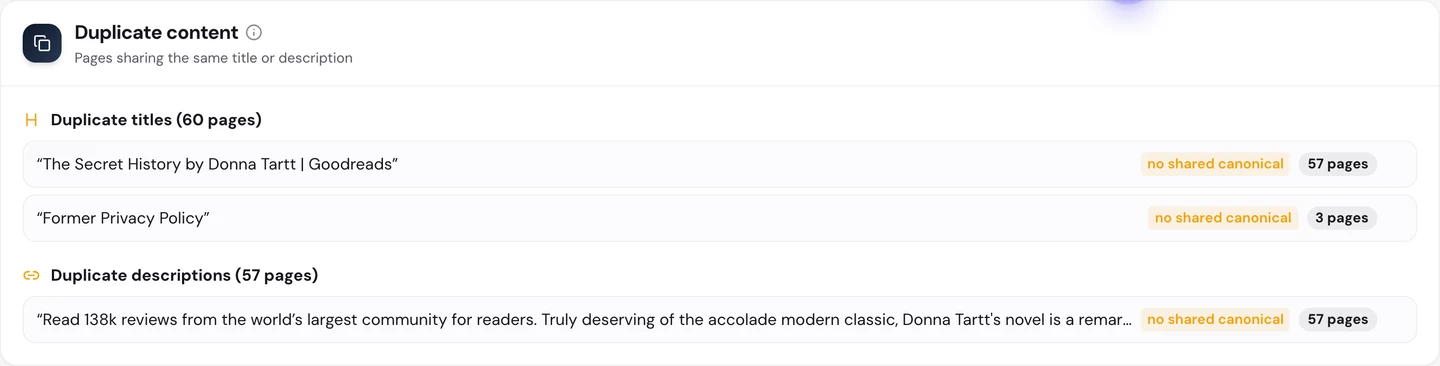
"The Secret History by Donna Tartt | Goodreads" shows up on 57 pages. The description is the same on all of them too.
They're the same book in different languages, at addresses like /pl/ and /it/. Yet every one has the same English title.
Those pages use hreflang, a tag that tells Google which language version of a page to show. The audit found 57 pages where it points to the wrong copy, and 56 with a language code that doesn't exist.
So pick one main address for each item, and make every link and tag agree with it. Then give each language version its own title and check the tags with our Website Audit.
Goodreads shows one book's title on 57 language pages, and its Mockingbird page points Google to a different address. We find the copies on your site and tell Google which one is the real page.
- We map every copy of your key pages, in every language
- We fix your canonical and hreflang tags so they agree
- We write a unique title for each language version
- SEO and GEO, so AI answers can quote the right page too
Mark up every book in code
Structured data is code that tells Google what a page is, like a book, a person or a place. The extension's Structured tab looks for it.
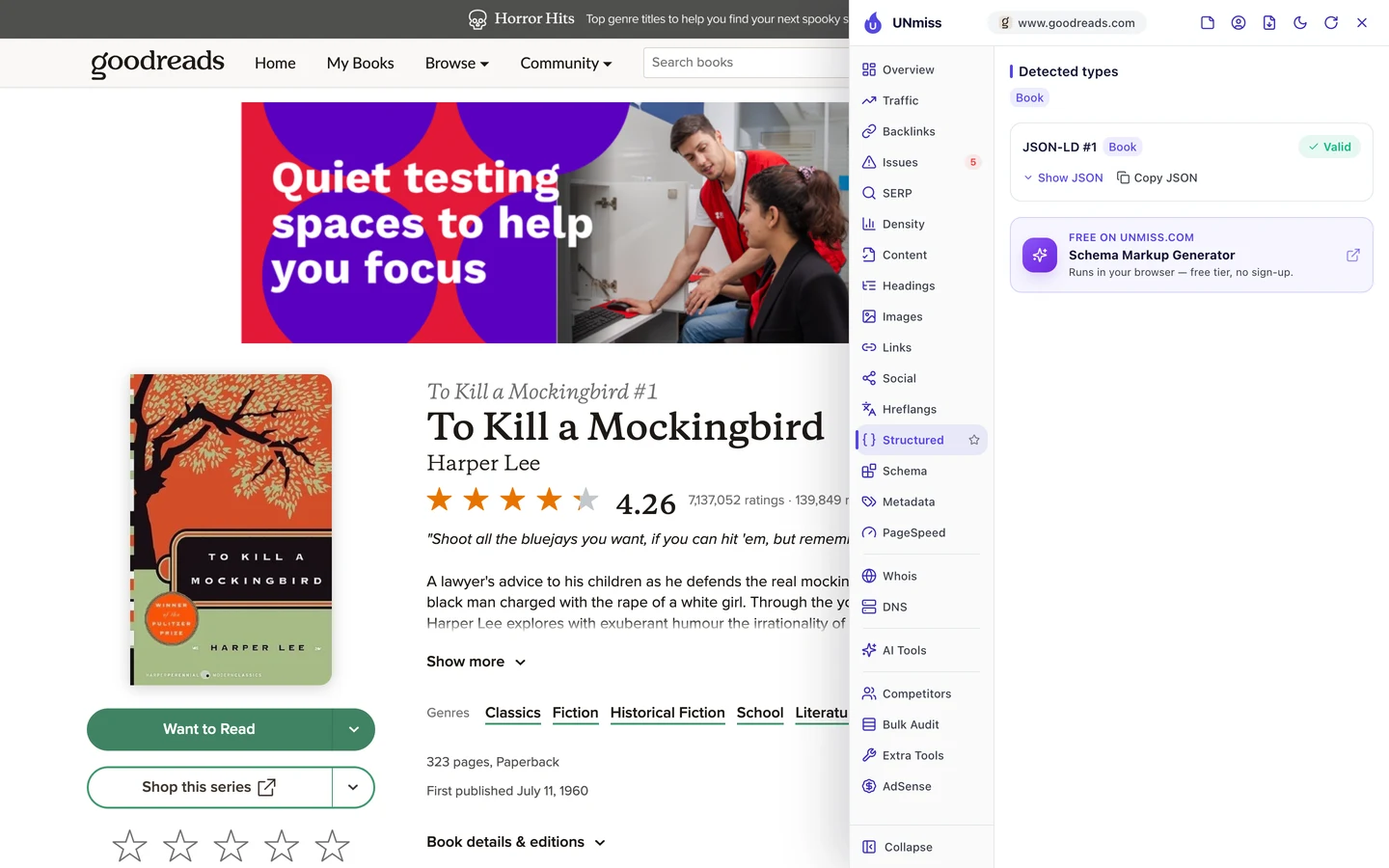
The Mockingbird page has it. The code says the page is a Book, and it's valid.
The quotes page is a different story.
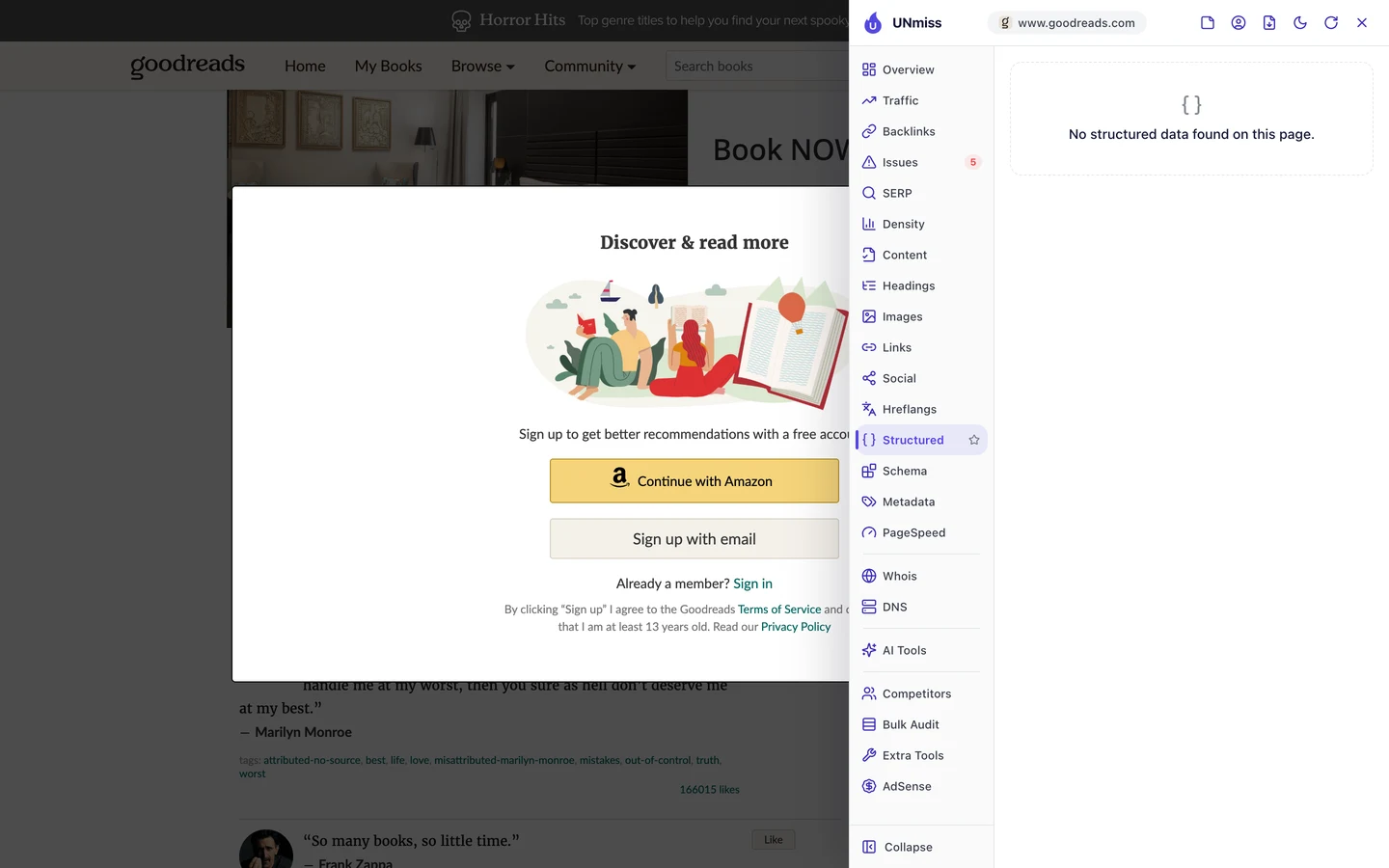
It has none at all. Google has to guess who said each quote and which book it came from.
Code like this helps AI tools too. So we checked which AI crawlers Goodreads lets in.
A crawler is a program that visits pages the way Google does. Robots.txt is a file that tells crawlers what they may read.
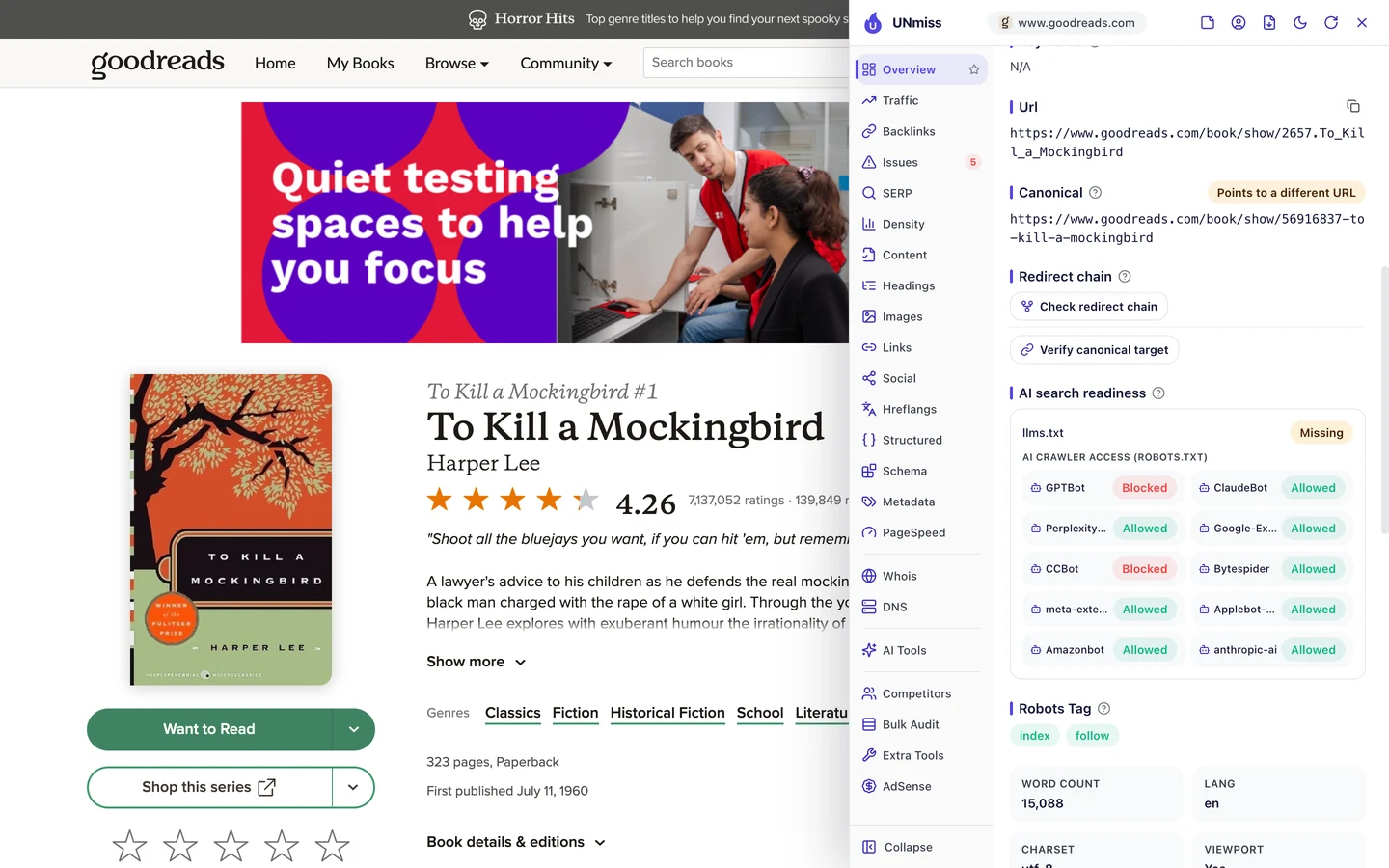
Goodreads blocks 2 of the 10 AI crawlers the extension checks. One of them is GPTBot, the crawler from the company behind ChatGPT.
It also has no llms.txt, a short file that explains a site to AI tools. That's a choice each site has to make for itself.
So add code that says what each page is, and decide which AI crawlers you let in. Our Schema Markup Generator writes the code, our robots.txt generator sets the rules, and our AI Visibility Checker shows if AI tools mention you.
Give people a reason to link
A backlink is a link from another website to yours. Google treats each one a bit like a vote of trust.
The Backlinks tab of our audit shows the same data as our Backlink Analyzer.
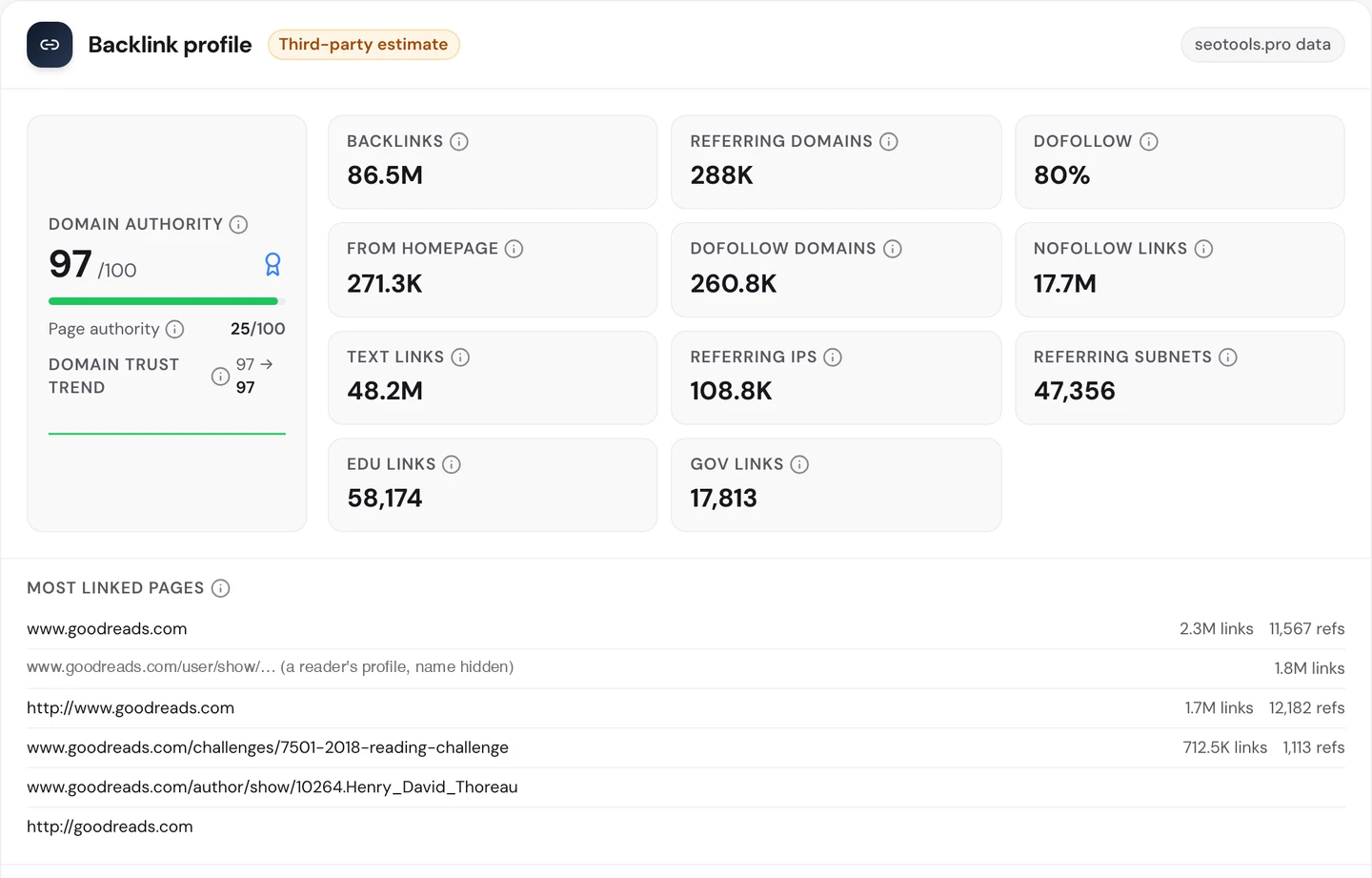
Goodreads has about 86.5M links from about 288K referring domains, meaning websites that link to it. Its Domain Authority, our 0 to 100 score for a site's link strength, is 97.
Now look at the most linked pages, and you'll spot a surprise. After the homepage comes a single reader's profile, with about 1.8M links.
We hid the name, since it's a private person. A link that big likely comes from a reading widget, a small box that shows what someone is reading, on that reader's own sites.
Then comes the 2018 Reading Challenge page, with about 713K links. People set a goal, share it, and link back.
That's the trick. Goodreads gives readers things they want to show off, and every share is a link.
So build something your users want to share, like a badge, a widget or a yearly goal. Then track the links it earns with our Backlink Analyzer.
Find the keywords near page 1
With all those links, you'd expect Goodreads near the top for everything. Our Domain Overview shows where it really stands.
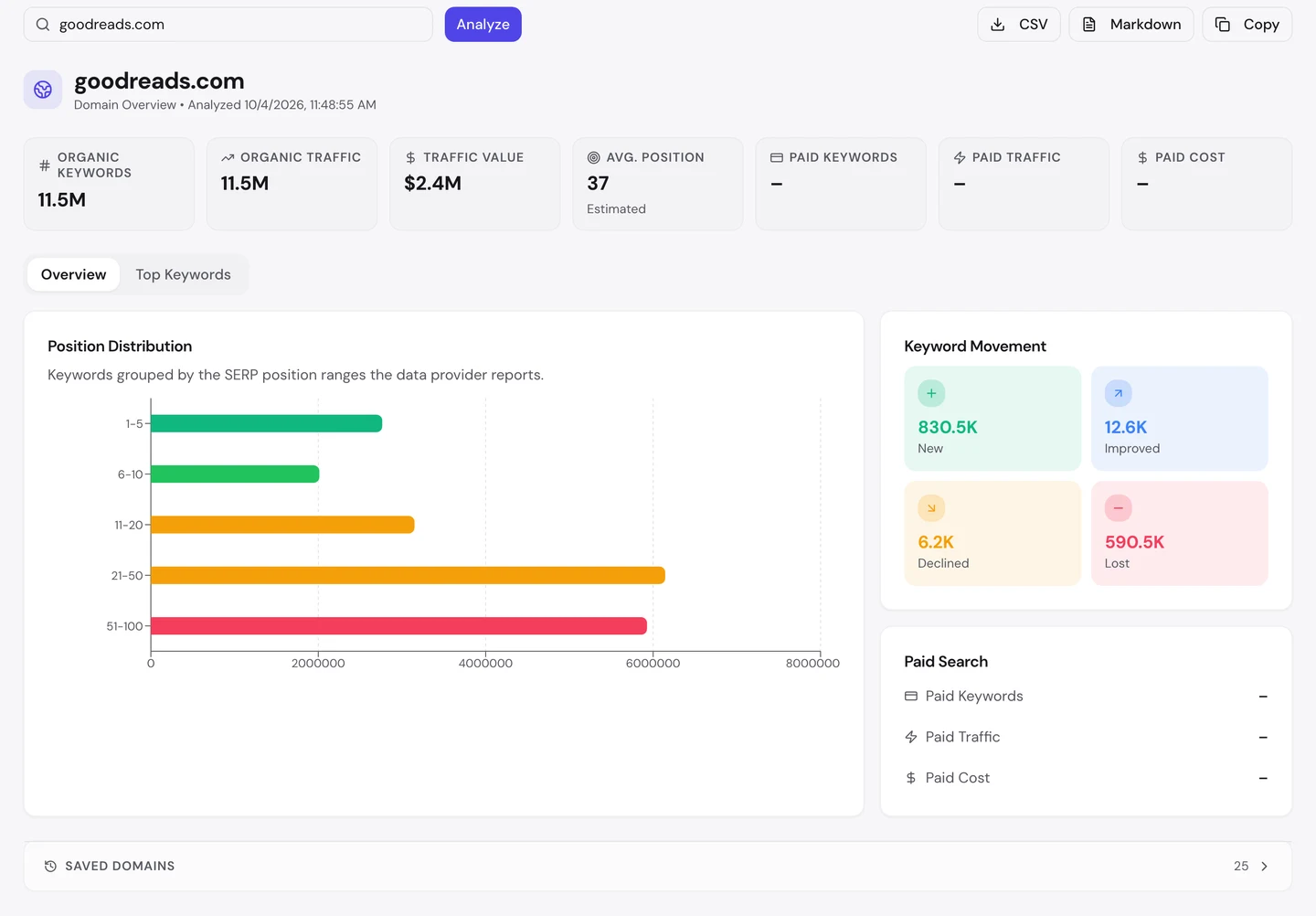
Goodreads ranks for about 11.5M searches. Its traffic value, what those visits would cost as Google ads, is about $2.4M a month.
But its average position is 37, on page 4 of Google. The longest bars in the chart are spots 21 to 100.
The movement box looks healthy to you and me. It picked up about 830K new keywords and lost about 590K.
If you want quick wins, look just short of page 1. The audit's Keywords tab counts about 3.1M rankings between 11th and 20th.
Some of those searches go to rivals. The audit's Competitors tab shows who they are.
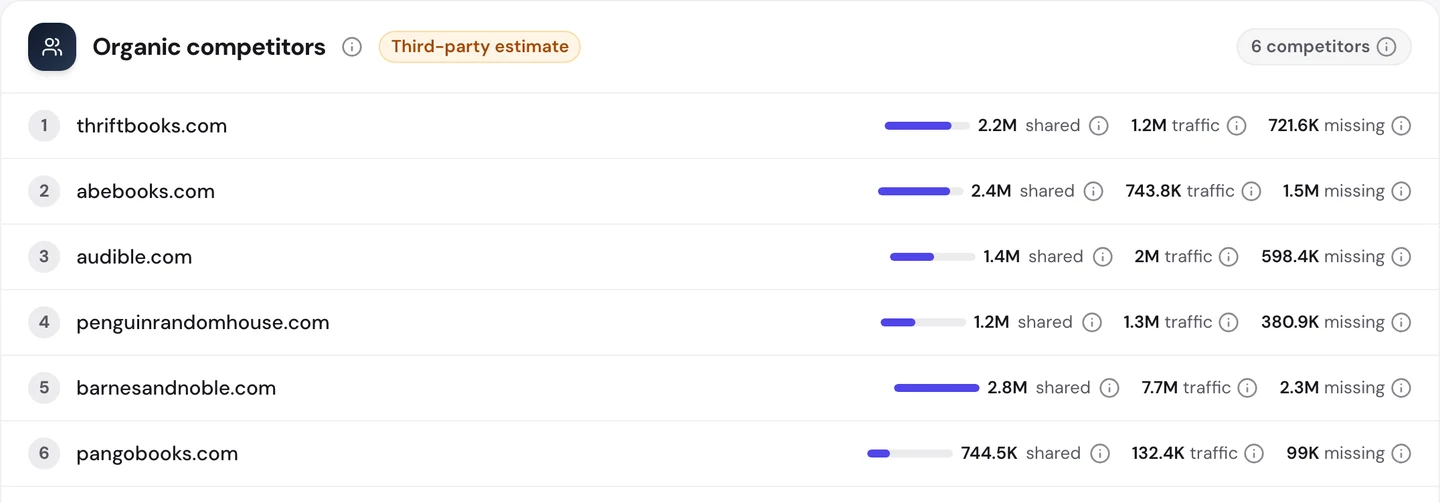
Most rivals are book shops. Barnes & Noble shares about 2.8M searches with Goodreads.
It also ranks for about 2.3M searches that Goodreads doesn't. That "missing" column is a ready-made to-do list for you.
So find your keywords between 11th and 20th and improve those pages first. Check your rivals with our Competitor Analysis, then watch your pages climb in our Rank Tracker.
Audit your book templates
The extension checks one page at a time. Our Website Audit checks thousands at once, so you can see which problems repeat.
It crawled 2,408 Goodreads pages, and the site scored 73 out of 100. The report rates that as fair.
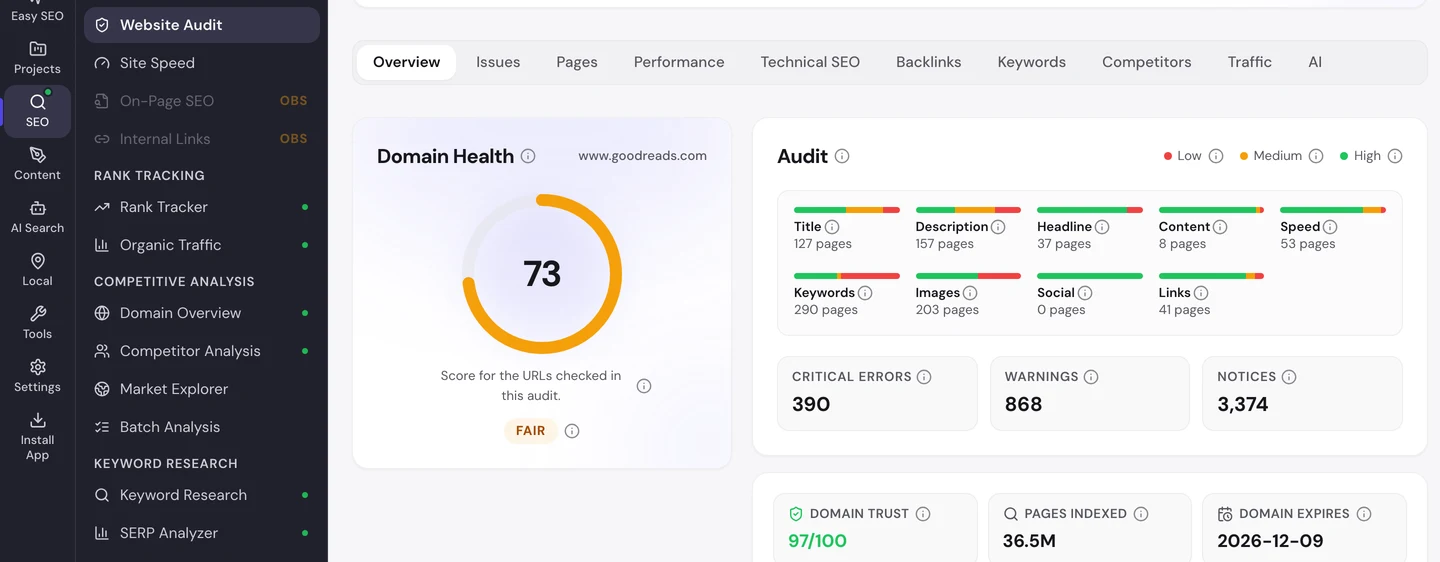
The Issues tab sorts the problems by how much they matter to you.
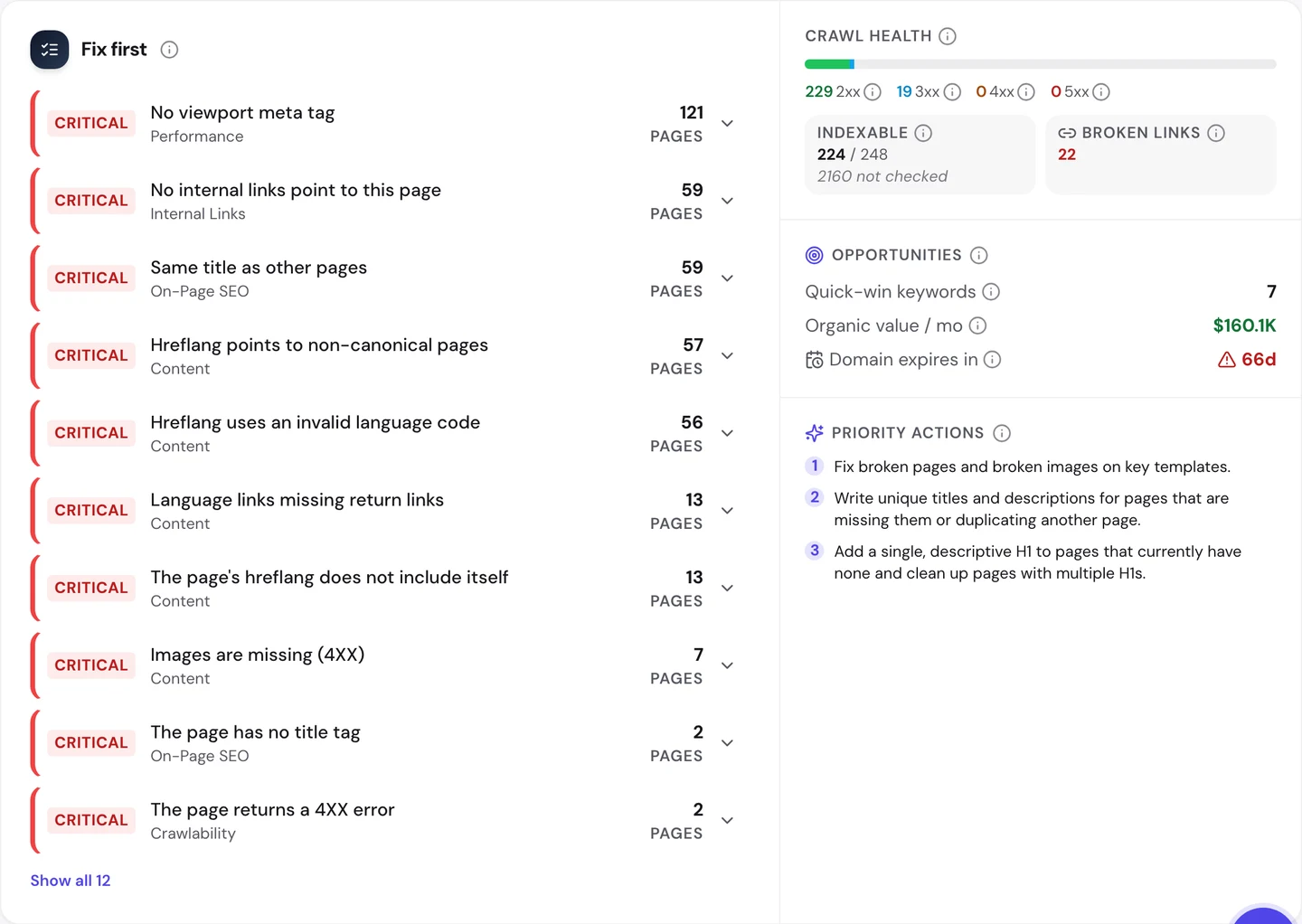
The top error is the missing viewport tag, on 121 pages. We saw it on the quotes page already.
Next come 59 pages with no links pointing to them. Then 59 that share a title, plus the language tag errors you saw before.
The Technical SEO tab shows which pages Google may list.
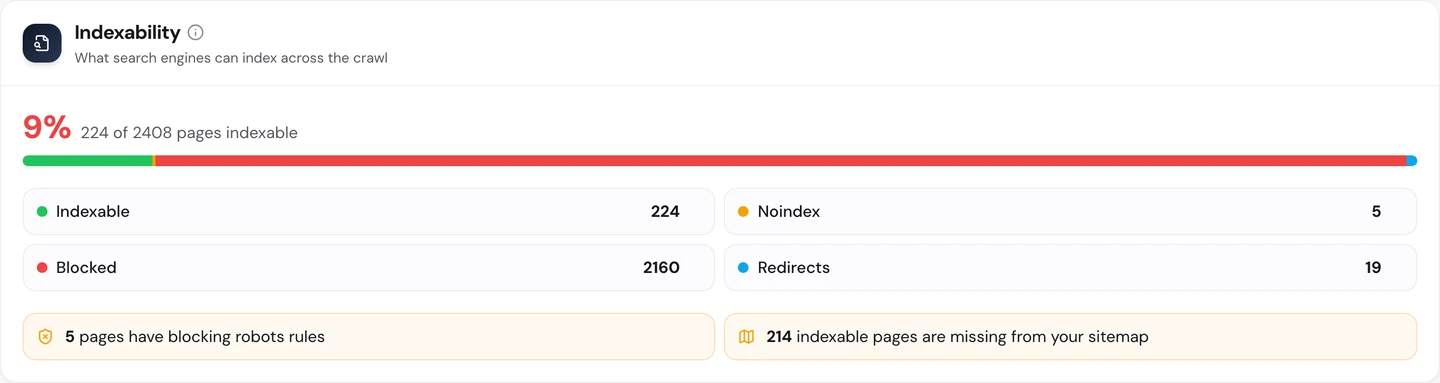
Only 9% of the addresses we crawled can be listed by Google. Robots.txt blocks about 2,160 of them.
That's likely on purpose. Big sites often block search and sign-in pages, so Google spends its time on the pages that matter.
Then there's the sitemap, the file that lists a site's pages for Google. 214 of the pages Google may list aren't in it.
You don't have to work out what to fix first. The audit's AI tab writes the plan: a short summary, each problem with how to fix it, and a 90-day to-do list.
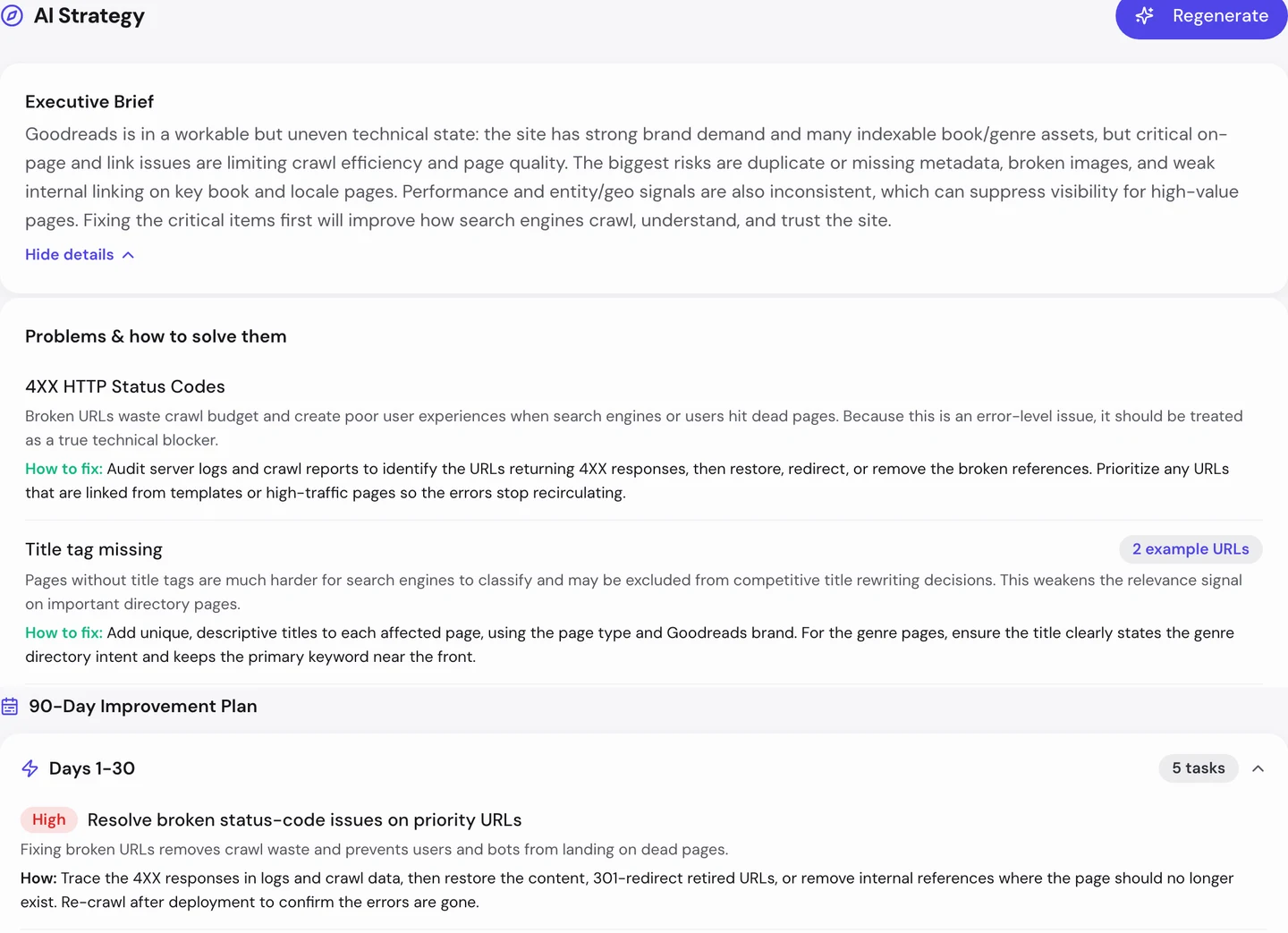
For Goodreads, the first month starts with broken pages and broken images. Then it fixes the duplicate titles on The Secret History's language pages.
So crawl your site the way Google would, and fix the problems that repeat across a template. Run our Website Audit, and you'll see which fixes help thousands of pages at once.
Keep pages still while they load
Last, speed. You can see it in the Performance tab of the audit, under Core Web Vitals.
These are Google's 3 checks of how fast a page loads, how fast it reacts and whether it stays still. They're measured on real visitors' devices.
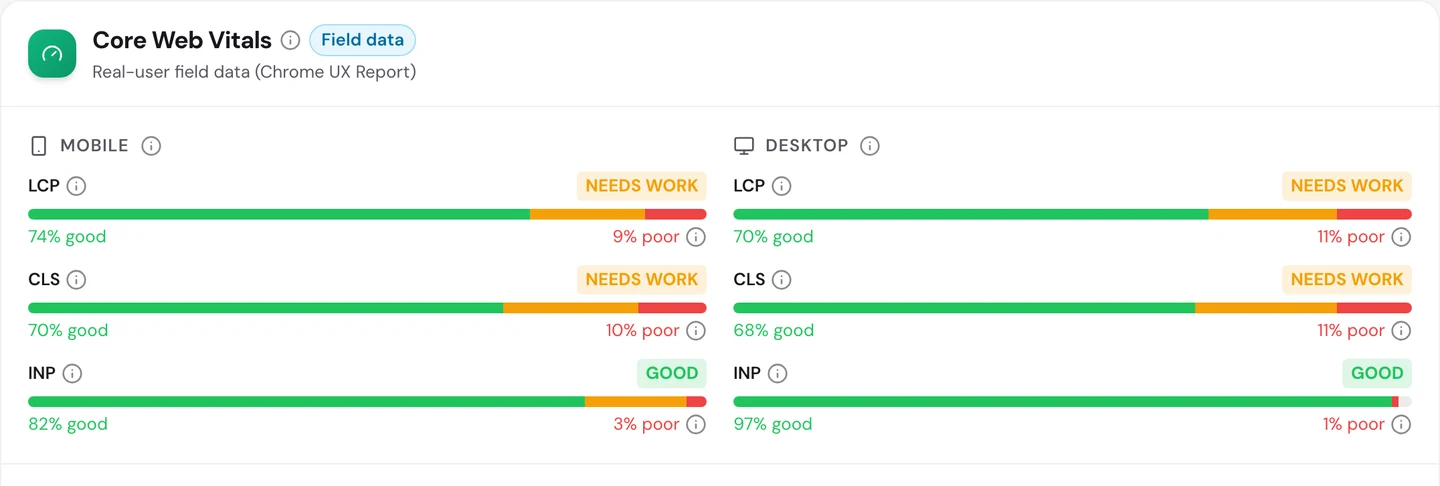
Goodreads passes 2 of the 6 checks. Its pages react fast, on phones and on computers.
But loading and staying still both need work. On phones, the page stays still for only about 7 in 10 visits.
The extension hints at why. On the Mockingbird page, 62 images have no set width or height.
So the browser doesn't know how much room to save. When each image arrives, the text below it jumps down.
So give every image a width and height, and test your busiest pages on a phone. Our Site Speed tool shows what slows each page down.
One Goodreads book shows the same title on 57 addresses. Our Website Audit finds the pages on your site that share a title, a description or a main copy, and tells you what to fix first.
- The same audit we ran on Goodreads
- Duplicate titles, canonical and hreflang errors in one place
- An AI plan that puts your fixes in order
What you cannot copy
First, the part you can't copy: millions of readers. They've rated, reviewed and quoted books on Goodreads for years, and its domain dates back to 2002.
Amazon owns it, along with Audible and AbeBooks. You can't buy that many readers or that much trust.
Now a few honest notes on the numbers.
We took our figures on 4 October 2026. The 11.5M figure counts US searches for goodreads.com only.
The 21M worldwide figure comes from the audit's Traffic tab. All of these are estimates, since nobody outside Goodreads can count its real visits.
Tools work them out from rankings and search volume. That's why a typo ranked 13th can show such a big number.
Our crawl checked 2,408 addresses, a small sample of a huge site. Most were blocked by robots.txt, likely on purpose, so we used the crawl to find problems that repeat.
The one number to take away
20%.
That's the share of Goodreads' search visits that come from people typing its name. The rest come from searches for books, series, authors and quotes.
Goodreads wins those because it has a page for each one. Its readers fill those pages with ratings, reviews, questions and quotes.
That's the lesson for any site. Make a page for every thing your buyers search for, and let your users help you fill it.
What would your users write if you gave them a page? Start with the searches you already almost win.
You can run every one of these checks on your own site, and on your rivals', and see the same numbers for yourself.
Frequently asked questions
Can a small site use the page-per-item idea?
Yes. Start with the things your buyers search for most, and give each one a full page. Add more as you learn what works.
How do I stop user pages from filling up with spam?
Ask users to sign in before they post, and check new pages before Google can list them. Keep thin or spammy pages out of your sitemap.
Should every language version have its own title?
Yes. Write the title in that page's language, and use hreflang tags that point to each version and back again.
What if Google ranks a page my canonical says to skip?
Check your own links first. If your menus and sitemap still use the old address, change them all to the main one.
Is it OK to block some crawlers in robots.txt?
Yes, if you mean to. Many sites block search results and sign-in pages, but check that the rules never block a page you want found.
Do sign-up pop-ups hurt my rankings?
A big box that hides the page on phones can annoy people. Keep it small, or show it after the visitor has read a bit.
How do I get people to link to my site without asking?
Make something they want to show off, like a badge, a progress goal or a widget for their own site. Each one they share links back to you.
Which fix should a big catalog site make first?
Fix the problems that sit in a template, since one change fixes every page built from it. Run an audit after each big template change too.