IKEA gets more than 10M visits a month from Google in the US, and the trick that keeps its 91 local sites apart isn't on its pages at all.
IKEA sells the same beds and sofas in lots of countries. So it needs hreflang, a tag that tells Google which language or country version of a page to show.
We ran the site through our SEO tools and found those tags where few people look. They sit in the sitemap, the file that lists a site's pages for Google.
Here are 9 lessons you can copy, plus the part you can't.
Build a category for every need
We started with our Organic Traffic Checker. It estimates a site's organic traffic, meaning the people who find it on Google without ads.
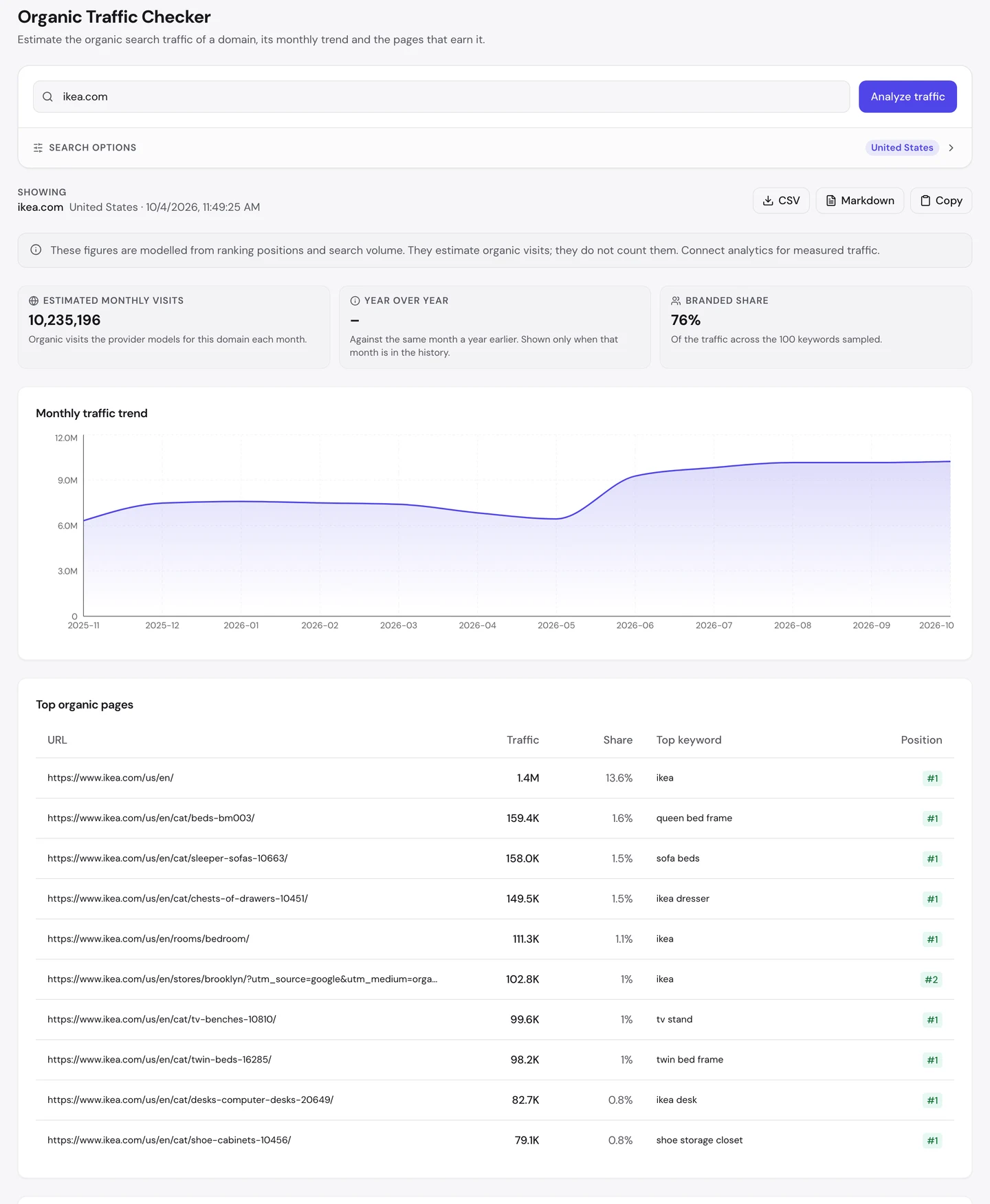
That's about 10.2M visits a month in the US. About 3 in 4 of the sampled visits come from people searching for the brand.
The homepage brings in about 1.4M of them. Now look at what fills the rest of the top 10.
7 of them are category pages, like beds, sofa beds and TV stands. Each one ranks 1st for its top search.
And most of those searches don't name IKEA. Think "queen bed frame", "tv stand" and "shoe storage closet".
The beds page alone pulls in about 159K visits a month. Someone typing that likely hasn't picked a store yet, and IKEA reaches them first.
These pages aren't just grids of products. Open the beds page, click the seotools.pro icon in our free browser extension, and a panel opens beside it.
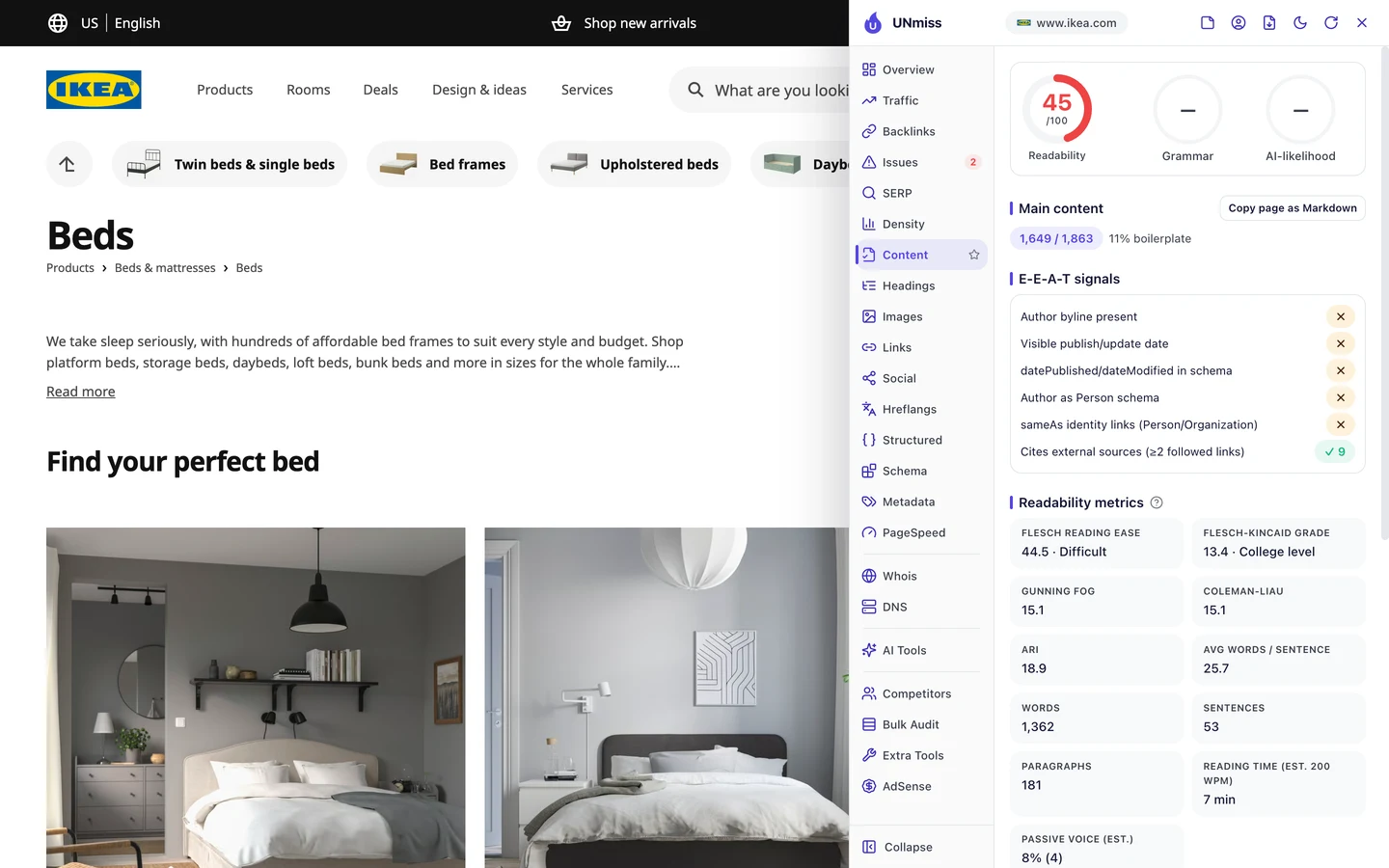
The Content tab finds about 1,650 words of main text. The page explains its beds in words, from platform beds to bunk beds.
It has no author or date, but that's normal for a shop. You don't need a byline to sell a bed frame.
So give each thing people shop for its own category page, with real words on it. Then see which of your pages earn the visits with our Organic Traffic Checker.
Use both names shoppers type
Now look at the sofa beds page. Its top search is "sofa beds", and it ranks 1st for it.
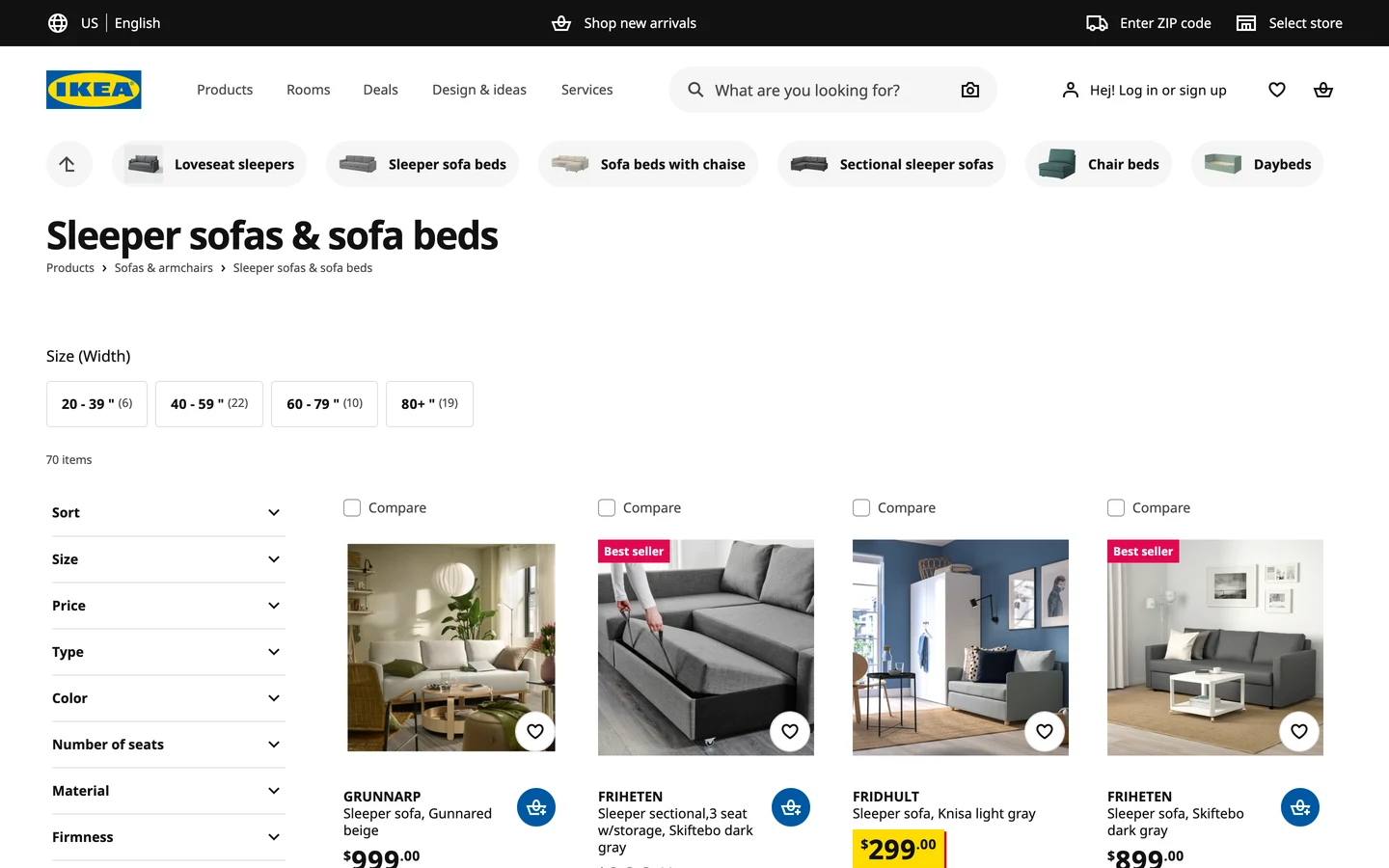
But the heading says "Sleeper sofas & sofa beds". You might say sleeper sofa, or you might say sofa bed, so IKEA uses both.
The title does the same. The title is the blue link you see in Google, and the extension's Overview tab shows it.
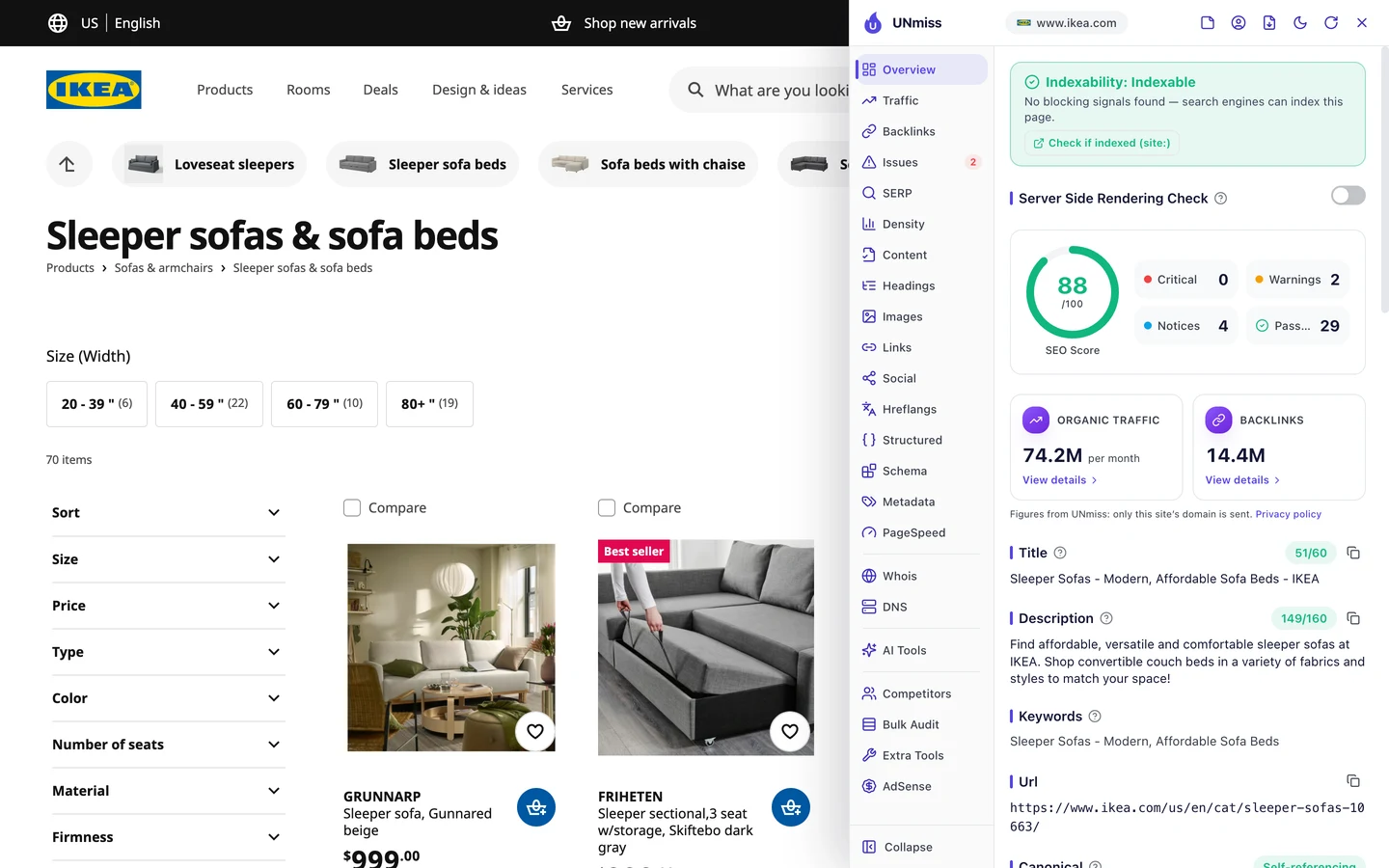
It reads "Sleeper Sofas - Modern, Affordable Sofa Beds - IKEA". That's 51 characters, so it fits before Google cuts titles off at about 60.
The beds page works the same way. Its title names both beds and bed frames, and it wins "queen bed frame".
So find every name people use for what you sell, and put the top 2 in your title. Look them up with our Keyword Research tool, then preview the title with our SERP Simulator.
Keep one address for each page
Here's a quiet problem in that same top 10. IKEA's Brooklyn store page ranks with tracking tags stuck to its address.
The address ends in "?utm_source=google" and a few more tags. They come from a Google Maps link, and they help IKEA count those visits.
But to Google, that's a second address for the same page. The clean one and the tagged one can end up splitting the credit.
The fix is a canonical, a tag that names a page's one real address. You can see it on the beds page in the extension's Overview tab.
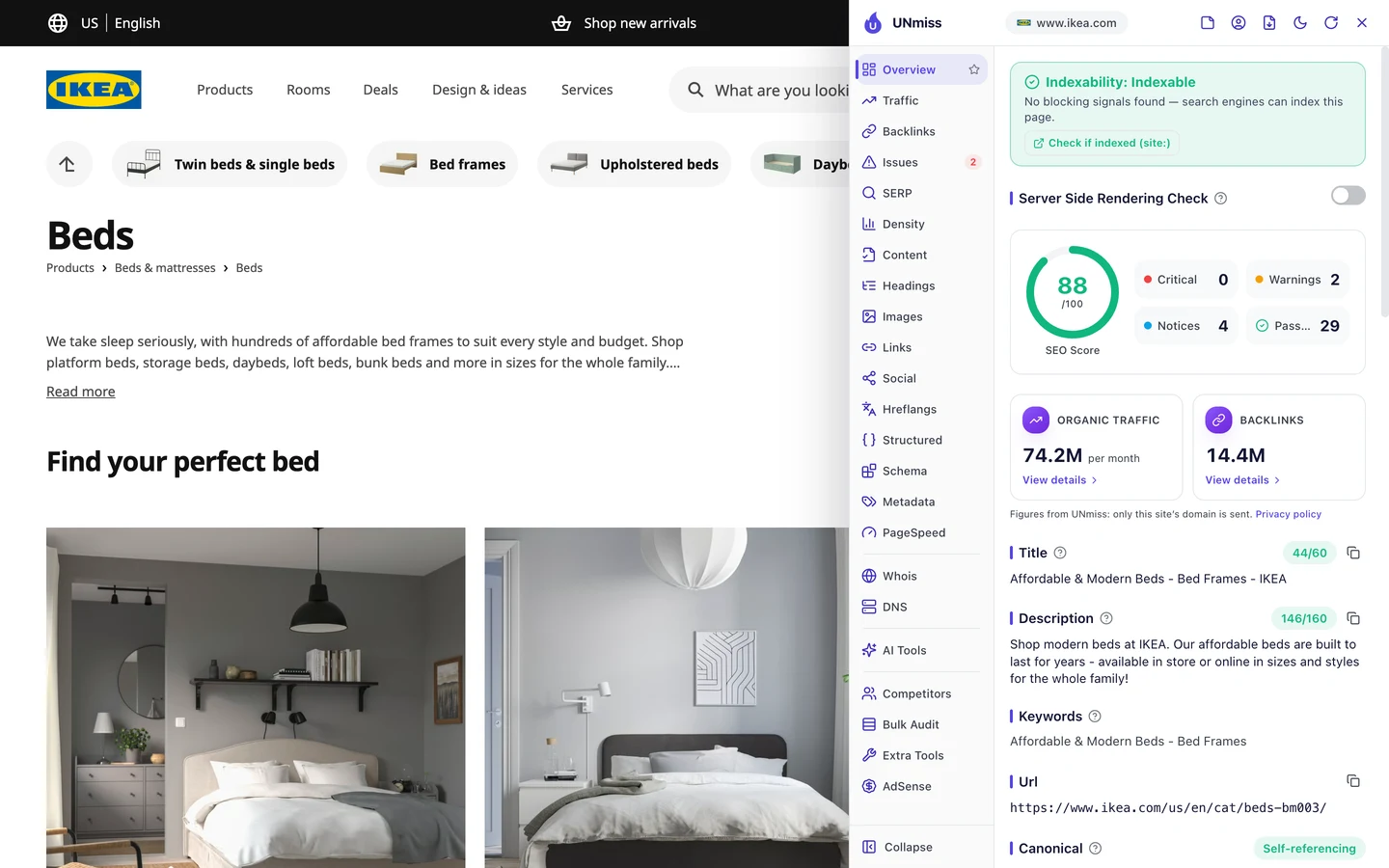
The beds page names itself as its own canonical. That's called self-referencing, and it's what you want on a clean page.
We didn't check the Brooklyn page's canonical, so we can't say it's broken. We only know the tagged address is the one that ranks.
So give every page a canonical that points to its clean address. You can check yours in seconds with our free browser extension.
Tell Google which country is which
Now for the big one. IKEA runs its site in 91 locales, meaning a mix of language and country, like English for the US.
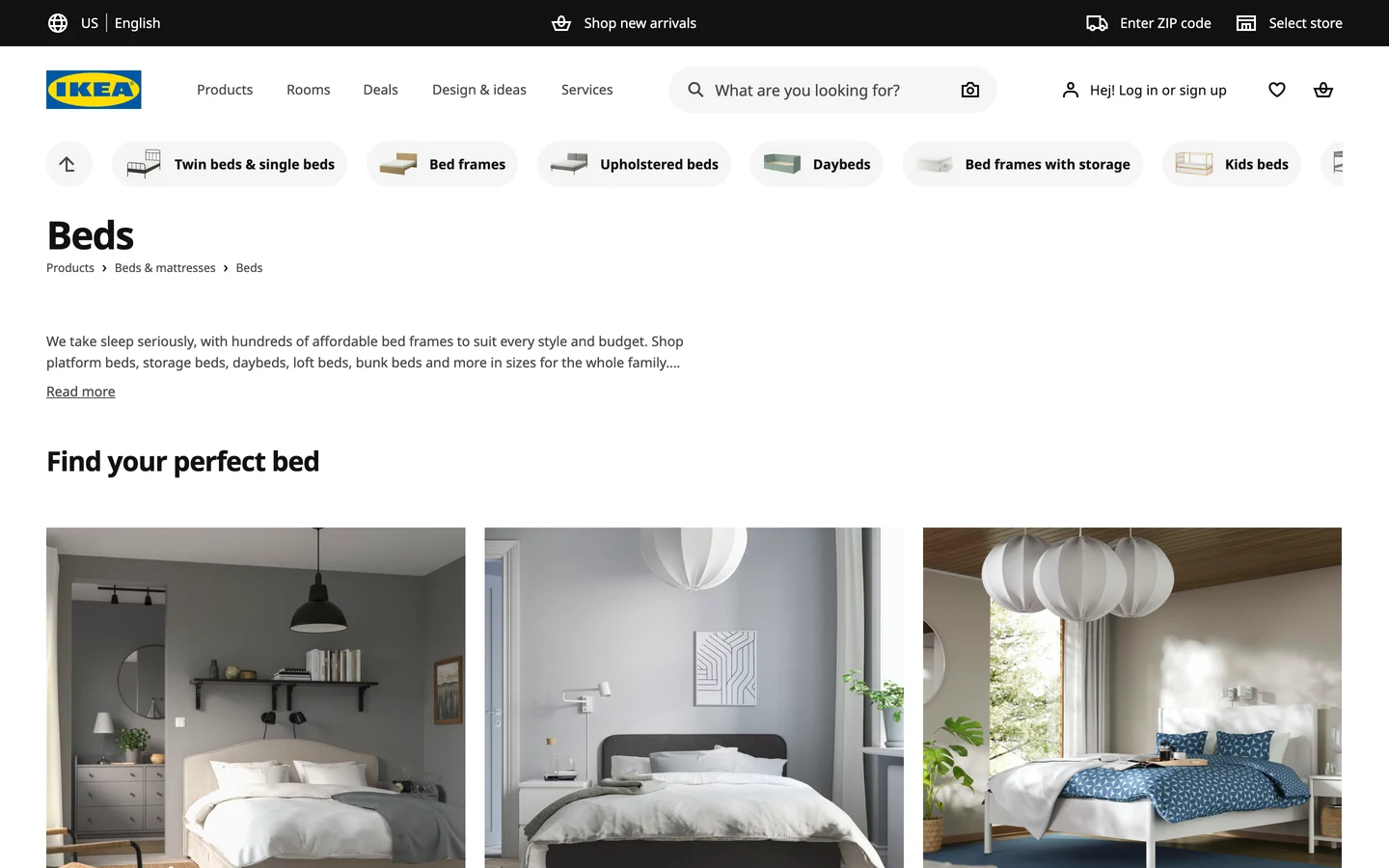
See the "US | English" switch at the top? Each country gets its own copy of the shop, with its own prices, stock and stores.
That's a puzzle for Google. A beds page in English for the US and one in English for another country look almost the same.
IKEA's global homepage lists 116 language and country versions in its code. 47 of them are in English, each for a different country.
Without hreflang, Google might show you a page with the wrong prices. Hreflang points each searcher to the right copy.
Wise, which we studied too, also copies its pages into lots of languages and countries. It puts its hreflang tags right on each page.
So if you sell in more than one country or language, tell Google which page is for whom. Then see which countries send you visits with the country setting in our Organic Traffic Checker.
Audit hreflang where it lives
Next, we went to check IKEA's tags. We started with our Website Audit, which sends a crawler, a program that visits pages the way Google does, through a whole site.
It couldn't get in. The report said, "We couldn't read any pages for this site," most likely because IKEA blocks automated visitors.
Our audit came back empty on ClinicalTrials.gov too, which we also studied, for a different reason. So we used the extension on the US beds page instead.
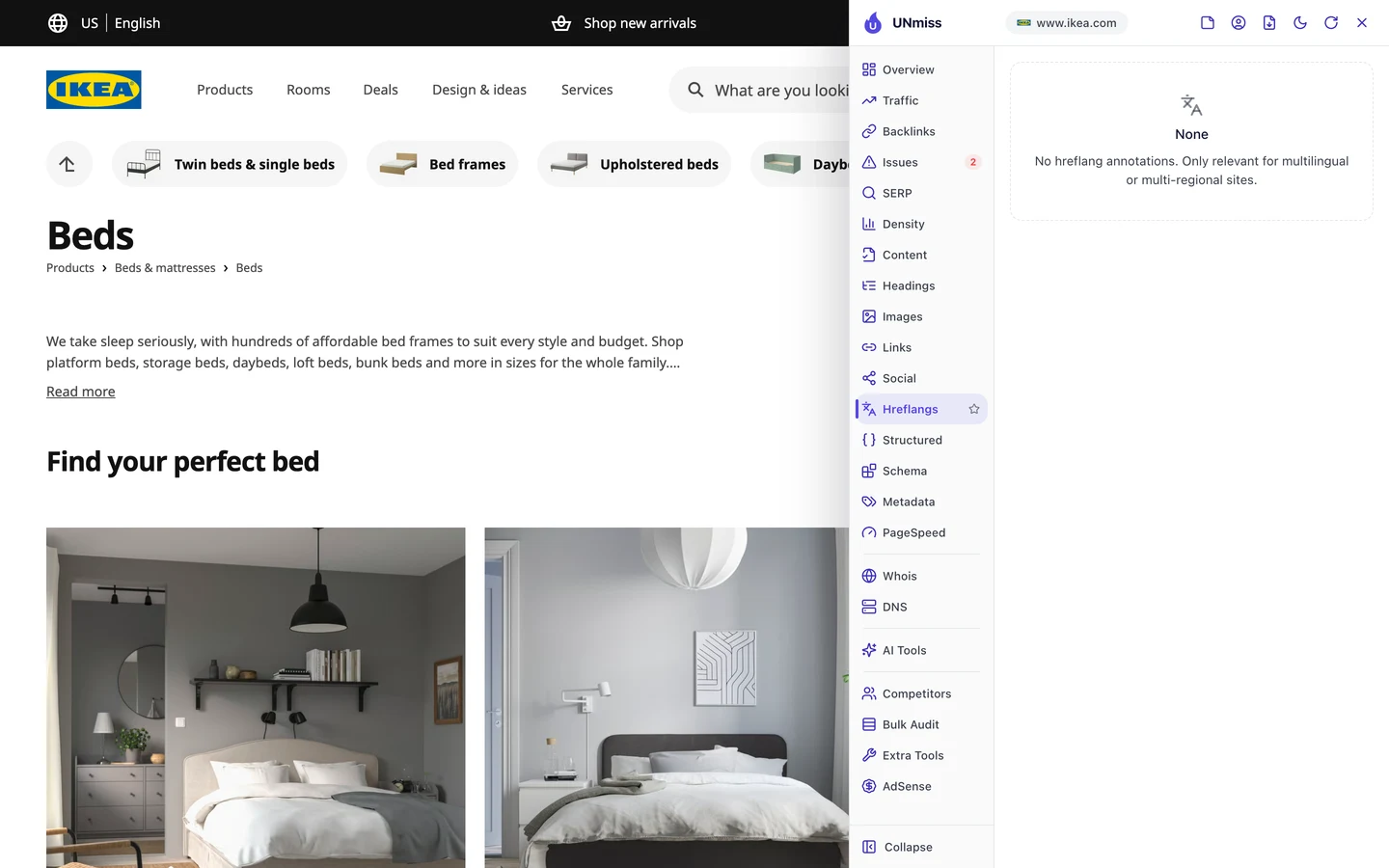
Its Hreflangs tab says "None". The Issues tab agrees, with "No hreflang annotations" at the bottom of the list.
Then we checked the page's headers, the hidden notes a server sends with each page. There were no hreflang tags there either.
So is IKEA's hreflang broken? No.
Hreflang has 3 legal homes: the page's code, its headers and the sitemap. You have to check all of them.
We opened IKEA's sitemap, and there they were. A US page in it lists 90 language and country versions.
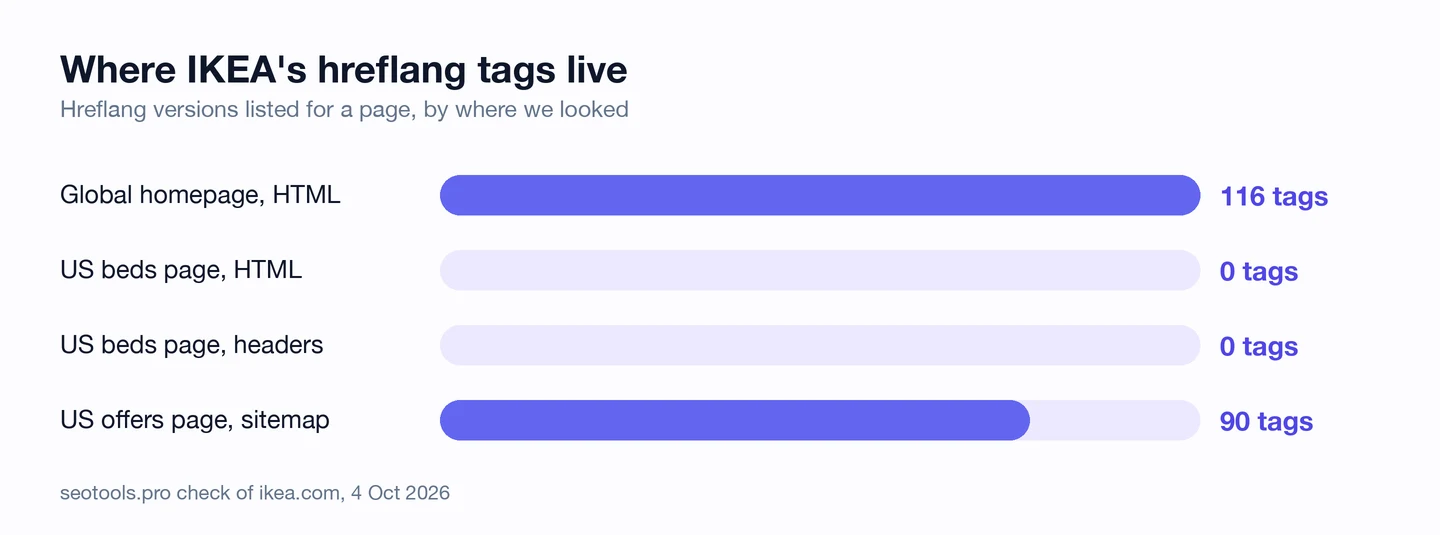
The extension reads the page you're on, so it was right to say "None". The tags just live somewhere else.
PHP.net, which we studied too, had real hreflang errors that our audit flagged. IKEA's case is the opposite, with tags that look missing but aren't.
So before you call a rival's hreflang broken, check all 3 homes. Run our Website Audit on your own site, and use the browser extension on single pages.
IKEA keeps hreflang for 91 locales in its sitemaps, and each page still points to the right country. We map your language and country versions, then put the tags where they'll work best.
- We check all 3 places hreflang can live on your site
- We fix missing return links and wrong language codes
- We split your sitemaps by page type and country
- SEO and GEO, so AI answers can quote you too
Move hreflang into your sitemaps
Why would IKEA keep these tags out of its pages? Think about the size.
Each country page would need about 90 extra lines of code. Every shopper would load them on every page, and never see them.
In the sitemap, the tags load only when Google reads the file. Here's how the first entry in IKEA's US category sitemap starts.
<url><loc>https://www.ikea.com/us/en/offers/limited-time-offers/</loc>
…
<xhtml:link rel="alternate" hreflang="et-ee" href="https://www.ikea.com/ee/et/offers/limited-time-offers/"/>
<xhtml:link rel="alternate" hreflang="en-ee" href="https://www.ikea.com/ee/en/offers/limited-time-offers/"/>
<xhtml:link rel="alternate" hreflang="ru-ee" href="https://www.ikea.com/ee/ru/offers/limited-time-offers/"/>
<xhtml:link rel="alternate" hreflang="lt-lt" href="https://www.ikea.com/lt/lt/offers/limited-time-offers/"/>
…
The top line is the US page. Each line under it points to the same page for another place, like Estonia in Estonian, English or Russian.
That one file holds about 1,050 pages. IKEA splits the rest of its site into lots more files.
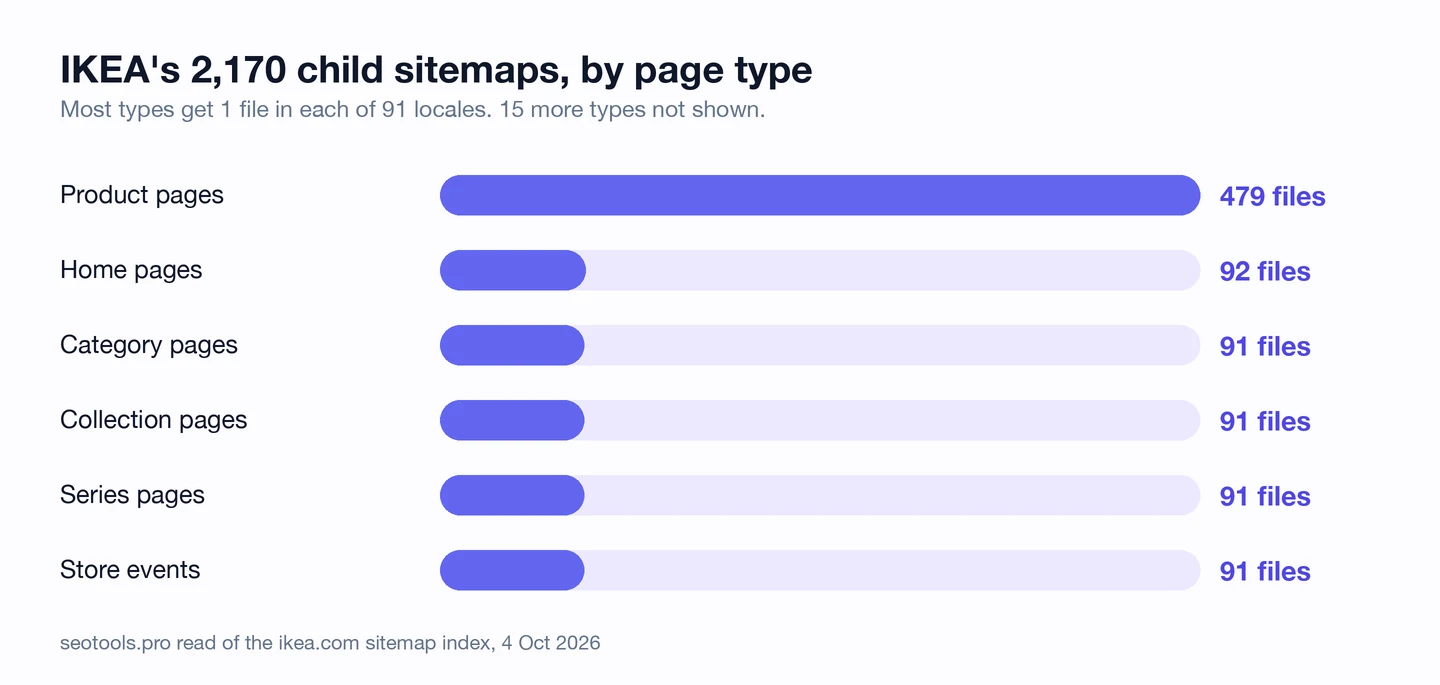
Its sitemap index, a master list of sitemaps, points to 2,170 smaller files. Each file covers one page type in one locale, like "cat-en-US" for US category pages.
Product pages need the most room, with 479 files. The US alone gets 4 product files and 19 more for other page types.
This keeps each file small and easy for you to check. If one page type breaks, you know which file to open.
We looked at how big sites build their sitemaps in our sitemap study too. It covers the basic rules most of them keep.
So if your pages have lots of language versions, put hreflang in your sitemap and split it by page type. Then point crawlers to it in robots.txt, a file that tells crawlers what they may read, with our robots.txt Generator.
Set a size for every image
Hreflang is IKEA's big win. Now for the small fixes, starting with images.
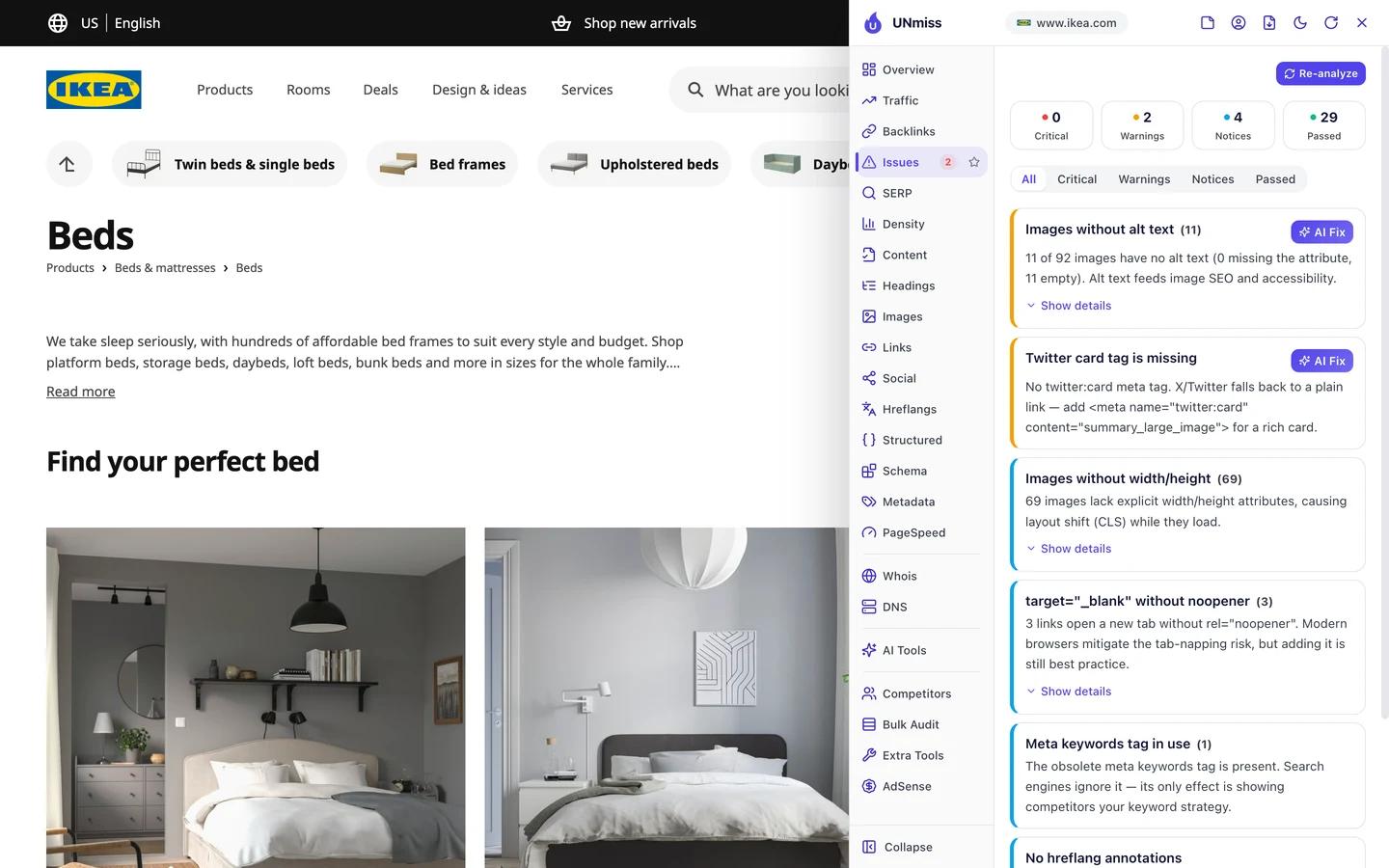
The sofa beds page has 125 images. The Issues tab says 104 of them have no set width and height.
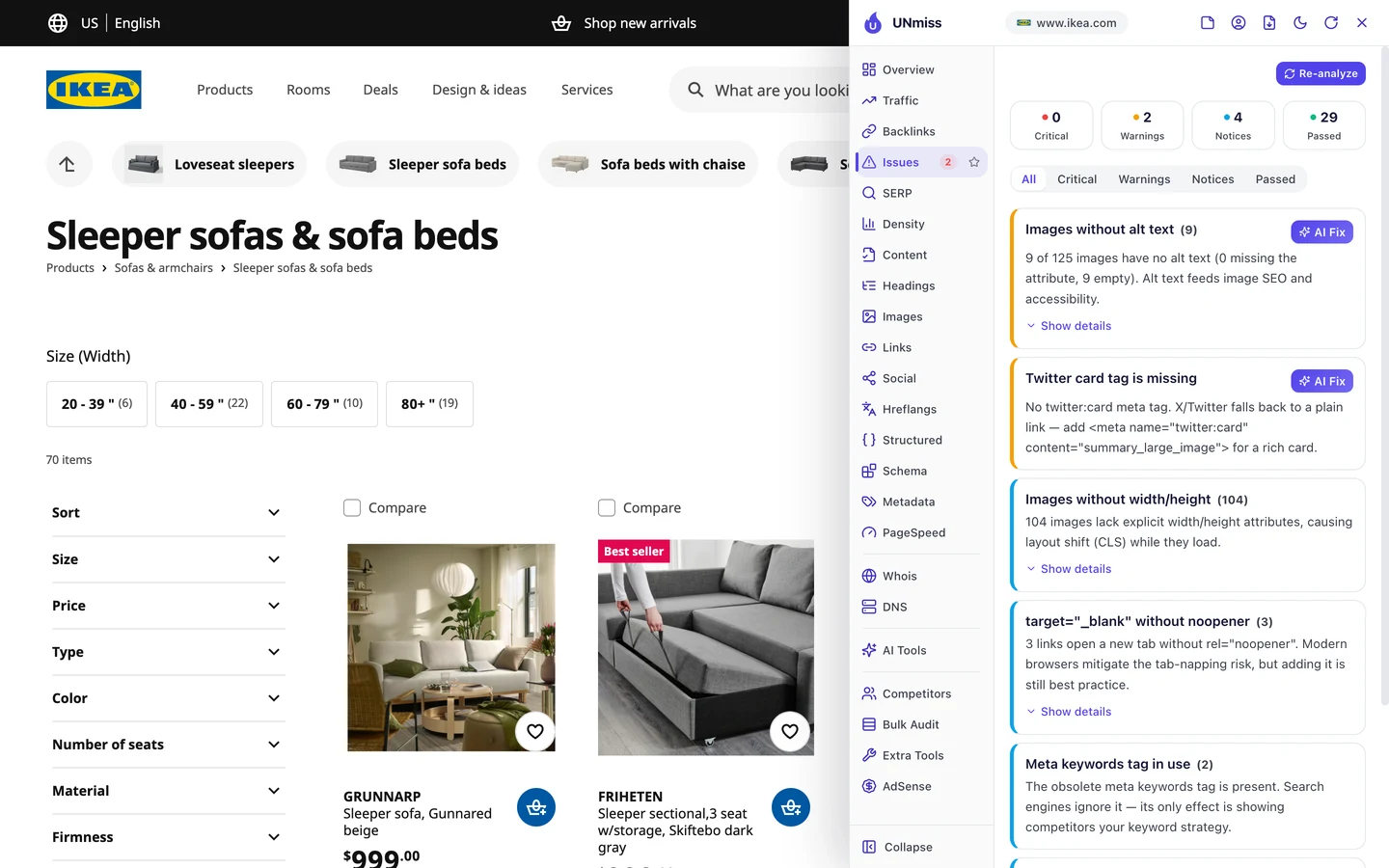
Without a size, your browser doesn't know how much room to save. So the page jumps around as each image loads.
That jump counts against you in Core Web Vitals, Google's 3 checks of how fast a page loads, how fast it reacts and whether it stays still.
9 images on that page also have empty alt text. Alt text is a short description that tells Google and screen readers what an image shows.
The beds page has the same 2 issues, with 11 empty alt texts and 69 images with no size. Both pages likely share a template, so 1 fix could clean up lots of pages.
So give every image a width, a height and real alt text. Then test how steady your pages load with our Site Speed tool.
Mark up each category in code
Structured data is code that tells Google what a page is, like a product, a list or a store. The extension's Structured tab shows what IKEA uses.
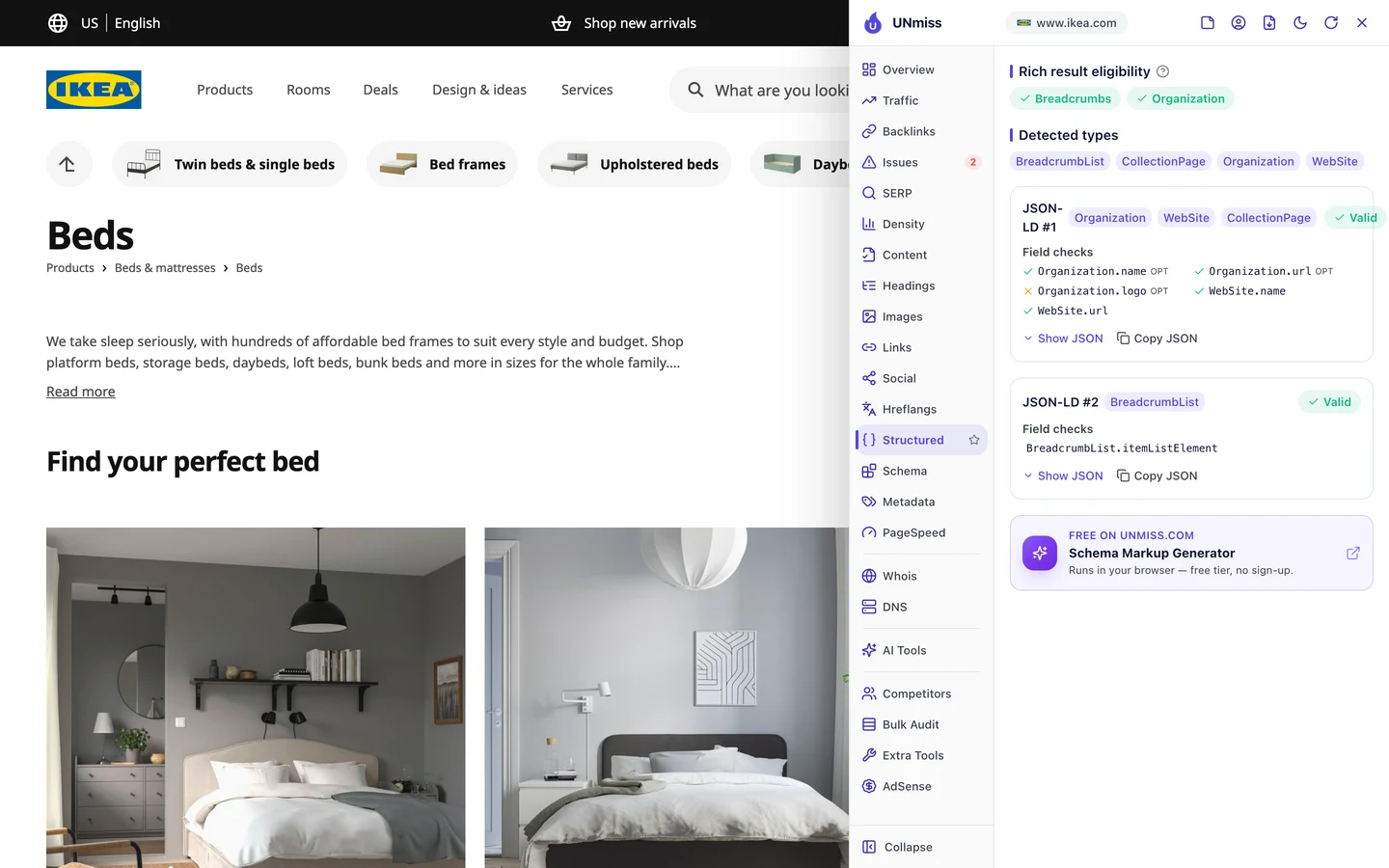
The beds page has 4 types of it. They're Organization, WebSite, CollectionPage and BreadcrumbList, and all of them pass.
CollectionPage tells Google it's a page that lists lots of products. BreadcrumbList spells out the trail: Products, then Beds & mattresses, then Beds.
That trail can show up in Google in place of a plain web address. The tab says this page can get breadcrumbs in search.
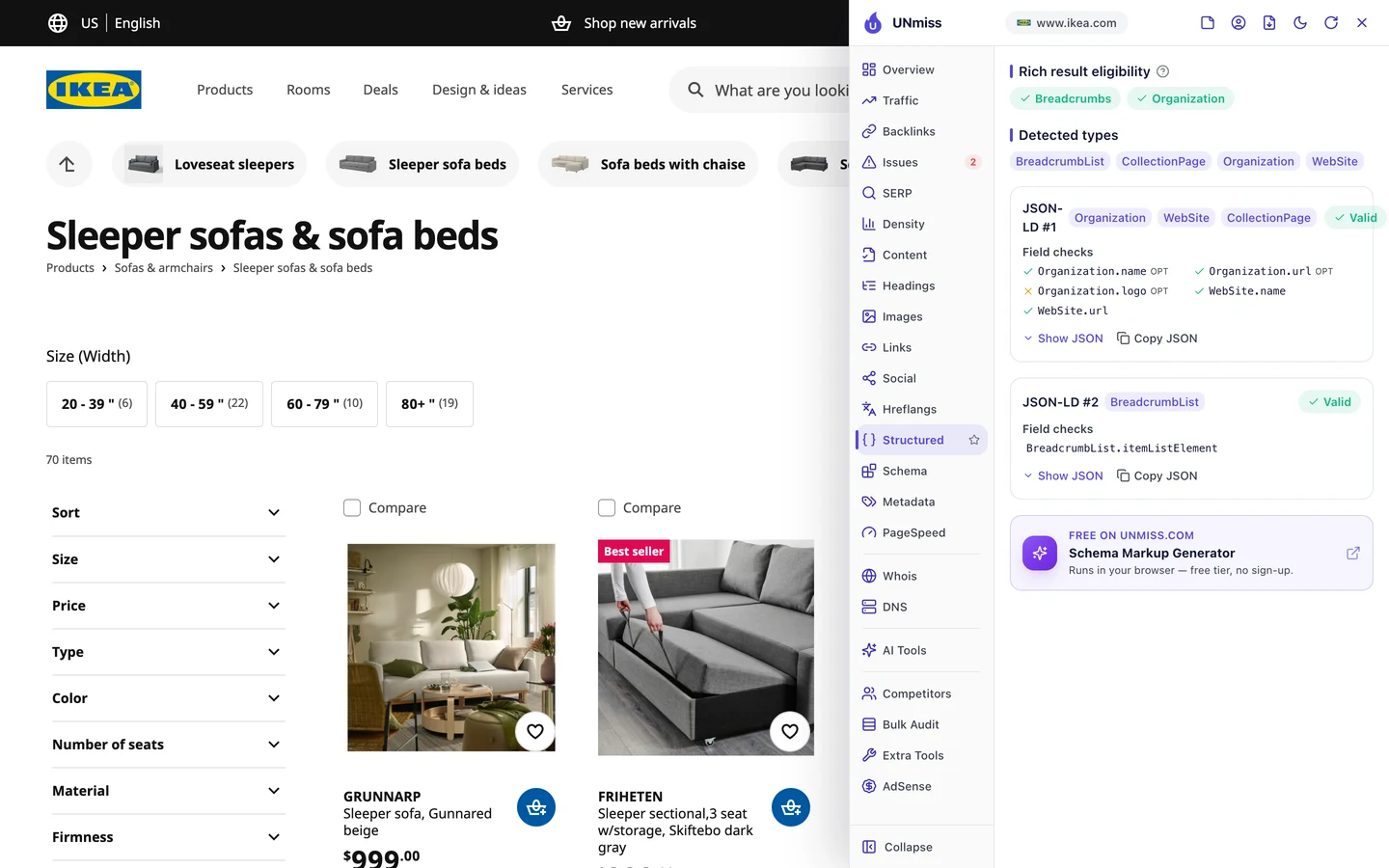
The sofa beds page has the exact same set. That's a sign 1 template marks up every category page.
There's one small gap. The Organization part has no logo, which is optional, but it's an easy add.
So add code that says what each page type is and where it sits on your site. Our Schema Markup Generator writes it for you.
Let AI crawlers read your pages
Last, look at who IKEA lets in. The extension's Overview tab checks robots.txt for the main AI crawlers.
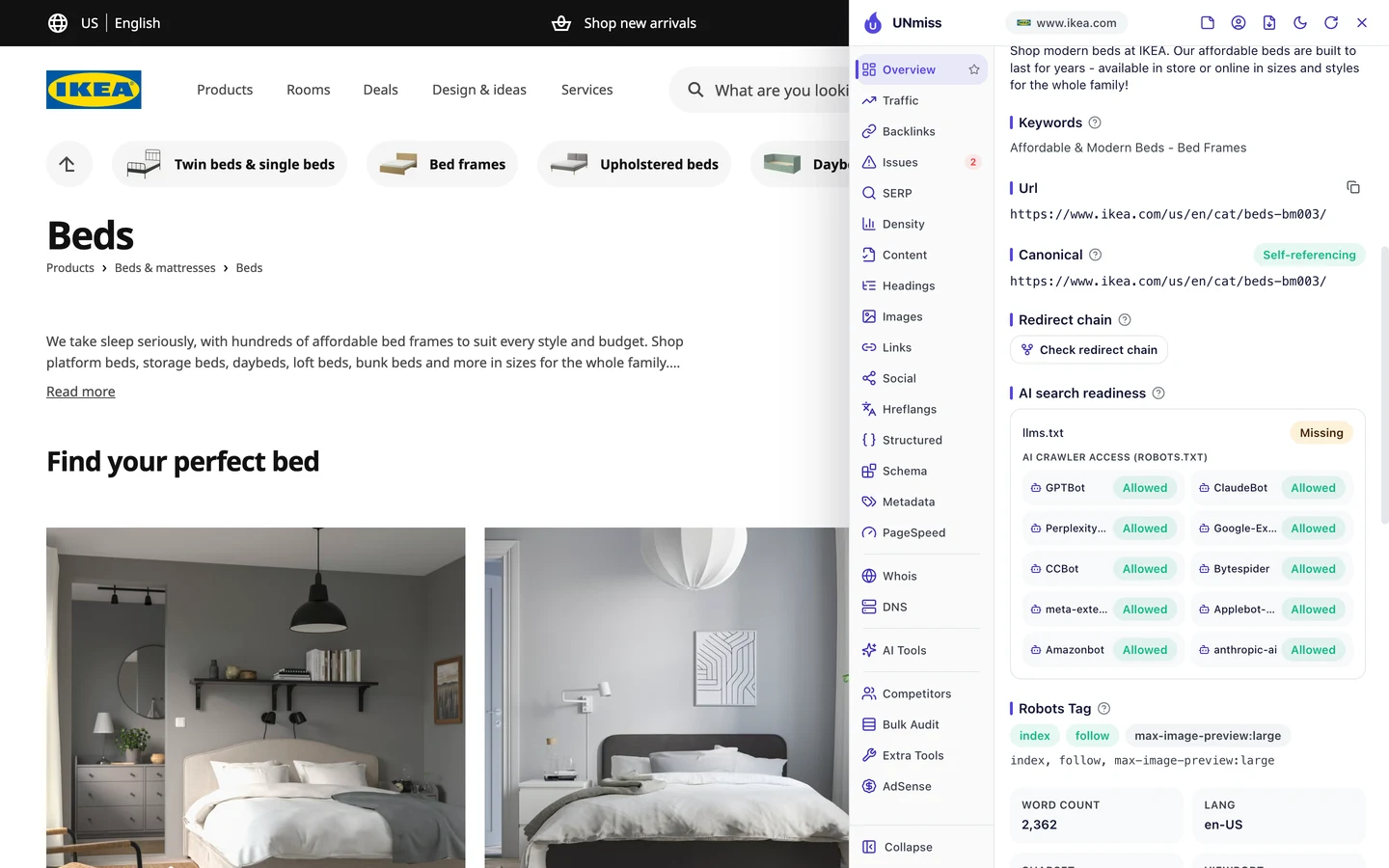
All 10 of them are allowed, from GPTBot to ClaudeBot. So AI tools can read IKEA's beds page and use it in their answers.
The site has no llms.txt, though. That's a short file that explains a site to AI tools.
For a shop this big, it's not a must. But it's a cheap way to point AI tools to your key pages.
So check that AI crawlers can reach your pages. Then see if AI tools name you with our AI Visibility Checker.
Our free extension showed us IKEA's titles, images, structured data and hreflang, right on the page. Add it to your browser and check your own pages, or a rival's.
- The same extension we used on IKEA
- Title, description, canonical and hreflang for any page
- Issues, structured data and AI crawler access in one panel
What you cannot copy
First, the part you can't copy. IKEA is a household name, and about 3 in 4 of its sampled US visits come from people searching for it.
Our Domain Overview shows how wide that reach goes.
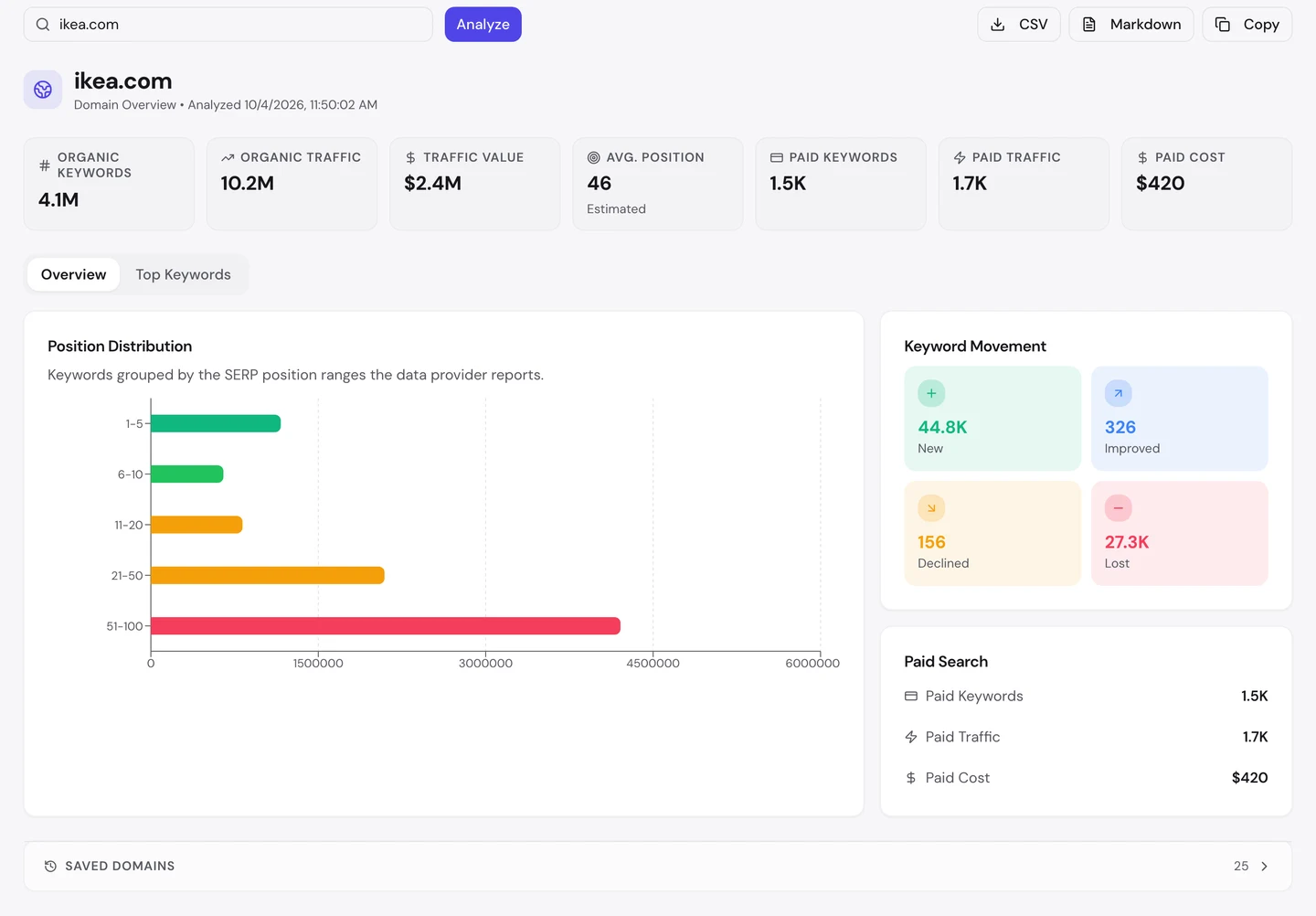
IKEA ranks for about 4.1M searches. Its traffic value, what those visits would cost as Google ads, is about $2.4M a month.
The extension counts about 14.4M backlinks. A backlink is a link from another website to yours, and IKEA's domain dates back to 1995.
That many links takes decades of trust you can't buy. You can still see who links to you, and to your rivals, with our Backlink Analyzer.
Now a few honest notes on the numbers.
We took our figures on 4 October 2026. The 10.2M figure counts US searches only.
The extension shows its own worldwide estimate of about 74.2M a month. Both are estimates, worked out from rankings and search volume, since nobody outside IKEA can count its real visits.
Our Website Audit read 0 pages, so there's no audit report and no crawl sample here. We checked single pages with the extension and read the sitemap ourselves, on the same day.
We checked hreflang on a few pages, not all of them. The 90 versions come from the first entry in the US category sitemap.
The one number to take away
0 tags.
That's how many hreflang tags we found on IKEA's US beds page, in its code or its headers. Yet its sitemap lists 90 versions for a US page.
A quick check would call that a bug. It's really a choice, and it keeps every page light.
So look in all 3 places before you judge a site's hreflang. And if you sell in lots of countries, your sitemap may be the best home for yours too.
You can run every one of these checks on your own site, and on your rivals', and see the same numbers for yourself.
Frequently asked questions
Do I need hreflang if my site is only in English?
Not if you serve just one country. If you sell to several English-speaking countries with different prices or stock, then yes, it helps Google pick the right page.
Is hreflang better in the page or in the sitemap?
Google reads both. Tags in the page are easy to spot and test, while the sitemap keeps pages light, so pick one home and stick to it.
What does x-default mean?
It's the hreflang value for the page Google should show when no version fits the searcher. Many sites point it to a country picker or their global homepage.
Do my language versions have to link back to each other?
Yes. If page A lists page B, page B has to list page A too, or Google may ignore the pair.
How do I know Google read my sitemap?
Add it in Google Search Console, the free tool where Google reports on your site. It shows when Google last read the file and how many pages it found.
Is a country picker on my site enough?
No. A picker helps people who are already on your site, but Google doesn't click buttons, so it still needs hreflang to match pages to searchers.
Should I remove tracking tags from my Google Maps link?
You can keep them to count visits. Just make sure the page has a canonical that points to its clean address.
Can I translate pages with AI and add hreflang?
Yes, but have a native speaker check the key pages first. Hreflang only sends people to the right page, so the page itself still has to read well.