PHP.net has about 450M links pointing at it, yet it gets only about 149K visits a month from Google in the US, and half of those people type its name.
PHP is a coding language, and PHP.net is its home. Its manual gives every PHP command its own page, and some of those pages win searches you'd never guess.
We ran PHP.net through our whole SEO toolkit to see what works, and where even the official site slips.
Here are 9 lessons you can copy, plus the part you can't.
Give every function its own page
We started with our Organic Traffic Checker. It estimates a site's organic traffic, meaning the people who find it on Google without ads.
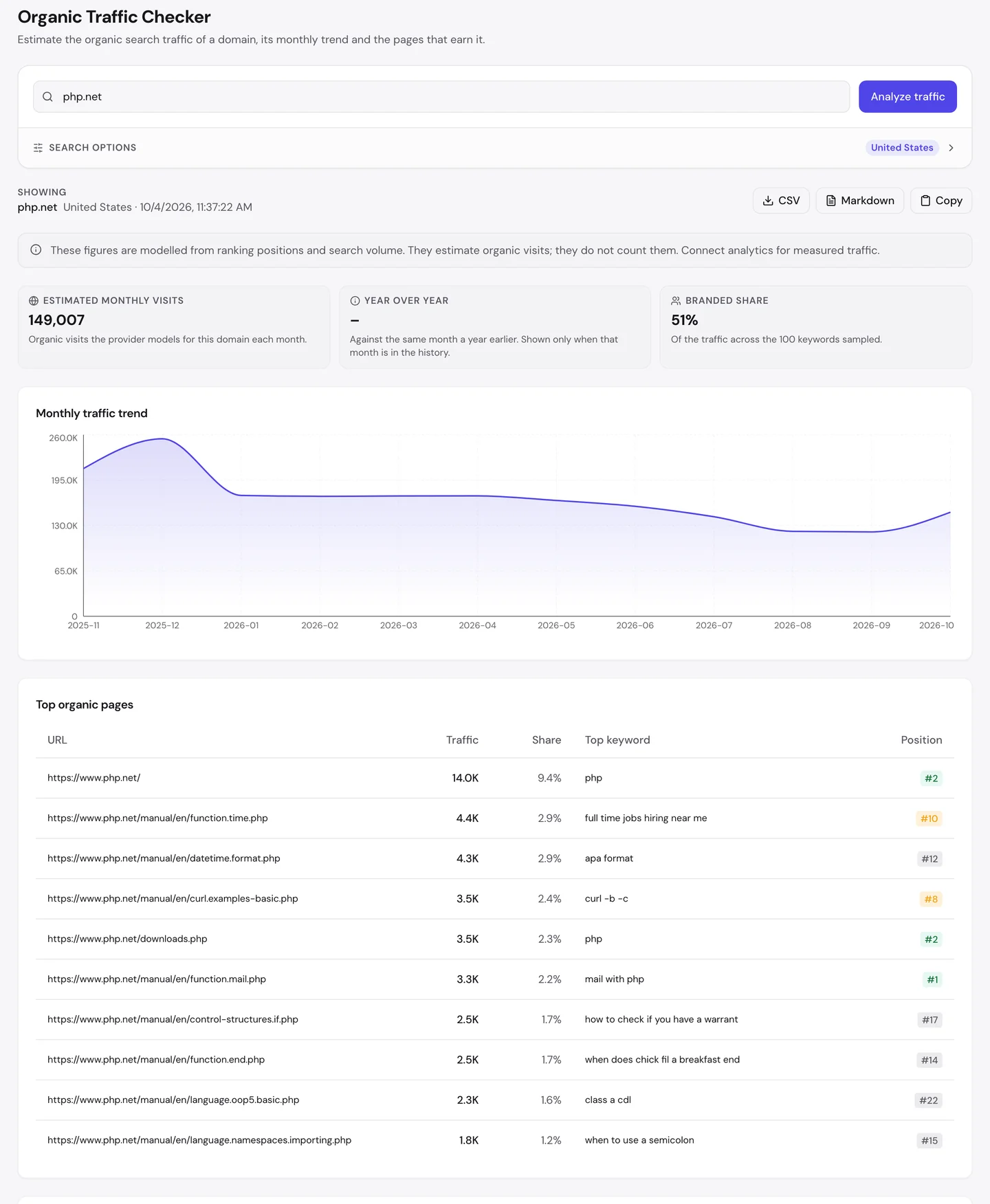
For PHP.net, that's about 149K visits a month in the US. The chart peaked last December and has slid since, with a small bounce this month.
Now look at the branded share. In the searches we sampled, 51% of the traffic came from people typing the name PHP.
Scroll down, and you'll see the top pages are almost all manual pages. Each one covers a single command, like mail(), which sends an email.
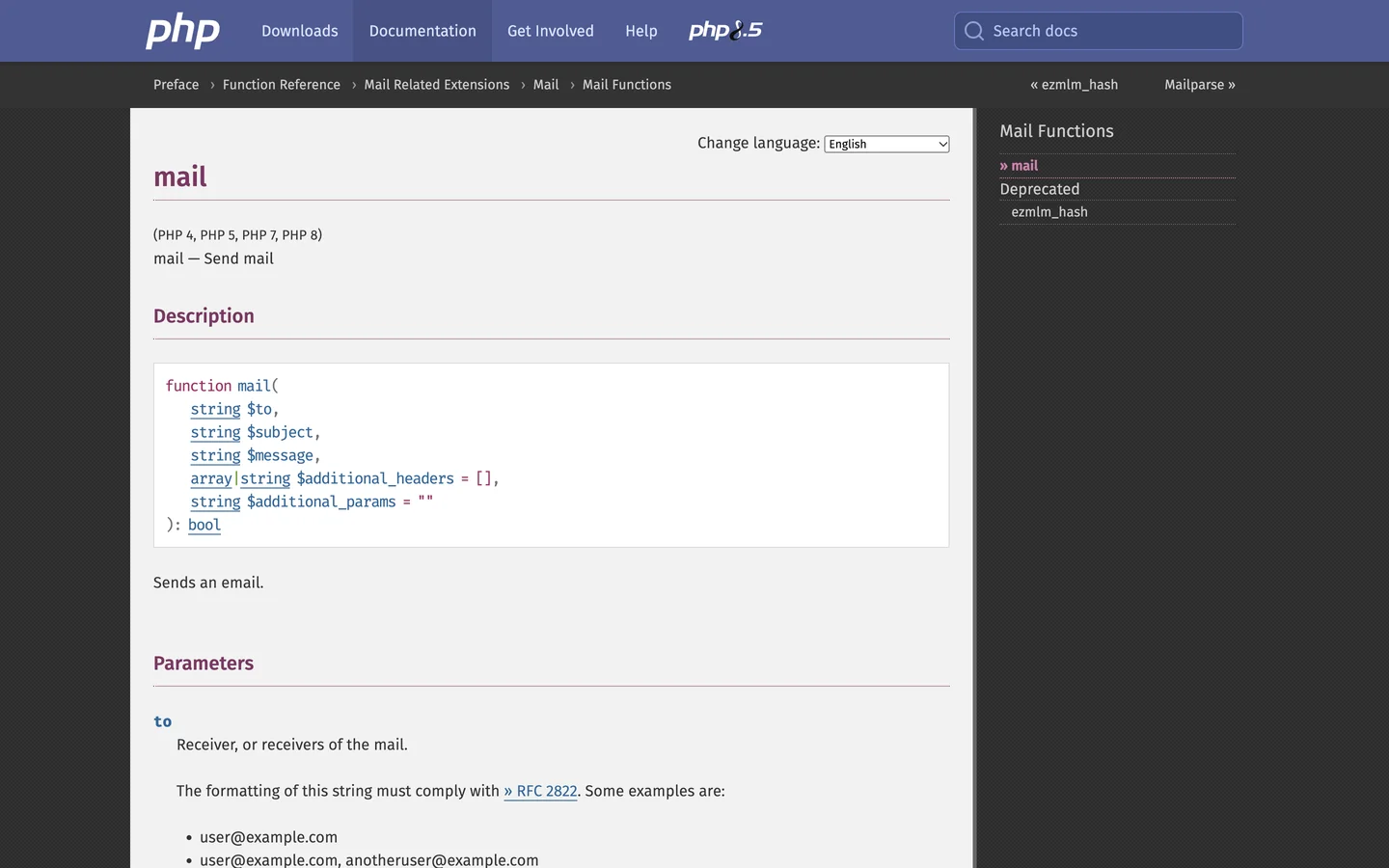
This page ranks first for "mail with php". It answers one question, and it shows you the code before anything else.
The Traffic tab of our Website Audit shows the whole world.
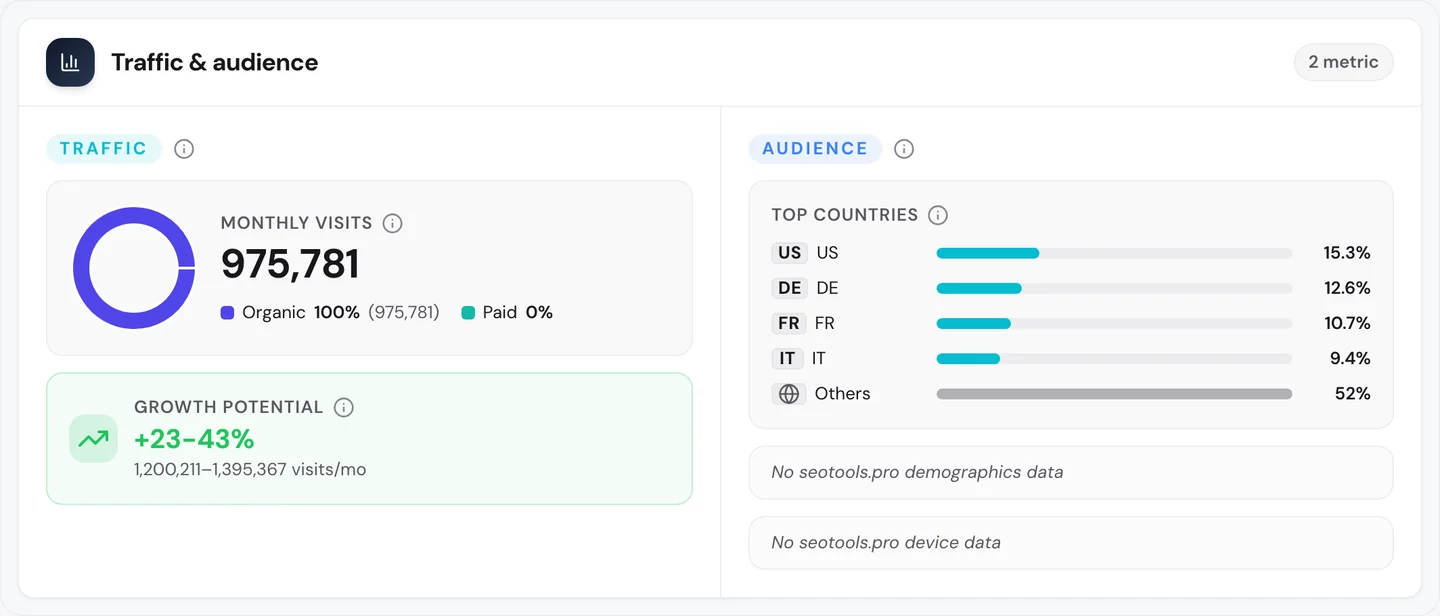
Worldwide it's close to 1M search visits a month. Germany, France and Italy together send twice as many as the US.
So give every task your product handles its own page, named after that task. See which of your pages earn the visits with our Organic Traffic Checker.
Match the words people type
The Keywords tab of our audit lists every search a site ranks for, where it ranks and how many visits each one sends.
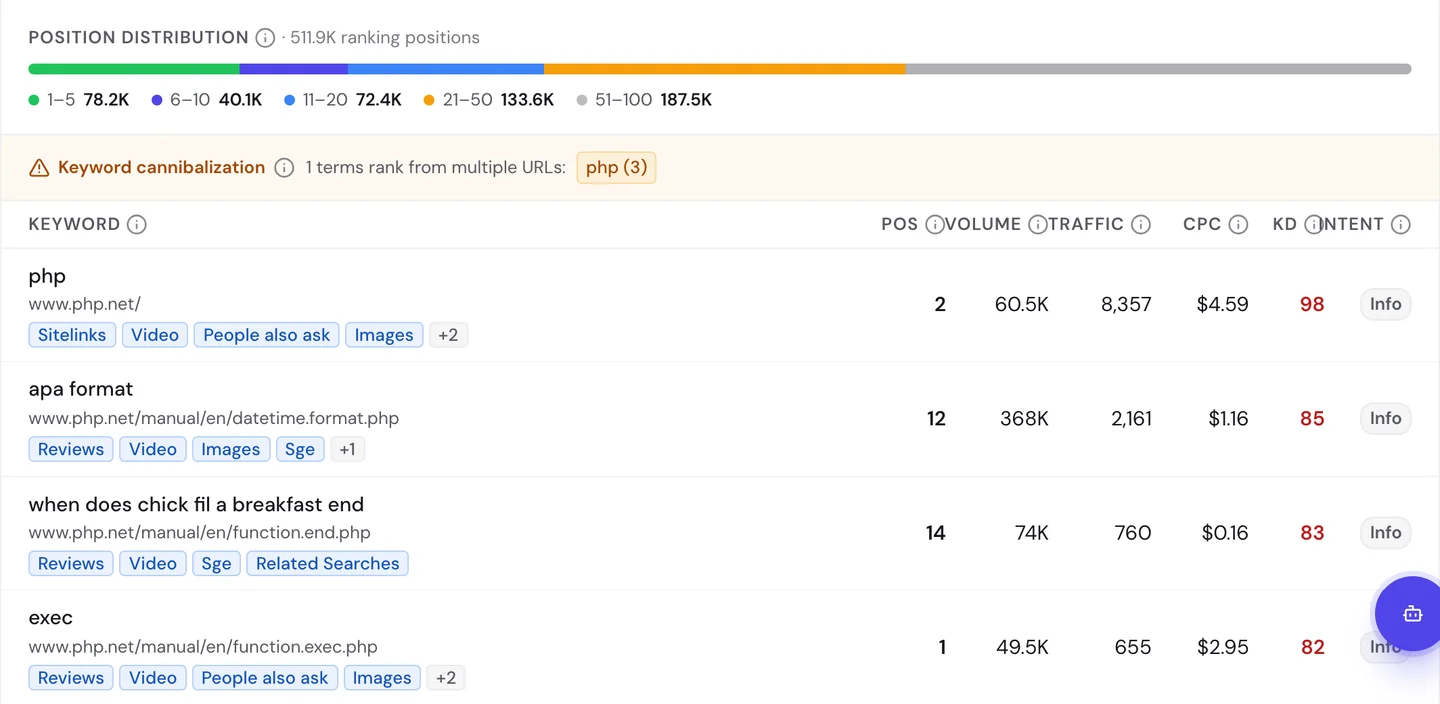
Some rows make sense. The page for exec, a command that runs other programs, ranks first for "exec".
Others will surprise you. The date format page ranks for "apa format", a style for citing sources in school papers.
The page for end() shows up for "when does chick fil a breakfast end". The page for time() shows up for "full time jobs hiring near me".
Google matches a single word in the page name to everyday searches. Visits like that look good in a report, but the people wanted something else.
Look at the warning above the rows too. The search "php" lands on 3 different pages, a problem called keyword cannibalization, when your own pages compete for the same search.
So check the searches each page really ranks for, and make sure they match what the page is about. Find the words your readers use with our Keyword Research tool.
Name the task in every title
Our free browser extension shows how a page is built. Open the page, click the seotools.pro icon, and a panel opens beside it with 35 SEO checks.
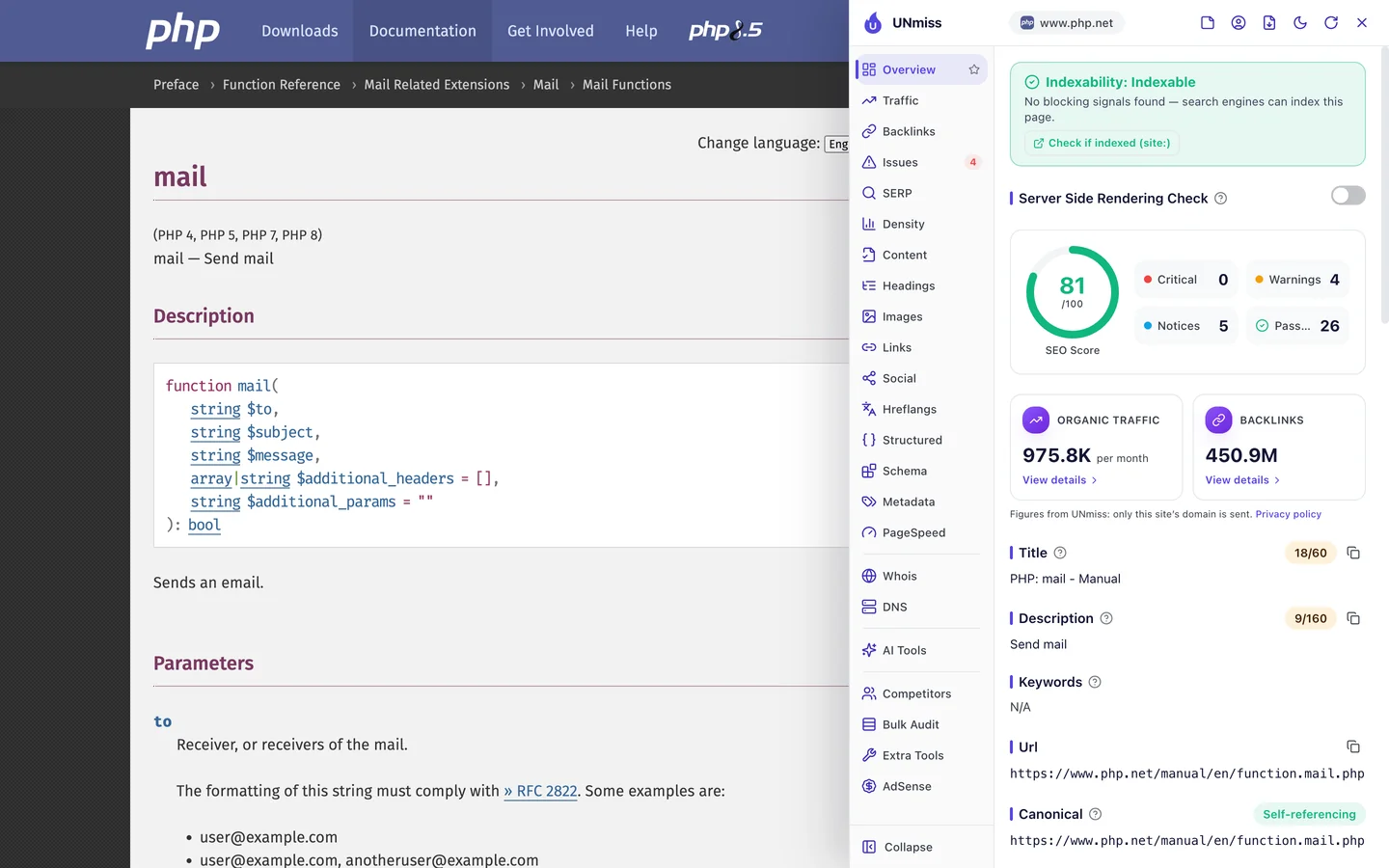
The mail page scores 81 out of 100. Its title is "PHP: mail - Manual", only 18 characters long.
The description, the short summary Google may show under your title, is just "Send mail". That's 9 characters, when Google can show about 160.
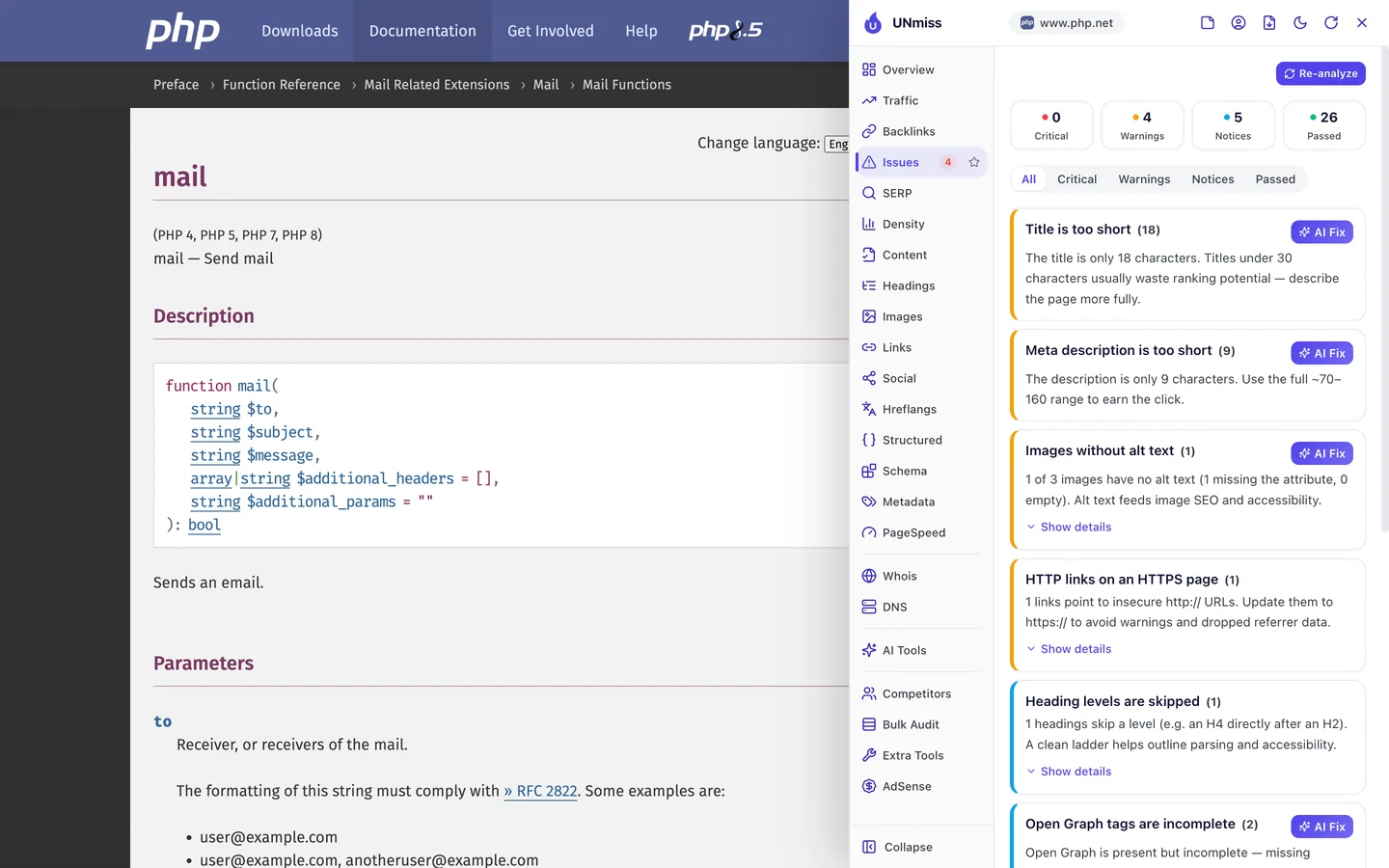
The Issues tab puts both at the top of its list. And a title that only says "mail" can match any search with that word in it.
The date format page has a different problem. Look at the top of it.
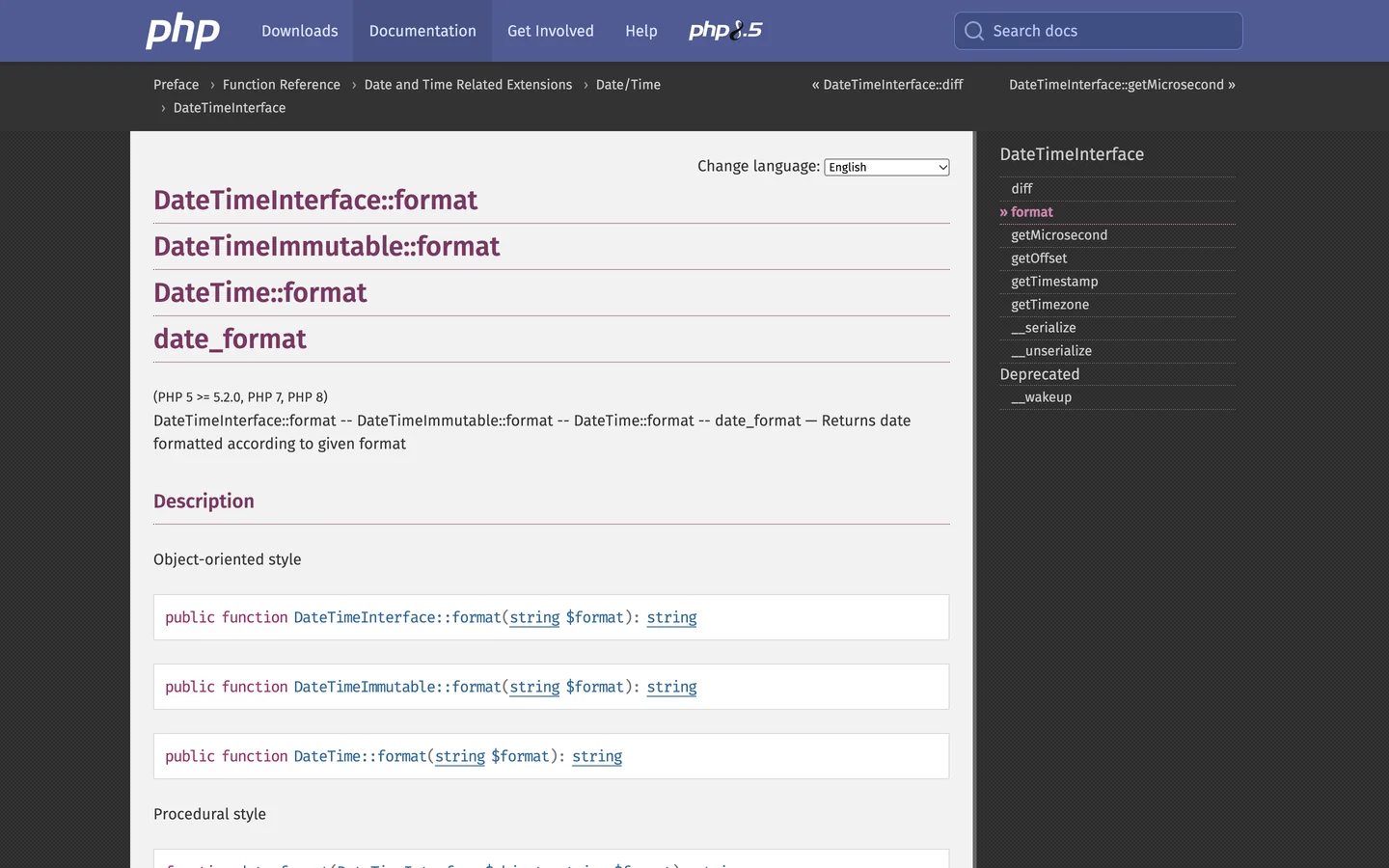
It covers 4 names for the same command. Each one gets its own main heading.
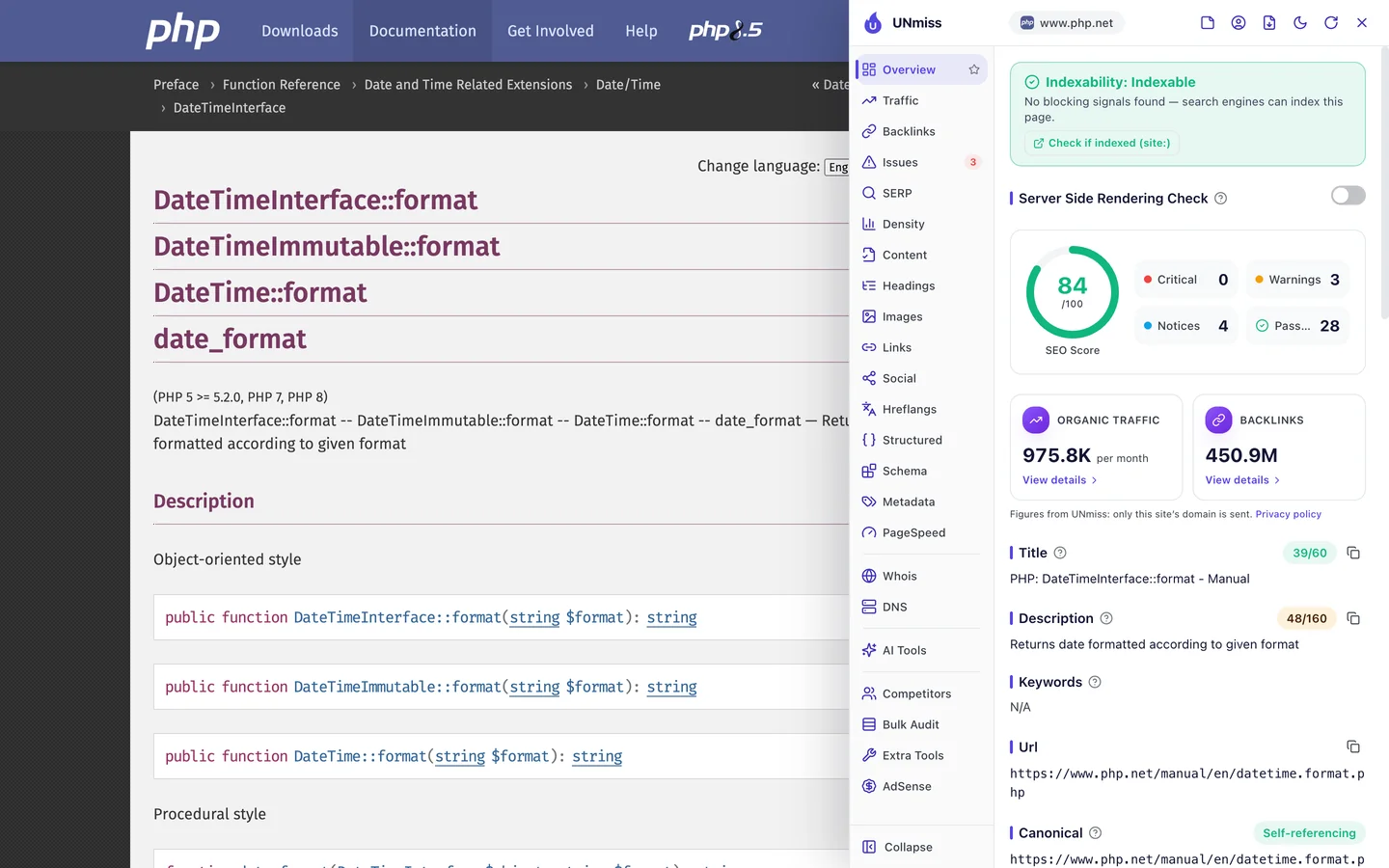
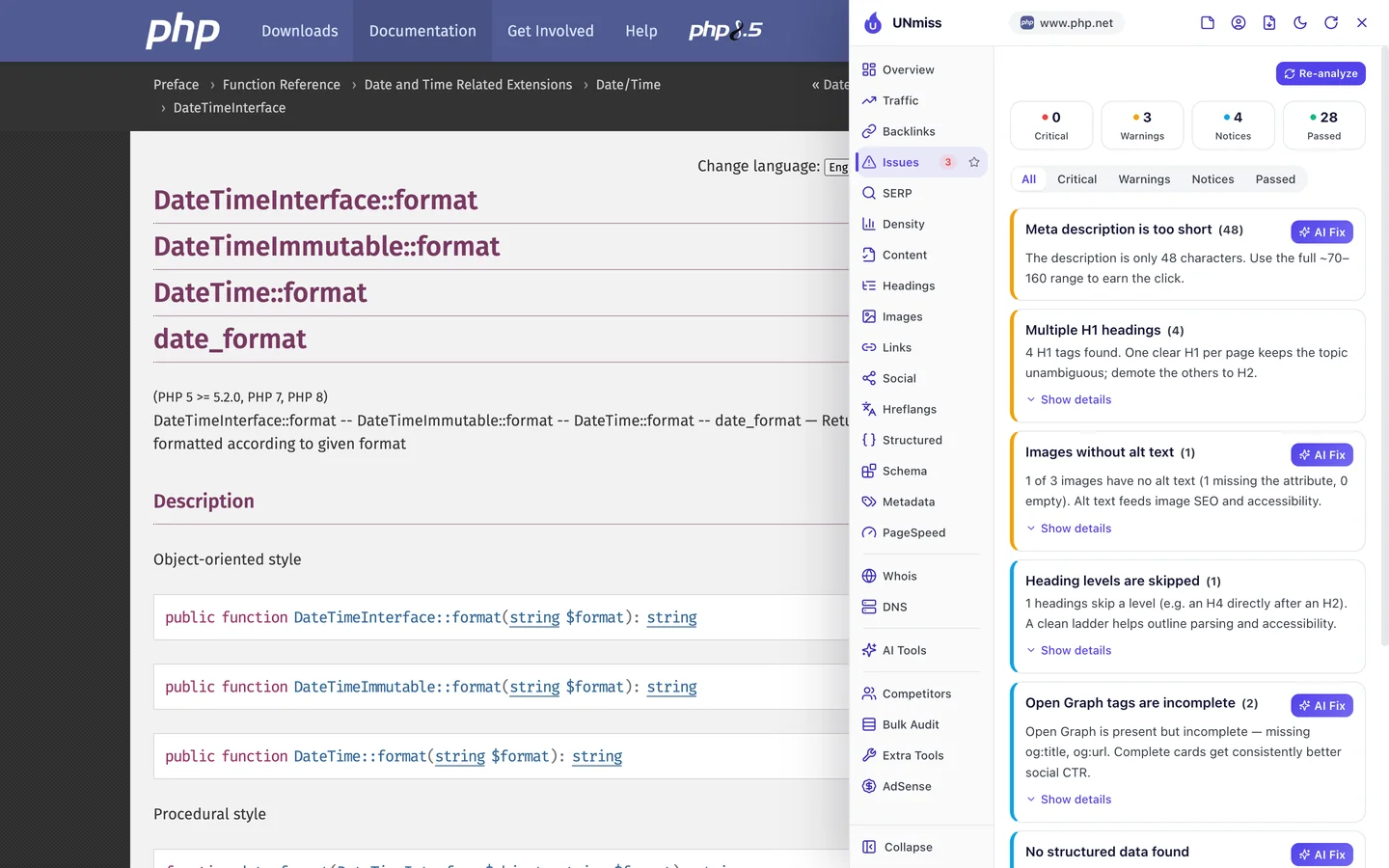
It scores 84, a bit better. But the extension flags 4 H1 headings, the tags for a page's main heading, where you only need 1.
And the title is a code name. If you just want to show a date, you may not know that name at all.
So put the task in plain words in every title, like "Send email with PHP: mail()". Our Meta Tag Generator shows how long your title and description should be.
Describe each page in code
Structured data is code that tells Google what a page is, like a guide, a product or a recipe. The extension's Structured tab looks for it.
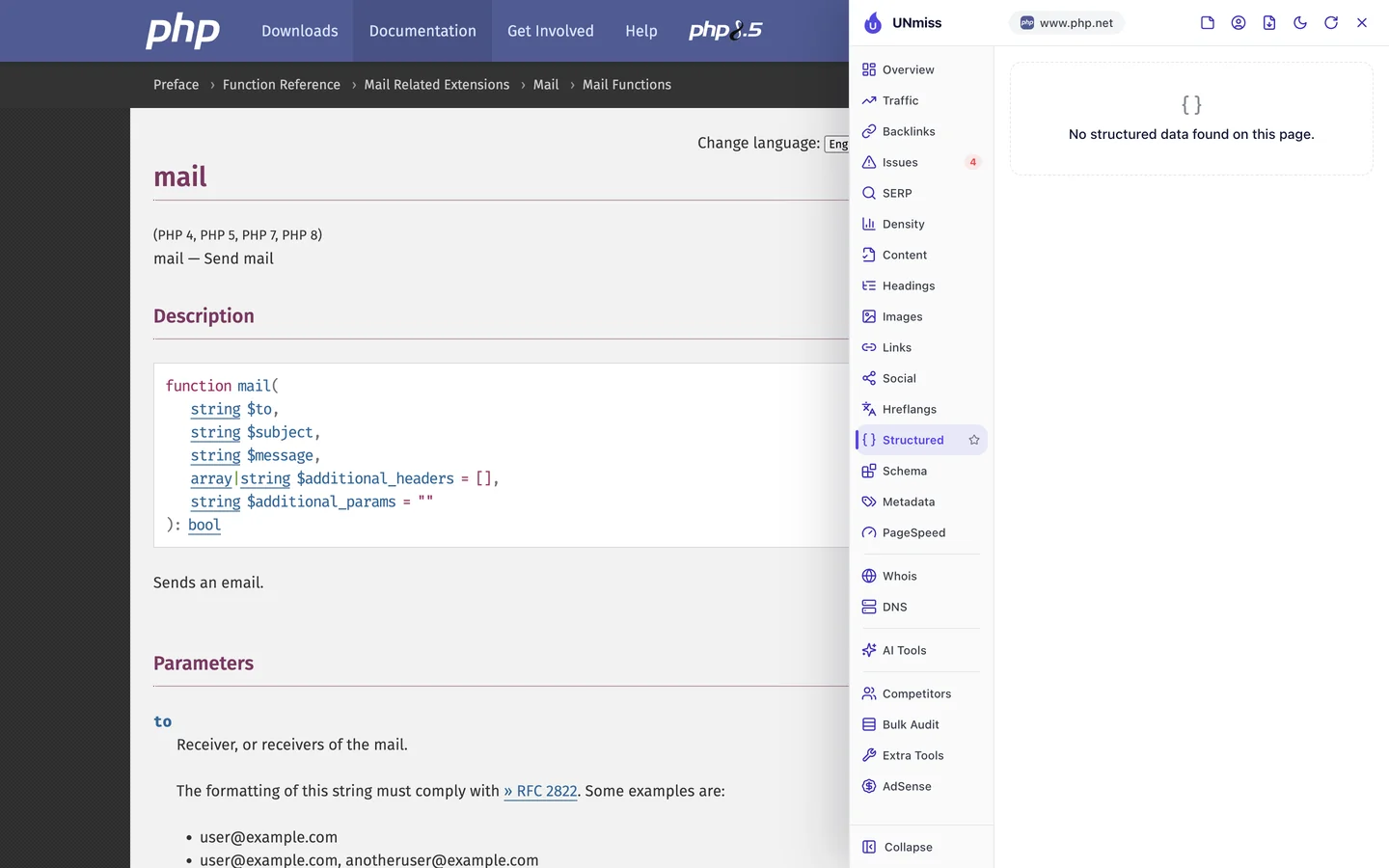
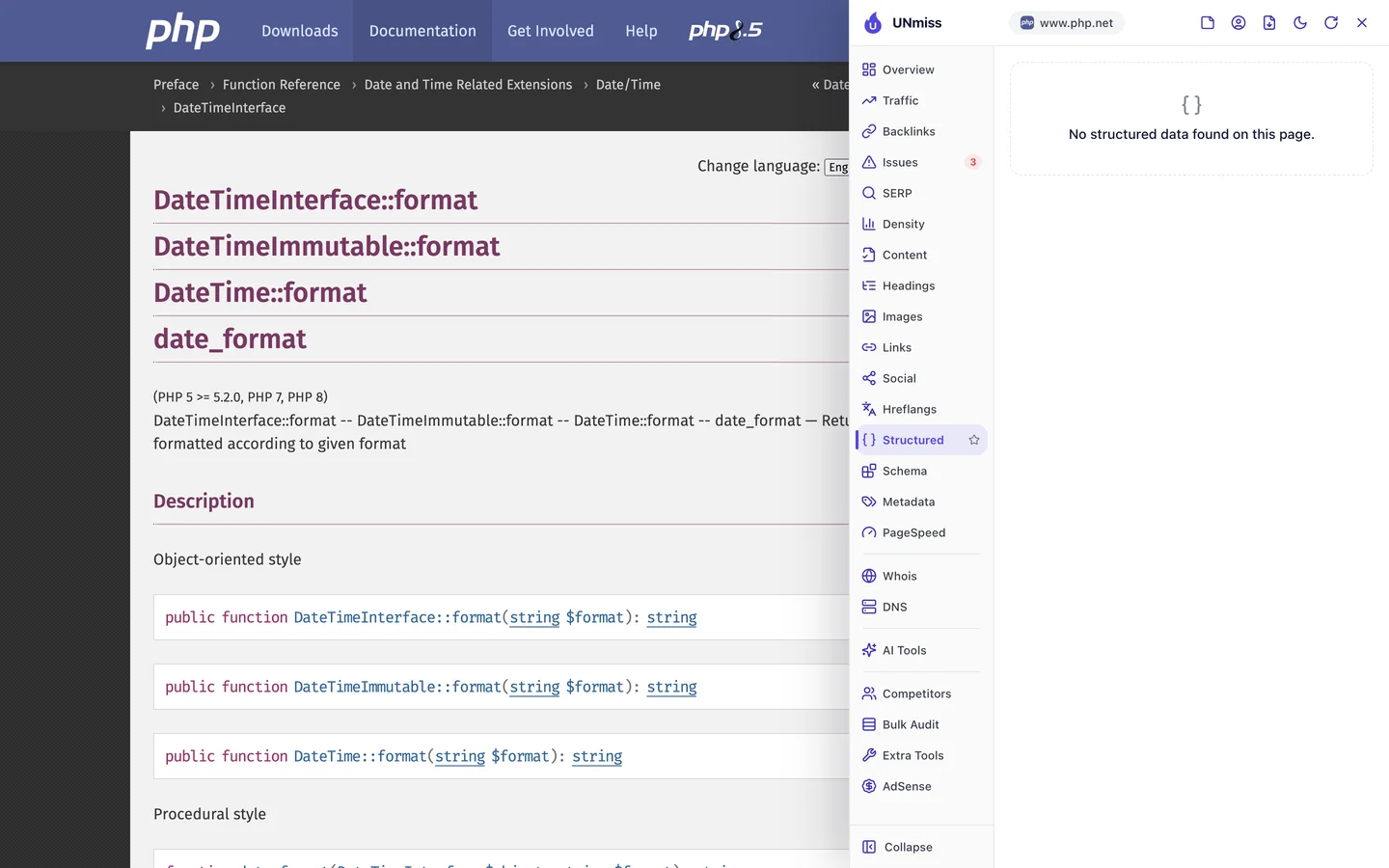
You won't find any on either page. Yet both show a trail of links at the top, from "Preface" down to the page you're on.
A few lines of code could tell Google about that trail. Then Google can show the path under your link in its results.
The Content tab checks the signs that tell you a page can be trusted.
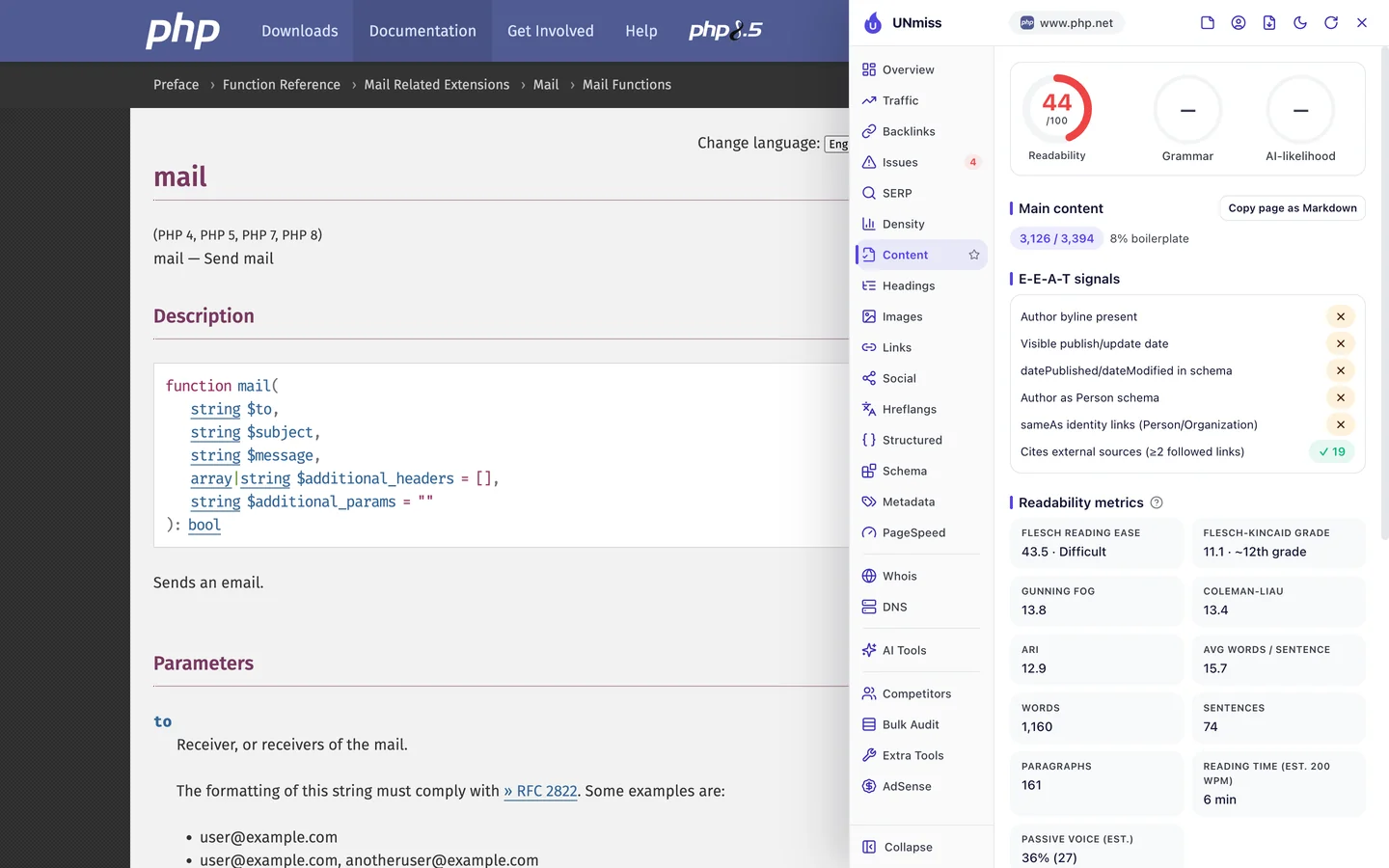
The mail page links to 19 outside sources, which is great. But it shows no author and no date, so you can't tell when someone last checked it.
It's also hard to read, at about a 12th grade level. That's fine for experts, but people who are new to code land here too.
So add a date and a few lines of code that say what each page is. Our Schema Markup Generator writes the code for you.
Don't lean on links alone
A backlink is a link from another website to yours. Google treats each one a bit like a vote of trust.
The Backlinks tab of our audit shows the same data as our Backlink Analyzer.
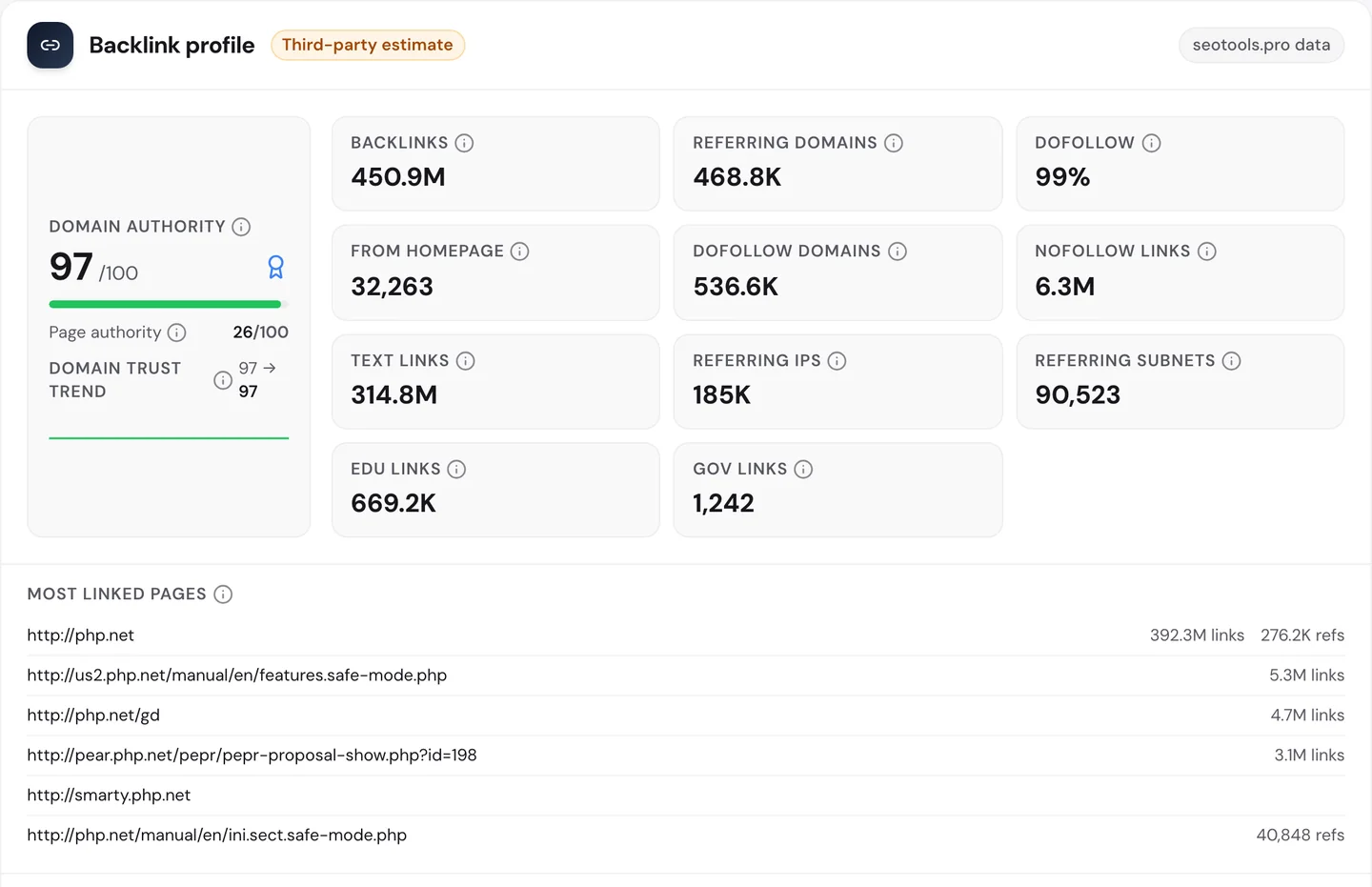
PHP.net has about 450M links from close to 470K websites. Its Domain Authority, our 0 to 100 score for a site's link strength, is 97.
But look where the links go. About 392M point at the homepage, and the most common link words are "PHP", "PHP logo" and "Powered by PHP".
Most look like badges on sites built with PHP. They're real links, but they don't point you to any manual page.
Our Domain Overview shows what all that trust buys.
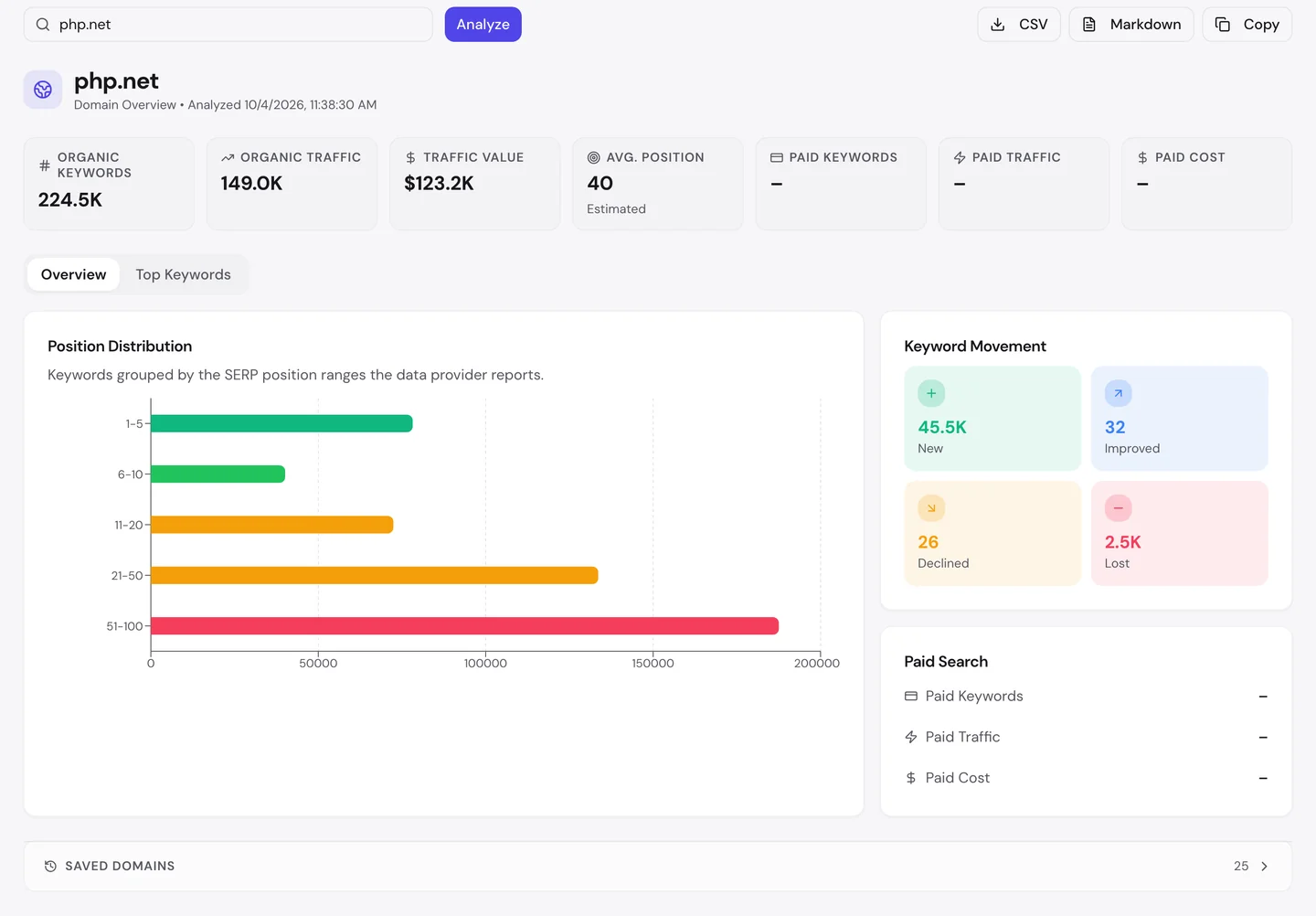
Its average position is 40, on page 4 of Google. The biggest group of its rankings sits between 51st and 100th.
MDN, another docs site for coders that we studied too, gets about 2M US visits a month by the same measure.
So check which of your pages get the links with our Backlink Analyzer, then link from those pages to the ones you want to rank. Links point the way, but the page still has to match the search.
Audit your language versions
We checked PHP.net with our Website Audit. It sends a crawler, a program that visits pages the way Google does, opening each page and following the links to the next ones.
We also gave it the sitemap, the file that lists a site's pages for Google, so it checked 862 pages. PHP.net scored 90 out of 100, which the report rates as good.
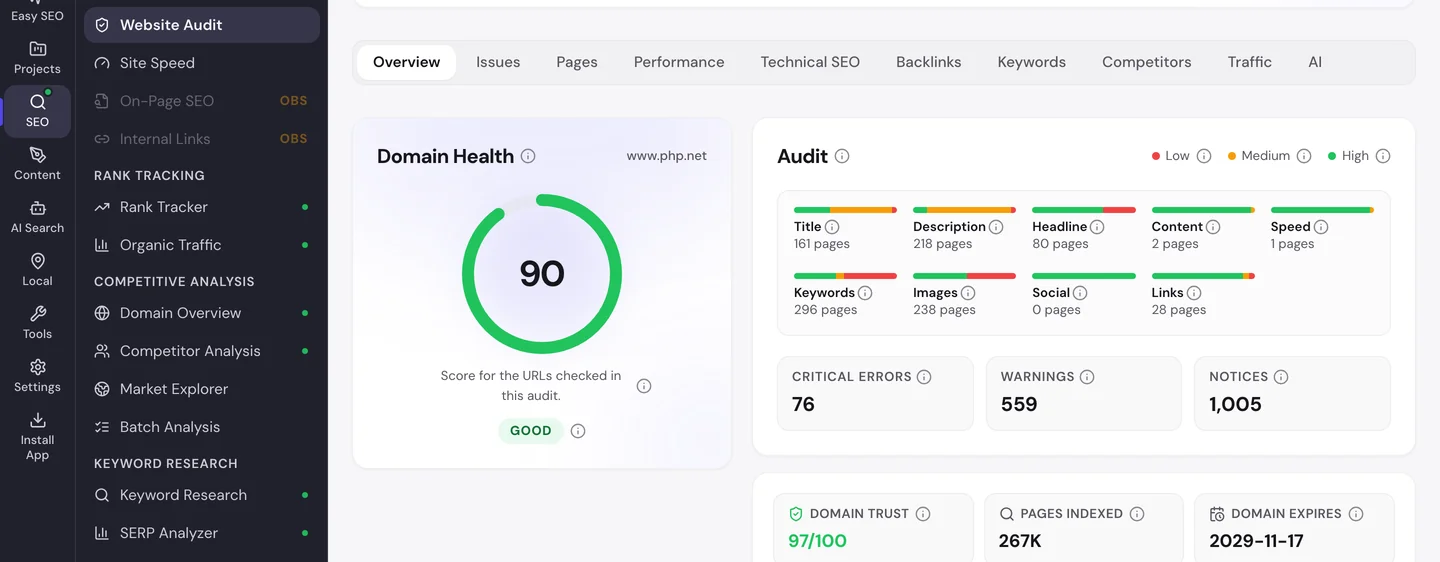
The Issues tab sorts the problems by how much they matter to you.
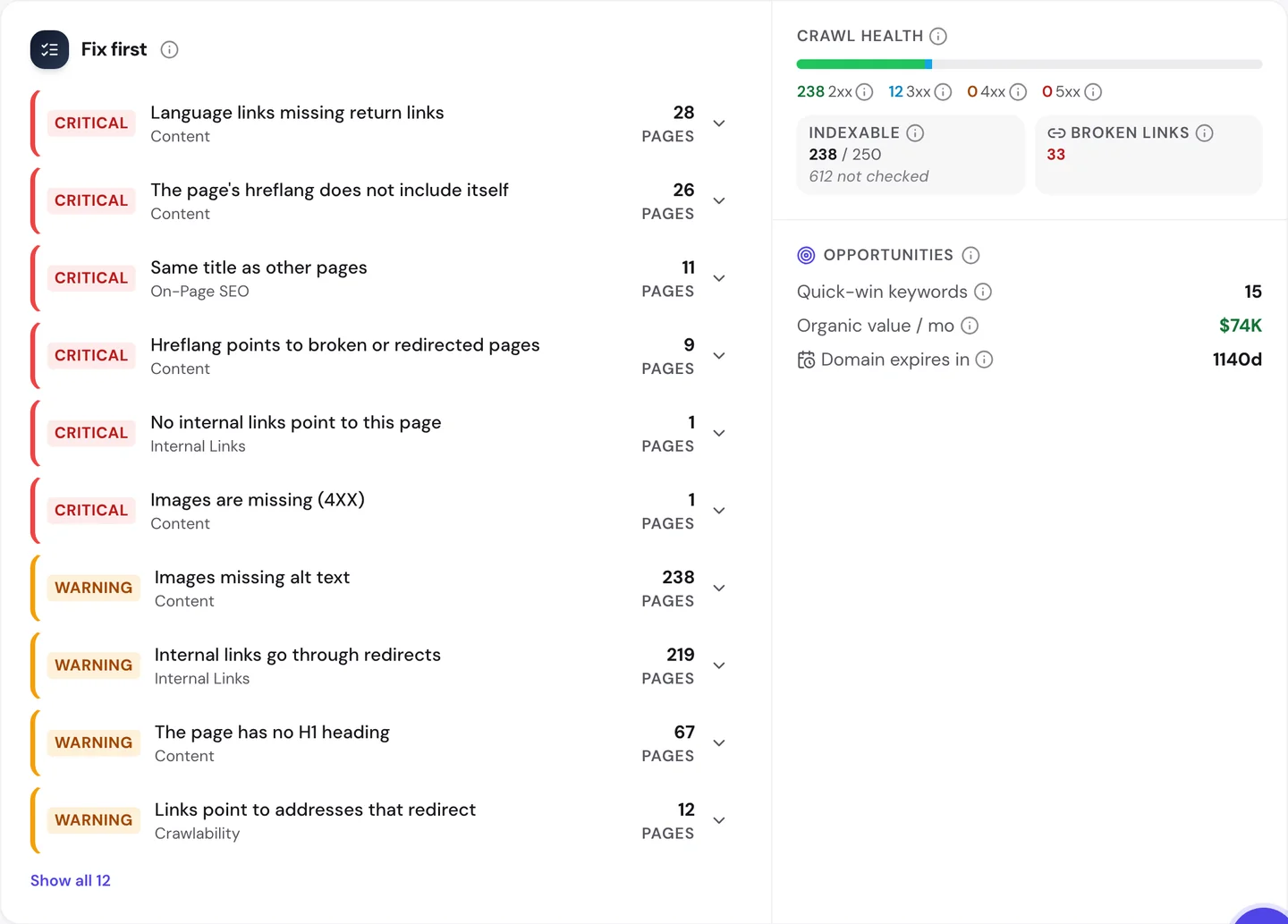
Hreflang is a tag that tells Google which language version of a page to show. PHP.net's manual comes in many languages, and you can switch with the menu at the top of each page.
The top error is 28 pages whose language links don't point back. If the English page names the German one, the German page should name the English one too.
On 26 pages, the list leaves out the page itself. And 9 point to pages that moved or broke.
The Technical SEO tab shows a second language problem.
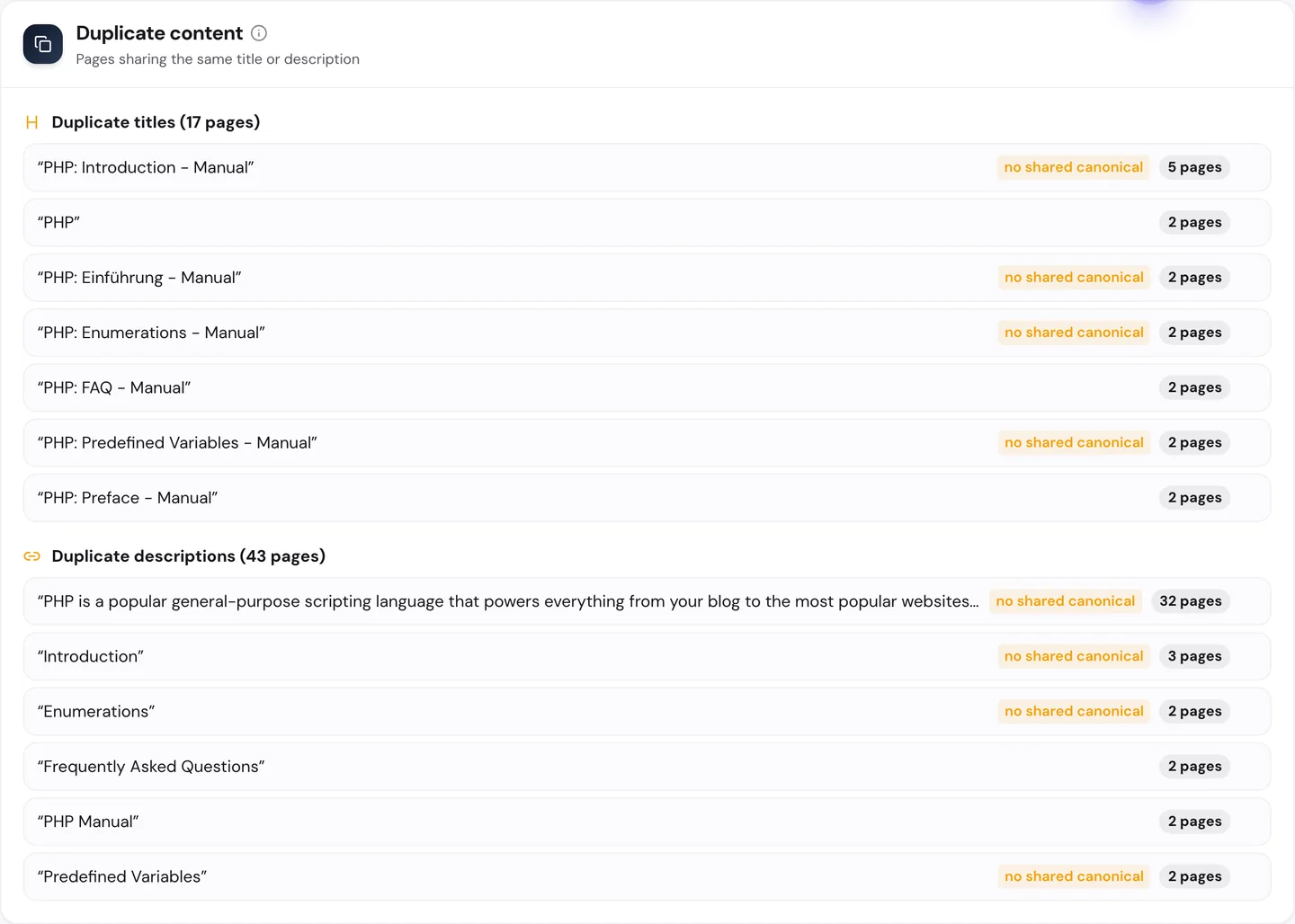
Many chapters of the manual start with a page called "Introduction". 5 of them share the exact same title, and the German manual does the same with "Einführung".
Google can't tell those pages apart from the title alone. Adding the chapter name, like "Introduction to Enumerations", would fix it.
You don't have to work out what to fix first. The audit's AI tab writes the plan: a short summary, each problem with how to fix it, and a 90-day to-do list.
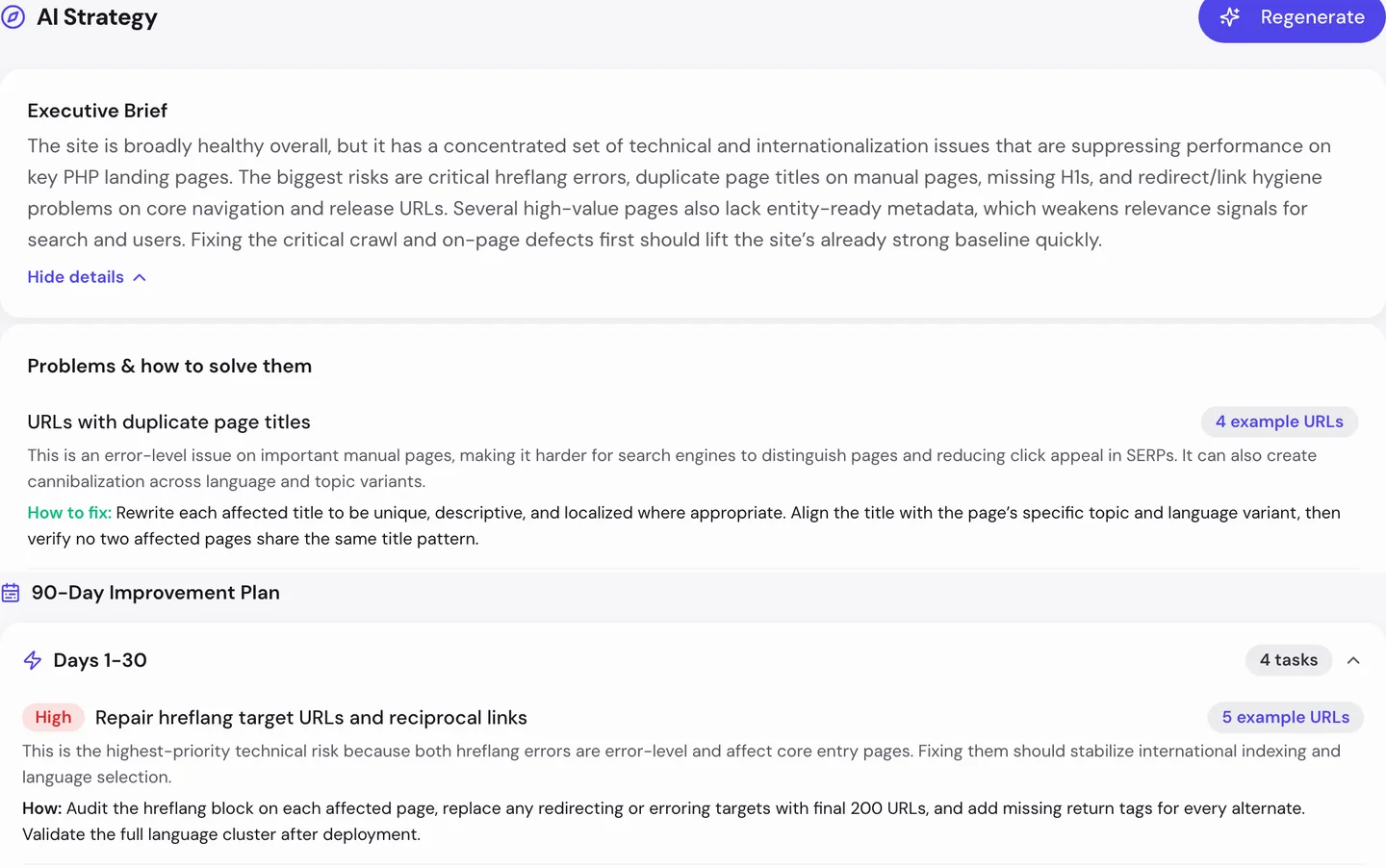
For PHP.net, the first month goes to the language links. Then come the repeated titles.
So if you publish in more than one language, link every version to the others, both ways, and give each its own title. Run our Website Audit to find the pages where that breaks.
PHP.net's manual reaches readers in many languages, but broken language links and repeated titles hold it back. We set up docs and help pages in every language, so Google shows each reader the right one.
- We find the language links that don't point back
- We write a clear title for every page in every language
- We match each page to the words your readers type
- SEO and GEO, so AI answers can quote you too
Keep your pages plain and fast
The Performance tab of the audit shows Core Web Vitals. These are Google's 3 checks of how fast a page loads, how fast it reacts and whether it stays still, measured on real visitors' devices.
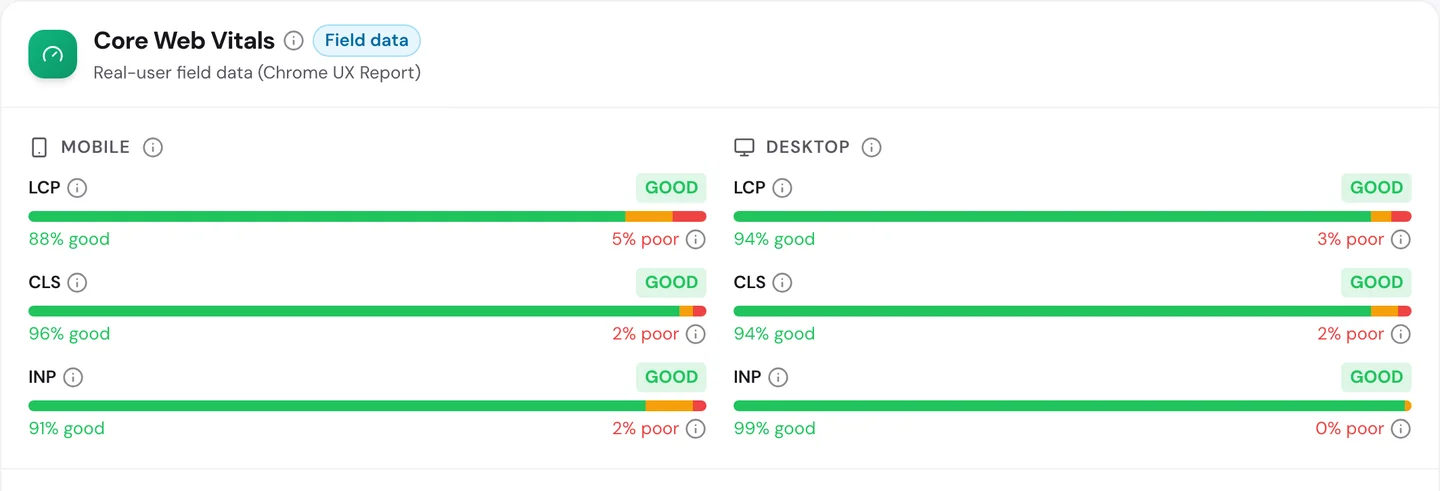
PHP.net passes all 6, on phones and on computers. On phones, 88% of visits see the main content load fast.
The pages are mostly text and code. The audit found no major speed blockers on the homepage, and it loaded in well under a second.
So keep your pages light, with the text first and the extras after. Test them with our Site Speed tool.
Know your real rivals
The audit's Competitors tab lists the sites that rank for the same searches as you.
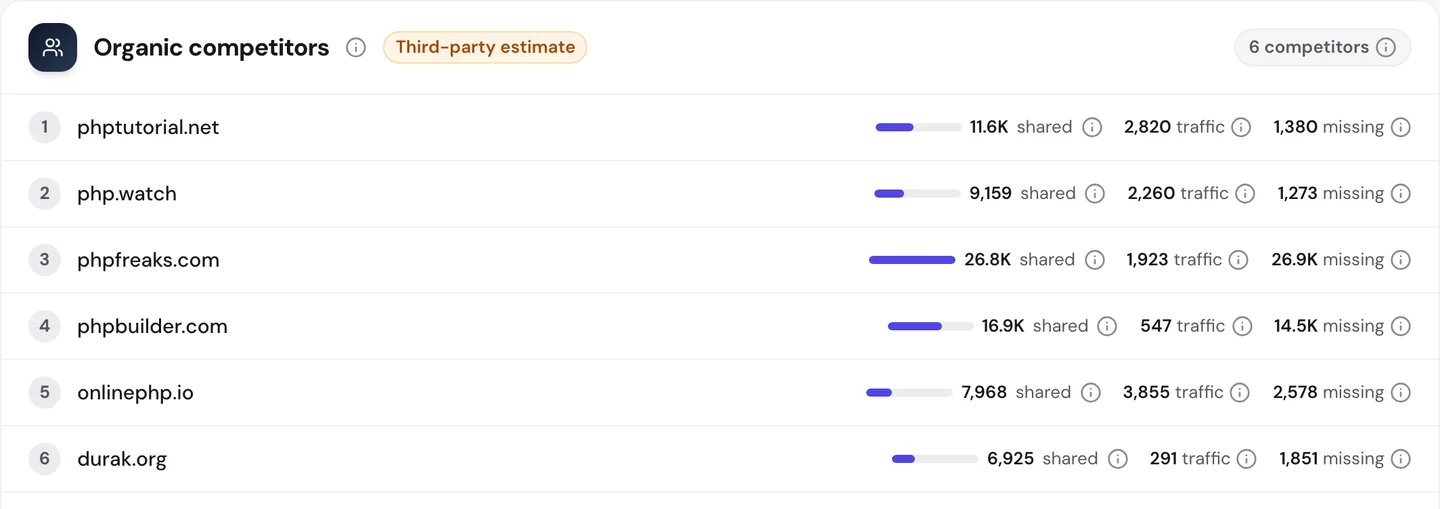
None of them make PHP, as you can see. They're tutorial and help sites, like PHP Tutorial and PHP Freaks.
A tutorial walks you through a task step by step. The manual lists facts about each command, so a tutorial can win the "how do I" searches.
The audit even lists searches the top rival ranks for, like "username and password form" and "abstract class".
GeeksforGeeks, a tutorial site we studied too, gets about 3.4M US visits a month by the same measure. freeCodeCamp, which we studied too, gets about 340K.
So add a short worked example to your key pages, and track the searches you share with rivals in our Rank Tracker.
Write robots.txt rules on purpose
Robots.txt is a file that tells crawlers what they may read. PHP.net's file is short and clear.
It blocks the download files, the search page and a few behind-the-scenes folders. It even has 3 joke rules taken from Isaac Asimov's laws for robots, like "Disallow: /harming/humans".
That's why you'll see 612 pages marked as blocked in our audit.
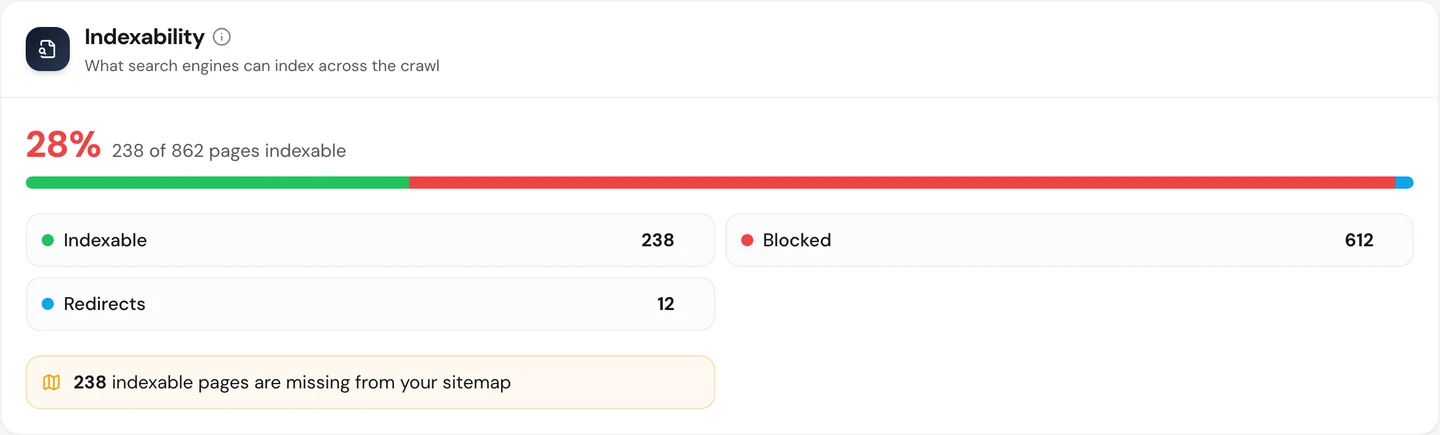
Those 612 are PHP download files, like old php-7 archives. Google has no reason to list them, so blocking them is right.
The audit also found 238 pages Google can list that are missing from the sitemap. That's worth a look, since the sitemap is how you tell Google what matters.
Then we checked the rules for AI tools. Our extension reads robots.txt for you.
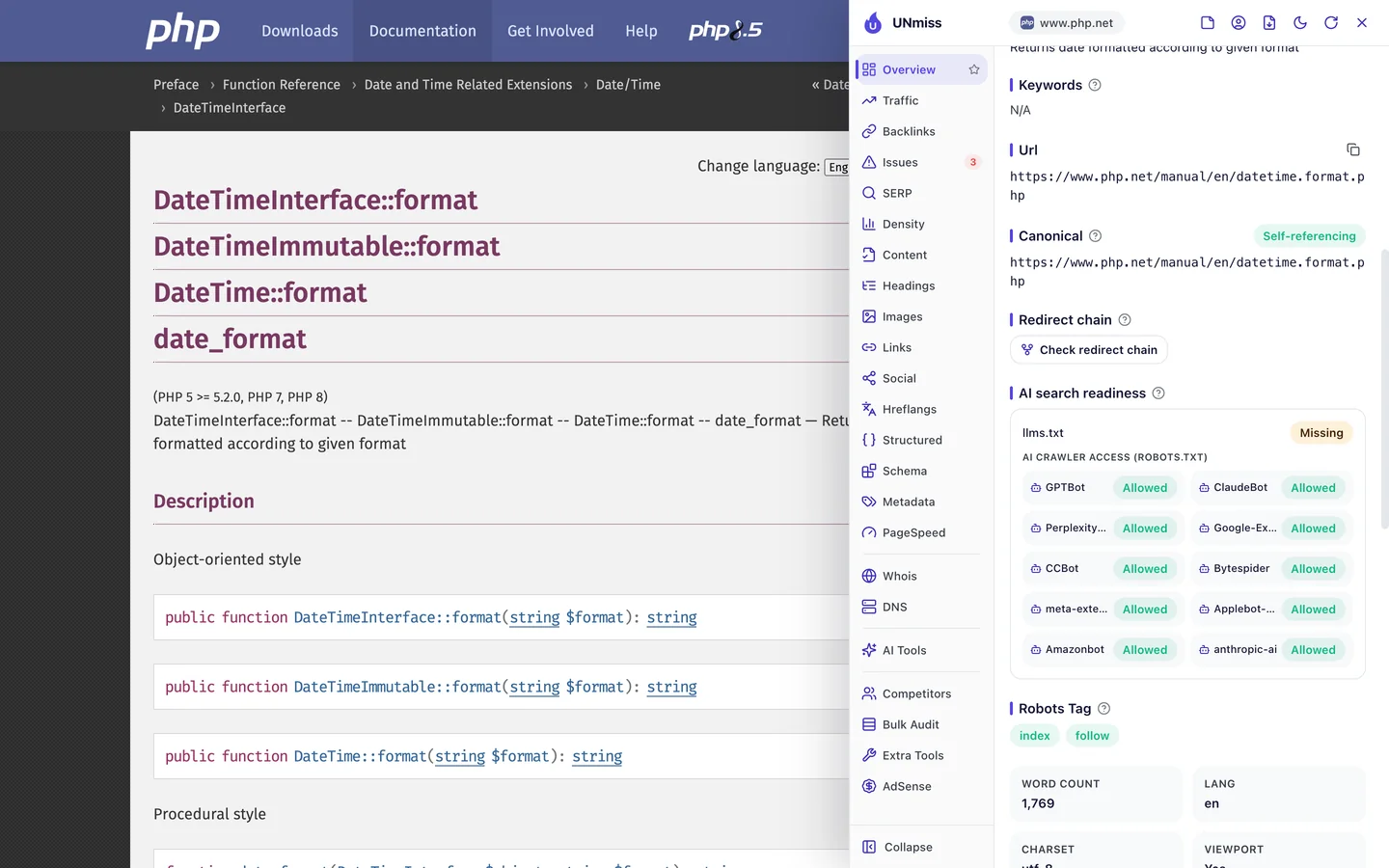
All 10 AI crawlers the extension checks may read PHP.net, including GPTBot, the crawler from the company behind ChatGPT. So when you ask an AI tool about PHP, it can learn from the manual.
There's no llms.txt file, though. That's a short guide that explains a site to AI tools, and it's still new.
So block only what you mean to, and let in the crawlers you want. Write your rules with our robots.txt generator, then check whether AI tools mention you with our AI Visibility Checker.
Some of PHP.net's top pages win searches that have nothing to do with code. Our Organic Traffic Checker shows your top pages and the search that brings each one the most visits.
- The same report that measured PHP.net
- Each top page's traffic, share and top search
- Run it on any rival's domain too
What you cannot copy
First, the part you can't copy: PHP.net is the official home of PHP. In its own words, PHP powers everything from your blog to the most popular websites in the world.
Its domain dates back to 1997, and sites built with PHP have linked to it for years. You can't buy that kind of history.
Now a few honest notes on the numbers.
Update the published/updated date to match the data date The 149K figure counts US searches only.
The worldwide figure of close to 1M comes from the audit's Traffic tab. Both are estimates, since nobody outside PHP.net can count its real visits.
Tools work them out from rankings and search volume. The odd searches are real rankings, but the visits from each one are estimates too.
Our crawl checked 862 pages because we gave it the sitemap. 612 of those were download files, so we used it to find problems that repeat, not to count every error.
The one number to take away
51%.
That's how much of PHP.net's US search traffic, in the searches we sampled, comes from people typing its name. Even with about 450M links, half its visitors already knew where they were going.
That's the lesson for any docs site. Links help, but pages named after the words you'd type are what bring new readers.
What does your most useful page call itself? Check it the way Google would.
You can run every one of these checks on your own site, and on your rivals', and see the same numbers for yourself.
Frequently asked questions
Can I stop a page from ranking for searches that don't fit it?
Not directly. Give the page a title and a first line that name the real task, and Google will match it to the right searches more often.
What should a title look like on a reference page?
Put the task first and the code name second, like "Send email with PHP: mail()". Keep it short enough to show in full on Google.
Which structured data fits a docs page?
Breadcrumb code is a good start, since most docs pages already show a trail of links. Article code can describe the page itself, with its date.
Do "Powered by" badge links help SEO?
They count as links, but most point at your homepage. A link from an article that names one of your pages does more for that page.
How do I check that my language links point both ways?
Open a page, note each language version it names, then open those and make sure they name it back. An audit does this for every page at once.
Should I block download files in robots.txt?
Usually, if they're archives nobody needs to find on Google. Keep the download page itself open, so people can still find the latest version.
Is an llms.txt file worth adding?
It's cheap to try. It's a plain text file at the root of your site that sums it up for AI tools, but not every AI tool reads it yet.
Should my docs include tutorials?
A short worked example on each key page helps a lot. Longer guides can live in their own section and link back to the reference pages.