Every publisher we checked blocks AI crawlers in its robots.txt, but only 5 of 41 software companies block even one.
Robots.txt is a small file that tells crawlers, the programs that visit websites, which pages they may read. We read that file on 57 big sites and looked for 18 AI crawlers by name.
The split is clear. Publishers sell their words, so they lock them up.
Software companies want AI tools to recommend them, so they leave the door open.
Here are 8 lessons you can copy, plus the part you can't.
Treat your words as the product
Start with the big picture. A site blocks a crawler when its file tells that crawler to stay off every page.
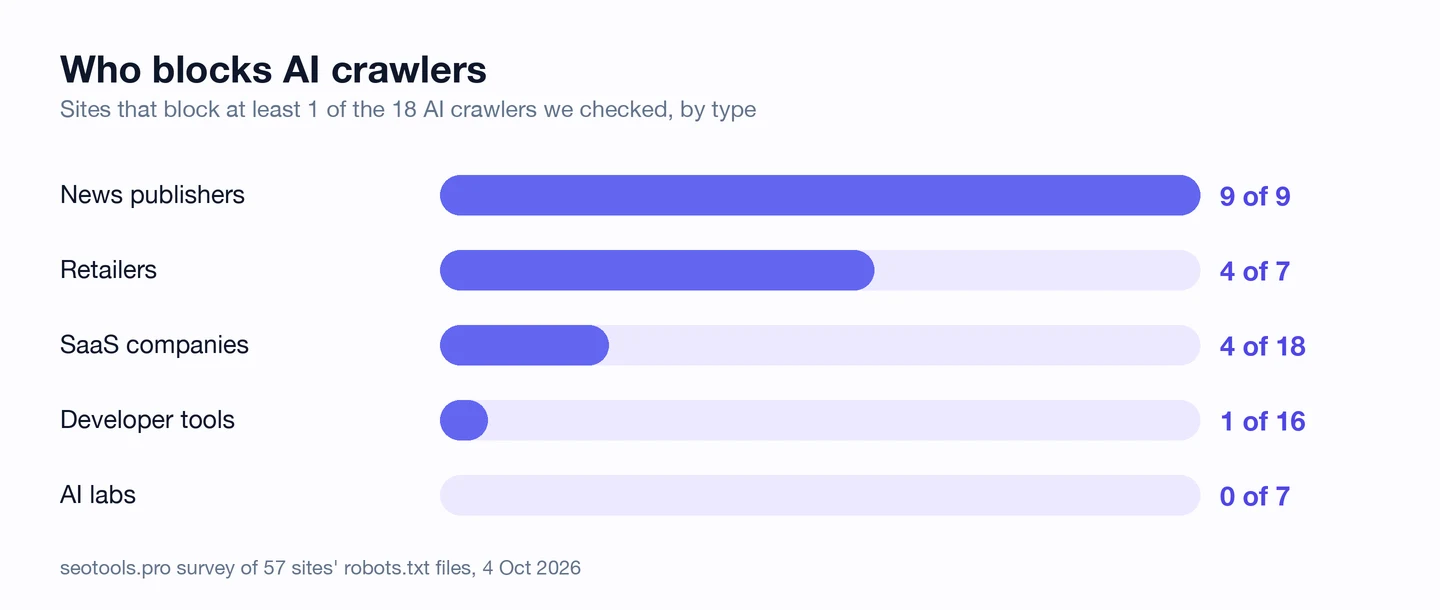
All 9 publishers block at least one AI crawler. The New York Times, CNN and wikiHow each block 17 of the 18 we looked for.
Here's what they're guarding. The Times sells its reporting, and its front page marks the top stories that are free to read.
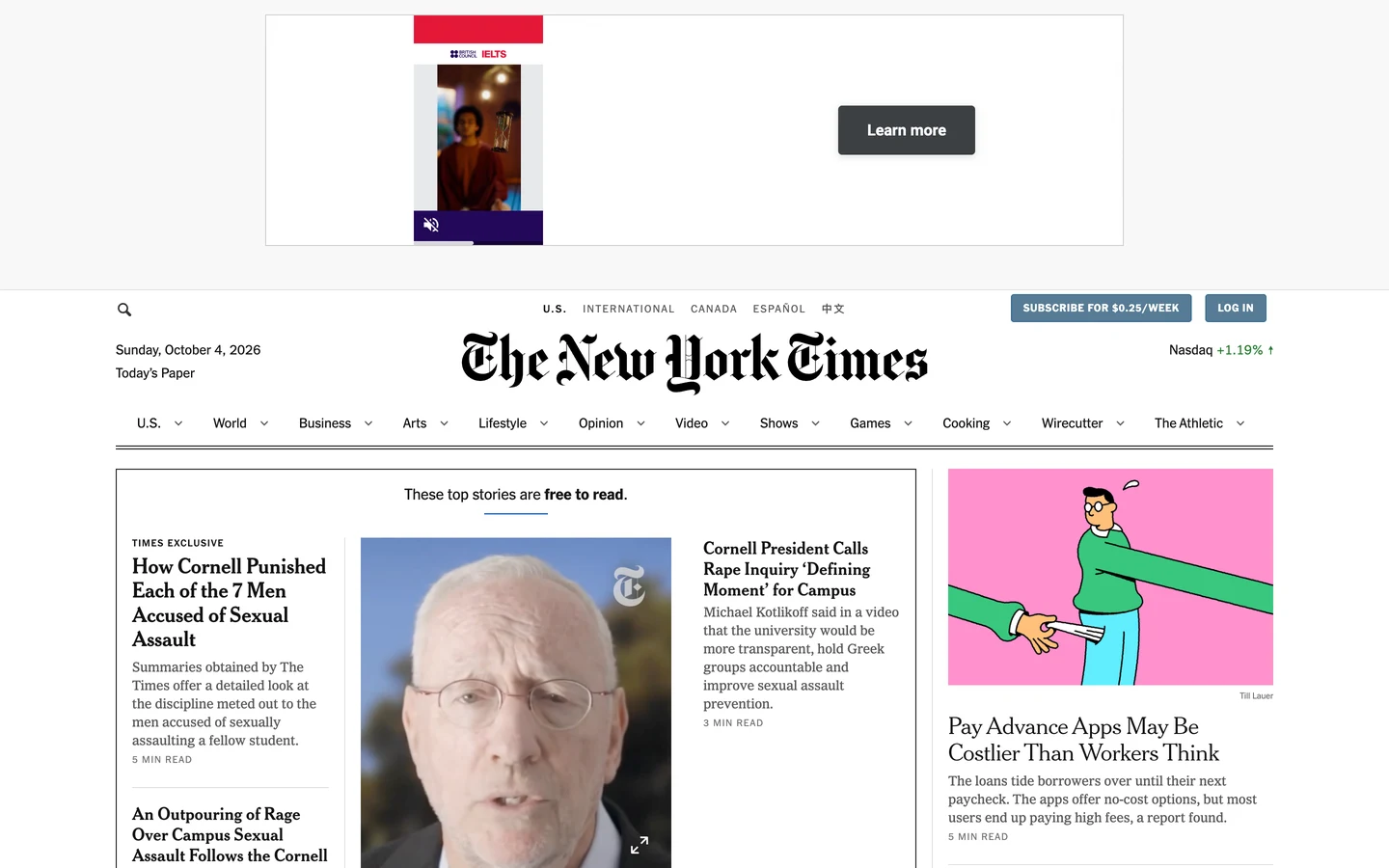
Its robots.txt opens with a note in plain English. It says you can't use its articles to build AI or large language models without written permission.
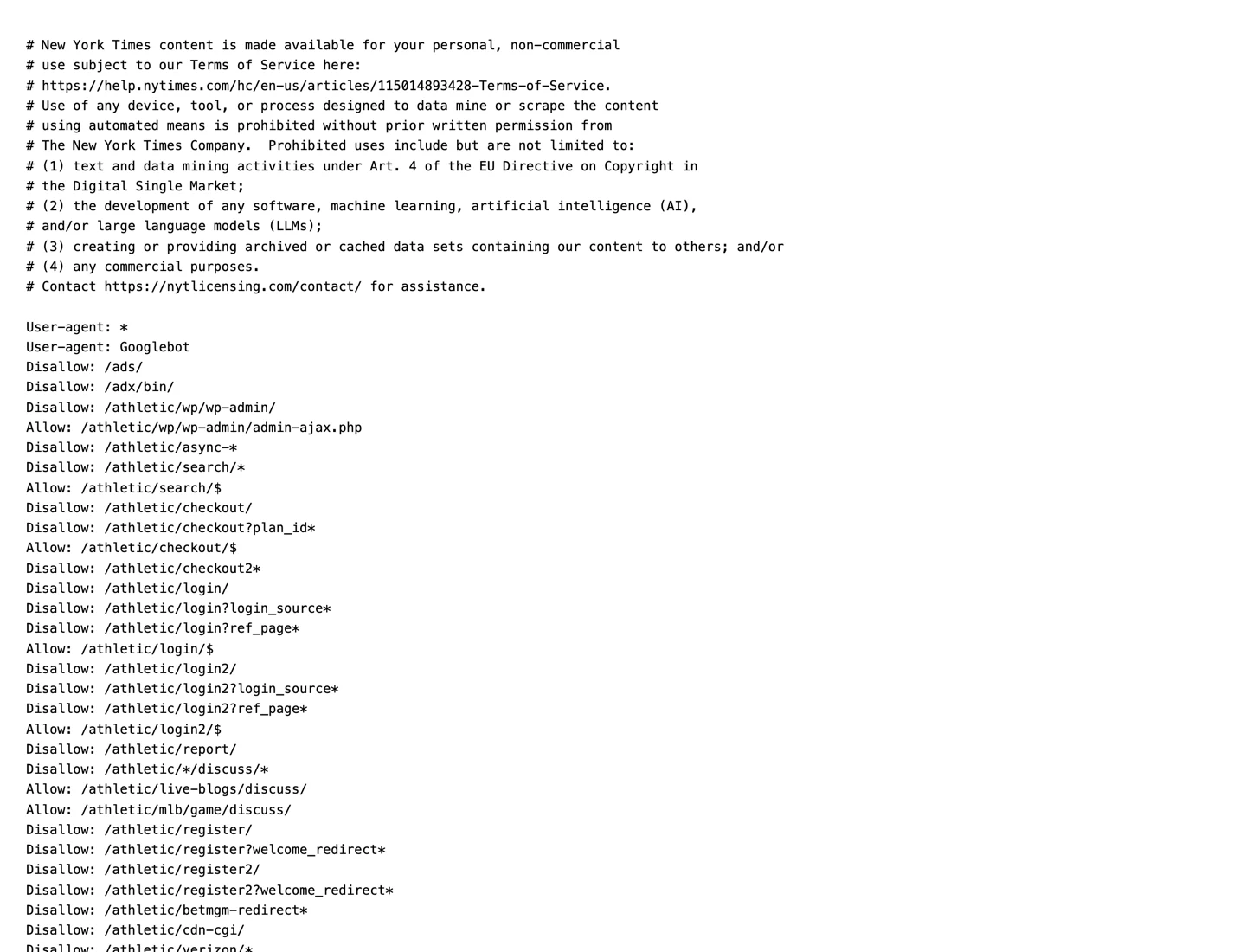
The note ends with a contact for licensing. In other words, the words are for sale.
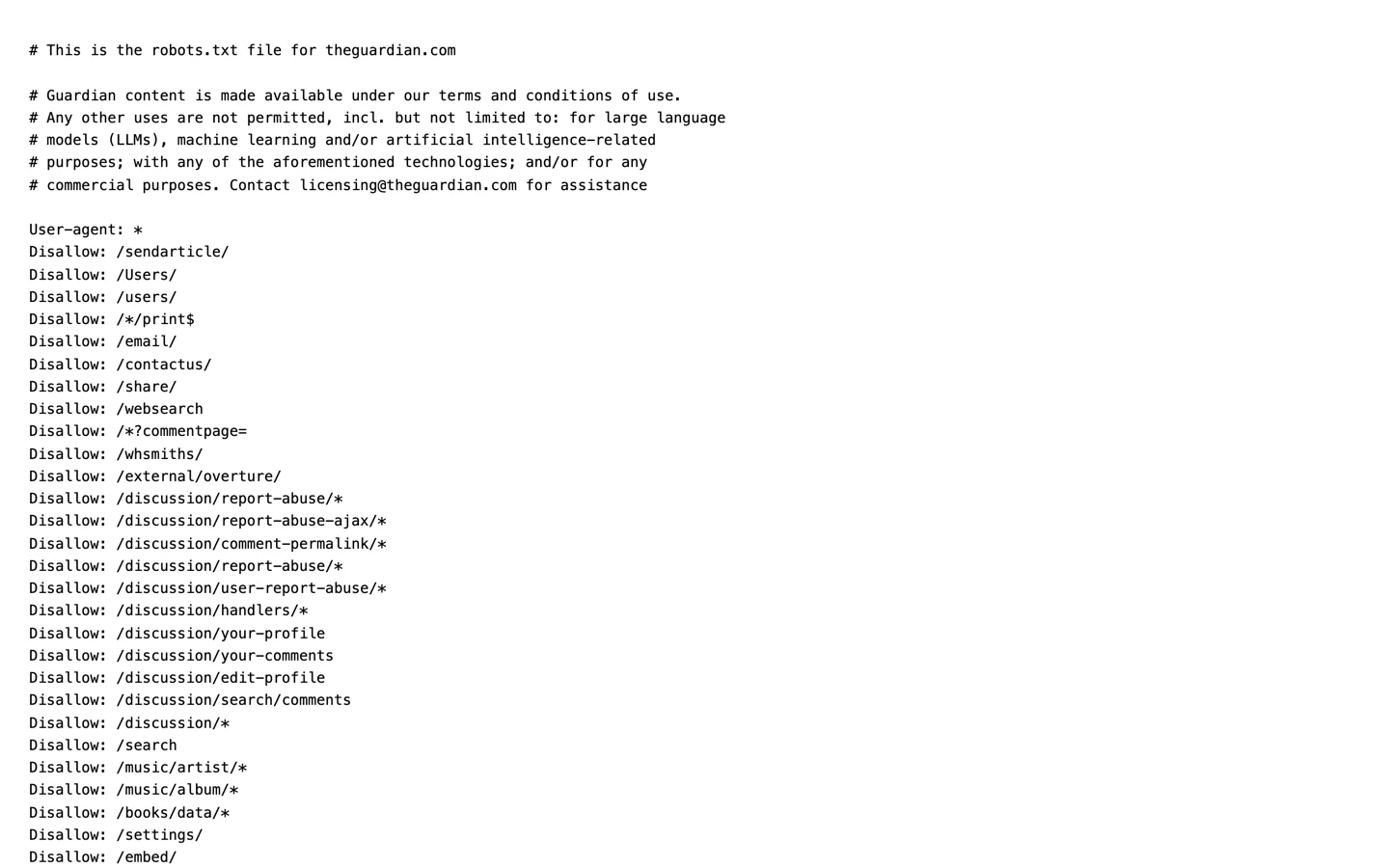
The Guardian's file says much the same thing. It names AI and large language models as uses it doesn't allow.
wikiHow, which we studied too, blocks 17 AI crawlers. Healthline, another site we pulled apart, blocks 11.
So if your words are the thing you sell, keep the AI crawlers that copy them out. Our Robots.txt Generator writes those rules for you.
Let AI tools read your pitch
Software companies make the opposite choice. Only 5 of the 41 we checked block any AI crawler at all.
Their pages don't sell words. They sell a product, and the pages are the sales pitch.
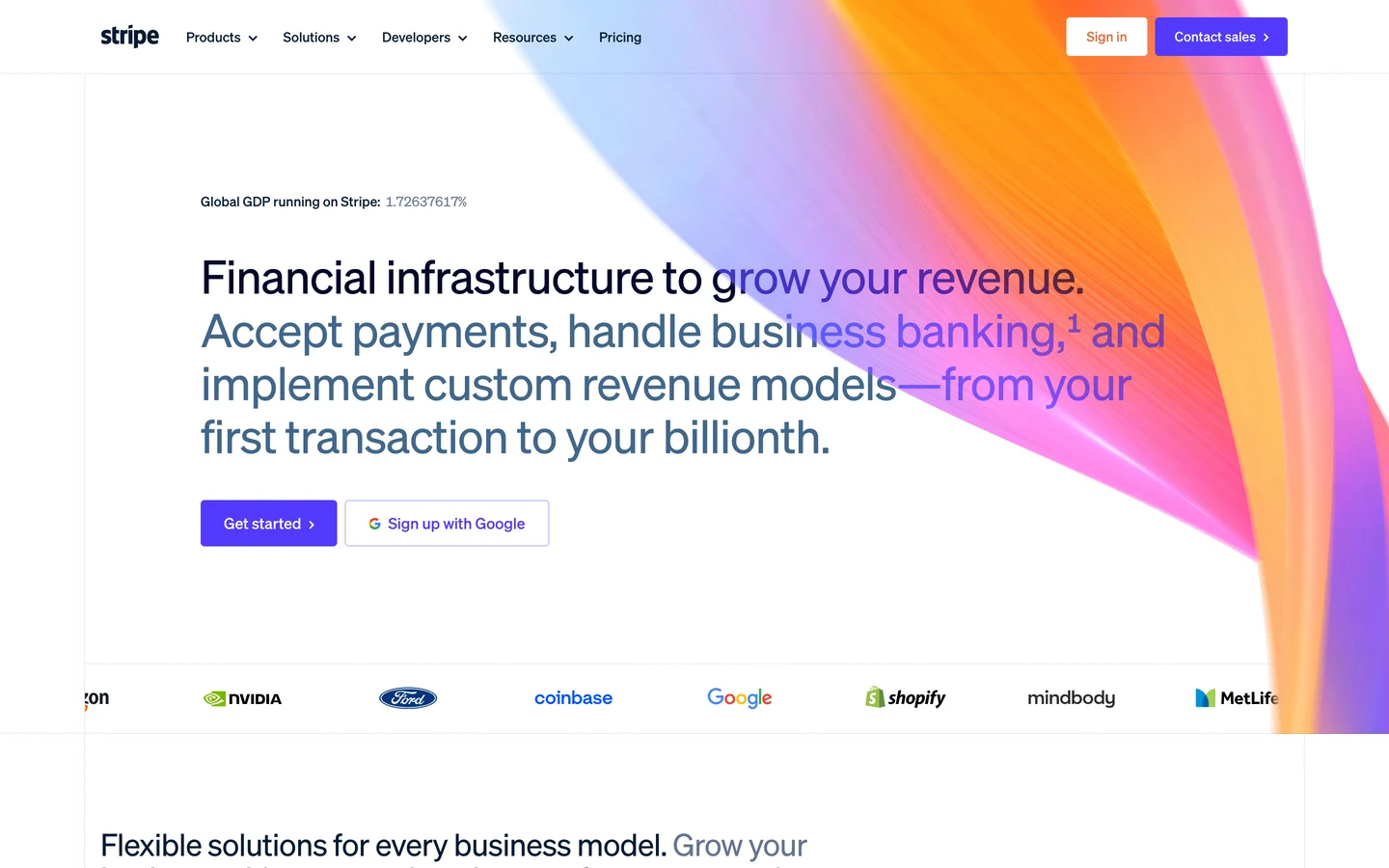
Stripe's homepage is a good example. When someone asks an AI tool how to take payments online, Stripe wants to be in the answer.
Our free browser extension shows what a site's robots.txt allows. Open any page, click the seotools.pro icon, and scroll to AI search readiness.
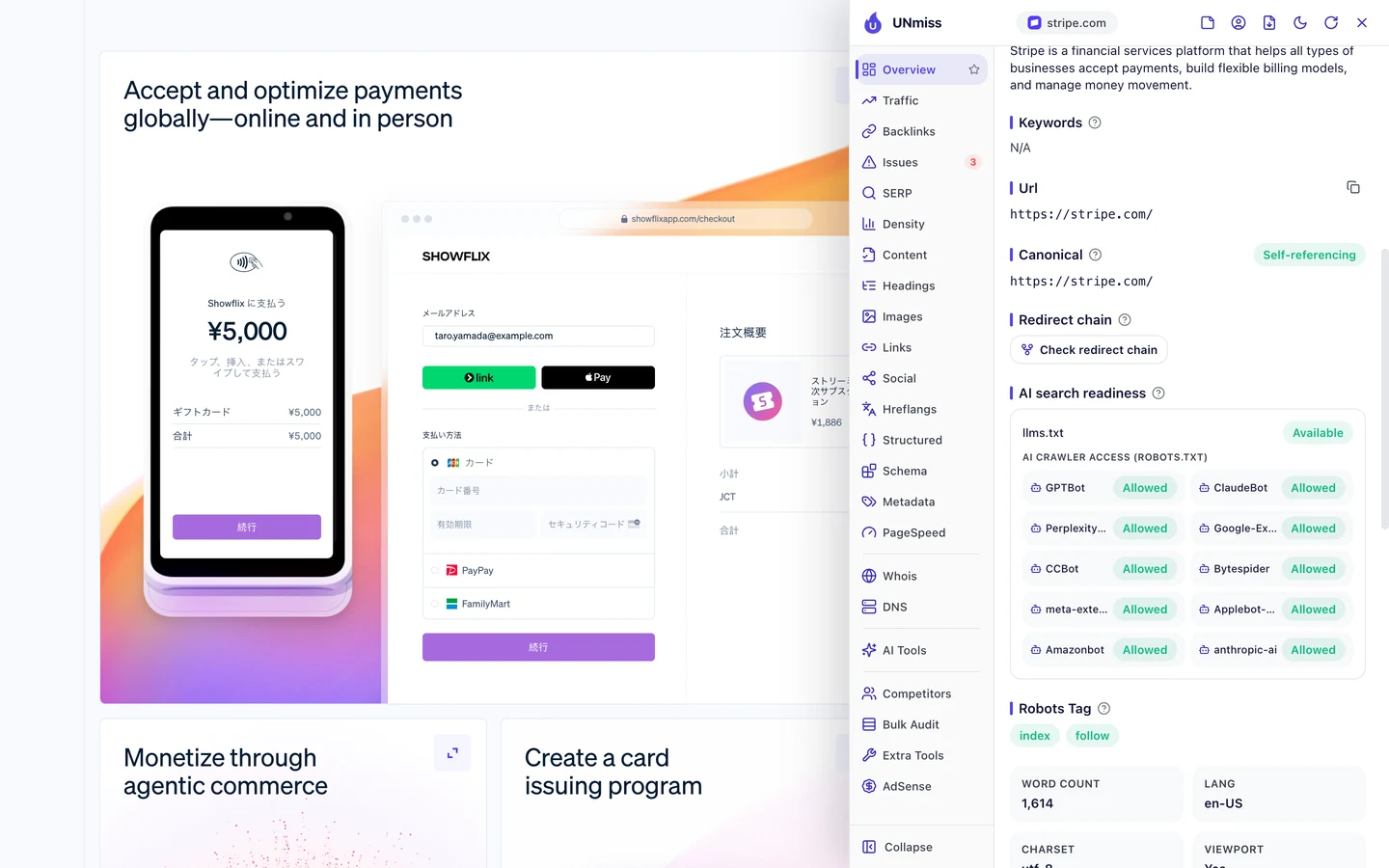
Stripe lets in all 10 crawlers the panel lists. It also has llms.txt, a short file that explains a site to AI tools.
Even the AI labs, the companies that build these bots, block none of them. GitHub blocks just one, Bytespider.
Figma and Canva, which we studied too, are the odd ones out. They block 11 each.
Being readable doesn't mean you get the link, though. Our AI citation study found AI tools often name a brand without linking to it, and our llms.txt study looked at who has that guide file.
So if your pages sell a product, let AI tools in. Then see if they actually name you with our AI Visibility Checker.
Block training bots, not answers
Not every AI crawler does the same job. Some collect pages for training, which means feeding them to an AI so it learns from them.
Others fetch a page to answer a question right now. Those can name you, link back and send you visitors.
Our Robots.txt Generator lists each AI crawler with the company behind it and the job it says it does.
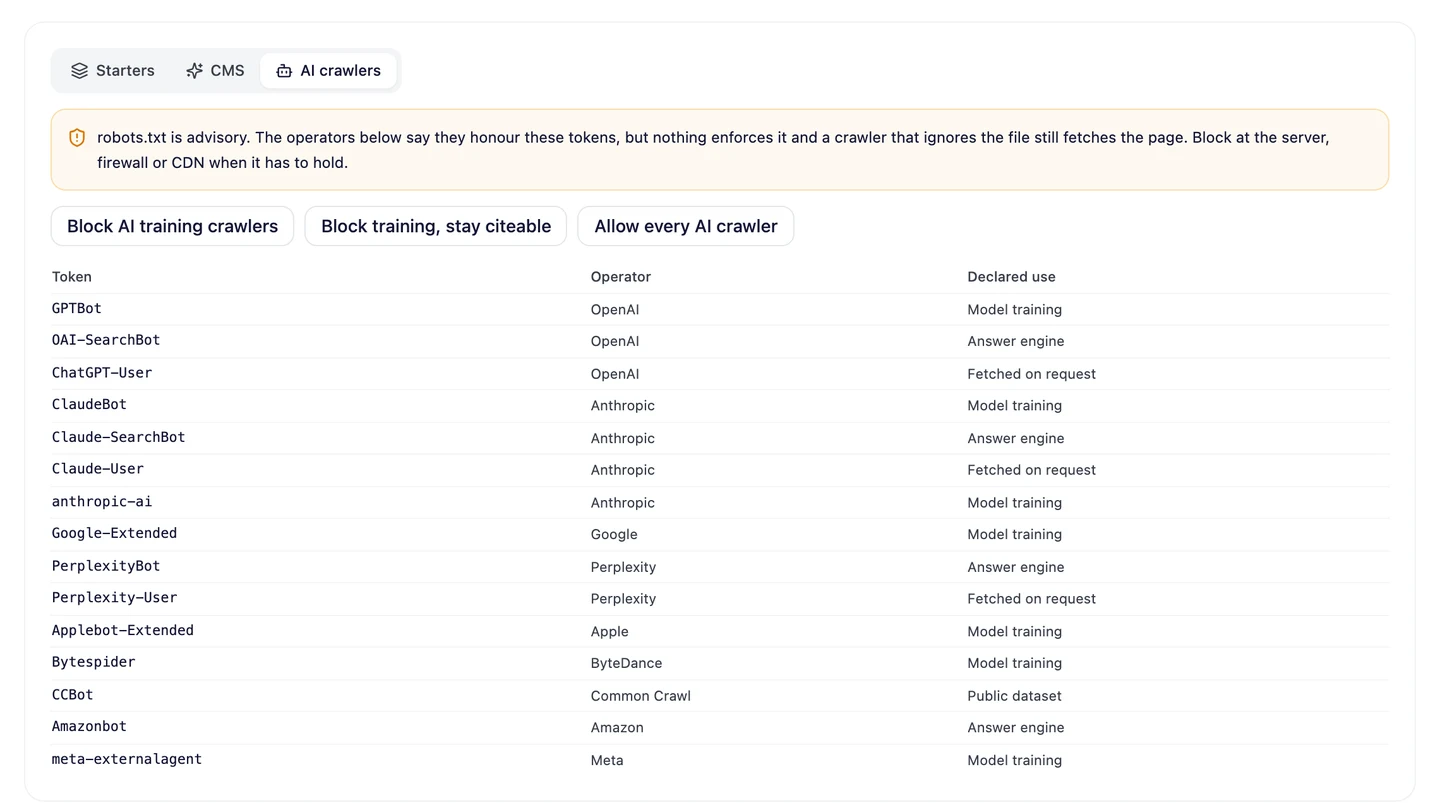
OpenAI is a good example. GPTBot is marked for model training, while OAI-SearchBot is marked as an answer engine.
Sites treat those 2 very differently. Here's how many of the 57 block each crawler.
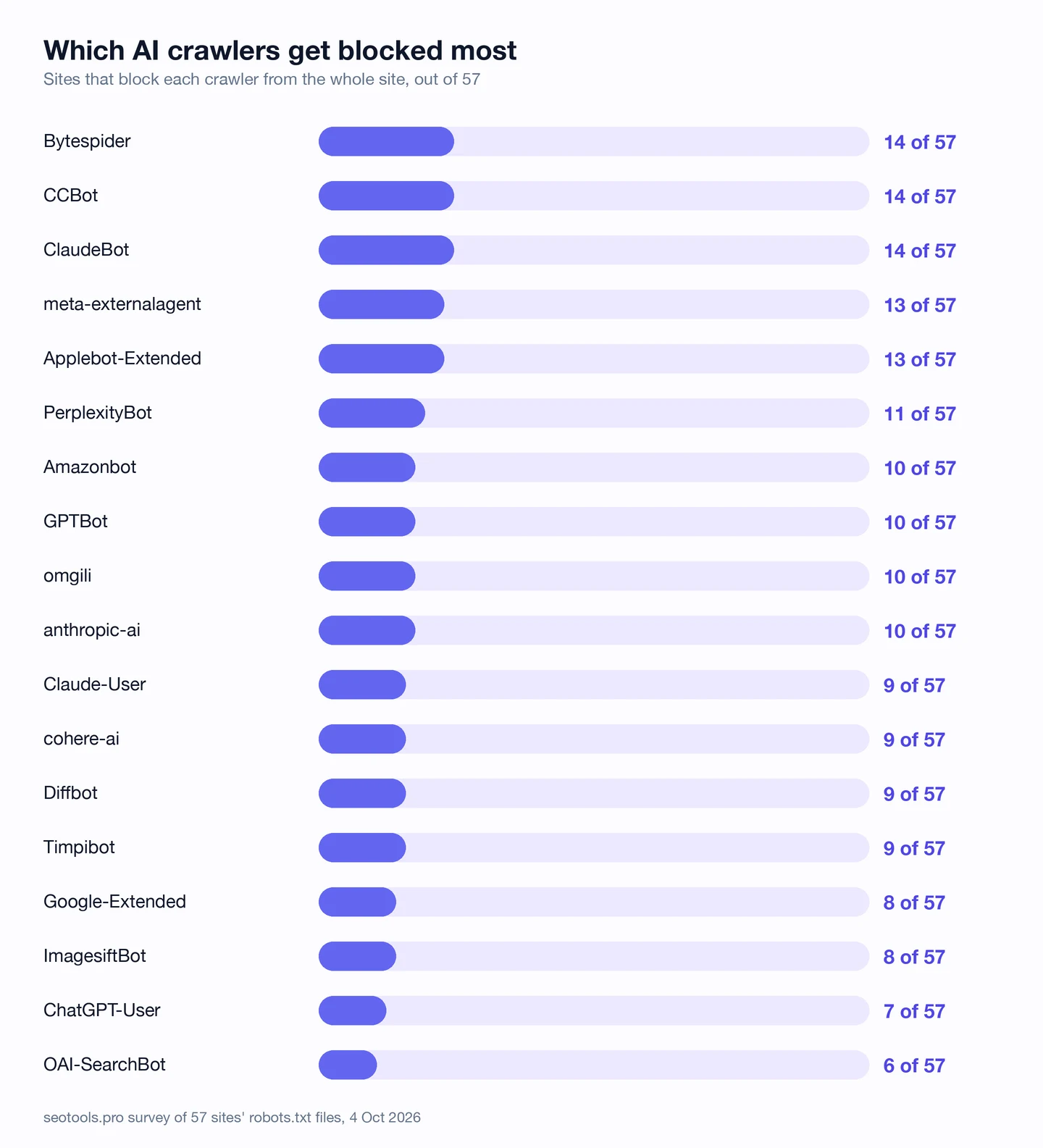
ClaudeBot, CCBot and Bytespider are blocked most, by 14 sites each. All 3 collect pages for training or for public datasets.
OAI-SearchBot is blocked least of all 18. Only 6 sites keep it out, while 10 block GPTBot.
It's not a perfect pattern. PerplexityBot is an answer engine, yet 11 sites still block it.
The generator has a preset built on this idea, called "Block training, stay citeable". Being cited means an AI tool names you with a link back to your page.
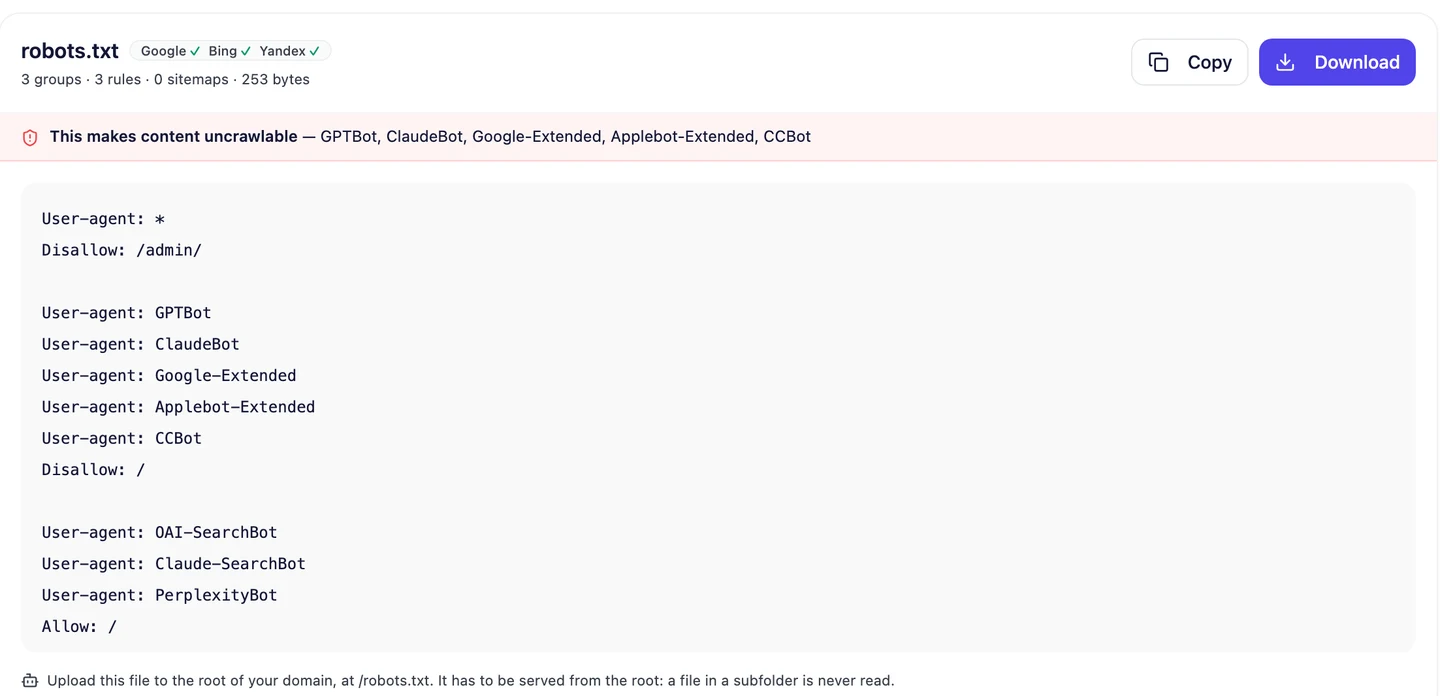
It keeps 5 crawlers off the whole site, GPTBot and ClaudeBot among them, and lets 3 answer engines in. The full file is just 3 short groups.
So keep your pages out of training if you like, but let answer bots read them. Pick that preset in our Robots.txt Generator and copy the file.
Publishers lock AI crawlers out, and software companies let them in. We work out which side your site belongs on, set the right rules for each bot, and help AI answers name and link to you.
- We check which AI crawlers your site blocks today
- We write rules that keep training bots out and answer bots in
- We track whether AI tools name you and link to you
- SEO and GEO, so you show up in Google and in AI answers
Pick each crawler one by one
Even publishers don't block every bot. Look at how many each one keeps out.
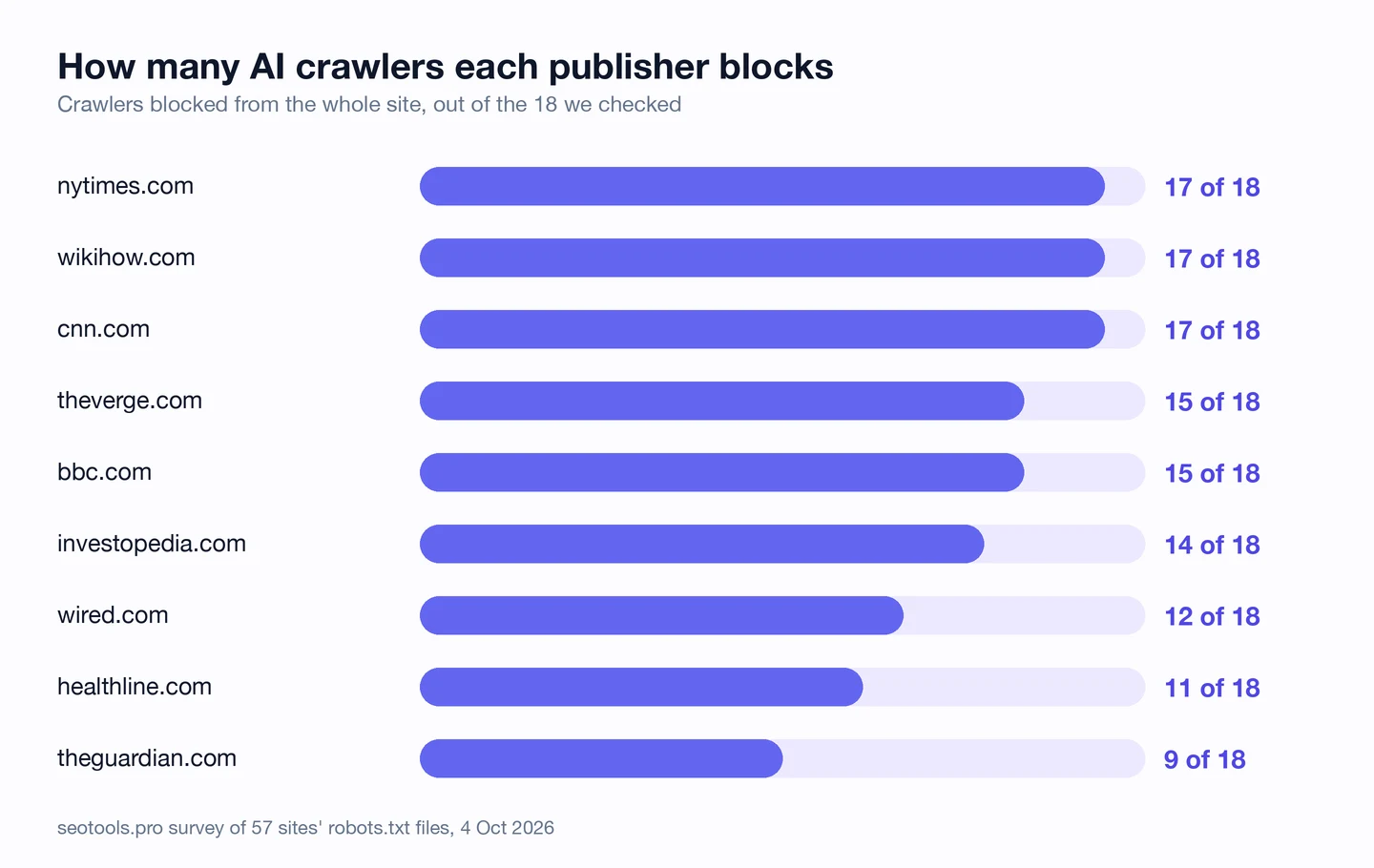
The top 3 block 17 of the 18. The Guardian blocks just 9.
The gaps look chosen, not forgotten. Investopedia blocks 14, but not OpenAI's 3 crawlers, even though its file names all 3.
The Guardian blocks Anthropic's and Perplexity's bots. It leaves OpenAI's and Google's alone.
We can't see the reasons from the outside. But it shows that each bot gets its own yes or no.
Here's how a file does that. A user-agent is the name a bot goes by, and you can list many names above one rule.
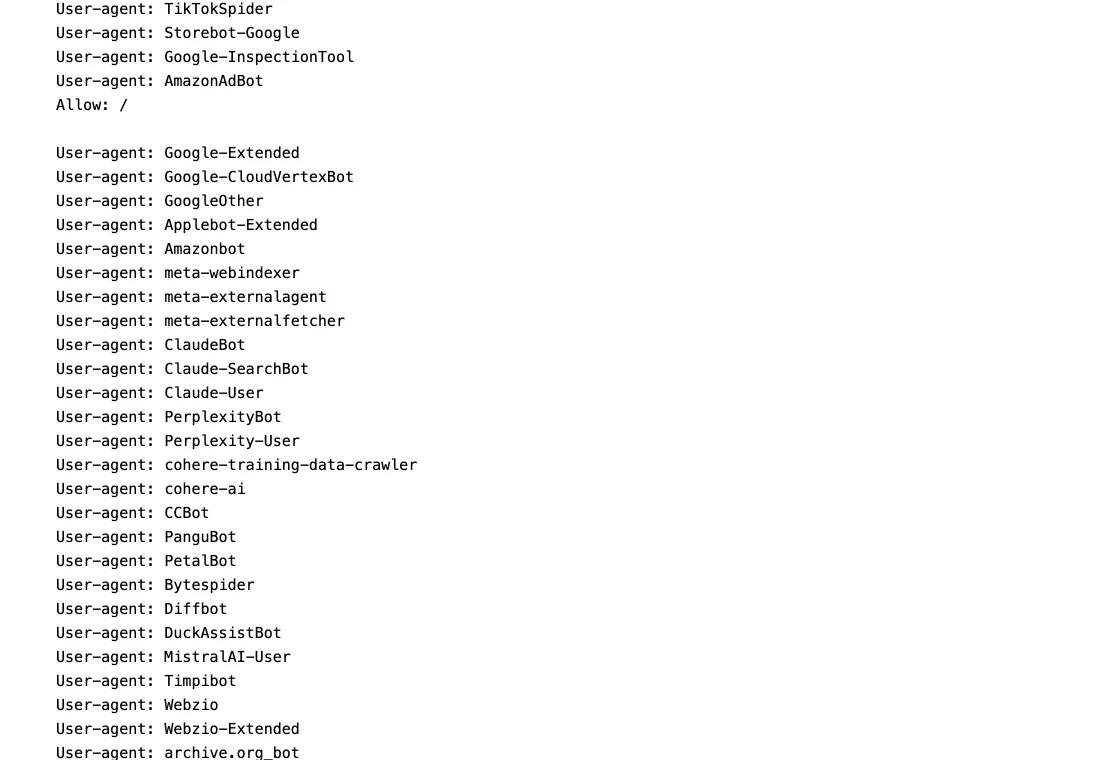
Wired puts a long run of AI crawlers in one group. Our survey found it blocks 12 of the 18 we looked for.
So decide bot by bot, not all or nothing. Our Robots.txt Generator shows each bot's job, so you know what you're saying no to.
Choose what shopping AI can see
Shops sit in the middle. Of the 7 retailers we checked, 4 block at least one AI crawler.
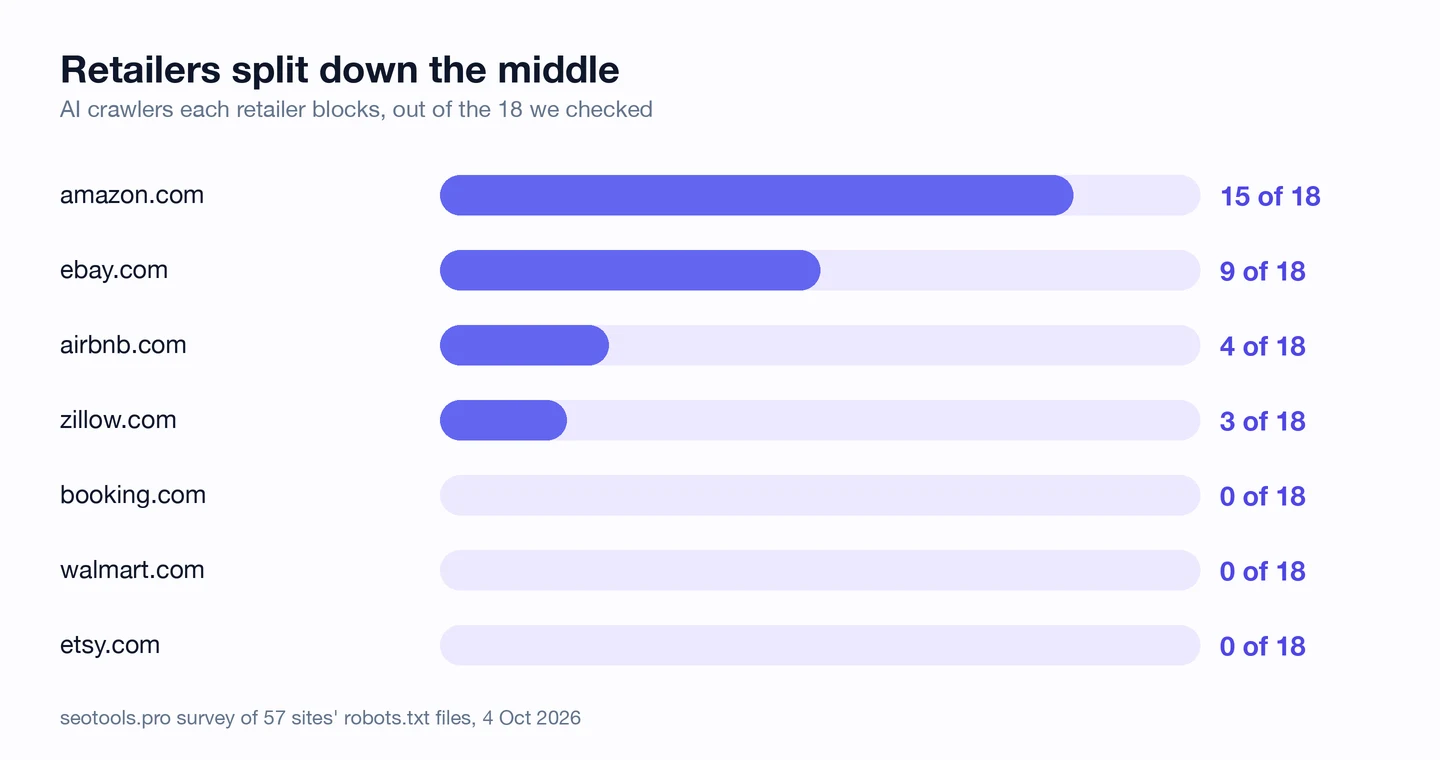
Amazon blocks 15 of the 18. But it leaves its own crawler, Amazonbot, alone.
eBay blocks 9. Walmart, Etsy and Booking.com block none at all.
Think about what a shopper asks an AI tool, like "what's a good tent for a beginner?" If your rules keep answer bots out, your tents can't be in that answer.
Amazon has its own crawler and its own huge store, so it can afford to say no. Most shops need every answer they can get.
So if you sell things, let answer bots read your product pages. Then help them find every product with a sitemap, the file that lists a site's pages, from our XML Sitemap Generator.
Don't mistake naming for blocking
Here's a trap that's easy to fall into. Lots of files name AI crawlers without blocking them at all.
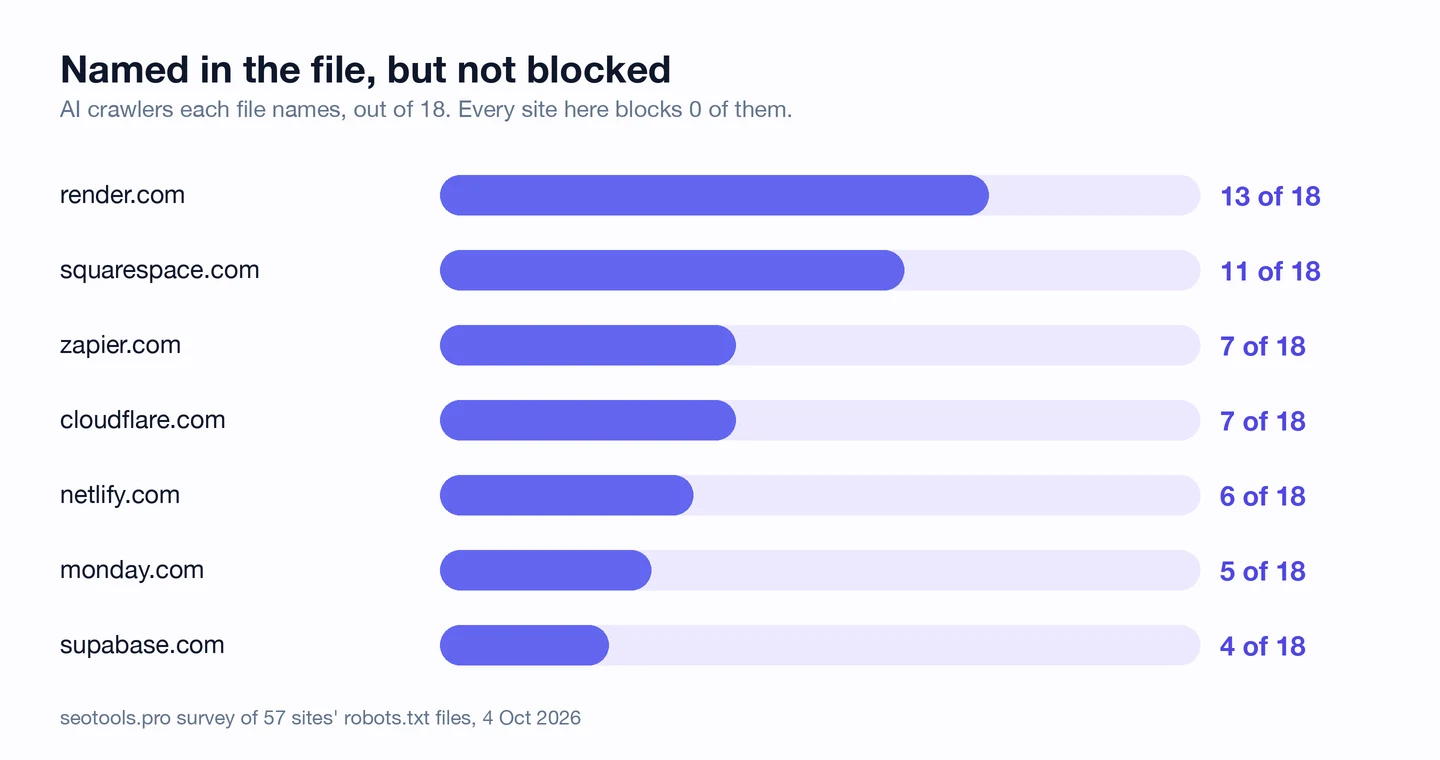
Render names 13 AI crawlers in its file. It blocks 0 of them.
Zapier, which we studied too, names 7 and blocks none. Squarespace, Netlify and a few others do the same.
A name in the file can mean lots of things. It might sit above a rule for one folder, above an Allow line, or inside a comment.
Only one rule locks a bot out of everything. It's Disallow: / under the bot's name, and it means "stay off every page".
So read the rule under each name, not just the name. The AI crawler panel in our browser extension reads the rules for you and marks each bot Allowed or Blocked.
Audit your robots.txt every quarter
Files change, and new AI crawlers keep showing up. So check yours, and your rivals', every 3 months.
The quickest check is the extension. Open the site, click the seotools.pro icon, and look at AI search readiness.
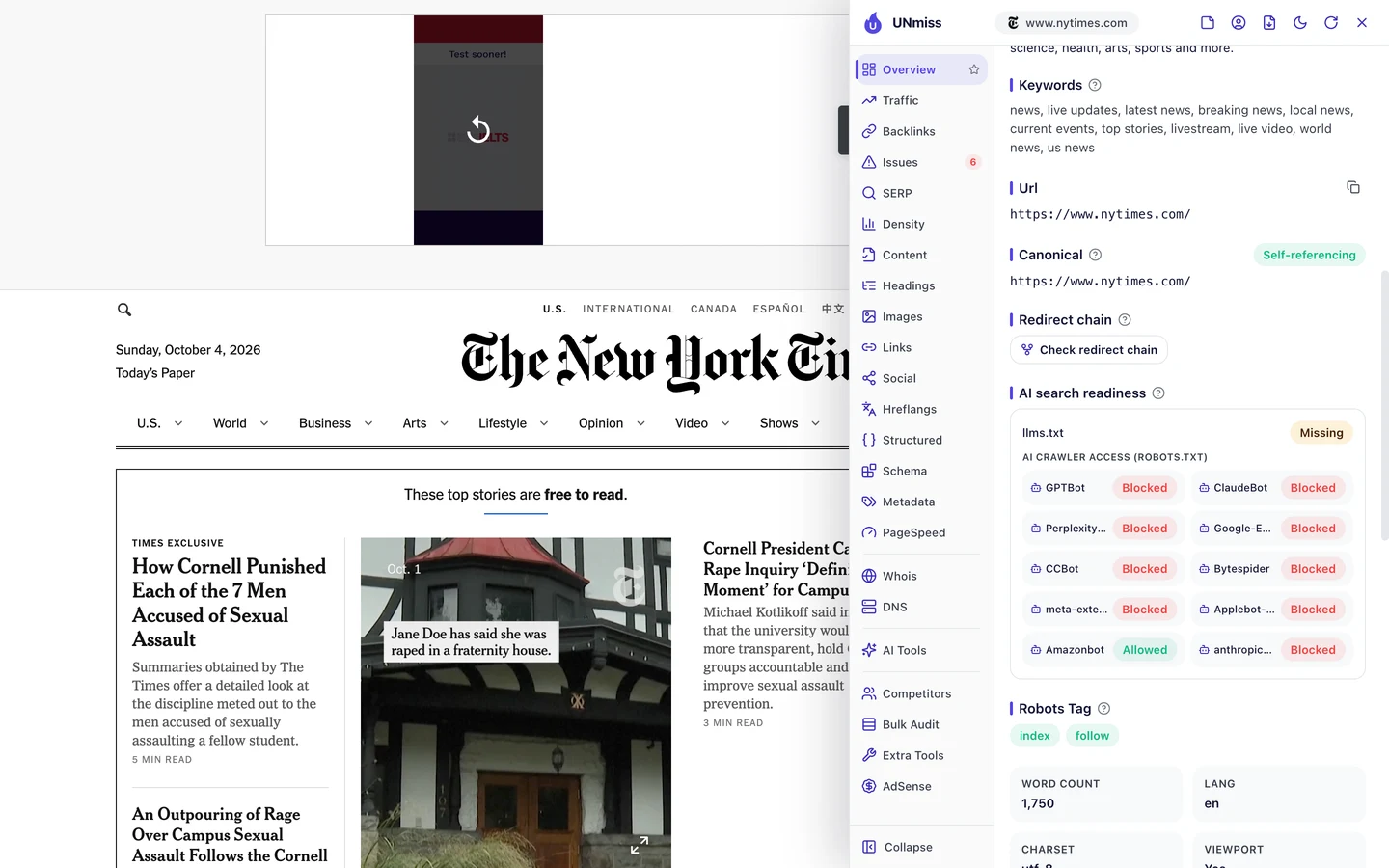
On the New York Times, 9 of the 10 bots show as Blocked. Amazonbot is the only one marked Allowed.
It also shows llms.txt as missing. Stripe, by contrast, lets every bot in and has the file.
Now run the same check on your own site. Did you block an answer bot by mistake?
Then look for gaps. Is a new crawler missing from your list?
For the whole site, run our Website Audit. Its Technical SEO tab shows AI crawler access next to the rest of your site's health.
Here's that card for the NHS website, from an audit we ran the same week.
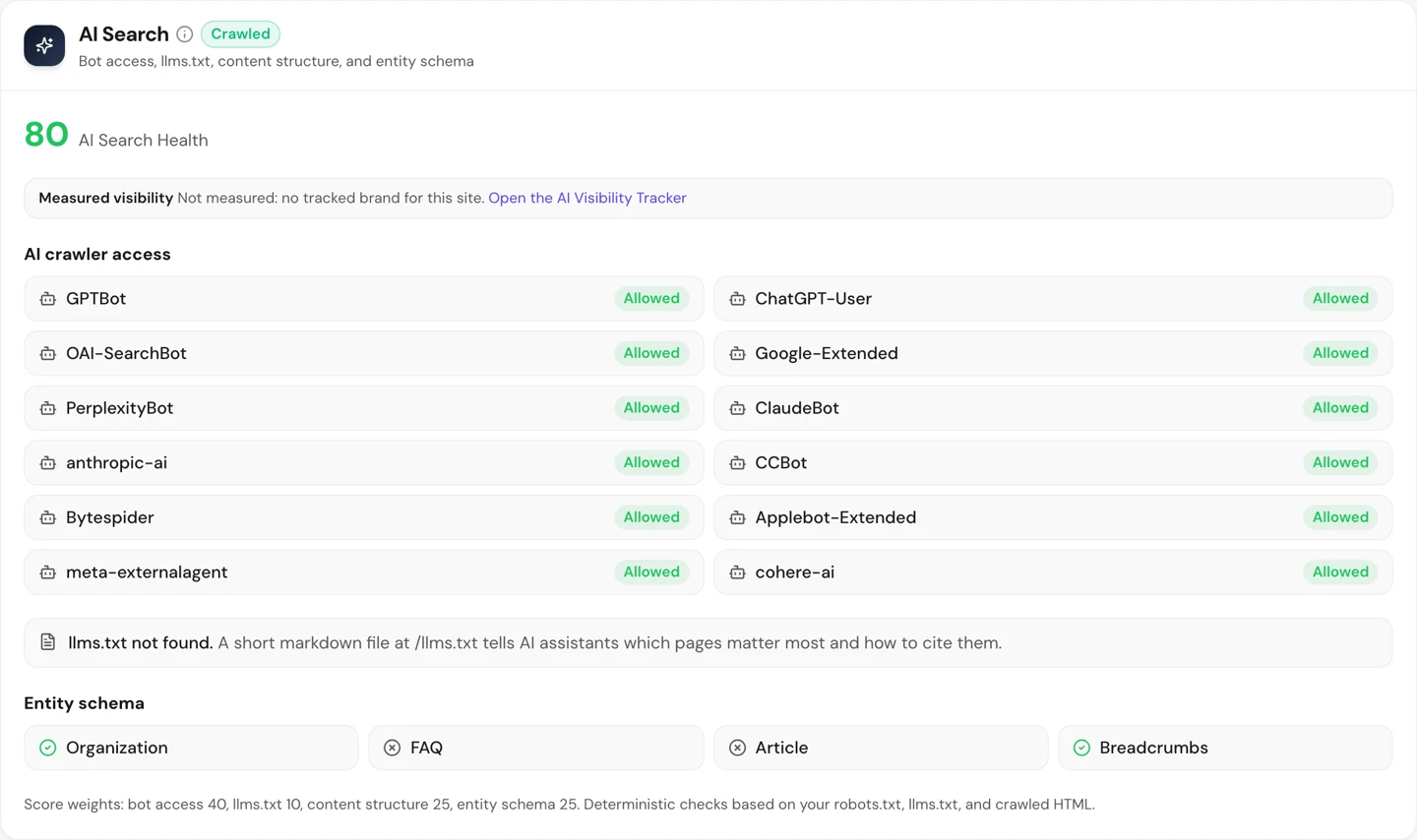
It lists each AI crawler as allowed or blocked, and it checks for llms.txt too.
So put a check in your calendar every 3 months. Run our Website Audit on your site, and the extension on your rivals'.
Expect some bots to ignore it
One last thing to know. Robots.txt is a request, not a lock.

Our generator says so right at the top. The big AI firms say they follow the file, but nothing makes a crawler obey it.
A bot that ignores the file can still fetch every page. So if a page must stay private, robots.txt alone won't do it.
For that, block the bot at your server or firewall too. Your web host can usually help you set that up.
So write clear rules with our Robots.txt Generator, and add a firewall rule for any bot you truly must keep out.
Every publisher we checked blocks AI crawlers, and most software companies don't. Our browser extension reads any site's robots.txt and marks each AI crawler Allowed or Blocked, so you know where you stand.
- The same AI crawler panel we used on the New York Times and Stripe
- Checks for an llms.txt file too
- Run it on any rival's site as well
What you cannot copy
First, the part you can't copy. The New York Times has a famous name and a huge archive, so it can say no to AI tools and still be read.
Stripe can say yes to every bot for the opposite reason. It sells software, so it gives nothing away when AI reads its pages.
Most sites sit somewhere in between. That's why the choice is yours to make.
Now a few honest notes on the numbers.
Update the article date to match the October recount Robots.txt files can change any day, so a recount may differ.
We counted 57 sites and looked for 18 AI crawlers by name. 2 more sites didn't respond, so we left them out.
We also left out SEO software companies, our own included, so nobody grades their own homework.
A site only counts as blocking a crawler when its file keeps that crawler off the whole site. Rules for a single folder don't count.
The screenshots of the raw files from the New York Times, the Guardian and Wired come from an earlier check in August. Every count comes from October.
The extension panel lists 10 AI crawlers, while our survey looked for 18. So the panel can show fewer blocks than our charts.
And robots.txt only shows what a site asks for. It can't tell us which bots actually obey.
The one number to take away
9 of 9.
That's how many publishers we checked block AI crawlers. Their words are the product, so they guard them.
Software companies went the other way, and only 5 of 41 block anything. They'd rather be part of the answer.
Your choice comes down to one question. Are your pages the thing you sell, or the way you sell it?
You can run every one of these checks on your own site, and on your rivals', and see the same numbers for yourself.
Frequently asked questions
Will blocking AI crawlers hurt my Google rankings?
No. Googlebot, the crawler behind Google Search, is separate from Google-Extended. Google says blocking Google-Extended doesn't change how your pages rank.
Does blocking remove my pages from AI models that already read them?
No. A block only stops future visits. Anything a model learned before you added the rule stays in that model.
Can I block AI crawlers from some pages but not others?
Yes. Put a Disallow rule for one folder, like your paid articles, under the bot's name. The rest of your site stays open.
Will AI tools still mention me if I block them?
They might, using what other sites say about you. But they can't read your own pages, so they can't quote them or link to them.
How soon do bots notice a change to robots.txt?
Most big crawlers read the file again often, usually within a day or so. Give it a little time before you check your server logs.
Where does the robots.txt file go?
At the root of your domain, like yoursite.com/robots.txt. Bots never read a copy in a subfolder, and each subdomain needs its own file.
Do I need llms.txt if my robots.txt already lets AI in?
It's optional. Robots.txt says what bots may read, while llms.txt gives AI tools a short guide to your best pages.
What about AI bots that don't give their name?
Robots.txt can't stop a bot that hides who it is. Your server logs can show odd visitors, and your host or firewall can block them.